> For the complete documentation index, see [llms.txt](https://docs.heeler.com/mrecEO40m5D6bt7Pq5pE/llms.txt). Markdown versions of documentation pages are available by appending `.md` to page URLs; this page is available as [Markdown](https://docs.heeler.com/mrecEO40m5D6bt7Pq5pE/administer-and-monitor/audit-log.md).

# Audit Log

See who changed what in Heeler, when, and from where — your organization's record of every configuration and policy change.

The Audit Log answers "who changed this?" It records every change your organization makes in Heeler — a role edit, a policy change, a connection deleted, a fix triggered — with the person, the action, the time, and the source. It lives at **Administration → Access → Audit Log**, and it's grouped here with the rest of Monitor because it's how you confirm the platform is being administered accountably.

{% hint style="info" %}
You need to be an admin to view the Audit Log.
{% endhint %}

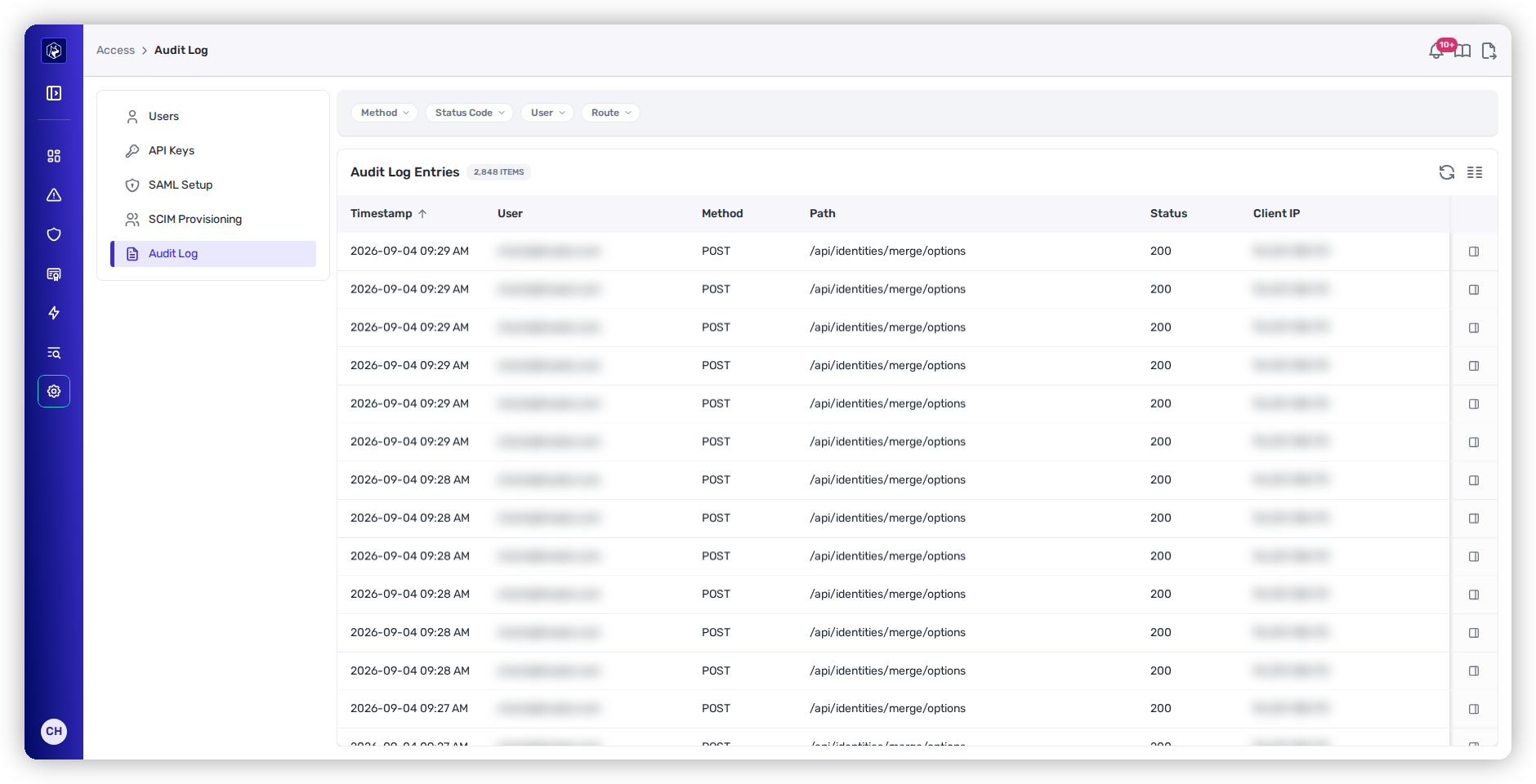
<figure><img src="https://414480750-files.gitbook.io/~/files/v0/b/gitbook-x-prod.appspot.com/o/spaces%2FXP3dp2kecwKA2KvYkntz%2Fuploads%2Fgit-blob-d1759efe175a89f5348bfa1bf4289c44e0778bdd%2Fam-access-audit-log.png?alt=media" alt="The Audit Log with columns for Timestamp, User, Method, Path, Status, and Client IP, and filters for Method, Status Code, User, and Route."><figcaption><p>The Audit Log — every change, newest first, with filters for method, status, user, and route.</p></figcaption></figure>

## What each column tells you

<table><thead><tr><th width="160">Column</th><th>What it means</th></tr></thead><tbody><tr><td><strong>Timestamp</strong></td><td>When it happened (newest first by default).</td></tr><tr><td><strong>User</strong></td><td>Who did it.</td></tr><tr><td><strong>Method</strong></td><td>The kind of change — create, update, or delete.</td></tr><tr><td><strong>Path</strong></td><td>What was changed, as the API path acted on.</td></tr><tr><td><strong>Status</strong></td><td>Whether the change succeeded.</td></tr><tr><td><strong>Client IP</strong></td><td>The network address the request came from.</td></tr></tbody></table>

## What is and isn't recorded

The Audit Log is a record of **changes**, not general activity — this is the key thing to understand about it:

* **Recorded:** actions by your users that create, update, or delete something (a role change, a policy edit, a deleted connection, a triggered fix). Each entry keeps a redacted copy of the request, with secrets, tokens, passwords, and credentials stripped out.
* **Not recorded:** *viewing* pages and data. Reads are not logged, so this is a record of who changed something, not of who looked at it.

## See the detail of a change

Click any entry to open a drawer with the full request detail — the exact route and, where one applies, the redacted request body.

### When the body is too large to store

Where a request body is large, the entry records a marker in place of it:

| Marker                                           | What it means                                                                                                            |
| ------------------------------------------------ | ------------------------------------------------------------------------------------------------------------------------ |
| `_truncated`, alongside `_original_size`         | The redacted body was over 64 KB. `_original_size` is its size in bytes.                                                 |
| `_skipped`, alongside `_declared_content_length` | The request declared over 256 KB and its body was not read. `_declared_content_length` is the size the request declared. |

Everything else about the entry — the user, the method, the route, the status, the time, the client IP — is recorded in full either way.

A request carrying a file upload, or no JSON body, records no body.

### A change that covers several users

Assigning a role to several people at once is one request, so it records one entry. Its body carries the user identifiers the change covered and the role they were moved to.

## Investigate

Filter to answer a specific question:

* **User** — everything a given person changed.
* **Method** — narrow to deletes when you're chasing "who removed this?"
* **Status Code** — find failed attempts.
* **Route** — every change to a particular area.

A typical investigation: filter to **Method = delete** and the relevant **Route** to find who removed a connection or user, then open the entry for the specifics.

## Worked example

See how this feeds an audit-ready evidence pack:

{% content-ref url="/pages/PjsYwV0vEThhl6wY14LV" %}
[Evidence for a Security Audit](/mrecEO40m5D6bt7Pq5pE/solutions-and-use-cases/prove-your-security-posture.md)
{% endcontent-ref %}

## Related

* [Users and Roles](/mrecEO40m5D6bt7Pq5pE/administer-and-monitor/manage-access/users-and-roles.md) — the roles whose changes show up here.
* [Agent Executions](/mrecEO40m5D6bt7Pq5pE/fix/agent-executions.md) — the parallel, detailed trail for automated agent work.


---

# Agent Instructions
This documentation is published with GitBook. GitBook is the documentation platform designed so that both humans and AI agents can read, navigate, and reason over technical content effectively. Learn more at gitbook.com.

## Querying This Documentation
If you need additional information that is not directly available in this page, you can query the documentation dynamically by asking a question.

Perform an HTTP GET request on the current page URL with the `ask` query parameter, and the optional `goal` query parameter:

```
GET https://docs.heeler.com/mrecEO40m5D6bt7Pq5pE/administer-and-monitor/audit-log.md?ask=<question>&goal=<endgoal>
```

`ask` is the immediate question: it should be specific, self-contained, and written in natural language.
`goal` is optional and describes the broader end goal you are ultimately trying to accomplish on behalf of the user. GitBook uses it to tailor the answer towards what is most useful for that goal.

The response will contain a direct answer to the question and relevant excerpts and sources from the documentation.

Use this mechanism when the answer is not explicitly present in the current page, you need clarification or additional context, or you want to retrieve related documentation sections.
