> For the complete documentation index, see [llms.txt](https://docs.heeler.com/mrecEO40m5D6bt7Pq5pE/llms.txt). Markdown versions of documentation pages are available by appending `.md` to page URLs; this page is available as [Markdown](https://docs.heeler.com/mrecEO40m5D6bt7Pq5pE/administer-and-monitor/connections-and-integrations/brokers.md).

# On-Premises Brokers

Manage the on-premises brokers that let Heeler reach private, self-hosted resources — read their status, keep them updated, and see each instance.

A broker is a lightweight agent you run inside your own network so Heeler can reach resources it otherwise couldn't — on-prem source control and private Kubernetes clusters. It pulls work, runs analysis inside your network, and returns results over an outbound connection, so you never open inbound firewall holes. **Administration → Connections → Brokers** is where you monitor them. Install one from [Get Started → On-Premises Broker](/mrecEO40m5D6bt7Pq5pE/get-started/registries-and-artifacts/on-premises-broker.md).

{% hint style="info" %}
Changing anything on this page requires the **Administrator** role. An **Administrator (read-only)** can view it but can't make changes.
{% endhint %}

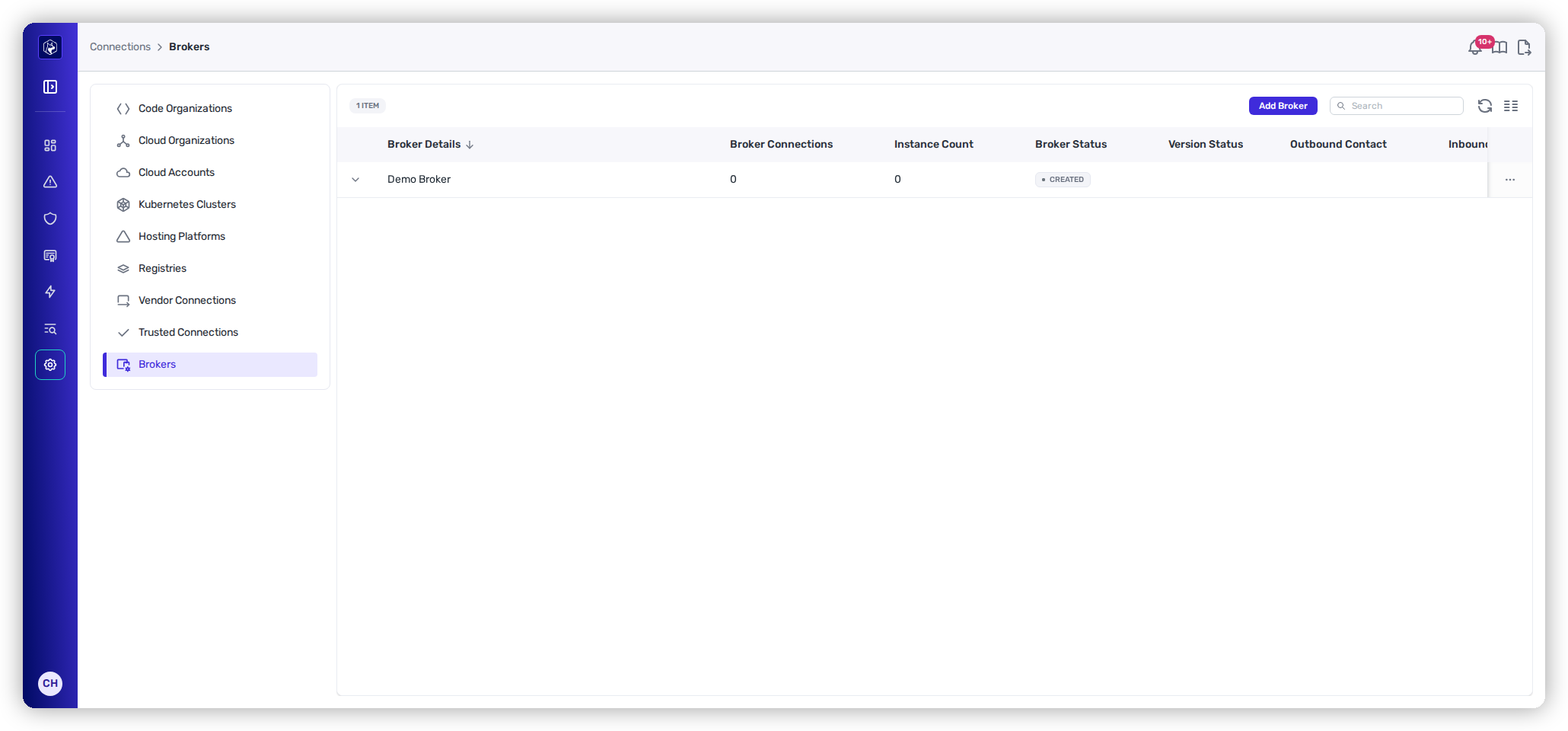
<figure><img src="https://414480750-files.gitbook.io/~/files/v0/b/gitbook-x-prod.appspot.com/o/spaces%2FXP3dp2kecwKA2KvYkntz%2Fuploads%2Fgit-blob-6ea348671bd3f2d0c99f7d776947973e87be92d3%2Fam-connections-brokers.png?alt=media" alt="The Brokers list showing a broker with columns for Broker Connections, Instance Count, Broker Status, Version Status, and Outbound/Inbound Contact."><figcaption><p>Brokers — status, version, and last contact for each broker.</p></figcaption></figure>

## Reading a broker's status

<table><thead><tr><th width="180">Broker Status</th><th>What it means</th></tr></thead><tbody><tr><td>✅ <strong>Healthy</strong></td><td>Running, with at least one working connection and nothing missing.</td></tr><tr><td>⏳ <strong>Ready</strong></td><td>The broker is alive but nothing is routed through it yet — expected right after install, until you attach a connection.</td></tr><tr><td>⚠️ <strong>Degraded</strong></td><td>A mix of working and missing connections. Open it to see which connection is failing.</td></tr><tr><td>❌ <strong>Error</strong></td><td>Its connections are all failing.</td></tr><tr><td>⏳ <strong>Created</strong></td><td>The broker record exists, but no running instance has checked in. If it stays here after install, the agent isn't running or can't reach Heeler — an instance that stops sending heartbeats drops off after about two hours.</td></tr></tbody></table>

The other columns round out the picture:

<table><thead><tr><th width="200">Column</th><th>What it tells you</th></tr></thead><tbody><tr><td><strong>Broker Connections</strong> / <strong>Instance Count</strong></td><td>How many connections route through it and how many agent instances are running.</td></tr><tr><td><strong>Version Status</strong></td><td><strong>Up to date</strong>, or <strong>Update Available</strong> when an instance is behind — hover to see current vs. target version, then update the agent.</td></tr><tr><td><strong>Outbound Contact</strong></td><td>The last time the broker reached out to Heeler.</td></tr><tr><td><strong>Inbound Contact</strong></td><td>The last time Heeler reached the broker. Both going stale points to a connectivity problem.</td></tr></tbody></table>

## Inspecting instances

Expand a broker's row to see each running instance with its **Disk** and **CPU utilization**, **Version**, **Runtime Environment**, validated **Connections**, and **Jobs** — enough to tell whether an instance is healthy, under-resourced, or stuck.

## Manage

Use the row's **⋯** menu to **Edit Broker** or **Delete Broker**. Deleting a broker that still backs live connections will break them, so move or remove those connections first.

## Set it up

Installing and registering a broker for the first time is covered in Get Started:

{% content-ref url="/pages/7Hp2EopNbP60MkJEKKwF" %}
[On-Premises Broker](/mrecEO40m5D6bt7Pq5pE/get-started/registries-and-artifacts/on-premises-broker.md)
{% endcontent-ref %}

## Related

* [Source Connections](/mrecEO40m5D6bt7Pq5pE/administer-and-monitor/connections-and-integrations/source-connections.md) — the private sources a broker makes reachable.


---

# Agent Instructions
This documentation is published with GitBook. GitBook is the documentation platform designed so that both humans and AI agents can read, navigate, and reason over technical content effectively. Learn more at gitbook.com.

## Querying This Documentation
If you need additional information that is not directly available in this page, you can query the documentation dynamically by asking a question.

Perform an HTTP GET request on the current page URL with the `ask` query parameter, and the optional `goal` query parameter:

```
GET https://docs.heeler.com/mrecEO40m5D6bt7Pq5pE/administer-and-monitor/connections-and-integrations/brokers.md?ask=<question>&goal=<endgoal>
```

`ask` is the immediate question: it should be specific, self-contained, and written in natural language.
`goal` is optional and describes the broader end goal you are ultimately trying to accomplish on behalf of the user. GitBook uses it to tailor the answer towards what is most useful for that goal.

The response will contain a direct answer to the question and relevant excerpts and sources from the documentation.

Use this mechanism when the answer is not explicitly present in the current page, you need clarification or additional context, or you want to retrieve related documentation sections.
