> For the complete documentation index, see [llms.txt](https://docs.heeler.com/mrecEO40m5D6bt7Pq5pE/llms.txt). Markdown versions of documentation pages are available by appending `.md` to page URLs; this page is available as [Markdown](https://docs.heeler.com/mrecEO40m5D6bt7Pq5pE/administer-and-monitor/connections-and-integrations/integrations.md).

# Integrations

Manage the ticketing, messaging, and developer-platform tools Heeler works with — all in one list, each with a health status.

**Administration → Integrations** is one list for every outside tool Heeler works with — ticketing, messaging, and developer platforms together. It's where you confirm each one is healthy and add or remove tools as they change. Set them up the first time under [Connect Ticketing](/mrecEO40m5D6bt7Pq5pE/get-started/ticketing.md), [Connect Messaging](/mrecEO40m5D6bt7Pq5pE/get-started/messaging.md), and [Connect Developer Platforms](/mrecEO40m5D6bt7Pq5pE/get-started/developer-platform.md).

{% hint style="info" %}
Changing anything on this page requires the **Administrator** role. An **Administrator (read-only)** can view it but can't make changes.
{% endhint %}

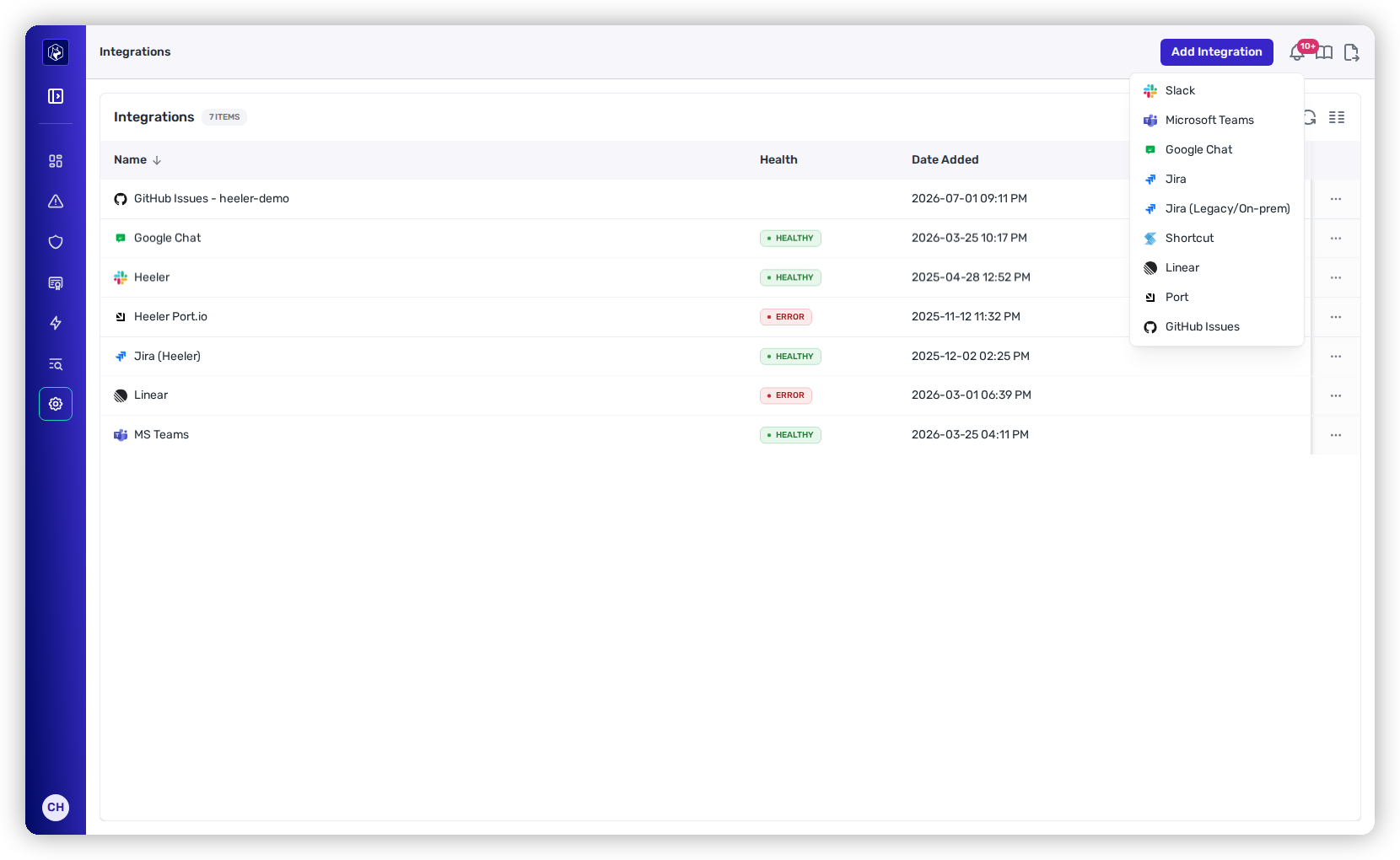
<figure><img src="https://414480750-files.gitbook.io/~/files/v0/b/gitbook-x-prod.appspot.com/o/spaces%2FXP3dp2kecwKA2KvYkntz%2Fuploads%2Fgit-blob-5b30ee4a16768fa9d54a142652161e660ca62176%2Fam-integrations.png?alt=media" alt="The Integrations list, each row carrying a Health status; some are healthy and some show an ERROR."><figcaption><p>All integrations in one list, each with a Health status.</p></figcaption></figure>

## What connects here

{% tabs %}
{% tab title="Ticketing" %}
**Jira** (Cloud and Legacy/On-prem), **Linear**, **Shortcut**, and **GitHub Issues** — where Heeler creates the tickets it opens for findings and remediations.

**Setting up a ticketing tool for the first time?** It's covered in Get Started:

{% content-ref url="/pages/gLOoH1uE26NofKsETDov" %}
[Connect Ticketing](/mrecEO40m5D6bt7Pq5pE/get-started/ticketing.md)
{% endcontent-ref %}
{% endtab %}

{% tab title="Messaging" %}
**Slack**, **Microsoft Teams**, and **Google Chat** — where Heeler posts notifications.

**Setting up a messaging tool for the first time?** It's covered in Get Started:

{% content-ref url="/pages/vY8v3UYXHOSJZ7Ob7AXi" %}
[Connect Messaging](/mrecEO40m5D6bt7Pq5pE/get-started/messaging.md)
{% endcontent-ref %}
{% endtab %}

{% tab title="Developer platform" %}
**Port** — sync teams, services, and ownership from your internal developer portal.

**Setting up a developer platform for the first time?** It's covered in Get Started:

{% content-ref url="/pages/rVN02vXlKvUUNBeKOdlC" %}
[Connect Developer Platforms](/mrecEO40m5D6bt7Pq5pE/get-started/developer-platform.md)
{% endcontent-ref %}
{% endtab %}
{% endtabs %}

## Add an integration

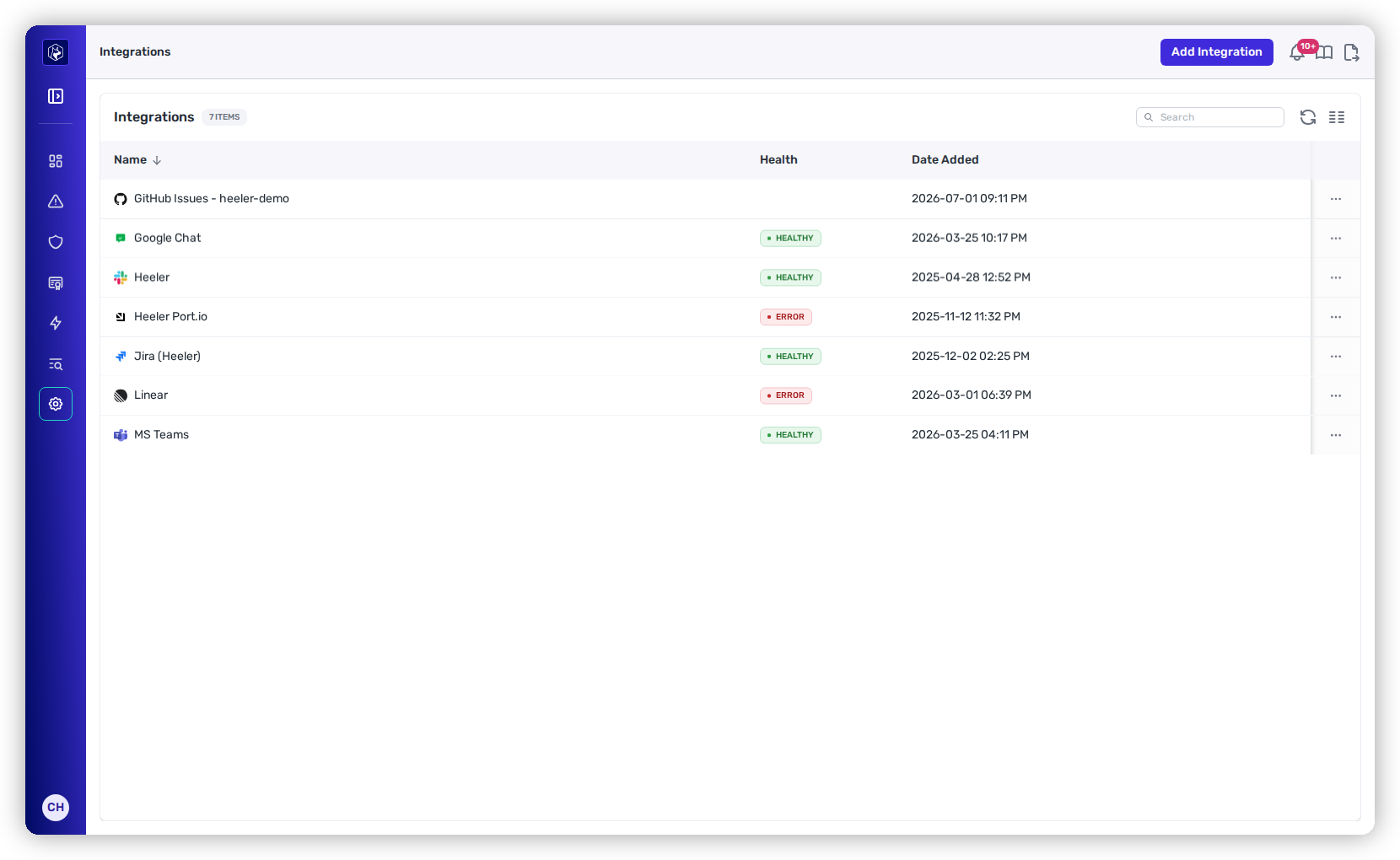
**Add Integration** opens a picker of every supported tool; choosing one launches its connection flow.

<figure><img src="https://414480750-files.gitbook.io/~/files/v0/b/gitbook-x-prod.appspot.com/o/spaces%2FXP3dp2kecwKA2KvYkntz%2Fuploads%2Fgit-blob-13dc23ca4e72d50103f5e068c0c923e00367c543%2Fam-integrations-picker.png?alt=media" alt="The Add Integration menu listing Slack, Microsoft Teams, Google Chat, Jira, Jira (Legacy/On-prem), Shortcut, Linear, Port, and GitHub Issues."><figcaption><p>The Add Integration picker — every supported ticketing, messaging, and developer-platform tool.</p></figcaption></figure>

## Keep an integration healthy

The **Health** column uses the [same states as connections](/mrecEO40m5D6bt7Pq5pE/administer-and-monitor/connections-and-integrations.md#reading-the-health-column). An **Error** means the integration's credentials or authorization stopped working — the most common cause is a token that was revoked or expired (as with the `Port.io` row above). Open the integration and reconnect it.

The row's **⋯** menu offers the right maintenance action for each tool:

<table><thead><tr><th width="240">Action</th><th>Applies to</th></tr></thead><tbody><tr><td><strong>Refresh Token</strong> / reconnect</td><td>Slack, Linear, Jira — re-authorize when the token expires.</td></tr><tr><td><strong>Sync Channels</strong></td><td>Slack — refresh the list of channels Heeler can post to.</td></tr><tr><td><strong>Manage Webhooks</strong></td><td>Microsoft Teams, Google Chat — manage the incoming webhooks used to post messages.</td></tr><tr><td><strong>Edit Settings</strong> / <strong>Settings</strong></td><td>GitHub and Port — adjust integration-specific configuration.</td></tr><tr><td><strong>Delete Connection</strong></td><td>All — remove the integration. Anything routing to it (workflows, team notifications) stops.</td></tr></tbody></table>

{% hint style="info" %}
Which teams actually get tickets and messages through these integrations is set per team under [Connection Mapping → Teams](/mrecEO40m5D6bt7Pq5pE/administer-and-monitor/organization-model/teams.md). This tab is about the connection itself being healthy; routing is separate.
{% endhint %}

## Related

* [Teams](/mrecEO40m5D6bt7Pq5pE/administer-and-monitor/organization-model/teams.md) — route each team's tickets and messages.
* [Ticket Closing](/mrecEO40m5D6bt7Pq5pE/administer-and-monitor/organization-model/ticket-closing.md) — control when Heeler closes the tickets it opens.


---

# Agent Instructions
This documentation is published with GitBook. GitBook is the documentation platform designed so that both humans and AI agents can read, navigate, and reason over technical content effectively. Learn more at gitbook.com.

## Querying This Documentation
If you need additional information that is not directly available in this page, you can query the documentation dynamically by asking a question.

Perform an HTTP GET request on the current page URL with the `ask` query parameter, and the optional `goal` query parameter:

```
GET https://docs.heeler.com/mrecEO40m5D6bt7Pq5pE/administer-and-monitor/connections-and-integrations/integrations.md?ask=<question>&goal=<endgoal>
```

`ask` is the immediate question: it should be specific, self-contained, and written in natural language.
`goal` is optional and describes the broader end goal you are ultimately trying to accomplish on behalf of the user. GitBook uses it to tailor the answer towards what is most useful for that goal.

The response will contain a direct answer to the question and relevant excerpts and sources from the documentation.

Use this mechanism when the answer is not explicitly present in the current page, you need clarification or additional context, or you want to retrieve related documentation sections.