> For the complete documentation index, see [llms.txt](https://docs.heeler.com/mrecEO40m5D6bt7Pq5pE/llms.txt). Markdown versions of documentation pages are available by appending `.md` to page URLs; this page is available as [Markdown](https://docs.heeler.com/mrecEO40m5D6bt7Pq5pE/administer-and-monitor/manage-access/api-keys.md).

# API Keys

Create, scope, and revoke the API keys that let scripts, CI, and integrations call the Heeler API.

**Administration → Access → API Keys** manages the keys that authenticate programmatic access to Heeler — CI jobs, scripts, the [CLI](/mrecEO40m5D6bt7Pq5pE/get-started/set-up-developer-tooling/cli.md), and the [MCP server](/mrecEO40m5D6bt7Pq5pE/get-started/set-up-developer-tooling/mcp.md). Each key belongs to a person and carries that person's permissions.

{% hint style="info" %}
Changing anything on this page requires the **Administrator** role. An **Administrator (read-only)** can view it but can't make changes.
{% endhint %}

{% hint style="warning" %}
**A key inherits the role of whoever creates it.** There's no separate permission scope to narrow it down — a key created by an Administrator can do everything an Administrator can. Create keys under a user whose role matches what the integration actually needs, and prefer a **Team viewer** for read-mostly automation.
{% endhint %}

## What the list shows

<table><thead><tr><th width="200">Column</th><th>What it means</th></tr></thead><tbody><tr><td><strong>Name</strong></td><td>The label you gave the key — make it say where it's used ("GitHub Actions – SCA gate").</td></tr><tr><td><strong>Created</strong></td><td>When it was issued.</td></tr><tr><td><strong>Expires</strong></td><td>When it stops working. Plan to rotate before this date.</td></tr><tr><td><strong>Created By</strong></td><td>The user the key acts as — and whose permissions it carries.</td></tr></tbody></table>

## Create a key

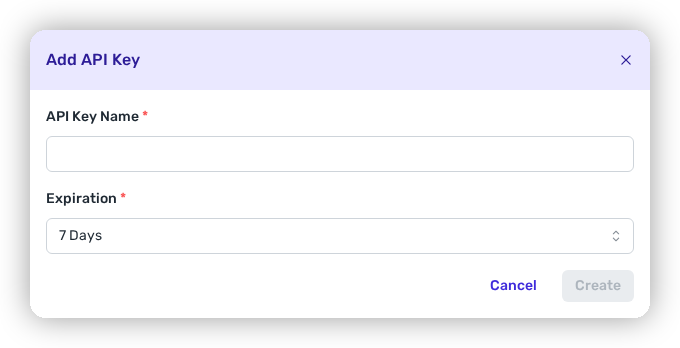
Click **Create API Key**, give it a name, and choose an expiration — **7, 30, 60, or 90 days, or 1 year**. There's no "never expires" option, by design.

<figure><img src="https://414480750-files.gitbook.io/~/files/v0/b/gitbook-x-prod.appspot.com/o/spaces%2FXP3dp2kecwKA2KvYkntz%2Fuploads%2Fgit-blob-3e7c3d37a6f4d5861c3d64e65af77ea288992712%2Fam-access-api-key.png?alt=media" alt="The Add API Key modal with an API Key Name field and an Expiration selector set to 7 Days."><figcaption><p>Creating a key — name it for where it's used, and pick an expiration.</p></figcaption></figure>

{% hint style="danger" %}
The full key is shown **once**, right after you create it. Copy it then — Heeler can't show it to you again. Keys look like `h4r-…`; store them in your secrets manager, never in a repository.
{% endhint %}

## Rate limits

Calls made with a key are rate limited, and every response tells you where you stand in the current window. The budget is per key, which is a good reason to give each integration its own rather than sharing one:

{% content-ref url="/pages/M36Ztg8QfKCRtMy4X8Zl" %}
[Rate Limits](/mrecEO40m5D6bt7Pq5pE/reference/rate-limits.md)
{% endcontent-ref %}

## Rotate a key

There's no in-place rotate. To rotate, **create a new key**, update wherever the old one is used, then **delete the old one**. Doing it in that order avoids downtime.

## Revoke a key

Use the row's trash icon to **delete** a key. It stops working immediately — any job still using it will start getting authentication failures, so make sure nothing depends on it first.

## Verify it worked

A new key appears in the list with its expiration date. A deleted key disappears, and calls using it fail on the next request. Key creation and deletion are recorded in the [Audit Log](/mrecEO40m5D6bt7Pq5pE/administer-and-monitor/audit-log.md).

## Set it up

Where API keys fit into onboarding is covered in Get Started:

{% content-ref url="/pages/5ZLKP5RDPX7iIJroiUy6" %}
[API Keys](/mrecEO40m5D6bt7Pq5pE/get-started/users-and-access/api-keys.md)
{% endcontent-ref %}

## Related

* [Users and Roles](/mrecEO40m5D6bt7Pq5pE/administer-and-monitor/manage-access/users-and-roles.md) — the roles a key can inherit.


---

# Agent Instructions
This documentation is published with GitBook. GitBook is the documentation platform designed so that both humans and AI agents can read, navigate, and reason over technical content effectively. Learn more at gitbook.com.

## Querying This Documentation
If you need additional information that is not directly available in this page, you can query the documentation dynamically by asking a question.

Perform an HTTP GET request on the current page URL with the `ask` query parameter, and the optional `goal` query parameter:

```
GET https://docs.heeler.com/mrecEO40m5D6bt7Pq5pE/administer-and-monitor/manage-access/api-keys.md?ask=<question>&goal=<endgoal>
```

`ask` is the immediate question: it should be specific, self-contained, and written in natural language.
`goal` is optional and describes the broader end goal you are ultimately trying to accomplish on behalf of the user. GitBook uses it to tailor the answer towards what is most useful for that goal.

The response will contain a direct answer to the question and relevant excerpts and sources from the documentation.

Use this mechanism when the answer is not explicitly present in the current page, you need clarification or additional context, or you want to retrieve related documentation sections.
