> For the complete documentation index, see [llms.txt](https://docs.heeler.com/mrecEO40m5D6bt7Pq5pE/llms.txt). Markdown versions of documentation pages are available by appending `.md` to page URLs; this page is available as [Markdown](https://docs.heeler.com/mrecEO40m5D6bt7Pq5pE/administer-and-monitor/organization-model/applications.md).

# Applications

Group repositories and services into the applications they make up, so you can see and report posture by product.

**Connection Mapping → Applications** groups repositories and services into the products they make up. Where a [team](/mrecEO40m5D6bt7Pq5pE/administer-and-monitor/organization-model/teams.md) answers "who owns this," an application answers "what product is this part of". Findings, risk and posture can then be read for a whole product rather than repository by repository.

{% hint style="info" %}
Changing anything on this page requires the **Administrator** role. An **Administrator (read-only)** can view it but can't make changes.
{% endhint %}

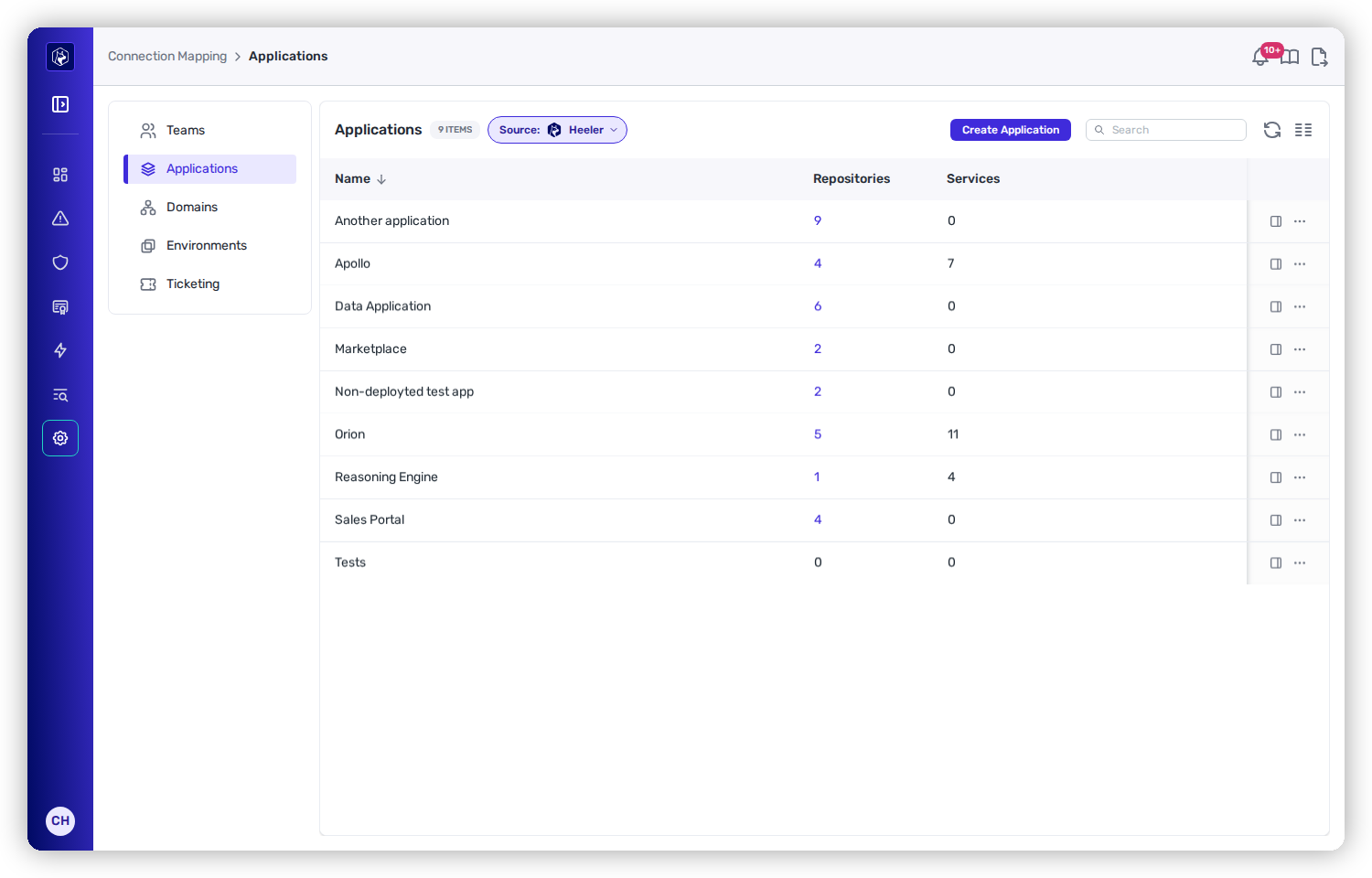
<figure><img src="https://414480750-files.gitbook.io/~/files/v0/b/gitbook-x-prod.appspot.com/o/spaces%2FXP3dp2kecwKA2KvYkntz%2Fuploads%2Fgit-blob-c3a1ed7bd47ccac68e89cbb7ea2cceedd2f45e12%2Fam-mapping-applications.png?alt=media" alt="The Applications list showing applications with Repositories and Services counts, and a Source set to Heeler."><figcaption><p>Applications — each grouping a set of repositories and services.</p></figcaption></figure>

## What the list shows

<table><thead><tr><th width="180">Column</th><th>What it means</th></tr></thead><tbody><tr><td><strong>Name</strong></td><td>The application.</td></tr><tr><td><strong>Repositories</strong></td><td>How many repositories belong to it — click through to them in the Catalog.</td></tr><tr><td><strong>Services</strong></td><td>How many running services roll up into it.</td></tr></tbody></table>

## Create or sync applications

Like teams, applications can be created by hand (**Source: Heeler**) with **Create Application**, or synced from a connected source, in which case **Configure Mapping** appears to define how that source's fields populate them.

## Teams compared with applications

<table><thead><tr><th width="180"></th><th>Team</th><th>Application</th></tr></thead><tbody><tr><td><strong>Answers</strong></td><td>Who owns this?</td><td>What product is this?</td></tr><tr><td><strong>Groups</strong></td><td>Repositories + people</td><td>Repositories + services</td></tr><tr><td><strong>Drives</strong></td><td>Remediation routing, ticketing, notifications, and visibility for the team-scoped roles (<strong>Team viewer</strong> and <strong>Team contributor</strong>)</td><td>Product-level posture and reporting, and what the team-scoped roles see</td></tr></tbody></table>

A repository can belong to both — owned by one team, part of one product.

## Set it up

First-time setup is covered in Get Started:

{% content-ref url="/pages/OWoiVJz01g2HClvxPNPB" %}
[Map Your Organization](/mrecEO40m5D6bt7Pq5pE/get-started/map-your-organization.md)
{% endcontent-ref %}

## Related

* [Teams](/mrecEO40m5D6bt7Pq5pE/administer-and-monitor/organization-model/teams.md) — the ownership side of the model.


---

# Agent Instructions
This documentation is published with GitBook. GitBook is the documentation platform designed so that both humans and AI agents can read, navigate, and reason over technical content effectively. Learn more at gitbook.com.

## Querying This Documentation
If you need additional information that is not directly available in this page, you can query the documentation dynamically by asking a question.

Perform an HTTP GET request on the current page URL with the `ask` query parameter, and the optional `goal` query parameter:

```
GET https://docs.heeler.com/mrecEO40m5D6bt7Pq5pE/administer-and-monitor/organization-model/applications.md?ask=<question>&goal=<endgoal>
```

`ask` is the immediate question: it should be specific, self-contained, and written in natural language.
`goal` is optional and describes the broader end goal you are ultimately trying to accomplish on behalf of the user. GitBook uses it to tailor the answer towards what is most useful for that goal.

The response will contain a direct answer to the question and relevant excerpts and sources from the documentation.

Use this mechanism when the answer is not explicitly present in the current page, you need clarification or additional context, or you want to retrieve related documentation sections.
