> For the complete documentation index, see [llms.txt](https://docs.heeler.com/mrecEO40m5D6bt7Pq5pE/llms.txt). Markdown versions of documentation pages are available by appending `.md` to page URLs; this page is available as [Markdown](https://docs.heeler.com/mrecEO40m5D6bt7Pq5pE/administer-and-monitor/organization-model/environments.md).

# Environments

Tell Heeler which cloud accounts are production versus sandbox, so risk is scored against where things actually run.

Where something runs changes how much it matters. A vulnerability in production is urgent; the same one in a throwaway sandbox usually isn't. **Connection Mapping → Environments** is where you classify your cloud accounts so Heeler scores risk against reality. Getting this right is one of the biggest levers on prioritization.

{% hint style="info" %}
Changing anything on this page requires the **Administrator** role. An **Administrator (read-only)** can view it but can't make changes.
{% endhint %}

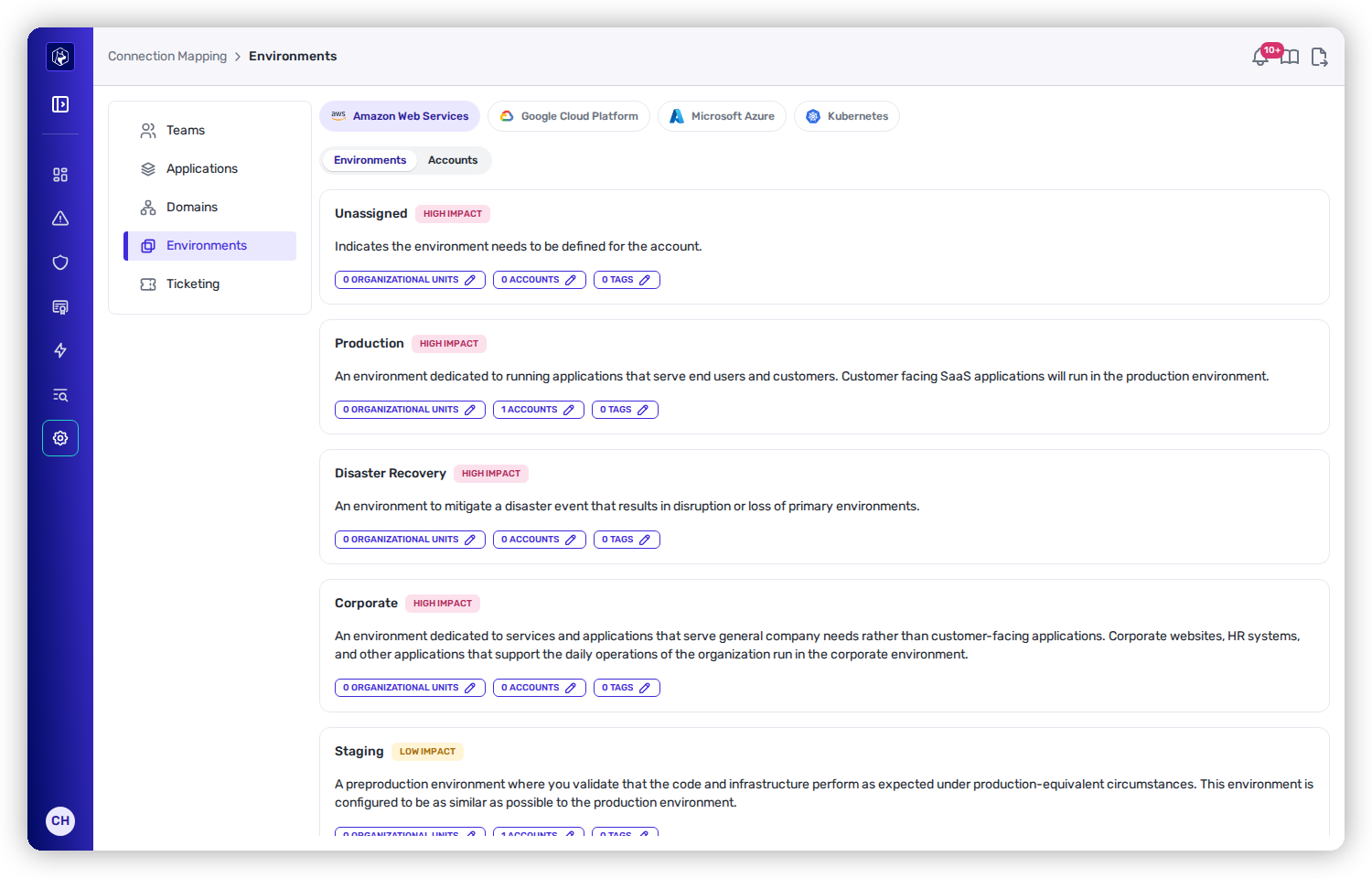
<figure><img src="https://414480750-files.gitbook.io/~/files/v0/b/gitbook-x-prod.appspot.com/o/spaces%2FXP3dp2kecwKA2KvYkntz%2Fuploads%2Fgit-blob-3988abc7038a3bc769d43ada8f1f1d92a29f42ec%2Fam-mapping-environments.png?alt=media" alt="The Environments page with provider tabs for AWS, GCP, Azure, and Kubernetes, showing environment cards like Production and Corporate labeled HIGH IMPACT with counts of organizational units, accounts, and tags."><figcaption><p>Environments — classify each provider's accounts, with the impact level shown on every card.</p></figcaption></figure>

## One tab per provider

The page has a sub-tab for each cloud you've connected — **Amazon Web Services, Google Cloud Platform, Microsoft Azure,** and **Kubernetes** — because each classifies accounts by its own hierarchy.

## The environments and their impact

Every account falls into one environment, and each environment carries a fixed **impact** level that feeds risk scoring:

<table><thead><tr><th width="220">Environment</th><th width="140">Impact</th><th>Meaning</th></tr></thead><tbody><tr><td><strong>Unassigned</strong></td><td>HIGH IMPACT</td><td>Not yet classified. Treated as high-impact on purpose, so nothing slips through under-scored — classify these first.</td></tr><tr><td><strong>Production</strong></td><td>HIGH IMPACT</td><td>Serves end users and customers.</td></tr><tr><td><strong>Disaster Recovery</strong></td><td>HIGH IMPACT</td><td>Stands in for production during an incident.</td></tr><tr><td><strong>Corporate</strong></td><td>HIGH IMPACT</td><td>Serves internal company needs.</td></tr><tr><td><strong>Staging</strong></td><td>LOW IMPACT</td><td>Pre-production.</td></tr><tr><td><strong>Development</strong></td><td>LOW IMPACT</td><td>Active development.</td></tr><tr><td><strong>Test</strong></td><td>LOW IMPACT</td><td>Testing.</td></tr><tr><td><strong>Sandbox</strong></td><td>LOW IMPACT</td><td>Experimentation.</td></tr></tbody></table>

{% hint style="info" %}
**Unassigned is deliberately treated as high-impact.** Until you classify an account, Heeler assumes the worst so findings there aren't under-prioritized. Clearing out Unassigned is the highest-value thing to do on this page.
{% endhint %}

## Assigning accounts to an environment

Each environment card shows clickable counts you use to populate it. The labels match each provider's hierarchy:

<table><thead><tr><th width="150">Provider</th><th>Group by</th><th>Individually by</th><th>Or by</th></tr></thead><tbody><tr><td><strong>AWS</strong></td><td>Organizational Units</td><td>Accounts</td><td>Tags</td></tr><tr><td><strong>GCP</strong></td><td>Folders</td><td>Projects</td><td>Tags</td></tr><tr><td><strong>Azure</strong></td><td>Management Groups</td><td>Subscriptions</td><td>Tags</td></tr><tr><td><strong>Kubernetes</strong></td><td>—</td><td>Clusters</td><td>Tags</td></tr></tbody></table>

Assigning by the grouping level (an OU, folder, or management group) or by **Tags** is usually best — new accounts land in the right environment automatically instead of arriving Unassigned.

## Effect on prioritization

Environment impact is a direct input to how Heeler prioritizes: a finding on a production, DR, or corporate account is weighted up; the same finding on staging or sandbox is weighted down. Misclassify production as low-impact and its findings will look less urgent than they are — so treat this page as security-relevant configuration.

## Set it up

First-time environment classification, including tag-based rules, is covered in Get Started:

{% content-ref url="/pages/hhXUasy6olTPDWYQhepB" %}
[Environments](/mrecEO40m5D6bt7Pq5pE/get-started/map-your-organization/environments.md)
{% endcontent-ref %}

## Related

* [The findings model](/mrecEO40m5D6bt7Pq5pE/findings.md) — how environment impact factors into risk.


---

# Agent Instructions
This documentation is published with GitBook. GitBook is the documentation platform designed so that both humans and AI agents can read, navigate, and reason over technical content effectively. Learn more at gitbook.com.

## Querying This Documentation
If you need additional information that is not directly available in this page, you can query the documentation dynamically by asking a question.

Perform an HTTP GET request on the current page URL with the `ask` query parameter, and the optional `goal` query parameter:

```
GET https://docs.heeler.com/mrecEO40m5D6bt7Pq5pE/administer-and-monitor/organization-model/environments.md?ask=<question>&goal=<endgoal>
```

`ask` is the immediate question: it should be specific, self-contained, and written in natural language.
`goal` is optional and describes the broader end goal you are ultimately trying to accomplish on behalf of the user. GitBook uses it to tailor the answer towards what is most useful for that goal.

The response will contain a direct answer to the question and relevant excerpts and sources from the documentation.

Use this mechanism when the answer is not explicitly present in the current page, you need clarification or additional context, or you want to retrieve related documentation sections.
