> For the complete documentation index, see [llms.txt](https://docs.heeler.com/mrecEO40m5D6bt7Pq5pE/llms.txt). Markdown versions of documentation pages are available by appending `.md` to page URLs; this page is available as [Markdown](https://docs.heeler.com/mrecEO40m5D6bt7Pq5pE/administer-and-monitor/organization-model/ticket-closing.md).

# Ticket Closing

Control whether and when Heeler closes or comments on the tickets it opens, and the status it moves them to.

When Heeler opens a ticket for a finding, it can also close it once the finding is fixed — so your backlog reflects reality without anyone updating tickets by hand. **Connection Mapping → Ticketing** is where you set that behavior, per ticketing connection. You'll see a **Jira Ticket Closing** card, a **Linear Issue Closing** card, or both, depending on what you've connected.

{% hint style="info" %}
Changing anything on this page requires the **Administrator** role. An **Administrator (read-only)** can view it but can't make changes.
{% endhint %}

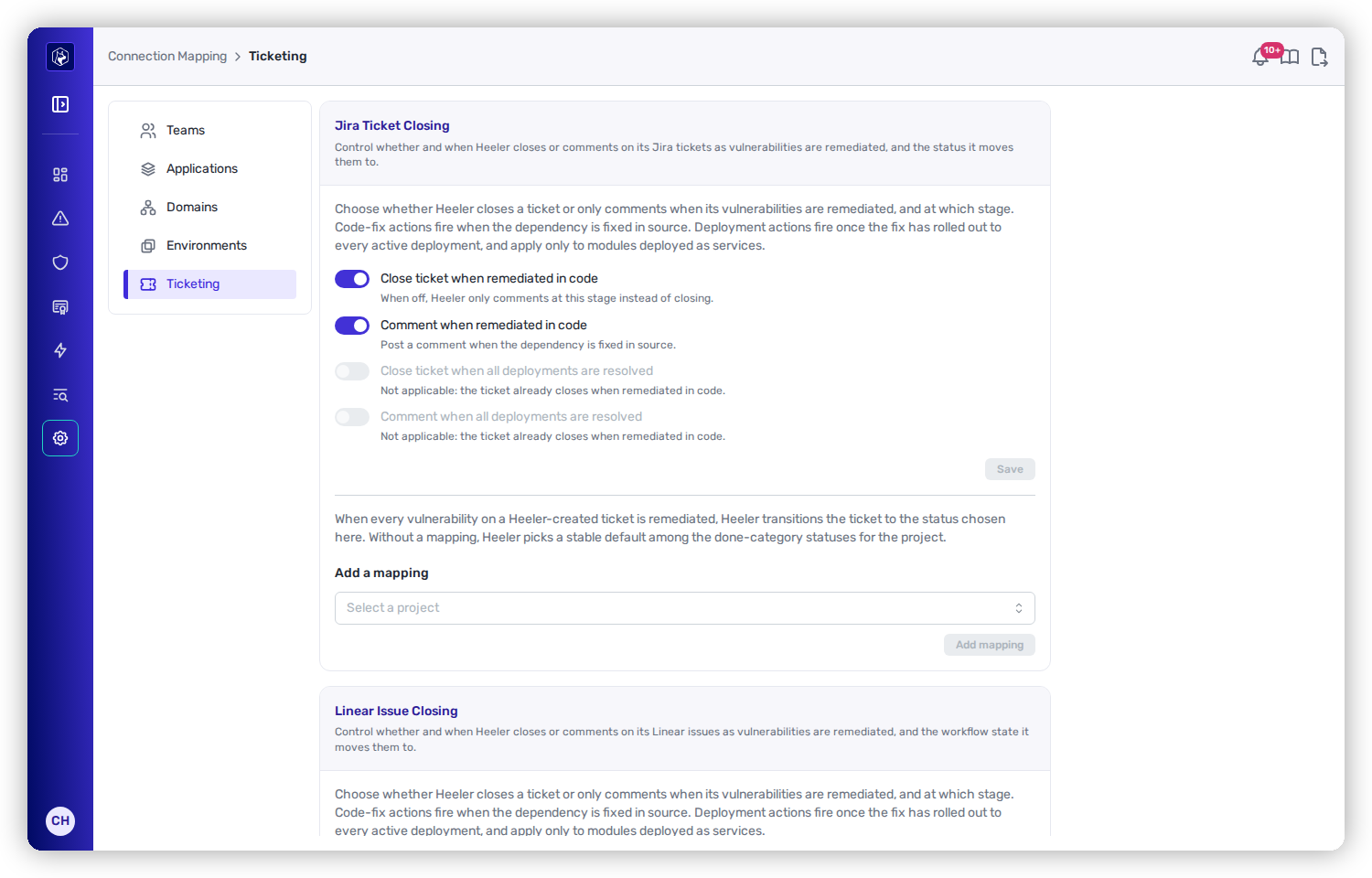
<figure><img src="https://414480750-files.gitbook.io/~/files/v0/b/gitbook-x-prod.appspot.com/o/spaces%2FXP3dp2kecwKA2KvYkntz%2Fuploads%2Fgit-blob-8a524f0bde1c3c53f5765668d44077d006e58be3%2Fam-mapping-ticketing.png?alt=media" alt="The Jira Ticket Closing card with switches for closing or commenting when remediated in code and when all deployments are resolved."><figcaption><p>Ticket closing — decide whether Heeler closes or just comments, and at which stage.</p></figcaption></figure>

## Two stages a fix can reach

Heeler recognizes fixes at two points, and you choose what happens at each:

* **Remediated in code** — the fix has landed in the source (the dependency was upgraded, the secret rotated). This fires for every finding.
* **All deployments resolved** — the fix has actually rolled out to every running deployment. This applies only to modules that are deployed as services, and it is the stronger of the two signals.

## The four switches

<table><thead><tr><th width="360">Switch</th><th width="130">Default</th><th>What it does</th></tr></thead><tbody><tr><td><strong>Close ticket when remediated in code</strong></td><td>On</td><td>Closes the ticket as soon as the fix is in source.</td></tr><tr><td><strong>Comment when remediated in code</strong></td><td>On</td><td>Posts a comment at the code-fix stage instead of (or before) closing.</td></tr><tr><td><strong>Close ticket when all deployments are resolved</strong></td><td>Off</td><td>Waits until the fix has rolled out everywhere before closing.</td></tr><tr><td><strong>Comment when all deployments are resolved</strong></td><td>Off</td><td>Posts a comment once deployments are fully resolved.</td></tr></tbody></table>

{% hint style="info" %}
If **Close when remediated in code** is on, the two deployment-stage switches are disabled — the ticket has already closed, so there's nothing left to do at the deployment stage. Turn code-fix closing **off** if you'd rather keep tickets open until the fix reaches production, then use the deployment-stage switches.
{% endhint %}

Click **Save** to apply. Changes apply to future closures. Tickets that already closed are unaffected.

## Which status Heeler moves tickets to

Closing means moving the ticket into your workflow's "done" state — and every team's workflow is different, so you map it per connection:

* **Jira** — under **Add mapping**, choose the **project** (or "All projects" as the default), optionally the **issue type**, and the **close status** to land on. You can also spell out the intermediate transition steps if your workflow requires passing through them.
* **Linear** — map per **team** to one of that team's completed states. Without a mapping, Heeler uses the team's first completed state.

## Verify it worked

Fix a finding that has a ticket and watch the ticket move to your chosen status (or receive a comment). The [Ticket Status](/mrecEO40m5D6bt7Pq5pE/administer-and-monitor/program-policy/ticket-status.md) tab lists every ticket Heeler has created and its current sync state.

## Set it up

First-time ticket-closing setup is covered in Get Started:

{% content-ref url="/pages/sVIggeuAWgUfpJwSZcAn" %}
[Ticket Closing](/mrecEO40m5D6bt7Pq5pE/get-started/map-your-organization/ticket-closing.md)
{% endcontent-ref %}

## Related

* [Ticket Status](/mrecEO40m5D6bt7Pq5pE/administer-and-monitor/program-policy/ticket-status.md) — the running list of Heeler-created tickets.
* [Integrations](/mrecEO40m5D6bt7Pq5pE/administer-and-monitor/connections-and-integrations/integrations.md) — the ticketing connections these policies apply to.


---

# Agent Instructions
This documentation is published with GitBook. GitBook is the documentation platform designed so that both humans and AI agents can read, navigate, and reason over technical content effectively. Learn more at gitbook.com.

## Querying This Documentation
If you need additional information that is not directly available in this page, you can query the documentation dynamically by asking a question.

Perform an HTTP GET request on the current page URL with the `ask` query parameter, and the optional `goal` query parameter:

```
GET https://docs.heeler.com/mrecEO40m5D6bt7Pq5pE/administer-and-monitor/organization-model/ticket-closing.md?ask=<question>&goal=<endgoal>
```

`ask` is the immediate question: it should be specific, self-contained, and written in natural language.
`goal` is optional and describes the broader end goal you are ultimately trying to accomplish on behalf of the user. GitBook uses it to tailor the answer towards what is most useful for that goal.

The response will contain a direct answer to the question and relevant excerpts and sources from the documentation.

Use this mechanism when the answer is not explicitly present in the current page, you need clarification or additional context, or you want to retrieve related documentation sections.
