> For the complete documentation index, see [llms.txt](https://docs.heeler.com/mrecEO40m5D6bt7Pq5pE/llms.txt). Markdown versions of documentation pages are available by appending `.md` to page URLs; this page is available as [Markdown](https://docs.heeler.com/mrecEO40m5D6bt7Pq5pE/administer-and-monitor/program-policy/fix-recognition.md).
# Fix Recognition
Credit the developers who fix vulnerabilities — an opt-in comment on the pull request listing what it resolved.
Most security tooling only tells people what they did wrong. **Fix Recognition** does the opposite: when a pull request removes open dependency vulnerabilities, Heeler comments on it saying so, and names what was fixed.
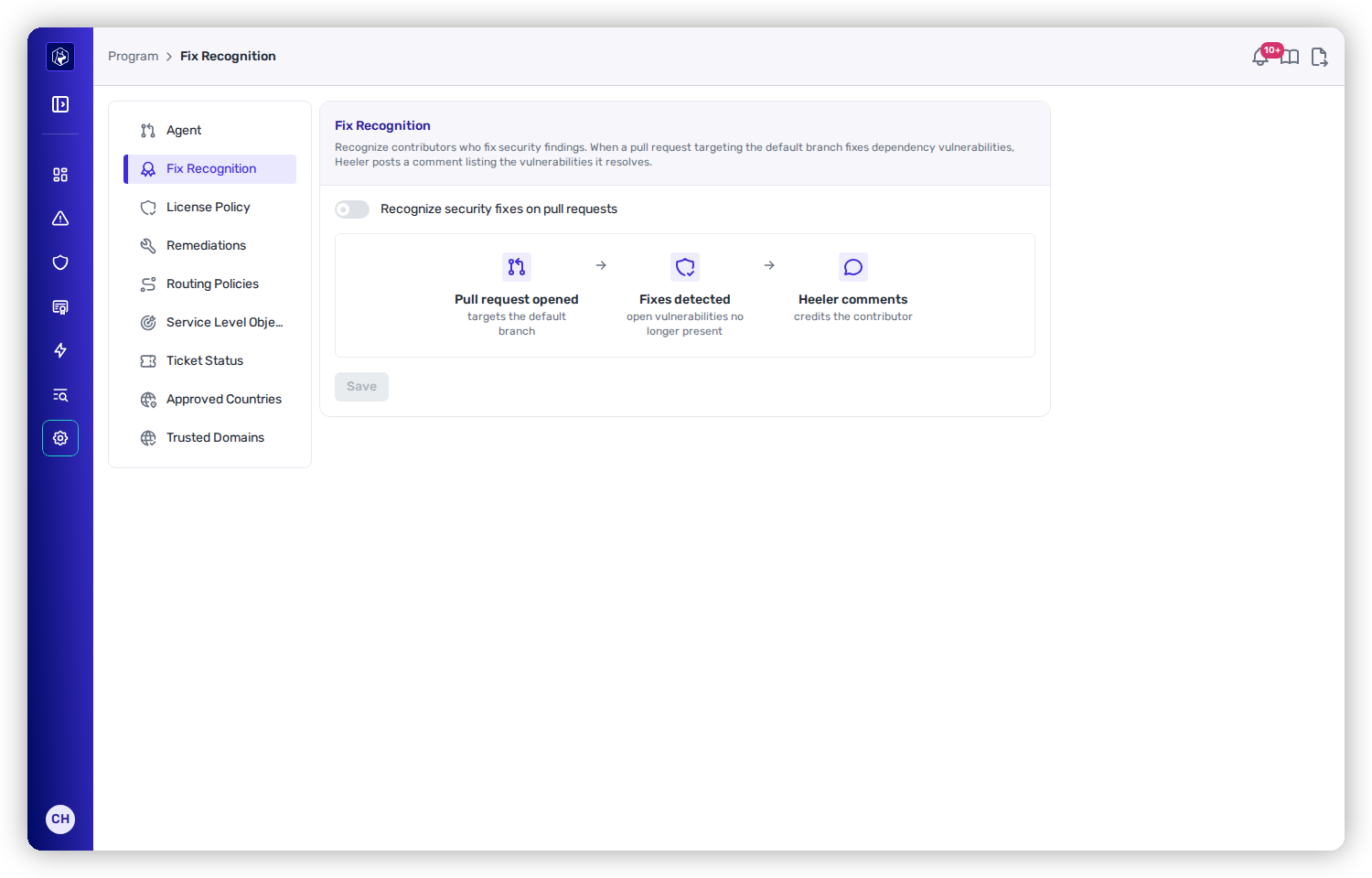
Fix Recognition — one switch, and the three stages it puts in motion.
{% hint style="info" %}
**Off unless you turn it on.** Fix Recognition is opt-in. Nothing is posted to any pull request until an **Administrator** enables **Recognize security fixes on pull requests** and saves.
{% endhint %}
## How it works
{% stepper %}
{% step %}
### A pull request opens
It has to target a branch Heeler analyzes — normally your default branch. Heeler already scans the PR as part of [guardrail evaluation](/mrecEO40m5D6bt7Pq5pE/prevent/pr-guardrails.md), so recognition costs no extra scan.
{% endstep %}
{% step %}
### Heeler compares the two sides
It takes the vulnerabilities currently **open on the base branch** and looks for the ones **absent from the PR's own scan results**. Those are what the PR fixed. Only findings on a dependency Heeler can see in the manifest count — a runtime-only finding never appears in a manifest scan, so it is never credited.
{% endstep %}
{% step %}
### Heeler comments
One comment on the pull request: *"Nice work! This PR fixes N vulnerabilities."* — then a table of **Package**, **Version change**, **Vulnerability** (linked to the finding in Heeler) and **Severity**. Ten rows at most, with an **and N more** link to the repository's findings if the PR fixed more than that.
{% endstep %}
{% endstepper %}
The comment closes with the caveat that matters: results compare the PR against the base branch **at the time the check ran**, so a branch that has fallen behind should be updated for an accurate list.
## It keeps itself honest
The comment is a living one, not a fire-and-forget post.
| What happens | What Heeler does |
| ------------------------------------------------- | ------------------------------------------------------------------------------------------------------------------------------------------------------------------------------------------------------------------- |
| A later push changes what the PR fixes | Edits the **same** comment rather than adding another. |
| A later push changes nothing | Leaves the comment alone. |
| A later push **reintroduces** the vulnerabilities | **Retracts** — the comment becomes *"This PR no longer fixes any open vulnerabilities. An earlier revision did; the list updates as the PR changes."* It is edited, never deleted, so the thread keeps its history. |
| Someone deletes the comment | Posts a fresh one on the next run. |
| A scan doesn't complete | Leaves the comment as it is. An empty result is only trusted when every code root actually produced scan results — a scan gap must not read as a fix reversal. |
## Related
* [Guardrails](/mrecEO40m5D6bt7Pq5pE/prevent/pr-guardrails.md) — the pull-request evaluation this rides along with.
* [Validate and Merge Ready](/mrecEO40m5D6bt7Pq5pE/fix/validate-and-merge-ready.md) — the other things Heeler puts on a pull request.
* [Set Program Policy](/mrecEO40m5D6bt7Pq5pE/administer-and-monitor/program-policy.md) — the rest of the tenant-wide policy.
---
# Agent Instructions
This documentation is published with GitBook. GitBook is the documentation platform designed so that both humans and AI agents can read, navigate, and reason over technical content effectively. Learn more at gitbook.com.
## Querying This Documentation
If you need additional information that is not directly available in this page, you can query the documentation dynamically by asking a question.
Perform an HTTP GET request on the current page URL with the `ask` query parameter, and the optional `goal` query parameter:
```
GET https://docs.heeler.com/mrecEO40m5D6bt7Pq5pE/administer-and-monitor/program-policy/fix-recognition.md?ask=&goal=
```
`ask` is the immediate question: it should be specific, self-contained, and written in natural language.
`goal` is optional and describes the broader end goal you are ultimately trying to accomplish on behalf of the user. GitBook uses it to tailor the answer towards what is most useful for that goal.
The response will contain a direct answer to the question and relevant excerpts and sources from the documentation.
Use this mechanism when the answer is not explicitly present in the current page, you need clarification or additional context, or you want to retrieve related documentation sections.