> For the complete documentation index, see [llms.txt](https://docs.heeler.com/mrecEO40m5D6bt7Pq5pE/llms.txt). Markdown versions of documentation pages are available by appending `.md` to page URLs; this page is available as [Markdown](https://docs.heeler.com/mrecEO40m5D6bt7Pq5pE/administer-and-monitor/program-policy/license-policy.md).

# License Policy

Decide which open-source licenses are allowed in your code and which are denied — the policy behind license-violation findings and PR guardrails.

Open-source licenses carry obligations, and some are incompatible with how you ship software. **Administration → Program → License Policy** is where you decide which licenses are acceptable. Your choices here drive Heeler's license-violation findings and the license PR guardrail.

{% hint style="info" %}
Changing anything on this page requires the **Administrator** role. An **Administrator (read-only)** can view it but can't make changes.
{% endhint %}

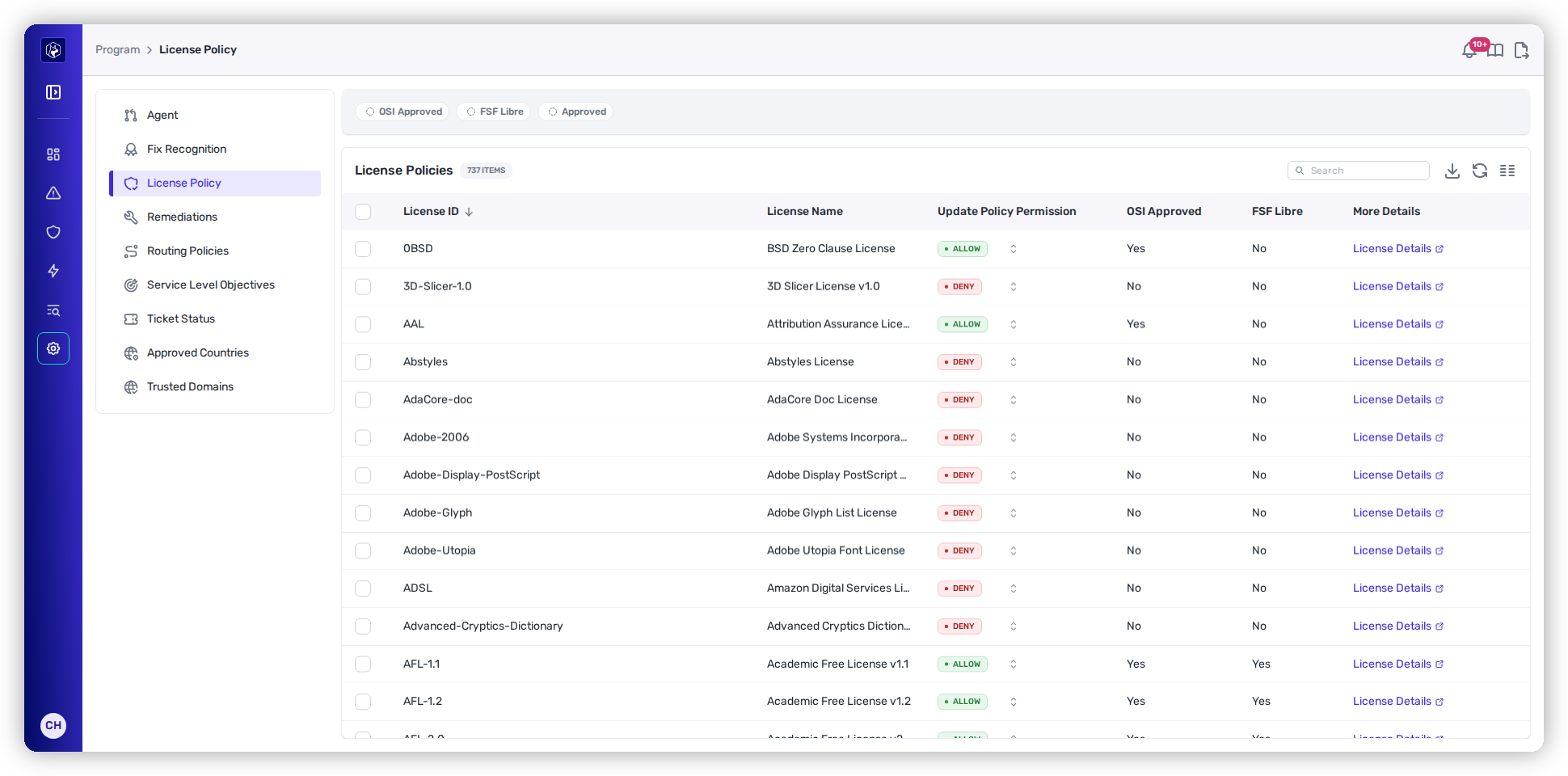
<figure><img src="https://414480750-files.gitbook.io/~/files/v0/b/gitbook-x-prod.appspot.com/o/spaces%2FXP3dp2kecwKA2KvYkntz%2Fuploads%2Fgit-blob-7b0e2323964a2ab351de892a4f8cc7664ff8fab7%2Fam-program-license.png?alt=media" alt="The License Policies list showing SPDX licenses with an Allow/Deny control, OSI Approved and FSF Libre columns, and a License Details link."><figcaption><p>License policy — allow or deny each license across the full SPDX catalog.</p></figcaption></figure>

## What the list shows

The table covers the full SPDX license catalog — hundreds of licenses.

<table><thead><tr><th width="220">Column</th><th>What it means</th></tr></thead><tbody><tr><td><strong>License ID</strong> / <strong>License Name</strong></td><td>The SPDX identifier and full name.</td></tr><tr><td><strong>Update Policy Permission</strong></td><td>The allow/deny control itself — set it to <strong>Allow</strong> (shows "Approved") or <strong>Deny</strong> ("Unapproved").</td></tr><tr><td><strong>OSI Approved</strong> / <strong>FSF Libre</strong></td><td>Whether the license is OSI-approved and FSF-libre — the reference signals behind the default policy.</td></tr><tr><td><strong>More Details</strong></td><td>Opens the license's full text and terms.</td></tr></tbody></table>

## The starting policy

Out of the box, a license is **allowed only if it's both OSI-approved and FSF-libre**; everything else starts **denied**. That's a deliberately conservative baseline — you loosen or tighten it to match your legal guidance.

## Change the policy

Set an individual license with its **Allow/Deny** control, or select multiple rows and use the **bulk Allow/Deny** actions to adjust a batch at once. Filter the list by **OSI Approved**, **FSF Libre**, or **Approved** to focus on a slice.

{% hint style="info" %}
Changing license policy **re-evaluates your existing dependencies** — Heeler reconciles every dependency version against the new allow/deny set within seconds, so license-violation findings update to match right away. This is one of the few policies that isn't limited to newly discovered work.
{% endhint %}

## Where the policy shows up

* **License-violation findings** — dependencies using a denied license surface as findings you can triage and remediate.
* **PR guardrail** — a pull request that introduces a denied license can be flagged or blocked, with a message naming the package, version, and license.

## Reporting and audit readiness

For legal and compliance, Heeler turns license posture into shareable evidence:

* **Export unapproved-license usage** on a recurring **daily / weekly / monthly** schedule — a downloadable CSV for legal review, compliance audits, or internal reporting, so the data collection isn't manual.
* **Export the License Policy itself** as a CSV to hand your legal team when defining what's approved.
* **Work violations directly** at **Security → License Violations** — each row shows any linked ticket, and you can **manually open a Jira or Linear ticket** from a violation, alongside automated [workflow](/mrecEO40m5D6bt7Pq5pE/operate/workflows.md)-driven ticketing. The same violations also appear under **Catalog → Dependencies** filtered to the **Unapproved License** classification.

## Worked example

See how this fits a proactive supply-chain program:

{% content-ref url="/pages/UKMcUu4uiPGFy8H7pw9o" %}
[Build a Supply Chain Security Program](/mrecEO40m5D6bt7Pq5pE/solutions-and-use-cases/building-a-proactive-supply-chain-security-program.md)
{% endcontent-ref %}

## Related

* [Prevent → PR Guardrails](/mrecEO40m5D6bt7Pq5pE/prevent/pr-guardrails.md) — blocking denied licenses at the pull request.
* [Get Started → Connect Your Code](/mrecEO40m5D6bt7Pq5pE/get-started/source-code-scm.md) — where license data comes from.


---

# Agent Instructions
This documentation is published with GitBook. GitBook is the documentation platform designed so that both humans and AI agents can read, navigate, and reason over technical content effectively. Learn more at gitbook.com.

## Querying This Documentation
If you need additional information that is not directly available in this page, you can query the documentation dynamically by asking a question.

Perform an HTTP GET request on the current page URL with the `ask` query parameter, and the optional `goal` query parameter:

```
GET https://docs.heeler.com/mrecEO40m5D6bt7Pq5pE/administer-and-monitor/program-policy/license-policy.md?ask=<question>&goal=<endgoal>
```

`ask` is the immediate question: it should be specific, self-contained, and written in natural language.
`goal` is optional and describes the broader end goal you are ultimately trying to accomplish on behalf of the user. GitBook uses it to tailor the answer towards what is most useful for that goal.

The response will contain a direct answer to the question and relevant excerpts and sources from the documentation.

Use this mechanism when the answer is not explicitly present in the current page, you need clarification or additional context, or you want to retrieve related documentation sections.
