> For the complete documentation index, see [llms.txt](https://docs.heeler.com/mrecEO40m5D6bt7Pq5pE/llms.txt). Markdown versions of documentation pages are available by appending `.md` to page URLs; this page is available as [Markdown](https://docs.heeler.com/mrecEO40m5D6bt7Pq5pE/administer-and-monitor/program-policy/remediation-assignment-and-routing.md).

# Remediation Assignment and Routing

Decide who a new remediation is assigned to — from a simple default to advanced, code-defined routing rules — plus dependency ownership and package freshness gating.

When Heeler discovers a new remediation, someone has to own it. This page — spanning the **Remediations** and **Routing Policies** sub-tabs of **Program** — is where you decide who. Start with the simple default; reach for routing policies only when you need conditional rules.

{% hint style="info" %}
Changing anything on this page requires the **Administrator** role. An **Administrator (read-only)** can view it but can't make changes.
{% endhint %}

Both apply to **newly discovered, unassigned** remediations. Anything that already has an owner is left alone.

## The simple default: automatic assignment

On **Program → Remediations**, the **Automatic Remediation Assignment** card picks a default owner for every new remediation.

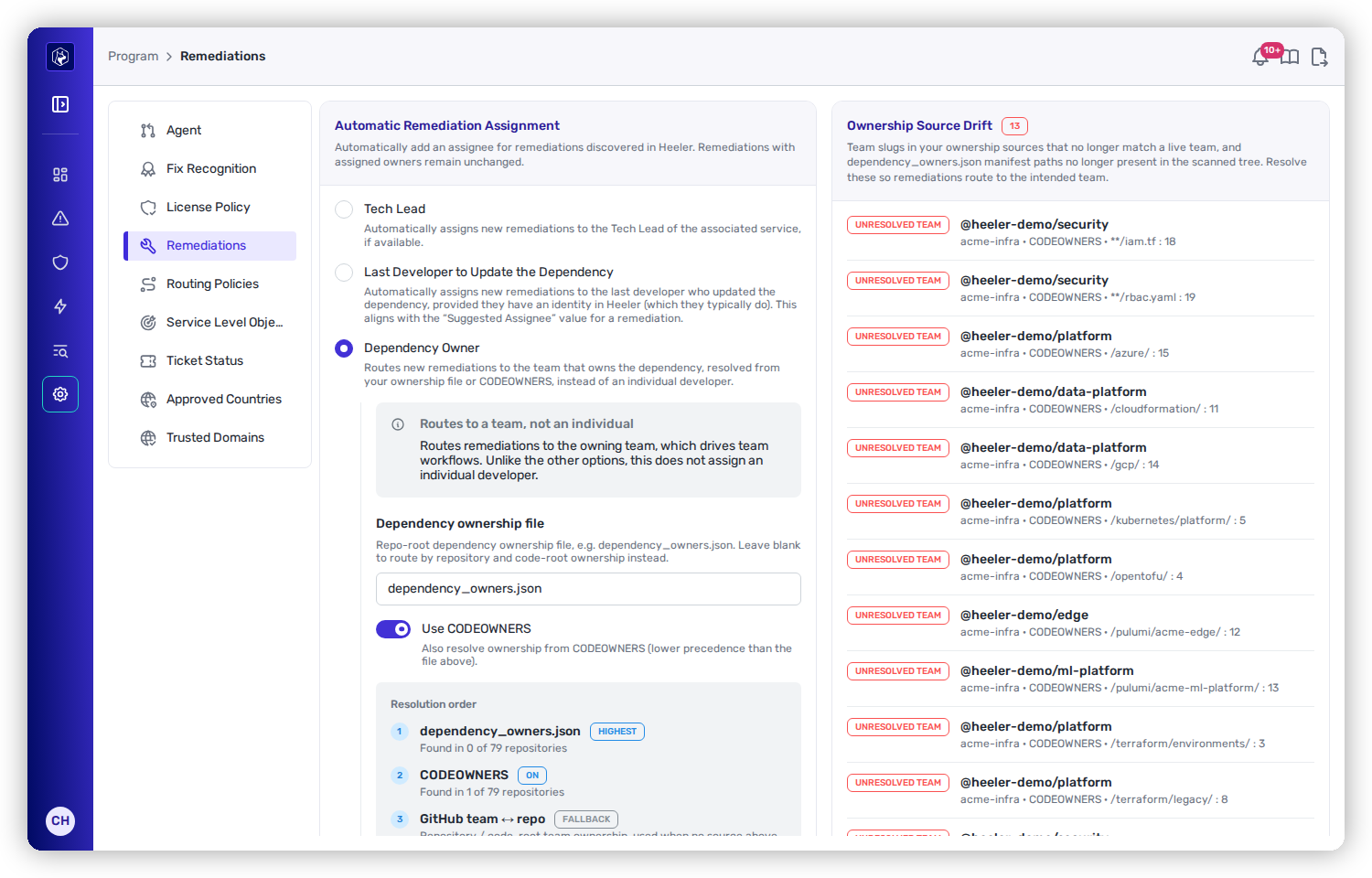
<figure><img src="https://414480750-files.gitbook.io/~/files/v0/b/gitbook-x-prod.appspot.com/o/spaces%2FXP3dp2kecwKA2KvYkntz%2Fuploads%2Fgit-blob-ed47b356d9a7fea47dfe294a2188cba504fca836%2Fam-program-remediations.png?alt=media" alt="The Automatic Remediation Assignment card offering Tech Lead, Last Developer to Update the Dependency, and Dependency Owner options."><figcaption><p>Automatic assignment — one default rule for who owns a new remediation.</p></figcaption></figure>

<table><thead><tr><th width="290">Option</th><th>Assigns to</th></tr></thead><tbody><tr><td><strong>Tech Lead</strong></td><td>The tech lead of the associated service, when one is known.</td></tr><tr><td><strong>Last Developer to Update the Dependency</strong></td><td>The developer who last touched the dependency (matched to their Heeler identity). This is the default, and it matches the "Suggested Assignee" you see on a remediation.</td></tr><tr><td><strong>Dependency Owner</strong></td><td>The <em>team</em> that owns the dependency — see below. Routes to a team, not an individual.</td></tr><tr><td><strong>No Automatic Assignment</strong></td><td>Leave new remediations unassigned for someone to triage.</td></tr></tbody></table>

### Dependency Owner resolution

Choosing **Dependency Owner** reveals how ownership is resolved, in order:

1. **A dependency ownership file** (default name `dependency_owners.json` at the repo root) — highest precedence. Point Heeler at it here.
2. **CODEOWNERS** — used next, if the **Use CODEOWNERS** switch is on.
3. **Team-to-repository ownership** — the fallback, from your GitHub team or code-root ownership.

Heeler shows how many repositories each source resolves in ("Found in N of M repositories").

**Ownership Source Drift** appears alongside when you're in Dependency Owner mode. It flags two decay problems: an **unresolved team** (a slug that no longer matches a live team) and a **stale manifest** (an ownership file whose path is no longer in the scanned tree). Check it periodically — drift is why remediations quietly stop routing correctly.

#### Owner token formats

An owner token in CODEOWNERS or a dependency ownership file is matched to a Heeler team according to the kind of token it is:

| Token                             | Matched against    |
| --------------------------------- | ------------------ |
| A GitHub team, `@org/team`        | Your GitHub teams  |
| A GitLab group, `@group/subgroup` | Your GitLab groups |

GitLab group paths are accepted in both the forms GitLab itself accepts: the full path, and the path written relative to the repository's own root namespace. For a repository under `acme`, `@platform/auth` resolves the same way `@acme/platform/auth` does.

A GitLab group reaches a Heeler team one of two ways:

* Through a `gitlab_group` relation on your Port team entities, where you use Port. This states which team owns which group, so it is taken first.
* By an exact, case-insensitive match between the group's path or display name and the team's name.

A token that reaches more than one team is left unresolved rather than routed to one of them, and appears in **Ownership Source Drift**.

## Module-level ownership

A repository with several modules can route each one to a different team. A Port software entity declares the repository-relative directory it lives in, through a `module_path` property on the entity, and owns the modules at that path.

Findings and remediations in those modules route to the entity's team in place of the repository's team.

| Situation                                                               | Team the work routes to |
| ----------------------------------------------------------------------- | ----------------------- |
| The entity names a directory holding one or more modules                | The entity's team       |
| The repository holds a single module                                    | The entity's team       |
| The entity names no directory, and the repository holds several modules | The repository's team   |
| The named directory holds no module                                     | The repository's team   |

A team you assign to a module by hand takes precedence, and the sync leaves it in place.

## Package freshness gating

Also on the Remediations tab, **Minimum Package Age** lets you require a new package version to have been public for a set number of days before Heeler surfaces it as a remediation candidate. Setting it to `0` disables the gate. Raising it gives the ecosystem time to catch a bad or compromised release before you adopt it — a supply-chain safeguard. (It's best-effort; some ecosystems don't publish reliable release timestamps.)

## Advanced: routing policies

When one default rule isn't enough — different teams for different ecosystems, gatekeeping certain dependencies — use **Program → Routing Policies** to author code-defined rules.

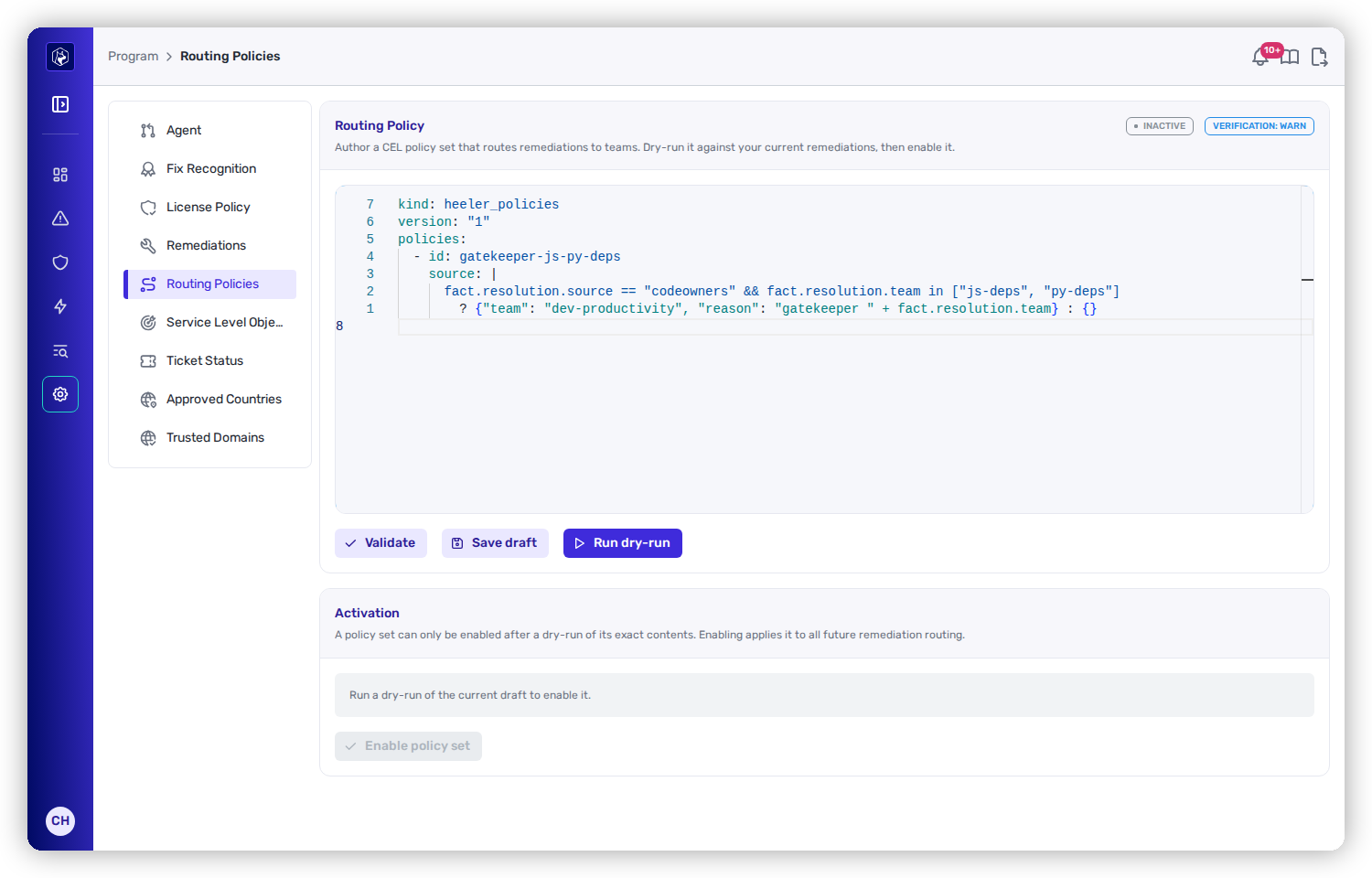
<figure><img src="https://414480750-files.gitbook.io/~/files/v0/b/gitbook-x-prod.appspot.com/o/spaces%2FXP3dp2kecwKA2KvYkntz%2Fuploads%2Fgit-blob-00cd6cafac765bafb7c76aaae3448f3cd6a57ec3%2Fam-program-routing.png?alt=media" alt="The Routing Policy editor showing a YAML policy set using CEL expressions, with Validate, Save draft, Run dry-run, and Enable policy set buttons."><figcaption><p>Routing policies — CEL rules that reassign remediations to teams, gated behind a mandatory dry-run.</p></figcaption></figure>

You write a policy set in YAML: a list of policies, each with an `id` and a CEL `source` expression that inspects a remediation and returns a team (with a reason) or nothing. Facts like `fact.resolution.source` and `fact.resolution.team` are available, so a policy can route on how ownership was resolved.

Routing policies are governed:

<table><thead><tr><th width="180">Step</th><th>What it does</th></tr></thead><tbody><tr><td><strong>Validate</strong></td><td>Compiles the policy set and reports any errors per policy.</td></tr><tr><td><strong>Save draft</strong></td><td>Saves your work without activating it.</td></tr><tr><td><strong>Run dry-run</strong></td><td>Evaluates the draft against your <em>current</em> remediations and shows exactly what would change — how many would move, from which team to which, with examples, plus any policy that fired but named a team that doesn't resolve.</td></tr><tr><td><strong>Enable policy set</strong></td><td>Activates it. This is only available after a dry-run of the <em>exact</em> current text — edit anything afterward and you must dry-run again. The header shows <strong>Active</strong>/<strong>Inactive</strong> and a verification state.</td></tr></tbody></table>

{% hint style="info" %}
Read the dry-run before enabling. It lists which remediations move and flags rules that would route to a non-existent team, so a typo cannot silently misroute the backlog.
{% endhint %}

## Related

* [Teams](/mrecEO40m5D6bt7Pq5pE/administer-and-monitor/organization-model/teams.md) — the teams these rules route to.
* [Remediation Agent](/mrecEO40m5D6bt7Pq5pE/administer-and-monitor/program-policy/remediation-agent.md) — how an assigned remediation becomes a pull request.
* [Operate → Workflows](/mrecEO40m5D6bt7Pq5pE/operate/workflows.md) — automating what happens after assignment.


---

# Agent Instructions
This documentation is published with GitBook. GitBook is the documentation platform designed so that both humans and AI agents can read, navigate, and reason over technical content effectively. Learn more at gitbook.com.

## Querying This Documentation
If you need additional information that is not directly available in this page, you can query the documentation dynamically by asking a question.

Perform an HTTP GET request on the current page URL with the `ask` query parameter, and the optional `goal` query parameter:

```
GET https://docs.heeler.com/mrecEO40m5D6bt7Pq5pE/administer-and-monitor/program-policy/remediation-assignment-and-routing.md?ask=<question>&goal=<endgoal>
```

`ask` is the immediate question: it should be specific, self-contained, and written in natural language.
`goal` is optional and describes the broader end goal you are ultimately trying to accomplish on behalf of the user. GitBook uses it to tailor the answer towards what is most useful for that goal.

The response will contain a direct answer to the question and relevant excerpts and sources from the documentation.

Use this mechanism when the answer is not explicitly present in the current page, you need clarification or additional context, or you want to retrieve related documentation sections.