> For the complete documentation index, see [llms.txt](https://docs.heeler.com/mrecEO40m5D6bt7Pq5pE/llms.txt). Markdown versions of documentation pages are available by appending `.md` to page URLs; this page is available as [Markdown](https://docs.heeler.com/mrecEO40m5D6bt7Pq5pE/catalog/data-inventory/attributes.md).
# Attributes
The specific kinds of personal and sensitive data found in your code — each with its category, sensitivity, severity, health-data flag, and the regulations it brings into scope.
An **attribute** is a specific kind of data: an email address, a full name, a business tax identification number. This view lists every attribute Heeler classified anywhere in your code and how far each one reaches.
Read it when you want to reason about a *kind* of data rather than a place — "do we hold government identifiers at all, and if so where?"
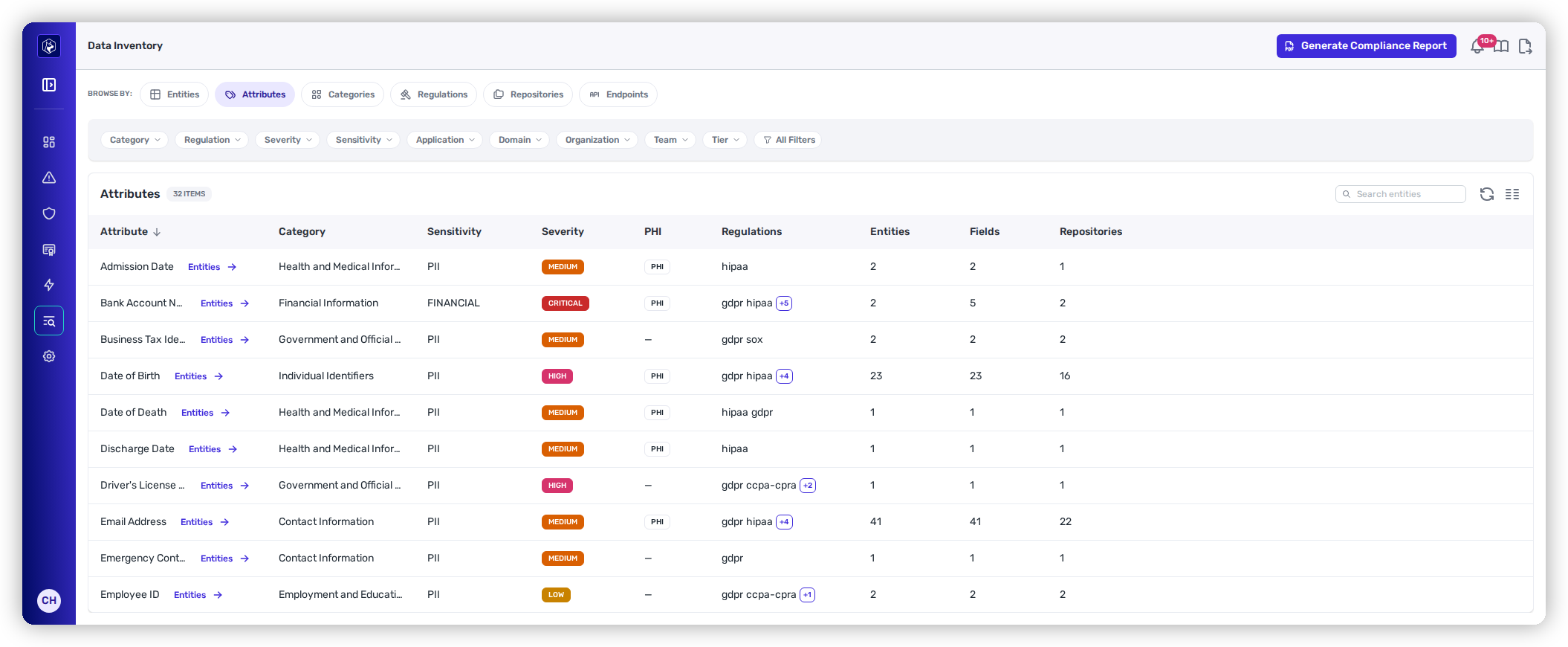
Attributes — every kind of data found, and how far it reaches.
## Columns
| Column | What it shows |
| ---------------- | ---------------------------------------------------------------------------------------------------------------------- |
| **Attribute** | The kind of data. Select it to see every field classified as this attribute. |
| **Category** | The group it belongs to — Contact Information, Individual Identifiers, Digital Identifiers and Credentials, and so on. |
| **Sensitivity** | The class of data, for example **PII**. |
| **Severity** | A badge — **Low**, **Medium**, **High**, or **Critical** — for how serious holding this attribute is. |
| **PHI** | A **PHI** badge when the attribute is treated as health information, or `—` when it isn't. |
| **Regulations** | The regulations that treat it as in scope, shown as short names with a **+N** chip when there are more. |
| **Entities** | How many discovered entities carry this attribute. |
| **Fields** | How many individual fields were classified as it. Higher than **Entities** when an entity holds it more than once. |
| **Repositories** | How many repositories contain it — the blast radius if this attribute has to be found or changed. |
## Reading severity and PHI together
Severity and PHI are independent. An attribute can be Medium severity and still be PHI, because the two answer different questions: how sensitive the data is, and whether health-information rules apply to it. Filter on **Severity** to triage by seriousness; use the **PHI** column when the question is specifically about health data.
## Filtering
The chips narrow the list by **Category**, **Regulation**, **Severity**, **Application**, **Organization**, **Team**, and **Tier**, with the remainder in **All Filters**. Filtering by regulation here gives you the attribute-level reason that regulation is in scope, which is usually the fastest way to explain a [Regulations](/mrecEO40m5D6bt7Pq5pE/catalog/data-inventory/regulations.md) row.
## Related
* [Categories](/mrecEO40m5D6bt7Pq5pE/catalog/data-inventory/categories.md) — attributes grouped, with a severity ceiling per group.
* [Entities](/mrecEO40m5D6bt7Pq5pE/catalog/data-inventory/entities.md) — the entities these attributes were found on.
* [Regulations](/mrecEO40m5D6bt7Pq5pE/catalog/data-inventory/regulations.md) — which rules the attributes pull in.
---
# Agent Instructions
This documentation is published with GitBook. GitBook is the documentation platform designed so that both humans and AI agents can read, navigate, and reason over technical content effectively. Learn more at gitbook.com.
## Querying This Documentation
If you need additional information that is not directly available in this page, you can query the documentation dynamically by asking a question.
Perform an HTTP GET request on the current page URL with the `ask` query parameter, and the optional `goal` query parameter:
```
GET https://docs.heeler.com/mrecEO40m5D6bt7Pq5pE/catalog/data-inventory/attributes.md?ask=&goal=
```
`ask` is the immediate question: it should be specific, self-contained, and written in natural language.
`goal` is optional and describes the broader end goal you are ultimately trying to accomplish on behalf of the user. GitBook uses it to tailor the answer towards what is most useful for that goal.
The response will contain a direct answer to the question and relevant excerpts and sources from the documentation.
Use this mechanism when the answer is not explicitly present in the current page, you need clarification or additional context, or you want to retrieve related documentation sections.