> For the complete documentation index, see [llms.txt](https://docs.heeler.com/mrecEO40m5D6bt7Pq5pE/llms.txt). Markdown versions of documentation pages are available by appending `.md` to page URLs; this page is available as [Markdown](https://docs.heeler.com/mrecEO40m5D6bt7Pq5pE/catalog/data-inventory/endpoints.md).
# Endpoints
Which API endpoints consume or transmit personal data — the categories they carry, the regulations that apply, and how sensitive the payload is.
Entities tell you what your code *stores*. This view tells you what it *moves*: which of your API endpoints take personal data in, which hand it back out, and what kind of data that is. It answers the question a privacy review usually asks first — *which of our endpoints are in scope for this regulation?*
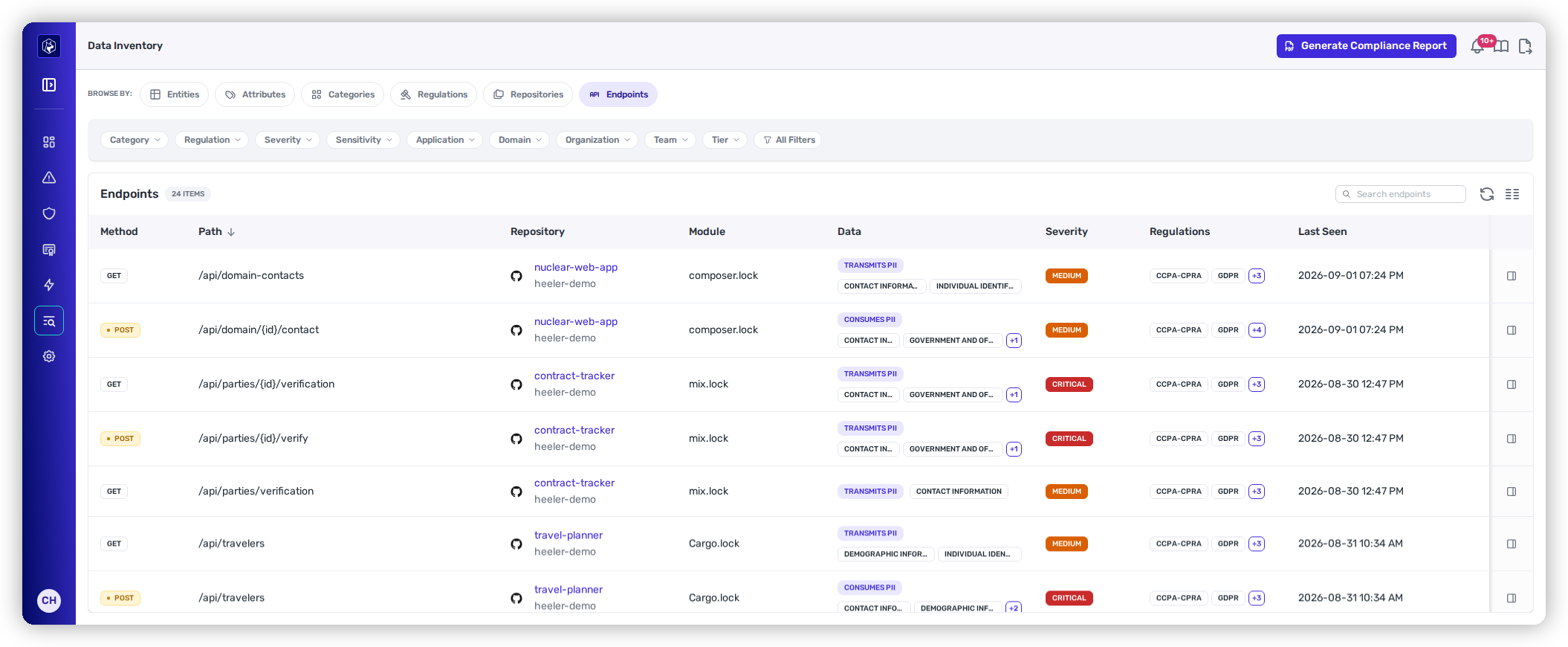
Endpoints — every discovered endpoint, classified by the data that moves through it.
The classification is read from the interface schemas your code already declares — OpenAPI, GraphQL, protobuf, and JSON Schema — and joined to the same taxonomy the rest of the inventory uses. Nothing is tagged by hand, and an endpoint that carries no classified data carries no tags.
## Columns
| Column | What it shows |
| --------------- | ------------------------------------------------------------------------------------------------------------ |
| **Method** | The HTTP method, as a badge. |
| **Path** | The endpoint's route, with path parameters shown as declared — for example `/api/parties/{id}/verification`. |
| **Repository** | The repository and organization the endpoint was found in. Links to it in the Catalog. |
| **Module** | The module within that repository. |
| **Data** | A **Consumes PII** or **Transmits PII** badge, followed by the categories carried, as badges. |
| **Severity** | The highest severity among everything the endpoint carries. |
| **Regulations** | Every regulation that treats the data as in scope. |
## Consumes and transmits are separate
**Consumes PII** means personal data arrives in the request. **Transmits PII** means it leaves in the response. An endpoint can do both, one, or neither, and the distinction usually decides what you do about it — an endpoint that returns personal data is an exposure question, while one that accepts it is a collection and retention question.
Both are read from the direction of the schema that produced them, so a request body and a response body are never conflated.
## Severity is a ceiling
**Severity** is the maximum across everything the endpoint carries, not an average. An endpoint showing **Critical** may carry one critical attribute alongside several low ones. Read it with the **Data** badges to tell what is driving it.
## Open an endpoint
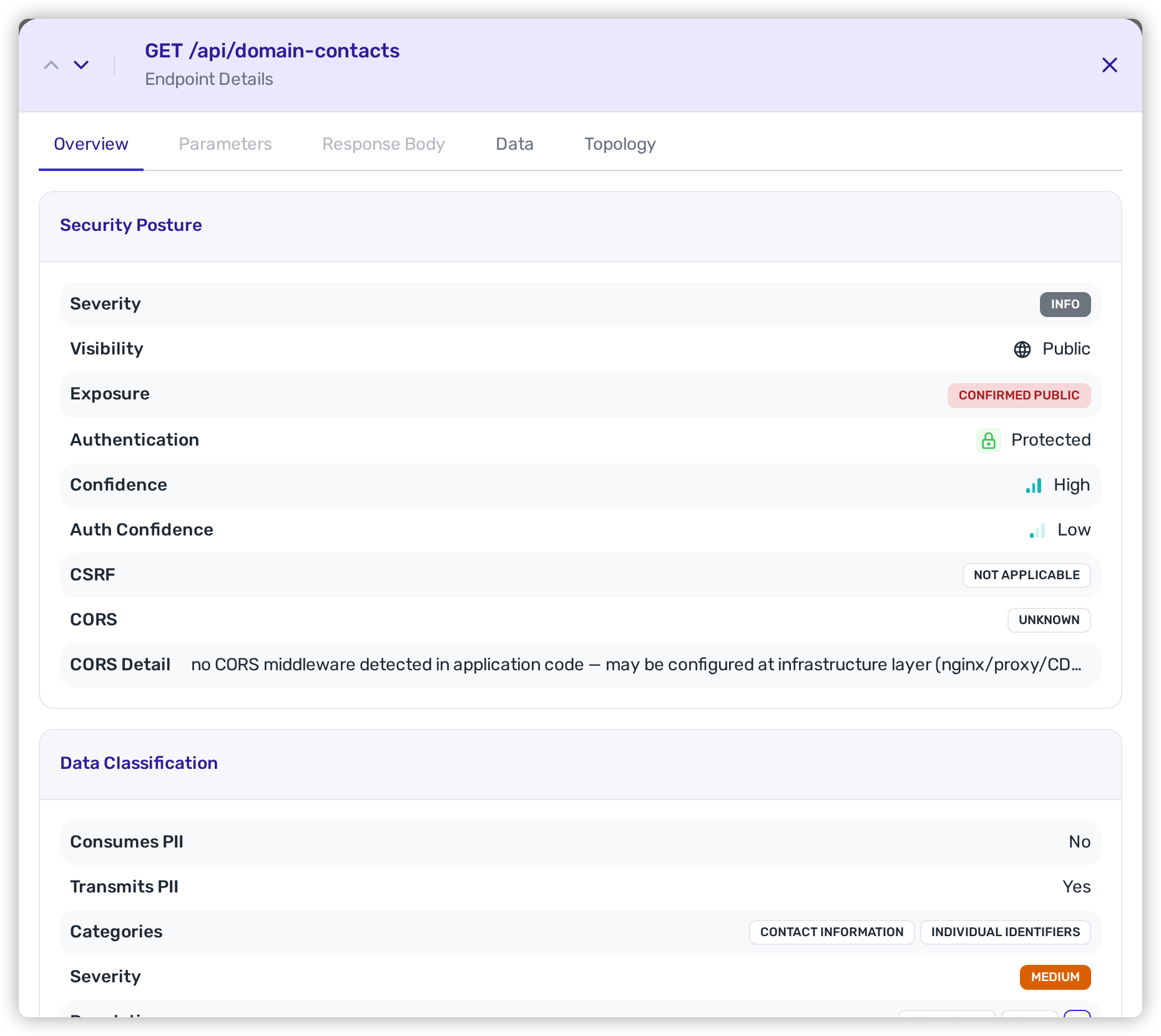
Selecting a row opens the endpoint's detail, where its data classification sits beside its security posture.
Endpoint details — data classification next to visibility and authentication.
That pairing is the point. **Data Classification** tells you what moves through the endpoint; **Security Posture** tells you whether it is reachable and whether anything guards it. An endpoint carrying critical personal data that is also **Public** and **Unprotected** is a different problem from the same payload behind authentication, and the two facts are on one screen rather than in two tools.
**Detection Context** below them records how the endpoint was found — the source it was read from, and whether it came from a published contract or from the code itself.
## Filtering
The same chips apply as everywhere else in the inventory — **Category**, **Regulation**, **Severity**, **Application**, **Organization**, **Team**, and **Tier** — plus **All Filters** and a search box.
Two combinations do most of the work:
* Filter by **Regulation** to get the endpoint scope list for an audit.
* Filter by **Team** to hand each team the endpoints it owns that touch regulated data.
## Export and report
**Generate Compliance Report** produces a point-in-time document for the current scope — see [Compliance Reports](/mrecEO40m5D6bt7Pq5pE/standards-and-compliance/compliance-reports.md). The listing also exports to CSV, and the same fields are available on the endpoints API, so "which endpoints handle regulated data" can be a scheduled query rather than a manual review.
## Related
* [Entities](/mrecEO40m5D6bt7Pq5pE/catalog/data-inventory/entities.md) — the data your code persists, rather than moves.
* [Endpoints](/mrecEO40m5D6bt7Pq5pE/catalog/endpoints.md) — how endpoints are discovered and assessed in the Catalog.
* [Regulations](/mrecEO40m5D6bt7Pq5pE/catalog/data-inventory/regulations.md) — which regulations apply across the whole inventory.
---
# Agent Instructions
This documentation is published with GitBook. GitBook is the documentation platform designed so that both humans and AI agents can read, navigate, and reason over technical content effectively. Learn more at gitbook.com.
## Querying This Documentation
If you need additional information that is not directly available in this page, you can query the documentation dynamically by asking a question.
Perform an HTTP GET request on the current page URL with the `ask` query parameter, and the optional `goal` query parameter:
```
GET https://docs.heeler.com/mrecEO40m5D6bt7Pq5pE/catalog/data-inventory/endpoints.md?ask=&goal=
```
`ask` is the immediate question: it should be specific, self-contained, and written in natural language.
`goal` is optional and describes the broader end goal you are ultimately trying to accomplish on behalf of the user. GitBook uses it to tailor the answer towards what is most useful for that goal.
The response will contain a direct answer to the question and relevant excerpts and sources from the documentation.
Use this mechanism when the answer is not explicitly present in the current page, you need clarification or additional context, or you want to retrieve related documentation sections.