> For the complete documentation index, see [llms.txt](https://docs.heeler.com/mrecEO40m5D6bt7Pq5pE/llms.txt). Markdown versions of documentation pages are available by appending `.md` to page URLs; this page is available as [Markdown](https://docs.heeler.com/mrecEO40m5D6bt7Pq5pE/catalog/data-inventory/entities.md).
# Entities
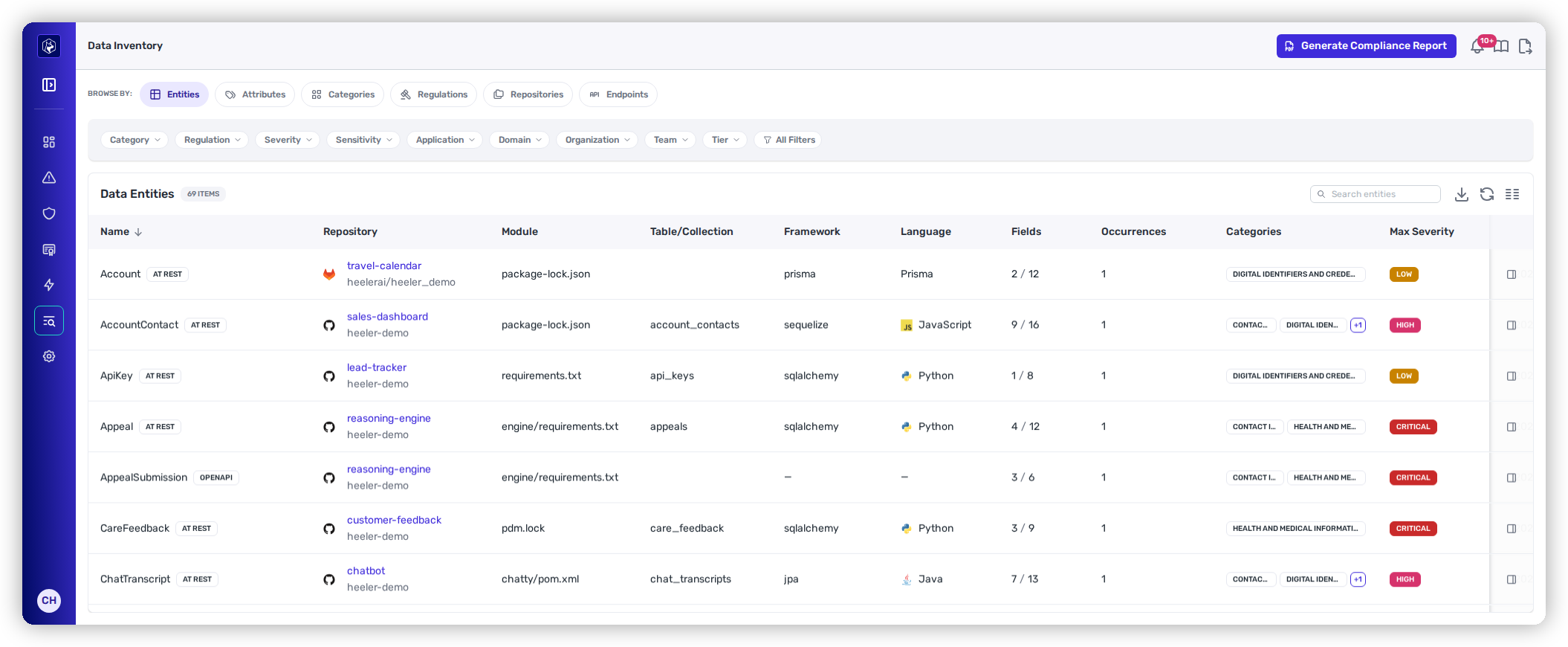
Every data entity Heeler discovered in your code, with the module and framework that declared it, how many of its fields are classified, and which data categories it carries.
**Data Entities** is the row-level view of the inventory: one row per entity Heeler found in your code. An entity is something your code persists or publishes — a database model, a table or collection, or a schema in an API contract.
Where the same entity is declared in more than one place in a repository, the row is the entity itself — the copies are collapsed into it and counted under [**Occurrences**](#occurrences).
Data Entities — every discovered entity and what it holds.
## Columns
| Column | What it shows |
| -------------------- | ---------------------------------------------------------------------------------------------------------------------------------------------------------------------------------- |
| **Name** | The entity as your code names it, with its [data-state](/mrecEO40m5D6bt7Pq5pE/catalog/data-inventory.md#data-state) badge — for example **At rest** for a persisted model. |
| **Repository** | The repository the entity was found in, with its organization and provider icon. Links to the repository. |
| **Module** | The module within the repository that owns the entity. |
| **Table/Collection** | The physical table or collection name where the declaration provides one. Blank when the schema doesn't name one. |
| **Framework** | What declared it — for example `sqlalchemy`, `prisma`, or `ef_core`. |
| **Language** | The language of the declaring code. |
| **Fields** | **Classified / total.** `5 / 14` means fourteen fields were read and five carry a classification. |
| **Occurrences** | How many separate declarations of this entity the row collapses. `1` is a single declaration; a higher number means the same entity was declared in more than one place. Sortable. |
| **Categories** | The data categories present on this entity. An entity commonly carries more than one. |
| **Max Severity** | The highest sensitivity across the entity's classified fields — the entity's own ceiling. |
| **Last Seen** | When analysis last confirmed the entity in code. |
Use **Manage Columns** to pin or hide any of these; the layout persists per user.
## Opening an entity
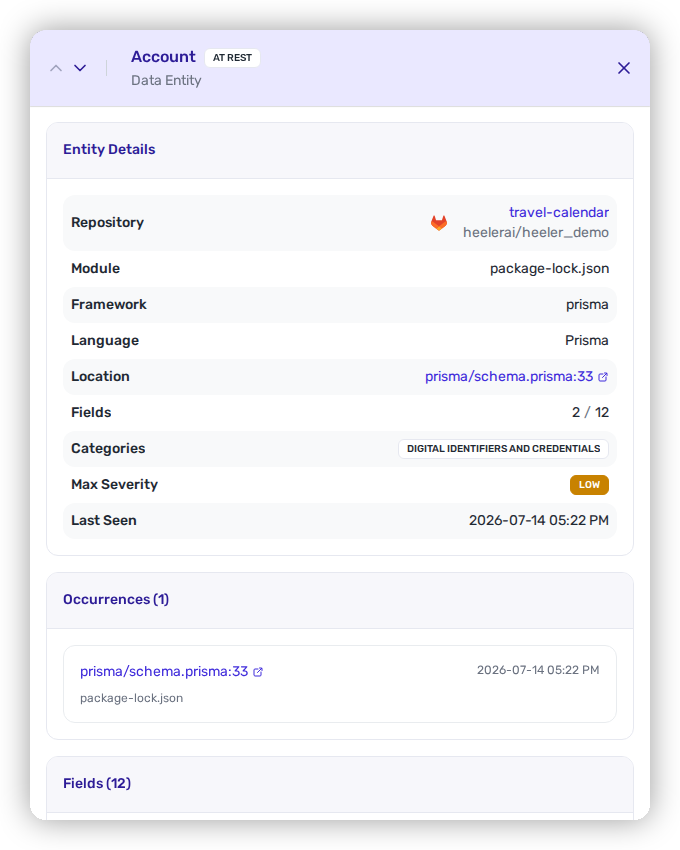
Select a row to open the entity. The detail names every field Heeler read, marks which are classified, and shows each classification's attribute, category, sensitivity, and the regulations it pulls in — plus the evidence for the match, so a classification is auditable rather than asserted.
## Occurrences
The same entity is often declared more than once in a repository — a versioned schema file that keeps earlier revisions alongside the current one, or a model that analysis reads separately for each code root it appears in. These are copies of one data holding, not separate holdings, so the inventory lists the entity once and counts the copies in **Occurrences**.
The count covers the same copies as the rest of the row: only those carrying classified data, so **Occurrences**, **Fields**, and **Categories** always describe the same set. Sort by the column to find the entities declared in the most places.
### Where each copy lives
Opening the entity shows an **Occurrences** card listing every copy behind the count, newest first. Each entry gives:
* **The file**, linked to your source provider — at the exact line where the declaration gives one.
* **The module** that owns it.
* **The schema path**, where the declaration sits inside a larger document. An OpenAPI file declares many schemas in one file, so `components.schemas.AppealSubmission` is what tells one copy from another when the file alone can't.
* **When analysis last saw** that copy.
The card is there even when the count is `1`, where it answers the simpler question of where the entity is declared at all.
The Occurrences card — every declaration behind the count, with a link to the source.
## Filtering
The chips above the table narrow the list: **Category**, **Regulation**, **Severity**, **Application**, **Organization**, **Team**, and **Tier**, with the rest in **All Filters**. **Search entities** matches on entity and table names as you type.
A useful pattern: filter by **Regulation**, then read the **Repository** column to see which teams own the code that brings that regulation into scope.
## Export
The download icon exports the current view — the rows as filtered, not the whole inventory — so an export answers the question you actually scoped.
## Related
* [Data Inventory](/mrecEO40m5D6bt7Pq5pE/catalog/data-inventory.md) — how entities are discovered and classified.
* [Attributes](/mrecEO40m5D6bt7Pq5pE/catalog/data-inventory/attributes.md) — the specific kinds of data found across entities.
* [Repositories](/mrecEO40m5D6bt7Pq5pE/catalog/data-inventory/repositories.md) — the same data rolled up per repository.
---
# Agent Instructions
This documentation is published with GitBook. GitBook is the documentation platform designed so that both humans and AI agents can read, navigate, and reason over technical content effectively. Learn more at gitbook.com.
## Querying This Documentation
If you need additional information that is not directly available in this page, you can query the documentation dynamically by asking a question.
Perform an HTTP GET request on the current page URL with the `ask` query parameter, and the optional `goal` query parameter:
```
GET https://docs.heeler.com/mrecEO40m5D6bt7Pq5pE/catalog/data-inventory/entities.md?ask=&goal=
```
`ask` is the immediate question: it should be specific, self-contained, and written in natural language.
`goal` is optional and describes the broader end goal you are ultimately trying to accomplish on behalf of the user. GitBook uses it to tailor the answer towards what is most useful for that goal.
The response will contain a direct answer to the question and relevant excerpts and sources from the documentation.
Use this mechanism when the answer is not explicitly present in the current page, you need clarification or additional context, or you want to retrieve related documentation sections.