> For the complete documentation index, see [llms.txt](https://docs.heeler.com/mrecEO40m5D6bt7Pq5pE/llms.txt). Markdown versions of documentation pages are available by appending `.md` to page URLs; this page is available as [Markdown](https://docs.heeler.com/mrecEO40m5D6bt7Pq5pE/catalog/data-inventory/repositories.md).
# Repositories
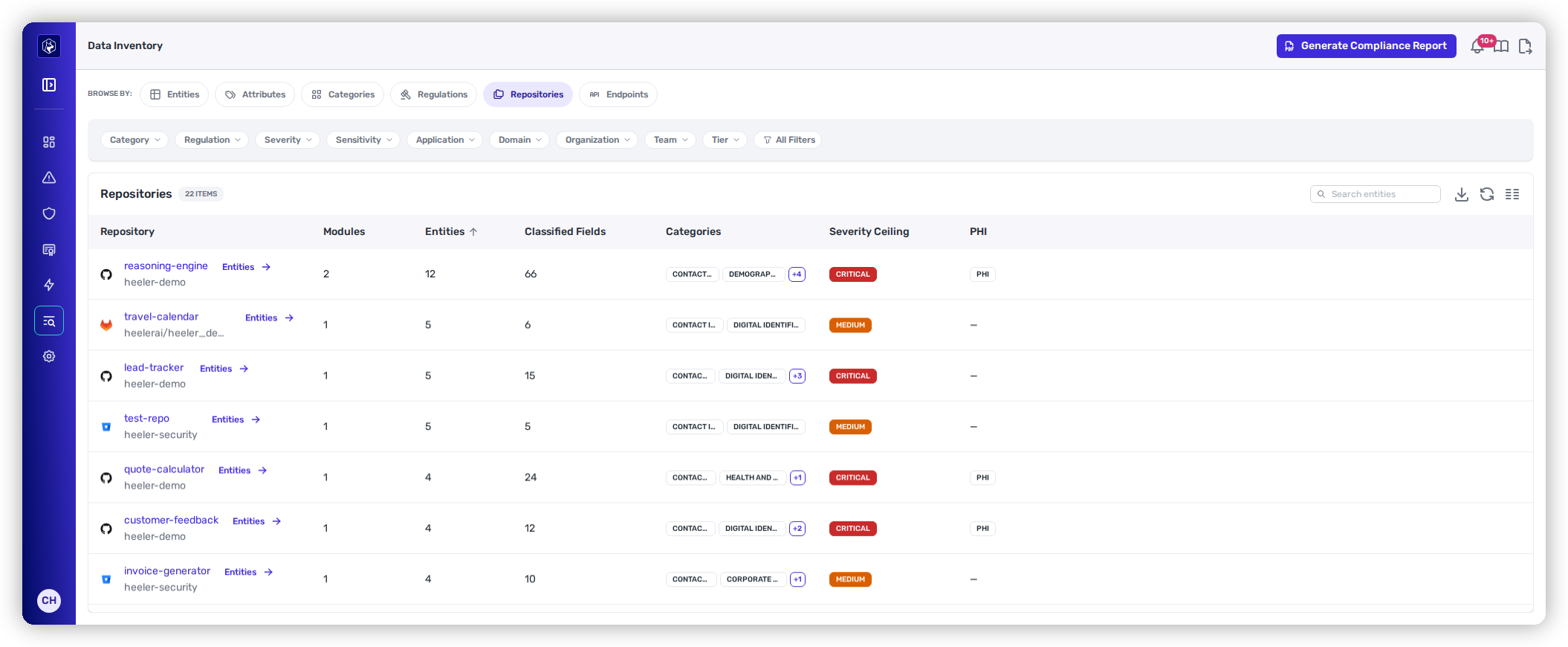
Classified data rolled up per repository — how many entities and fields each one holds, which categories, its severity ceiling, and whether it handles health data.
This view rolls the inventory up to the level most work gets assigned at: the repository. It answers "which of our repositories handle regulated data, and how much?" — and because repositories carry ownership, the answer comes with a team attached.
Repositories — classified data per repository, with the health-data flag.
## Columns
| Column | What it shows |
| --------------------- | ----------------------------------------------------------------------------------------------- |
| **Repository** | The repository with its organization and provider icon. Links to the repository in the Catalog. |
| **Modules** | How many modules in it declare classified entities. |
| **Entities** | How many discovered entities it holds. |
| **Classified Fields** | How many individual fields carry a classification. |
| **Categories** | The data categories present, as badges. |
| **Severity Ceiling** | The highest severity anywhere in the repository — its worst case. |
| **PHI** | A **PHI** badge when any entity in the repository holds health information. |
## Severity ceiling
**Severity Ceiling** is the maximum across everything the repository holds, so it tells you the worst case rather than the typical one. Two repositories showing **Medium** can hold very different amounts of data — read **Classified Fields** alongside the ceiling to tell volume from severity.
## Find the owning team
Select a repository to open it in the Catalog, where ownership, tier, and its findings already live. The repository's own **Data** tab shows just its entities, which is the view to use when you're briefing the owning team on what their service holds.
## Filtering
The same chips apply — **Category**, **Regulation**, **Severity**, **Application**, **Organization**, **Team**, and **Tier**. Filtering by **Team** turns this into a per-team data report; filtering by **Regulation** turns it into the scope list for that regulation.
## Export
The download icon exports the current view as filtered, so a per-team or per-regulation export is just that filter plus the export.
## Related
* [Entities](/mrecEO40m5D6bt7Pq5pE/catalog/data-inventory/entities.md) — the individual entities behind these counts.
* [Regulations](/mrecEO40m5D6bt7Pq5pE/catalog/data-inventory/regulations.md) — start from a regulation instead of a repository.
* [Repositories](/mrecEO40m5D6bt7Pq5pE/catalog/repositories.md) — the full repository inventory.
---
# Agent Instructions
This documentation is published with GitBook. GitBook is the documentation platform designed so that both humans and AI agents can read, navigate, and reason over technical content effectively. Learn more at gitbook.com.
## Querying This Documentation
If you need additional information that is not directly available in this page, you can query the documentation dynamically by asking a question.
Perform an HTTP GET request on the current page URL with the `ask` query parameter, and the optional `goal` query parameter:
```
GET https://docs.heeler.com/mrecEO40m5D6bt7Pq5pE/catalog/data-inventory/repositories.md?ask=&goal=
```
`ask` is the immediate question: it should be specific, self-contained, and written in natural language.
`goal` is optional and describes the broader end goal you are ultimately trying to accomplish on behalf of the user. GitBook uses it to tailor the answer towards what is most useful for that goal.
The response will contain a direct answer to the question and relevant excerpts and sources from the documentation.
Use this mechanism when the answer is not explicitly present in the current page, you need clarification or additional context, or you want to retrieve related documentation sections.