> For the complete documentation index, see [llms.txt](https://docs.heeler.com/mrecEO40m5D6bt7Pq5pE/llms.txt). Markdown versions of documentation pages are available by appending `.md` to page URLs; this page is available as [Markdown](https://docs.heeler.com/mrecEO40m5D6bt7Pq5pE/catalog/dependencies.md).
# Dependencies
Every third-party package across all your repositories in one inventory — with license, ecosystem, classification, hygiene scoring, and a global SBOM export.
The **Dependencies** inventory (**Catalog → Dependencies**) is a global view of every third-party package across all your repositories, in a single list. Use it to find systemic risk, reduce dependency sprawl, and hold teams to consistent standards — and because the view is global, it's where you export a **whole-environment SBOM**.
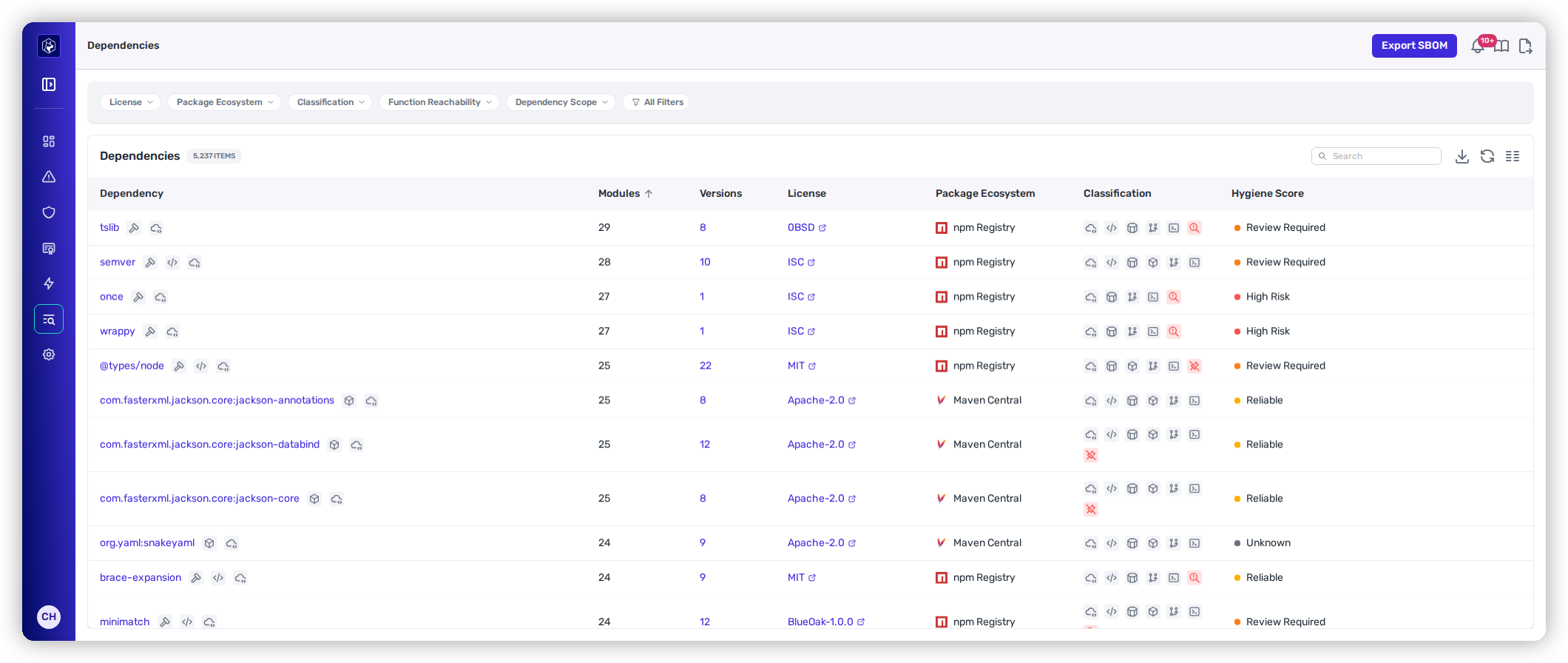
Dependencies — every package across every repo, with license, classification, and hygiene score.
{% hint style="info" %}
**Prerequisites:** The dependency inventory is built from your connected source-code (SCM) provider — connect one and Heeler resolves and rolls up every package automatically.
{% endhint %}
## The listing
Each row is a package in your environment, with the modules and versions that use it rolled up.
| Column | What it shows |
| --------------------- | ------------------------------------------------------------------------------------------------------------------------------ |
| **Dependency** | Package name. |
| **Modules** | Number of modules using it. |
| **Versions** | Distinct versions in use — open it to see each version and where it lands. |
| **License** | Detected license identifier. |
| **Package Ecosystem** | The registry — npm, Maven Central, PyPI, Go Module Proxy, and so on. |
| **Classification** | Usage characteristics: Direct/Transitive, Open Source/Vendor, Reachable, Unmaintained, Unpinned, Unapproved License, and more. |
| **Hygiene Score** | An OpenSSF Scorecard–based signal, shown as Reliable, Review Required, or High Risk. |
The quick-filter chips (License, Package Ecosystem, Classification, Dependency Scope) cover the common cuts — direct vs. transitive, reachable, unmaintained, unpinned, license-approval status. See [Filtering and Exports](/mrecEO40m5D6bt7Pq5pE/operate/dashboards/filtering-and-exports.md) for the shared controls.
## Exporting an SBOM
**Export SBOM** generates a **CycloneDX** software bill of materials for your entire environment, directly from this view — the **global** scope of the five described in [Software Bill of Materials (SBOM)](/mrecEO40m5D6bt7Pq5pE/catalog/sbom.md), which also covers the narrower per-repository, per-service, and per-deployment exports.
## Reading a dependency
Selecting a package opens its [**detail view**](/mrecEO40m5D6bt7Pq5pE/catalog/dependencies/dependency-detail.md) — a scope-and-impact summary, its version distribution, an OpenSSF hygiene breakdown, and where the package is instanced, vulnerable, and deployed across your estate.
Where reachability has been computed, the detail view also shows the recorded call-graph data for the module or dependency, so the evidence behind a reachability verdict can be read from the package it describes.
## Worked example
See how this fits a proactive supply-chain program:
{% content-ref url="/pages/UKMcUu4uiPGFy8H7pw9o" %}
[Build a Supply Chain Security Program](/mrecEO40m5D6bt7Pq5pE/solutions-and-use-cases/building-a-proactive-supply-chain-security-program.md)
{% endcontent-ref %}
## Related
* [Dependency Detail](/mrecEO40m5D6bt7Pq5pE/catalog/dependencies/dependency-detail.md) — hygiene, versions, findings, and deployments for one package.
* [Open Source (SCA)](/mrecEO40m5D6bt7Pq5pE/findings/open-source-sca.md) — how dependency vulnerabilities are prioritized and fixed.
---
# Agent Instructions
This documentation is published with GitBook. GitBook is the documentation platform designed so that both humans and AI agents can read, navigate, and reason over technical content effectively. Learn more at gitbook.com.
## Querying This Documentation
If you need additional information that is not directly available in this page, you can query the documentation dynamically by asking a question.
Perform an HTTP GET request on the current page URL with the `ask` query parameter, and the optional `goal` query parameter:
```
GET https://docs.heeler.com/mrecEO40m5D6bt7Pq5pE/catalog/dependencies.md?ask=&goal=
```
`ask` is the immediate question: it should be specific, self-contained, and written in natural language.
`goal` is optional and describes the broader end goal you are ultimately trying to accomplish on behalf of the user. GitBook uses it to tailor the answer towards what is most useful for that goal.
The response will contain a direct answer to the question and relevant excerpts and sources from the documentation.
Use this mechanism when the answer is not explicitly present in the current page, you need clarification or additional context, or you want to retrieve related documentation sections.