> For the complete documentation index, see [llms.txt](https://docs.heeler.com/mrecEO40m5D6bt7Pq5pE/llms.txt). Markdown versions of documentation pages are available by appending `.md` to page URLs; this page is available as [Markdown](https://docs.heeler.com/mrecEO40m5D6bt7Pq5pE/catalog/endpoints.md).
# Endpoints
Your application's attack surface — every API endpoint, MCP tool, GraphQL/gRPC service, and actuator route detected from source, with auth posture and accessibility for each.
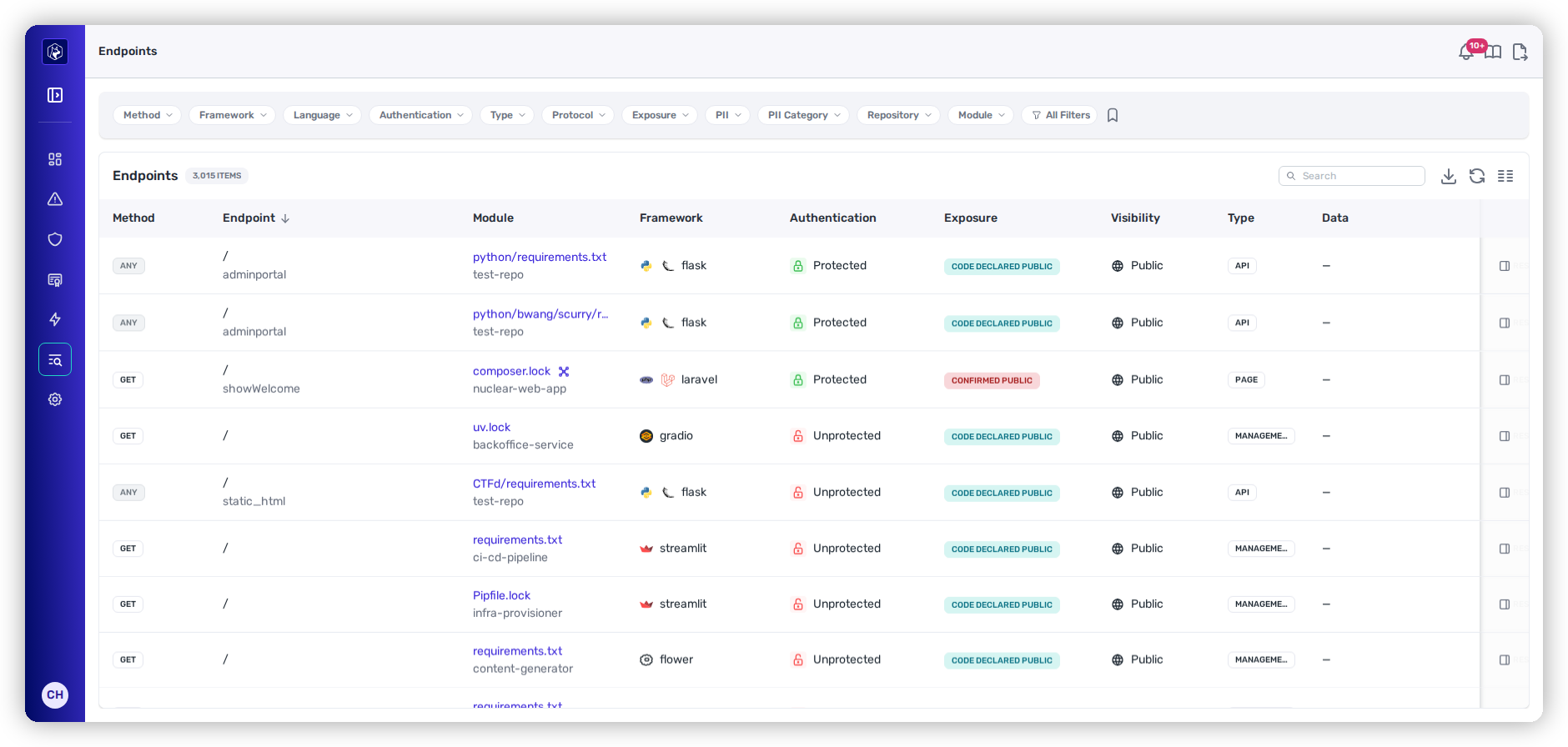
The **Endpoints** inventory (**Catalog → Endpoints**) is a complete map of your application's external interface — every route, API, and tool defined across your code. Heeler builds it **entirely from source-code analysis** — no runtime agents, proxies, or traffic capture — so it's current the moment code is pushed, and it covers interfaces that never show up in traffic logs.
Endpoints — method and framework, and (critically) whether each route is authenticated and how accessible it is.
{% hint style="info" %}
**Prerequisites:** Endpoints are discovered from your connected source-code (SCM) provider — no runtime agent required. Connect an SCM provider and the map fills in as code is pushed.
{% endhint %}
## What Heeler detects
Heeler classifies interfaces across a wide range of protocols:
* **REST APIs** — HTTP endpoints from decorators, annotations, route registrations, and class-based handlers.
* **MCP tools, resources, and prompts** — Model Context Protocol interfaces exposed by AI-agent frameworks, with transport and capability analysis (see [MCP Server Analysis](/mrecEO40m5D6bt7Pq5pE/catalog/endpoints/mcp-analysis.md)).
* **Spring Boot actuator endpoints** — management routes synthesized from manifests and config, with exposure and sensitivity analysis (see [Spring Boot Actuator Analysis](/mrecEO40m5D6bt7Pq5pE/catalog/endpoints/actuator-analysis.md)).
* **GraphQL** query and mutation resolvers, **gRPC** service definitions, **SOAP** (ASMX/WCF), and **WebSocket / Webhook** interfaces.
For each endpoint, Heeler captures not just the route and method but the authentication posture, middleware chain, handler function, visibility scope, and framework context.
### Languages and frameworks
Endpoint discovery is framework-aware across **13 languages** and **20+ web frameworks** — see [Supported Technologies](/mrecEO40m5D6bt7Pq5pE/supported-technologies.md) for the full language and framework matrix.
## The listing
| Column | What it shows |
| ------------------ | ------------------------------------------------------------------------------------------------------------------------------------------------ |
| **Method** | HTTP method (GET, POST, …) or interface type (MCP\_TOOL, MCP\_PROMPT, MCP\_RESOURCE). |
| **Endpoint** | The route path *and* the handler function/class — so you can find the implementation. |
| **Module** | The module and repository where it's defined, linked to source. |
| **Framework** | The detected framework, with language and framework icons. |
| **Authentication** | Protected or Unprotected. |
| **Accessibility** | Whether it's internet-accessible (reachable from the public internet), from deployment topology. |
| **Visibility** | Public, internal, private, or restricted. |
| **Type** | API, MCP, or Page. |
| **Data** | Whether the endpoint **consumes** or **transmits** personal data, with the categories it carries. A dash means nothing on its schema classified. |
| **Protocol** | REST, GraphQL, gRPC, MCP, or SOAP. |
Filter by Method, Framework, Language, Authentication, Type, Protocol, Accessibility, **PII**, Repository, and Module; full-text search matches paths, handler names, and repositories. Admins can **Export Data** as CSV (one-time or recurring) — see [Filtering and Exports](/mrecEO40m5D6bt7Pq5pE/operate/dashboards/filtering-and-exports.md).
{% hint style="info" %}
The **Authentication** and **Accessibility** columns are what make this more than a route list — an **unauthenticated, internet-accessible** endpoint is exactly the exposure that raises a finding's [Environment Impact](/mrecEO40m5D6bt7Pq5pE/findings/code-security-sast/prioritization.md). Filter to those two conditions to find your riskiest surface fast.
{% endhint %}
## Reading an endpoint
Selecting the detail icon on a row opens the [**Endpoint Detail**](/mrecEO40m5D6bt7Pq5pE/catalog/endpoints/endpoint-detail.md) tray — a deep security-posture analysis (auth method, CSRF/CORS, roles, issuer/provider), what personal data the endpoint carries, the handler chain, the API contract (Parameters and Response Body), and a **Topology** view placing the endpoint in its service graph. Spring Boot actuator and MCP interfaces get their own specialized analysis, covered in [**Spring Boot Actuator Analysis**](/mrecEO40m5D6bt7Pq5pE/catalog/endpoints/actuator-analysis.md) and [**MCP Server Analysis**](/mrecEO40m5D6bt7Pq5pE/catalog/endpoints/mcp-analysis.md).
## How endpoints are analyzed
Heeler determines each endpoint's authentication posture, accessibility, and framework from your code and configuration, re-analyzing on every push — with no runtime agents, proxies, or traffic capture. Accessibility combines configuration with deployment topology to decide whether a route is internet-accessible.
## Related
* [Endpoint Detail](/mrecEO40m5D6bt7Pq5pE/catalog/endpoints/endpoint-detail.md) · [Spring Boot Actuator Analysis](/mrecEO40m5D6bt7Pq5pE/catalog/endpoints/actuator-analysis.md) · [MCP Server Analysis](/mrecEO40m5D6bt7Pq5pE/catalog/endpoints/mcp-analysis.md)
* [Services → Endpoints & Connections](/mrecEO40m5D6bt7Pq5pE/catalog/services/service-detail.md) — endpoints scoped to a running service.
* [Data Inventory → Endpoints](/mrecEO40m5D6bt7Pq5pE/catalog/data-inventory/endpoints.md) — the same classification portfolio-wide, filterable by regulation and exportable.
---
# Agent Instructions
This documentation is published with GitBook. GitBook is the documentation platform designed so that both humans and AI agents can read, navigate, and reason over technical content effectively. Learn more at gitbook.com.
## Querying This Documentation
If you need additional information that is not directly available in this page, you can query the documentation dynamically by asking a question.
Perform an HTTP GET request on the current page URL with the `ask` query parameter, and the optional `goal` query parameter:
```
GET https://docs.heeler.com/mrecEO40m5D6bt7Pq5pE/catalog/endpoints.md?ask=&goal=
```
`ask` is the immediate question: it should be specific, self-contained, and written in natural language.
`goal` is optional and describes the broader end goal you are ultimately trying to accomplish on behalf of the user. GitBook uses it to tailor the answer towards what is most useful for that goal.
The response will contain a direct answer to the question and relevant excerpts and sources from the documentation.
Use this mechanism when the answer is not explicitly present in the current page, you need clarification or additional context, or you want to retrieve related documentation sections.