> For the complete documentation index, see [llms.txt](https://docs.heeler.com/mrecEO40m5D6bt7Pq5pE/llms.txt). Markdown versions of documentation pages are available by appending `.md` to page URLs; this page is available as [Markdown](https://docs.heeler.com/mrecEO40m5D6bt7Pq5pE/catalog/infrastructure.md).
# Infrastructure
Every cloud resource across your connected providers, organized by category and linked to the services and applications it supports.
The **Infrastructure** inventory (**Catalog → Infrastructure**) lists every cloud resource across your connected providers and links each one to the services and applications it supports — the context that turns a raw resource list into an understanding of how your cloud relates to your application risk. Once event collection is configured for a provider, Heeler detects infrastructure changes **within about 60 seconds**, so this stays a near-real-time view.
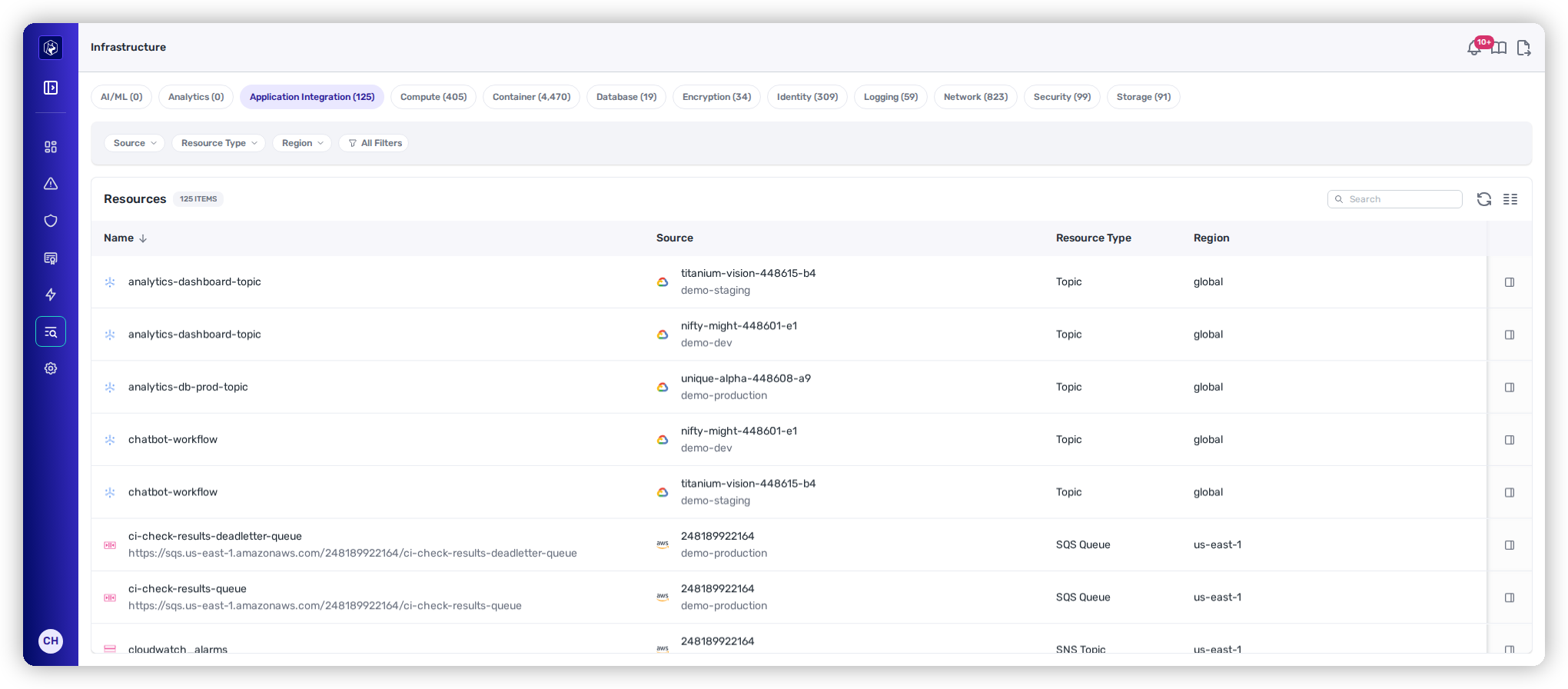
Infrastructure — resources organized into category tabs, each with a live count.
{% hint style="info" %}
**Prerequisites:** The Infrastructure inventory requires a connected cloud provider (CSP); resources populate per provider, and configuring event collection keeps the view near-real-time.
{% endhint %}
## Resource categories
Navigate between resource types using the category tabs at the top:
| Category | What it covers |
| --------------------------- | ----------------------------------------------------------------------- |
| **AI/ML** | ML models, training infrastructure, and AI service resources. |
| **Analytics** | Data-pipeline, analytics, and BI resources. |
| **Application Integration** | Queues, event buses, API gateways, messaging. |
| **Compute** | VMs, container instances, serverless functions, managed compute. |
| **Container** | Orchestration resources — pods, nodes, deployments, cluster components. |
| **Database** | Relational, NoSQL, and in-memory databases. |
| **Encryption** | Key-management and secrets-management resources. |
| **Identity** | IAM roles, service accounts, identity resources. |
| **Logging** | Log groups, log streams, observability infrastructure. |
| **Network** | VPCs, subnets, security groups, load balancers, DNS. |
| **Security** | Security groups, WAF rules, cloud security controls. |
| **Storage** | Object storage, block volumes, file systems. |
## The listing
| Column | What it shows |
| ----------------- | --------------------------------------------------------------------------------- |
| **Name** | Resource name or identifier. |
| **Source** | Cloud provider and resource path (AWS ARN, Azure resource ID, GCP resource name). |
| **Resource Type** | The specific type (ECS Service, Cloud Run Service, Lambda Function, …). |
| **Region** | The region or zone the resource is deployed in. |
Filter by Source (cloud provider), Resource Type, and Region. See [Filtering and Exports](/mrecEO40m5D6bt7Pq5pE/operate/dashboards/filtering-and-exports.md).
## Reading a resource
Selecting a resource opens its [**detail view**](/mrecEO40m5D6bt7Pq5pE/catalog/infrastructure/resource-detail.md) — full properties and relationships, which services and applications it supports, configuration annotations (misconfigurations or compliance risks), and the raw resource JSON.
## Related
* [Resource Detail](/mrecEO40m5D6bt7Pq5pE/catalog/infrastructure/resource-detail.md) — properties, relationships, and raw JSON.
* [Services → Infrastructure](/mrecEO40m5D6bt7Pq5pE/catalog/services/service-detail.md) — resources scoped to a running service.
---
# Agent Instructions
This documentation is published with GitBook. GitBook is the documentation platform designed so that both humans and AI agents can read, navigate, and reason over technical content effectively. Learn more at gitbook.com.
## Querying This Documentation
If you need additional information that is not directly available in this page, you can query the documentation dynamically by asking a question.
Perform an HTTP GET request on the current page URL with the `ask` query parameter, and the optional `goal` query parameter:
```
GET https://docs.heeler.com/mrecEO40m5D6bt7Pq5pE/catalog/infrastructure.md?ask=&goal=
```
`ask` is the immediate question: it should be specific, self-contained, and written in natural language.
`goal` is optional and describes the broader end goal you are ultimately trying to accomplish on behalf of the user. GitBook uses it to tailor the answer towards what is most useful for that goal.
The response will contain a direct answer to the question and relevant excerpts and sources from the documentation.
Use this mechanism when the answer is not explicitly present in the current page, you need clarification or additional context, or you want to retrieve related documentation sections.