> For the complete documentation index, see [llms.txt](https://docs.heeler.com/mrecEO40m5D6bt7Pq5pE/llms.txt). Markdown versions of documentation pages are available by appending `.md` to page URLs; this page is available as [Markdown](https://docs.heeler.com/mrecEO40m5D6bt7Pq5pE/catalog/repositories.md).

# Repositories

Every monitored repository across your SCM organizations, with per-repository visibility into modules, findings, secrets, endpoints, and ownership.

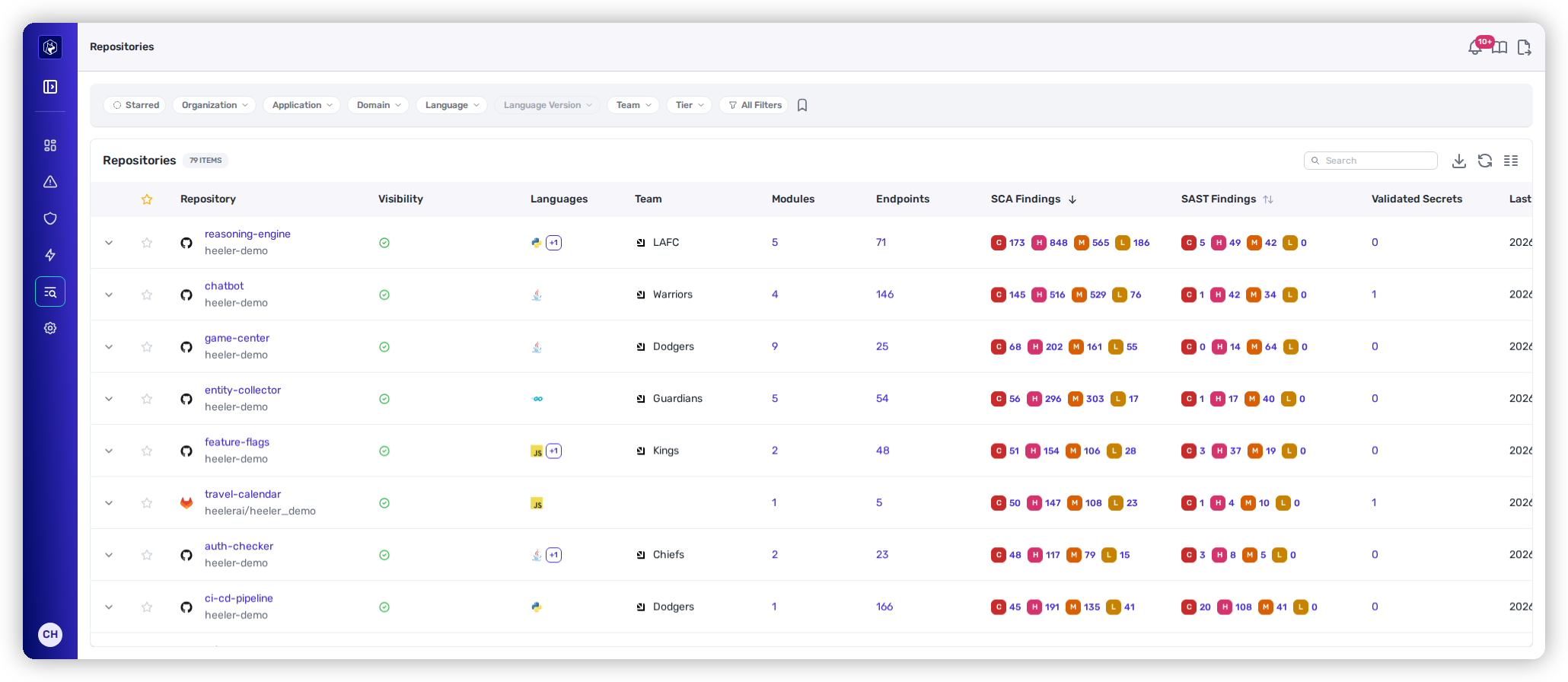
The moment you connect your source-code (SCM) provider, Heeler starts analyzing every repository — breaking monorepos into individual **modules**, detecting API endpoints, identifying secrets, and attributing findings to the right owners. The **Repositories** inventory (**Catalog → Repositories**) is the result: every repo across your organizations, with its security posture, structure, and ownership in one row.

<figure><img src="https://414480750-files.gitbook.io/~/files/v0/b/gitbook-x-prod.appspot.com/o/spaces%2FXP3dp2kecwKA2KvYkntz%2Fuploads%2Fgit-blob-02e7da028084d707874a1b677fa469785c98411a%2Fcc-vis-catalog.png?alt=media" alt="The Repositories inventory with columns for findings, secrets, endpoints, and ownership."><figcaption><p>The Repositories inventory — one row per repository, with its module count, findings, secrets, and owners.</p></figcaption></figure>

{% hint style="info" %}
**Prerequisites:** Repositories populate automatically once you connect a source-code (SCM) provider. Everyone can browse the inventory; the per-repository **Active Contributors** and **Collaborators** tabs are limited to administrators.
{% endhint %}

## The listing

| Column                        | What it shows                                                  |
| ----------------------------- | -------------------------------------------------------------- |
| **Repository**                | Repository name and SCM organization.                          |
| **Visibility**                | Public or Private.                                             |
| **Languages**                 | Detected programming languages.                                |
| **Team**                      | The owning Heeler team.                                        |
| **Modules**                   | Logical service boundaries within the repository.              |
| **Endpoints**                 | Detected API endpoints.                                        |
| **SCA Findings**              | Dependency-vulnerability findings by severity (C / H / M / L). |
| **SAST Findings**             | Source-code findings by severity (C / H / M / L).              |
| **Validated Secrets**         | Active, validated secrets.                                     |
| **Last Commit**               | Most recent commit timestamp.                                  |
| **Tech Lead / Security Lead** | Points of contact.                                             |

## Filtering and search

Quick-filter chips cover the common cases — **Starred, Organization, Application, Language, Language Version, Team,** and **Tier**. **All Filters** opens the full set: source, annotations, findings, recent commits, severity, **CI System** — the CI platforms detected in each repository's own configuration, so "which repositories build on Jenkins" is a filter rather than a question for their owners — and even specific vulnerabilities.

The **Team** chip also carries a **No team** option, which returns the repositories no team owns — the list to work from when you are closing ownership gaps before routing or SLOs depend on them.

That combination is what lets the list answer real questions, for example:

* *Which **public** repos expose **Spring Actuator** endpoints?*
* *Which repos still carry **CVE-2021-44228**?*
* *Which **Tier 1** repos have **critical** findings and **no security lead**?*

The shared controls (chips, All Filters, search, saved views, columns, export) work the same across the Catalog — see [Filtering and Exports](/mrecEO40m5D6bt7Pq5pE/operate/dashboards/filtering-and-exports.md).

## Modules

A **module** is a logical entry point or service boundary *within* a repository — a distinct application, microservice, or component, each with the configuration Heeler needs to build, test, or scan that slice on its own. Breaking a repository into modules is what keeps prioritization, analysis, and remediation scoped to the right code root instead of the whole repo — essential for monorepos where several services share one repository.

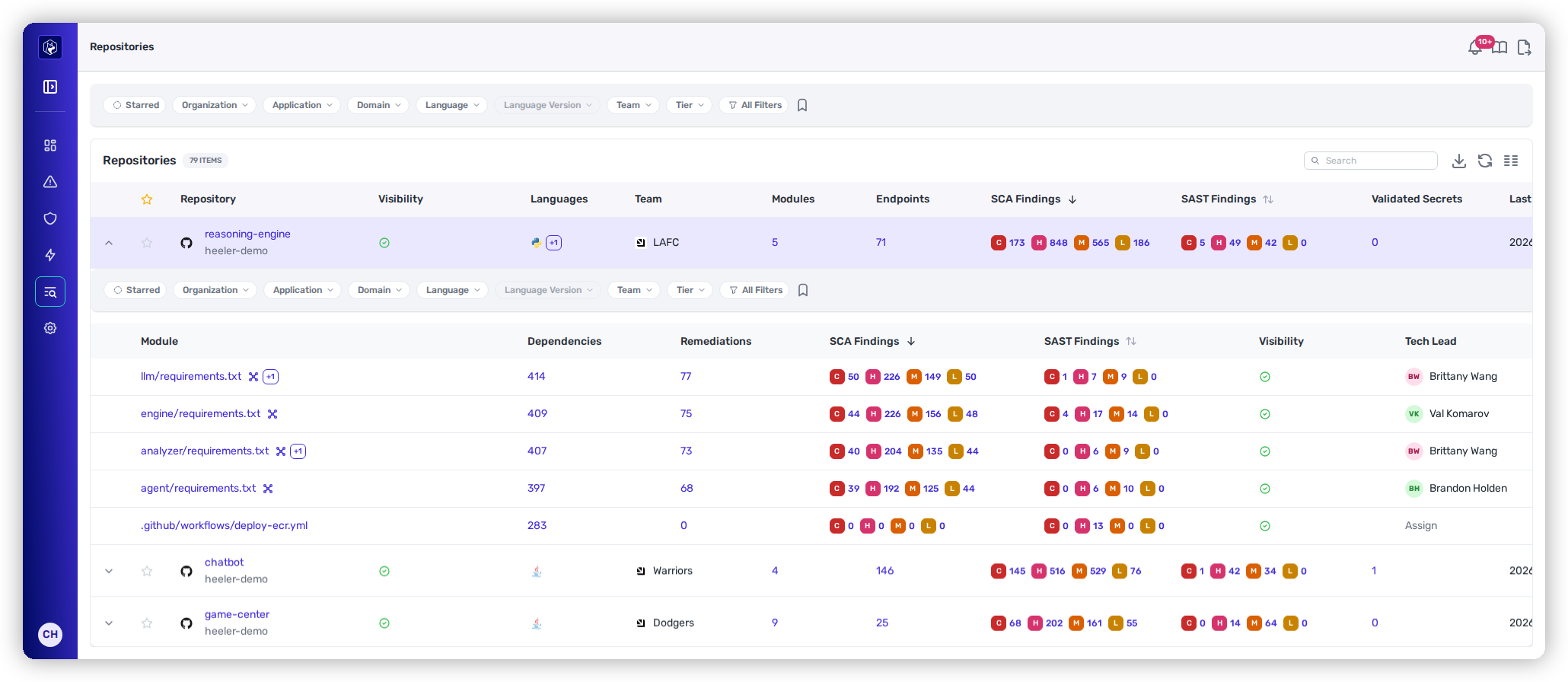
**Expand any repository row** (the chevron on the left) to preview its modules inline:

<figure><img src="https://414480750-files.gitbook.io/~/files/v0/b/gitbook-x-prod.appspot.com/o/spaces%2FXP3dp2kecwKA2KvYkntz%2Fuploads%2Fgit-blob-10c7fd6ed06bb25d31d341a40247cf96f48d3ca8%2Fcc-cat-repo-modules.png?alt=media" alt="A repository row expanded to show its modules inline, with dependencies, remediations, and findings per module."><figcaption><p>Expanding <code>reasoning-engine</code> reveals its five modules inline — each code root with its own dependencies, remediations, and findings.</p></figcaption></figure>

Each module row shows:

| Column            | What it shows                                                                                           |
| ----------------- | ------------------------------------------------------------------------------------------------------- |
| **Module**        | The code root — the lockfile or manifest path that defines the module (e.g. `engine/requirements.txt`). |
| **Dependencies**  | Number of dependencies resolved for that module.                                                        |
| **Remediations**  | Available remediations for the module.                                                                  |
| **SCA Findings**  | Dependency-vulnerability findings by severity (C / H / M / L).                                          |
| **SAST Findings** | Source-code findings by severity (C / H / M / L).                                                       |

Selecting a module opens its **own scoped view** — findings, dependencies, and endpoints for just that code root. The [Modules tab in a repository's detail](/mrecEO40m5D6bt7Pq5pE/catalog/repositories/repository-detail.md#modules) adds the fuller set of columns (severity, visibility, owners, and latest activity).

## Reading a repository

Selecting a repository opens its [**detail view**](/mrecEO40m5D6bt7Pq5pE/catalog/repositories/repository-detail.md), which has three parts:

* **A header** summarizing identity, posture, and ownership (Tier, environment, languages, default branch, and the Tech/Security Leads).
* **Two header actions** — **Export SBOM** (a scoped CycloneDX export) and [**Settings**](/mrecEO40m5D6bt7Pq5pE/catalog/repositories/settings.md).
* **A row of tabs** for every analysis Heeler runs against the repo — the finding tabs (SCA, SAST, Secrets, Compromised Dependencies, License Violations) and the structural tabs (Modules, Dependencies, Endpoints, Active Contributors, Collaborators, Files).

See [**Repository Detail**](/mrecEO40m5D6bt7Pq5pE/catalog/repositories/repository-detail.md) for each tab's columns and actions.

## Related

* [Repository Detail](/mrecEO40m5D6bt7Pq5pE/catalog/repositories/repository-detail.md) — the header, tabs, and per-repository analysis.
* [Repository Settings](/mrecEO40m5D6bt7Pq5pE/catalog/repositories/settings.md) — secret filters and the scan-branch override.
* [Dependencies](/mrecEO40m5D6bt7Pq5pE/catalog/dependencies.md) — the estate-wide package inventory across every repository.
* [Endpoints](/mrecEO40m5D6bt7Pq5pE/catalog/endpoints.md) — the estate-wide API attack surface across every repository.


---

# Agent Instructions
This documentation is published with GitBook. GitBook is the documentation platform designed so that both humans and AI agents can read, navigate, and reason over technical content effectively. Learn more at gitbook.com.

## Querying This Documentation
If you need additional information that is not directly available in this page, you can query the documentation dynamically by asking a question.

Perform an HTTP GET request on the current page URL with the `ask` query parameter, and the optional `goal` query parameter:

```
GET https://docs.heeler.com/mrecEO40m5D6bt7Pq5pE/catalog/repositories.md?ask=<question>&goal=<endgoal>
```

`ask` is the immediate question: it should be specific, self-contained, and written in natural language.
`goal` is optional and describes the broader end goal you are ultimately trying to accomplish on behalf of the user. GitBook uses it to tailor the answer towards what is most useful for that goal.

The response will contain a direct answer to the question and relevant excerpts and sources from the documentation.

Use this mechanism when the answer is not explicitly present in the current page, you need clarification or additional context, or you want to retrieve related documentation sections.