> For the complete documentation index, see [llms.txt](https://docs.heeler.com/mrecEO40m5D6bt7Pq5pE/llms.txt). Markdown versions of documentation pages are available by appending `.md` to page URLs; this page is available as [Markdown](https://docs.heeler.com/mrecEO40m5D6bt7Pq5pE/catalog/repositories/ossf-scorecard.md).
# OSSF Scorecard
The OSSF Scorecard for one of your own repositories — an overall score, and every check behind it with the reason it passed or failed.
You already judge your dependencies on their supply-chain practices. This applies the same standard to your own code: every repository Heeler analyzes carries an **OSSF Scorecard**, so "are our repositories held to the bar we expect of everyone else's" is a view rather than an audit.
Open a repository in the Catalog and select the **OSSF Scorecard** tab. The score also appears on the repository header, next to visibility and last-assessed.
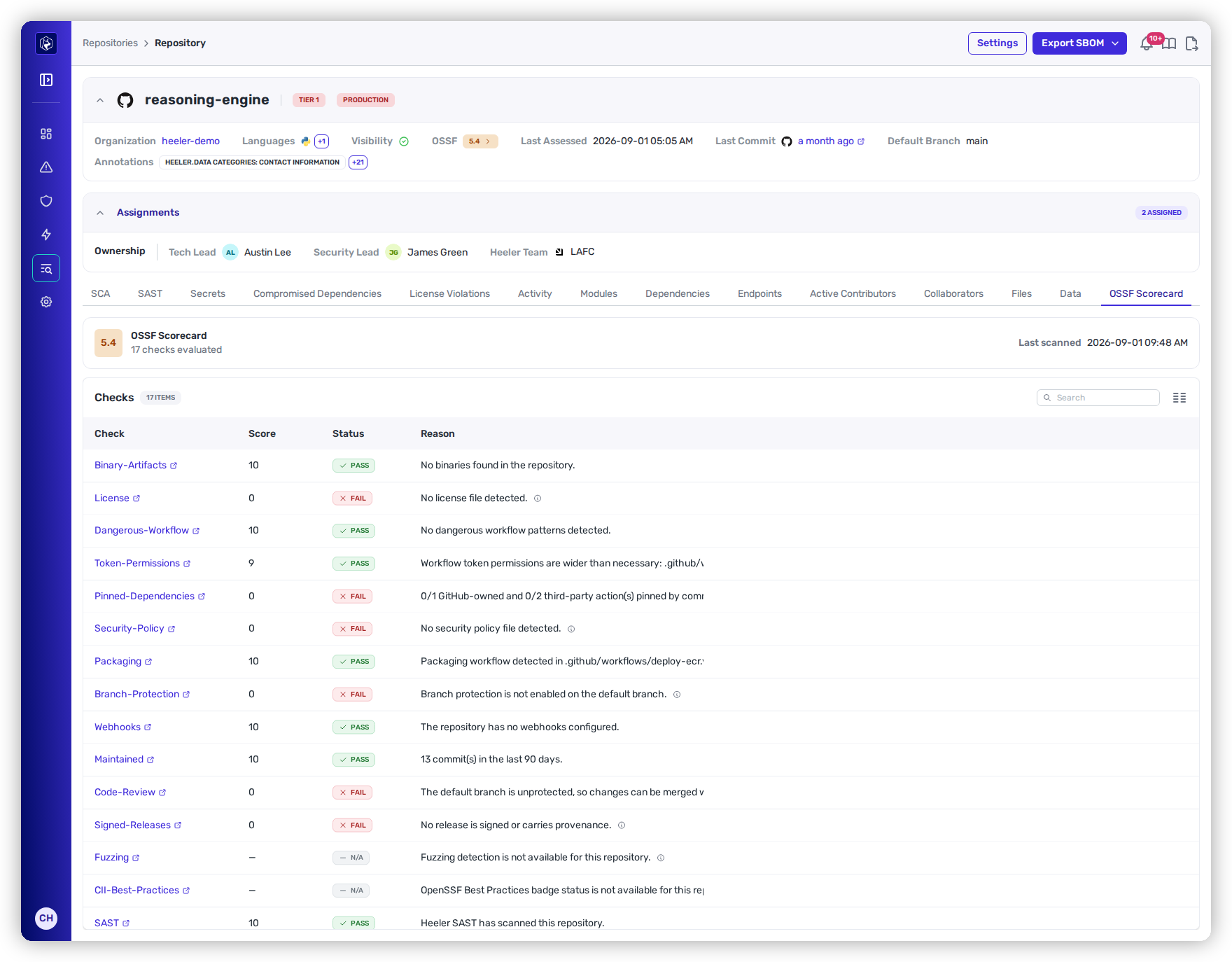
OSSF Scorecard — the overall score, and every check with the evidence behind it.
## The score
The header shows the overall score out of 10, how many checks were evaluated, and when the repository was last scanned. Scores are computed from the repository's own files, configuration and history — not from a published badge — so a repository that has never been scored anywhere still gets one.
Scorecard runs on both **GitHub** and **GitLab** repositories.
## The checks
Each check carries its own score, a status, and the reason it landed there. The reason is the useful part: it names the file or the condition, so the check is actionable rather than just red.
| Column | What it shows |
| ---------- | ----------------------------------------------------------------------------------------- |
| **Check** | The check name, linking to its definition. |
| **Score** | 0–10 for that check, or a dash where it does not apply. |
| **Status** | **Pass**, **Fail**, or **N/A** when the check could not be evaluated for this repository. |
| **Reason** | Why — for example *0/1 GitHub-owned and 0/2 third-party action(s) pinned by commit SHA*. |
Seventeen checks are evaluated, covering source integrity, build and release practice, and project health:
* **Branch-Protection** · **Code-Review** — whether changes can reach the default branch unreviewed.
* **Pinned-Dependencies** · **Dangerous-Workflow** · **Token-Permissions** — CI and workflow supply-chain risk.
* **Signed-Releases** · **Packaging** · **Binary-Artifacts** — what gets published, and whether it can be trusted.
* **Security-Policy** · **License** · **Webhooks** — the repository's declared posture.
* **Maintained** · **Contributors** · **CII-Best-Practices** — project health and provenance.
* **Vulnerabilities** · **SAST** · **Fuzzing** — whether the project finds its own defects.
A check reporting **N/A** has not failed. It means the signal was not available for that repository — an unreleased project has nothing to sign, and a repository with no fuzzing configuration has no fuzzing to detect.
## Use it across the estate
The score is included in the **repositories CSV export**, which ranks the whole estate in one pass — for finding the tier-one services with unprotected default branches, or for tracking the score over a quarter.
## Related
* [Repository Detail](/mrecEO40m5D6bt7Pq5pE/catalog/repositories/repository-detail.md) — the rest of what Heeler knows about a repository.
* [Dependencies](/mrecEO40m5D6bt7Pq5pE/catalog/dependencies.md) — the same supply-chain question, asked of the code you consume.
---
# Agent Instructions
This documentation is published with GitBook. GitBook is the documentation platform designed so that both humans and AI agents can read, navigate, and reason over technical content effectively. Learn more at gitbook.com.
## Querying This Documentation
If you need additional information that is not directly available in this page, you can query the documentation dynamically by asking a question.
Perform an HTTP GET request on the current page URL with the `ask` query parameter, and the optional `goal` query parameter:
```
GET https://docs.heeler.com/mrecEO40m5D6bt7Pq5pE/catalog/repositories/ossf-scorecard.md?ask=&goal=
```
`ask` is the immediate question: it should be specific, self-contained, and written in natural language.
`goal` is optional and describes the broader end goal you are ultimately trying to accomplish on behalf of the user. GitBook uses it to tailor the answer towards what is most useful for that goal.
The response will contain a direct answer to the question and relevant excerpts and sources from the documentation.
Use this mechanism when the answer is not explicitly present in the current page, you need clarification or additional context, or you want to retrieve related documentation sections.