> For the complete documentation index, see [llms.txt](https://docs.heeler.com/mrecEO40m5D6bt7Pq5pE/llms.txt). Markdown versions of documentation pages are available by appending `.md` to page URLs; this page is available as [Markdown](https://docs.heeler.com/mrecEO40m5D6bt7Pq5pE/catalog/sbom.md).
# Software Bill of Materials (SBOM)
Generate CycloneDX Software Bills of Materials at every scope — global, application, repository, service, and deployment — built from Heeler's real development and runtime context.
A **Software Bill of Materials (SBOM)** is a complete inventory of the components your software is built from — every open-source library, its version, and its license. It's what lets you answer "are we affected?" the moment the next Log4Shell lands, and it's increasingly a compliance requirement in its own right.
Heeler generates SBOMs in the **OWASP CycloneDX** format (the industry standard for supply-chain analysis), built from your **real development *****and***** runtime context** — so the inventory reflects what's actually deployed, not just what a manifest declares.
## Where you can generate one
Heeler produces an SBOM at five scopes:
| Scope | Where | What it covers |
| ---------------------------------- | ----------------------------------------------------------- | --------------------------------------------------------------------------------------------- |
| **Global** | Catalog → **Dependencies** | Every component across your whole environment — all applications, repositories, and services. |
| **Application** | Catalog → **Applications** → an application | Everything that contributes to a specific application's build and deployment. |
| **Repository** | Catalog → **Repositories** → a repository → **Export SBOM** | A single document for an entire repository — all its modules merged and deduped (see below). |
| **Service** *(runtime)* | Catalog → **Services** → a service → **Export** → **SBOM** | The components observed in a running service — a **runtime** SBOM. |
| **Service Deployment** *(runtime)* | Catalog → **Services** → a service → a deployment | The components in one specific deployment/release. |
The **Service** and **Service Deployment** exports are *runtime* SBOMs — they reflect what Heeler observes present in the deployed environment, which is what makes them more accurate than a build-time manifest alone.
## Repository SBOMs — modules merged and deduped
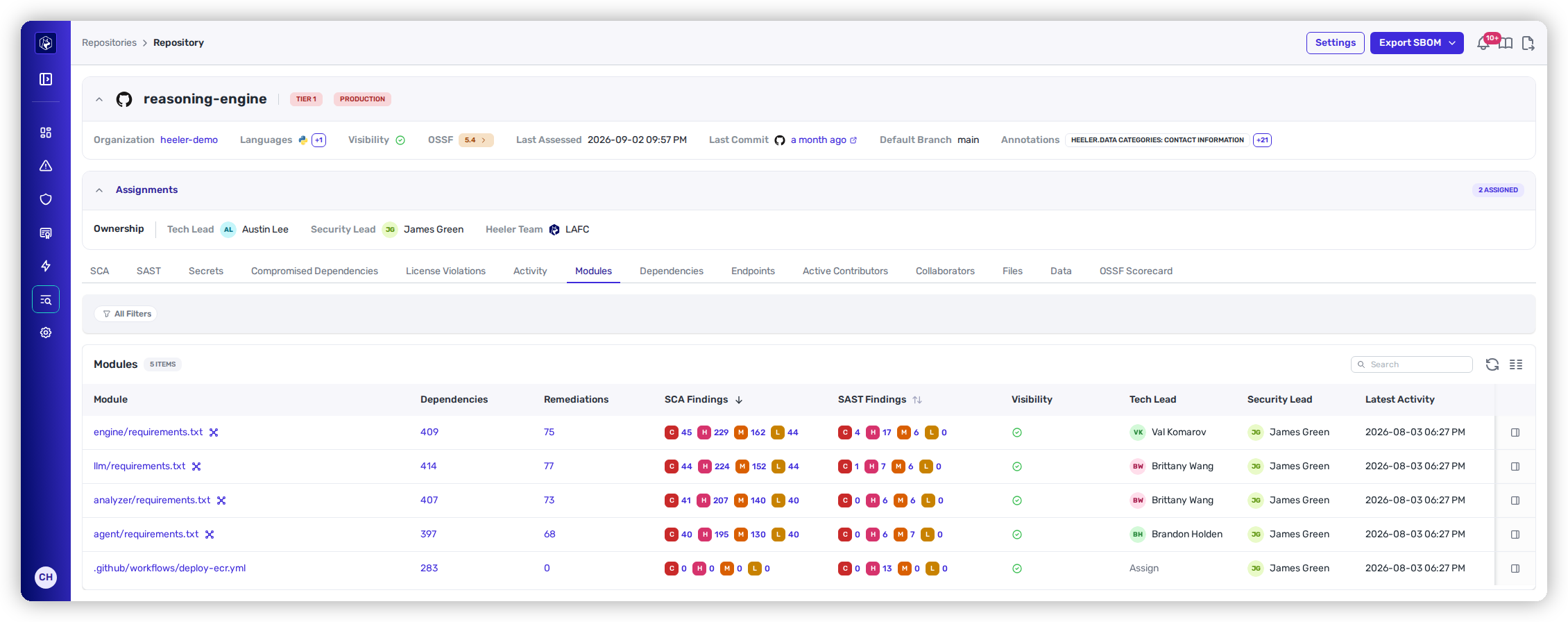
A repository often contains several modules (each with its own manifest — `engine/requirements.txt`, `llm/requirements.txt`, and so on). Rather than emit one SBOM per module, Heeler **merges every module in the repository into a single CycloneDX document and deduplicates components** — a library declared in several modules appears once — so a multi-module repo produces one portable artifact.
Every module in a repository is folded into one deduped SBOM.
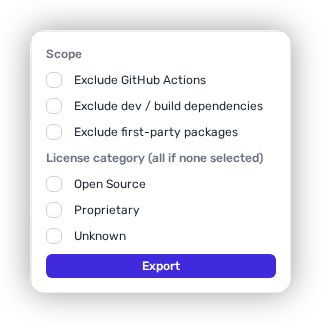
**Export SBOM** (top-right of a repository) opens a small panel to scope the document before you download it:
Scope a repository SBOM before exporting.
* **Scope** — narrow the inventory by excluding categories you don't want in the artifact:
* **Exclude GitHub Actions** — drop CI/workflow dependencies.
* **Exclude dev / build dependencies** — keep only what ships, not build-time tooling.
* **Exclude first-party packages** — keep only third-party/open-source components.
* **License category** *(all if none selected)* — restrict to **Open Source**, **Proprietary**, and/or **Unknown** licenses.
{% hint style="info" %}
The repository view also carries a deduped, repo-wide **dependency and license listing** (unioned across every module): every open-source library the repository uses, and its license.
{% endhint %}
## What's in a Heeler SBOM
Every component in a Heeler SBOM carries the metadata that makes it useful for security analysis and lifecycle tracking:
| Field | What it is |
| ---------------------------- | ------------------------------------------------------------------------------------------------- |
| **Component Name** | The name of the library or component. |
| **Version** | The exact version included in the build or deployment. |
| **Supplier Name** | The organization or vendor responsible for the component. |
| **License Type** | The license the component is distributed under. |
| **Dependency Relationships** | How components depend on one another (the dependency graph). |
| **Unique Identifiers** | Standard identifiers (e.g. package URLs / `bom-ref`) that reference each component unambiguously. |
## Worked example
See how this feeds an audit-ready evidence pack:
{% content-ref url="/pages/PjsYwV0vEThhl6wY14LV" %}
[Evidence for a Security Audit](/mrecEO40m5D6bt7Pq5pE/solutions-and-use-cases/prove-your-security-posture.md)
{% endcontent-ref %}
## Related
* [Dependencies](/mrecEO40m5D6bt7Pq5pE/catalog/dependencies.md) — the full dependency inventory the global SBOM is drawn from.
* [Repositories](/mrecEO40m5D6bt7Pq5pE/catalog/repositories/repository-detail.md) — where per-repository SBOM export lives.
* [Services](/mrecEO40m5D6bt7Pq5pE/catalog/services/service-detail.md) & [Deployments](/mrecEO40m5D6bt7Pq5pE/catalog/deployments.md) — runtime SBOMs and the [Service Decomposition export](/mrecEO40m5D6bt7Pq5pE/solutions-and-use-cases/threat-modeling-with-service-decomposition.md).
---
# Agent Instructions
This documentation is published with GitBook. GitBook is the documentation platform designed so that both humans and AI agents can read, navigate, and reason over technical content effectively. Learn more at gitbook.com.
## Querying This Documentation
If you need additional information that is not directly available in this page, you can query the documentation dynamically by asking a question.
Perform an HTTP GET request on the current page URL with the `ask` query parameter, and the optional `goal` query parameter:
```
GET https://docs.heeler.com/mrecEO40m5D6bt7Pq5pE/catalog/sbom.md?ask=&goal=
```
`ask` is the immediate question: it should be specific, self-contained, and written in natural language.
`goal` is optional and describes the broader end goal you are ultimately trying to accomplish on behalf of the user. GitBook uses it to tailor the answer towards what is most useful for that goal.
The response will contain a direct answer to the question and relevant excerpts and sources from the documentation.
Use this mechanism when the answer is not explicitly present in the current page, you need clarification or additional context, or you want to retrieve related documentation sections.