> For the complete documentation index, see [llms.txt](https://docs.heeler.com/mrecEO40m5D6bt7Pq5pE/llms.txt). Markdown versions of documentation pages are available by appending `.md` to page URLs; this page is available as [Markdown](https://docs.heeler.com/mrecEO40m5D6bt7Pq5pE/catalog/services.md).
# Services
Runtime services mapped from deployed compute back to the repositories and changesets that produced them — the bridge between your code and what's actually running.
A **Service** maps a source-code repository (and its modules) to the running compute that executes it — bridging development and runtime. The **Services** inventory (**Catalog → Services**) is where code, infrastructure, and runtime behavior come together: for any service you can see how it's built, where it's deployed, what it connects to, and how it's secured.
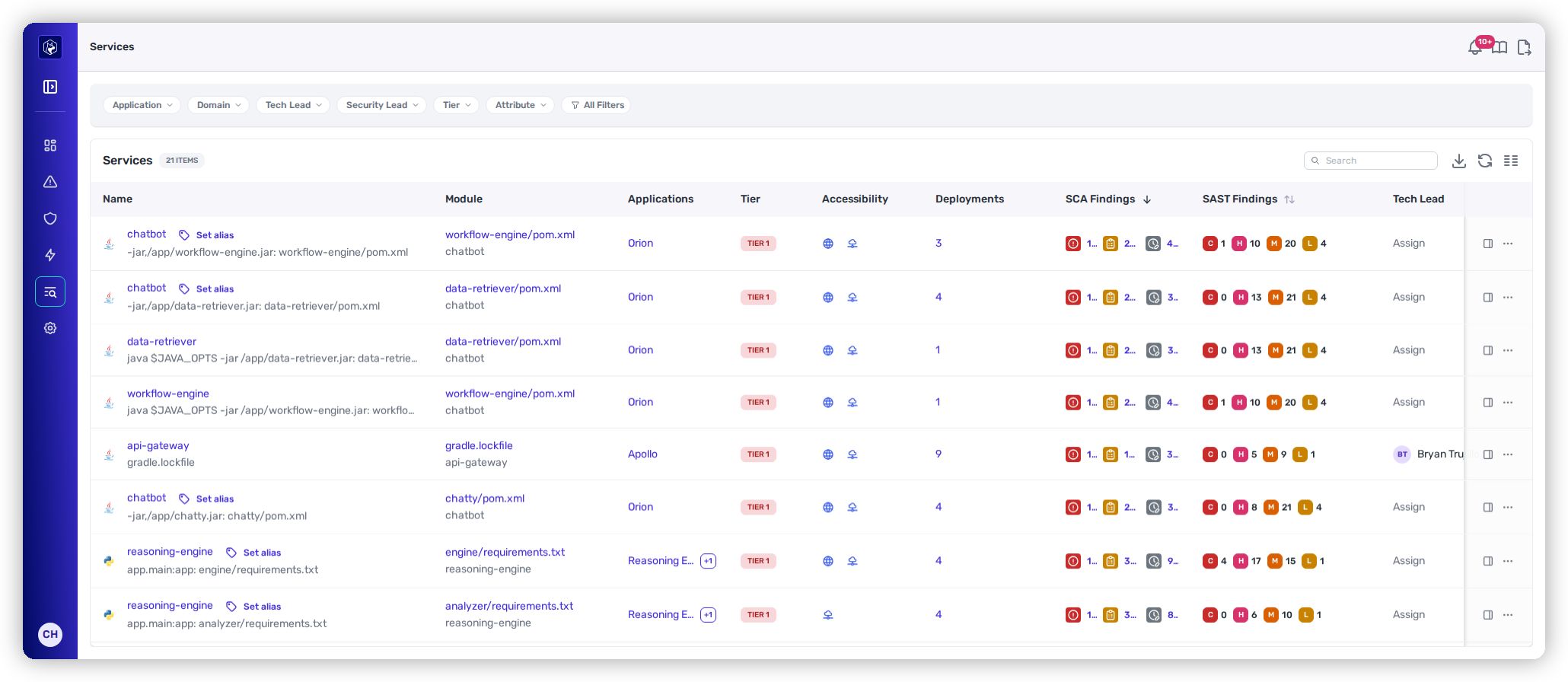
Services — each row is a repository module mapped to its runtime, with tier, accessibility, and findings.
{% hint style="info" %}
**Prerequisites:** Services map code to runtime, so they populate only once you've connected **both** a source-code (SCM) provider **and** a cloud provider (CSP). Without a connected CSP there's no runtime for Heeler to map the code to.
{% endhint %}
## The listing
| Column | What it shows |
| ----------------------------- | --------------------------------------------------------------------------------------- |
| **Name** | Service name and its run command / module (`pom.xml`, `requirements.txt`, `go.mod`, …). |
| **Module** | The source-code module it maps to, linked to the repository. |
| **Applications** | The application(s) it belongs to. |
| **Tier** | Tier inherited from the application. |
| **Accessibility** | Whether it's internet-accessible (reachable from the public internet). |
| **Deployments** | Number of active deployments. |
| **SCA Findings** | Dependency-vulnerability findings by severity (C / H / M / L). |
| **SAST Findings** | Source-code findings by severity (C / H / M / L). |
| **Tech Lead / Security Lead** | Points of contact. |
Filter by Application, Tech Lead, Security Lead, Tier, and Attribute, with more under **All Filters**. See [Filtering and Exports](/mrecEO40m5D6bt7Pq5pE/operate/dashboards/filtering-and-exports.md).
## Reading a service
Selecting a service opens its [**detail view**](/mrecEO40m5D6bt7Pq5pE/catalog/services/service-detail.md) — starting with the **Model** graph that shows how the service is wired from code to cloud, then tabs for its dependencies, deployments, findings, infrastructure, endpoints, and service-to-service connections. **Export SBOM** downloads a bill of materials for the service.
## Worked example
See this used to threat-model a live service:
{% content-ref url="/pages/BB8pBXBQOJm1GUVab0MM" %}
[Threat-Model a Service](/mrecEO40m5D6bt7Pq5pE/solutions-and-use-cases/threat-modeling-with-service-decomposition.md)
{% endcontent-ref %}
## Row actions
The **⋯** menu on a service row:
| Action | What it does |
| -------------------------------- | ----------------------------------------------------------------------------------------------------------------------------------------------------------------------- |
| **View Model** | Opens the service's **Model** tab — the code-to-cloud topology — without going through the detail page first. |
| **Edit Alias** | Sets a display name for the service, for when the name Heeler derived from the deployment is not the one your team uses. |
| **Export SBOM** | A CycloneDX SBOM for the service. |
| **Export Service Decomposition** | The structured model of the service as JSON. See [Threat-Model a Service](/mrecEO40m5D6bt7Pq5pE/solutions-and-use-cases/threat-modeling-with-service-decomposition.md). |
## Related
* [Service Detail](/mrecEO40m5D6bt7Pq5pE/catalog/services/service-detail.md) — the model graph and per-service tabs.
* [Applications](/mrecEO40m5D6bt7Pq5pE/catalog/applications.md) — the business grouping services roll up into.
* [Deployments](/mrecEO40m5D6bt7Pq5pE/catalog/deployments.md) — the running instances of a service.
---
# Agent Instructions
This documentation is published with GitBook. GitBook is the documentation platform designed so that both humans and AI agents can read, navigate, and reason over technical content effectively. Learn more at gitbook.com.
## Querying This Documentation
If you need additional information that is not directly available in this page, you can query the documentation dynamically by asking a question.
Perform an HTTP GET request on the current page URL with the `ask` query parameter, and the optional `goal` query parameter:
```
GET https://docs.heeler.com/mrecEO40m5D6bt7Pq5pE/catalog/services.md?ask=&goal=
```
`ask` is the immediate question: it should be specific, self-contained, and written in natural language.
`goal` is optional and describes the broader end goal you are ultimately trying to accomplish on behalf of the user. GitBook uses it to tailor the answer towards what is most useful for that goal.
The response will contain a direct answer to the question and relevant excerpts and sources from the documentation.
Use this mechanism when the answer is not explicitly present in the current page, you need clarification or additional context, or you want to retrieve related documentation sections.