> For the complete documentation index, see [llms.txt](https://docs.heeler.com/mrecEO40m5D6bt7Pq5pE/llms.txt). Markdown versions of documentation pages are available by appending `.md` to page URLs; this page is available as [Markdown](https://docs.heeler.com/mrecEO40m5D6bt7Pq5pE/findings/agentic-supply-chain-agent-files.md).

# Agent Files

Inventory and score the AI-agent instruction files in your repositories — before a poisoned skill or hook turns your coding agent into an attacker.

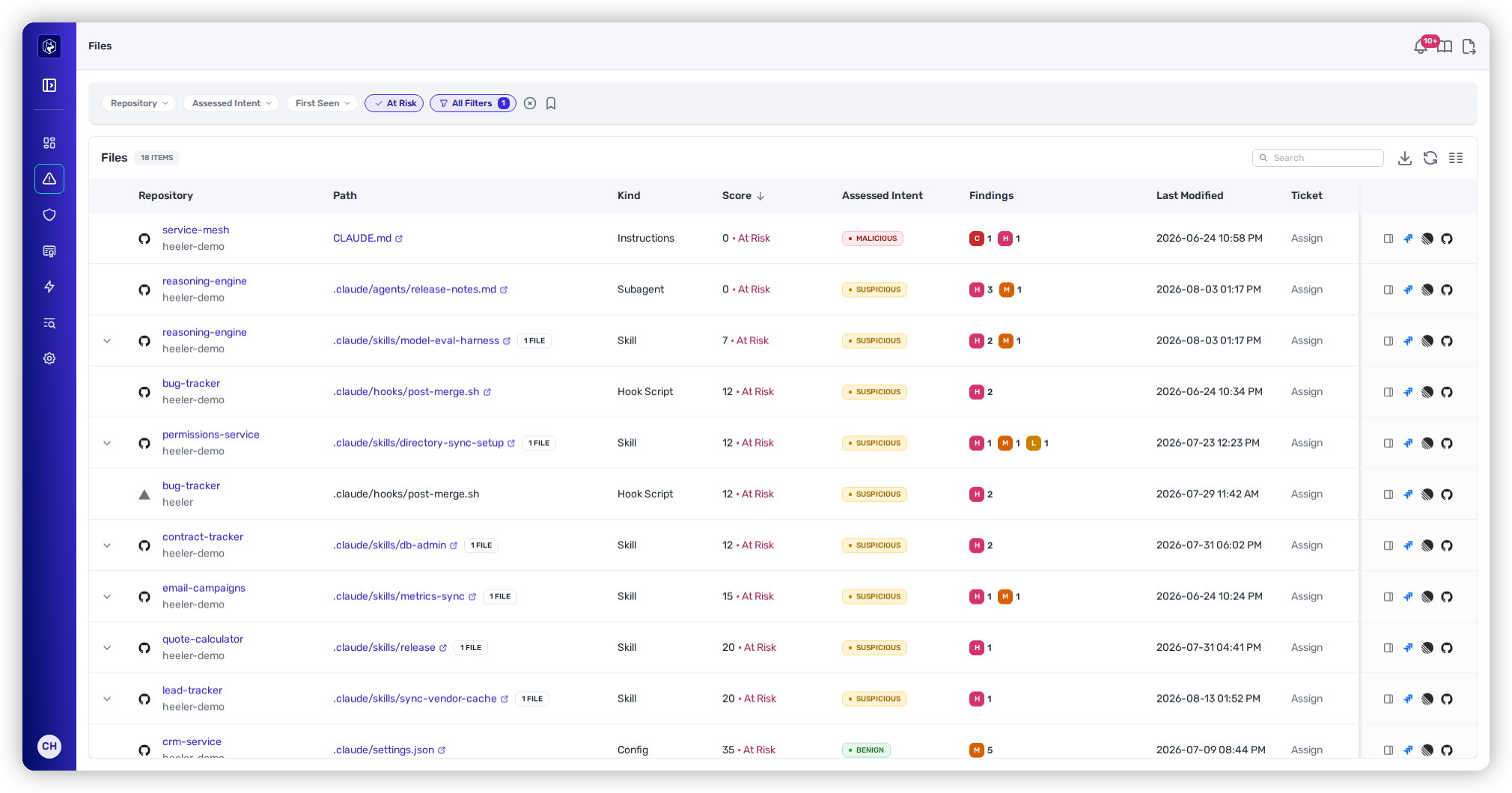
AI coding agents run on files that ship in your repo — **instructions, skills, hook scripts, and configuration**. Those files are executable intent: a poisoned skill or a hidden instruction can make a trusted agent exfiltrate secrets, run malicious code, or quietly hide its own changes. Heeler finds every agent file, analyzes it, and scores how dangerous it is — **whichever coding assistant produced it**.

{% hint style="info" %}
**For developers and security engineers** reviewing agent-written and agent-driven repositories. Depends on your **SCM** being connected; analysis runs automatically on the agent files Heeler finds. See [Set Up Agentic Remediation](/mrecEO40m5D6bt7Pq5pE/get-started/set-up-automated-remediation.md).
{% endhint %}

<figure><img src="https://414480750-files.gitbook.io/~/files/v0/b/gitbook-x-prod.appspot.com/o/spaces%2FXP3dp2kecwKA2KvYkntz%2Fuploads%2Fgit-blob-e30efb44554bc6f9d1418ed2906ff498f9d8c823%2Fcc-files-list.png?alt=media" alt="The Agent Files view: a table of agent instruction, skill, hook, and config files across repositories, each with its kind, risk score, and an assessed intent of Malicious, Suspicious, or Benign."><figcaption><p>The <strong>Agent Files</strong> view — every agent file inventoried and scored, with an assessed intent.</p></figcaption></figure>

## What Heeler inventories

Several **kinds** of agent file, across your repositories:

| Kind             | Examples                                                                                                                                                                              |
| ---------------- | ------------------------------------------------------------------------------------------------------------------------------------------------------------------------------------- |
| **Instructions** | Top-level agent guidance — `CLAUDE.md`, `AGENTS.md`, `GEMINI.md`, Cursor rules (`.cursorrules`, `.cursor/rules/…`)                                                                    |
| **Skill**        | A skill (a `SKILL.md` plus its member scripts and assets), under `.claude/skills/…`, `.cursor/skills/…`, `.gemini/skills/…`, `.opencode/skills/…`, or the portable `.agents/skills/…` |
| **Subagent**     | A defined subagent — e.g. under `.claude/agents/…`, `.cursor/agents/…`, `.gemini/agents/…`, `.codex/agents/…`, or `.opencode/agents/…`                                                |
| **Hook Script**  | A script an agent runs on an event — `.claude/hooks/…`, `.cursor/hooks/…`, `.agents/hooks/…`                                                                                          |
| **Config**       | Agent and MCP configuration — `.mcp.json`, `.claude/settings.json`, `.cursor/mcp.json`, `.gemini/settings.json`, `.codex/config.toml`, `agents.toml`, and plugin manifests            |

{% hint style="info" %}
**Not just Claude.** `CLAUDE.md` is the best-known example, but Heeler is assistant-agnostic. It recognizes agent files across **Claude, Cursor, Gemini, Codex, and OpenCode**, the cross-assistant **`AGENTS.md`** standard, and the portable **`.agents/`** layout — so whichever assistant your team uses (or several at once), its instructions, skills, subagents, hooks, and MCP/config files are inventoried and scored the same way.
{% endhint %}

## The safety score

Each file gets a **0–100 safety score** — **higher is safer**. Any file scoring **below 70** is flagged **At Risk**. The score rolls up three factors, each with its own finding count:

* **Static Risk** — deterministic rule/pattern findings in the file.
* **LLM Risk** — a model's assessment of what the file instructs the agent to do.
* **External Risk** — the reputation of external systems the file reaches.

The more findings a file carries — and the more severe they are — the lower its score. The rollup is deterministic: the same file content produces the same score every time.

## Assessed intent

Each file also carries an **assessed intent** — the judge's call on the file: **Benign**, **Suspicious**, or **Malicious**. The verdict interacts with the score:

* **Benign** — the score reflects only the file's findings.
* **Suspicious** — the verdict **caps the score**, so the file always lands in the At Risk band.
* **Malicious** — the verdict caps the score **lower still**.

Intent and score move together: a Suspicious or Malicious verdict pulls the score into or below the at-risk range regardless of what the individual factors add up to. A **Confidence** (High / Medium / Low) accompanies the verdict — a low-confidence call is a flag to look more closely, not to dismiss.

## Overriding what the review got wrong

A judgement can be wrong, and until you can say so, one bad call pins a file below the score threshold indefinitely. Any **current** signal on a file can be overridden:

* A **static finding** — the deterministic detection was a false positive in this file's context.
* An **LLM finding** — the reviewed risk doesn't hold up.
* The file's **assessed verdict** — the intent call itself.

Each override takes a **reason** and, optionally, an **expiry**. The safety score is recomputed without the overridden signals as soon as you apply one, so a file that was only At Risk because of an accepted finding leaves the At Risk band. When an override expires, the signal returns and the score falls back — an override is a decision with a shelf life, not a deletion.

You can accept one signal at a time, or accept **every current signal on a file** in a single action when the whole assessment is wrong.

{% hint style="info" %}
**The record is append-only.** Granting and revoking are both kept, with who did it and why, so an accepted finding can be audited later rather than looking like a file that was never flagged. A filter finds the files carrying overrides, and the score indicator shows which ones have been adjusted.
{% endhint %}

Granting or revoking an override requires the **Administrator** role.

## How files are analyzed

Findings come from three complementary passes — **deterministic static analysis**, **LLM-assisted analysis**, and **external-reference reputation**. Every finding on a file is one of the types catalogued below.

### Static findings (deterministic)

The same file content always produces the same static findings, each carrying a fixed severity.

| Finding                                 | Severity      | What it flags                                                                                                                                                                                                                                                                                                                                                                                                                      |
| --------------------------------------- | ------------- | ---------------------------------------------------------------------------------------------------------------------------------------------------------------------------------------------------------------------------------------------------------------------------------------------------------------------------------------------------------------------------------------------------------------------------------- |
| **Dangerous Dynamic-Context Command**   | High          | A command that runs **during preprocessing, before the model ever sees the rendered instructions** — so the model can't inspect or refuse it. Triggers on network tools (`curl`, `wget`, `ssh`, `scp`, `nc`, `nmap`, DNS lookups), reads of sensitive files (`.env`, `~/.aws`, `~/.ssh`, shell history, OS credential stores), or references to credential environment variables (tokens, secrets, API keys, passwords).           |
| **Session Persistence in Agent File**   | High          | A mechanism an agent could use to persist beyond the current session — a **cron schedule**, `systemctl enable`, **launchctl** registration, a LaunchAgent/LaunchDaemon plist, a write to a **shell startup profile** (`~/.bashrc`, `~/.zshrc`, …), an `/etc/rc.local` reference, or a `crontab -e` edit. One finding per mechanism. In Markdown files only **code** blocks count, so prose that merely mentions cron doesn't fire. |
| **AI Skill Integrity Drift**            | High          | A skill whose file no longer matches the SHA-256 recorded for it in a skills lockfile (`skills.lock` / `skills-lock.json`) — evidence the skill was **modified after locking**. The evidence names the lockfile, the expected hash, and the actual one.                                                                                                                                                                            |
| **Insecure Shell Pipe in Agent File**   | High / Medium | A **remote-fetch-and-execute** pattern — `curl` or `wget` piped into `bash`/`sh`, or a shell process substitution wrapping one. This is the "curl \| bash" supply-chain pattern: code fetched from elsewhere and run without review. **Medium** when the host is a reputable canonical installer origin; **High** for anything else. Documentation placeholders and fictional example domains are excluded.                        |
| **Encoded Blob in Agent File**          | Medium        | Large Base64/hex content that decodes primarily into **readable text** — often hidden instructions. Common legitimate encodings (certificates, image data, short tokens, content digests, common hashes) are deliberately excluded to cut false positives.                                                                                                                                                                         |
| **Wildcard Permission in Agent Config** | Medium / Low  | An over-broad permission grant in agent configuration — the evidence quotes the wildcard value and its line, e.g. `wildcard value "Bash(pytest:*)" in permission declaration at line 9`. **Low** when the wildcard is anchored to a directory path.                                                                                                                                                                                |
| **Agent-Invoked Script**                | Informational | A script or shell command an agent file may execute, tagged by **how** it runs: **`auto_run`** (executes automatically via a hook or event) or **`agent_discretion`** (the agent is instructed or encouraged to run it).                                                                                                                                                                                                           |
| **Referenced External System**          | Informational | An external URL or domain the file references (APIs, docs, MCP servers, cloud services). A referenced URL is **not automatically unsafe** — review whether each is expected and trusted. Approving the domain (below) lowers its external-system risk and hides this finding for that host.                                                                                                                                        |

{% hint style="info" %}
**Refusal Suppression, Hidden Content in HTML Comment, and Invisible Unicode are retired.** These static rules inferred intent from phrase and character patterns and mostly flagged benign style guidance and header comments. Heeler no longer produces them; the LLM findings below (**Prompt Injection**, **Obfuscation**, **Deception**) cover hidden or refusal-bypassing instructions.
{% endhint %}

### LLM findings (contextual)

A model reads each file for risky *intent* a pattern can't catch, assigning one of eleven categories per finding, with a severity set by the judge.

| Category                      | What it flags                                                                                                                                                                                               |
| ----------------------------- | ----------------------------------------------------------------------------------------------------------------------------------------------------------------------------------------------------------- |
| **Prompt Injection**          | Instructions that override, redirect, or manipulate the agent away from the user's task via hidden, disguised, or higher-priority directives.                                                               |
| **Data Exfiltration**         | Instructions to transmit source code, repository contents, runtime context, secrets, or credentials to an external destination.                                                                             |
| **Remote Code Execution**     | Instructions to **download and execute remote code** — remote shell scripts, installers, or encoded payloads retrieved from external sources.                                                               |
| **Code Execution**            | Instructions to execute **local** scripts or commands (hooks, task definitions, imperative run instructions). Unlike Remote Code Execution, the code is **already present locally** rather than downloaded. |
| **Destructive Action**        | Instructions for irreversible operations — force-pushing repositories, mass deletion, dropping databases.                                                                                                   |
| **Privilege Escalation**      | Attempts to gain elevated privileges or bypass protections — disabling sandboxing, bypassing approval workflows, removing execution safeguards.                                                             |
| **Secrets Exposure**          | Instructions to read, display, log, forward, or otherwise expose credential or secret values.                                                                                                               |
| **Obfuscation**               | Behavior deliberately hidden or obscured so its true effect isn't obvious on review.                                                                                                                        |
| **Deception**                 | Instructions to conceal activity, suppress output, misrepresent changes, or otherwise deceive reviewers or users.                                                                                           |
| **Unsafe External Reference** | A reference to an external system in a risky way — an untrusted host, plain HTTP, a raw IP, or a URL shortener.                                                                                             |
| **Other**                     | Risky behavior that doesn't fit the categories above.                                                                                                                                                       |

{% hint style="info" %}
**Remote Code Execution vs. Code Execution** is a deliberate distinction: RCE pulls code *from outside* and runs it (the higher-risk supply-chain case), while Code Execution runs code that's *already in the repository*. Both are worth reviewing, but an agent that fetches and runs remote payloads is the more dangerous pattern.
{% endhint %}

### External references

Outbound systems the file contacts are tiered by reputation — **trusted developer infrastructure**, **unrecognized hosts**, and **high-risk hosts** — and each contributes to External Risk.

**Approving trusted domains.** When an external reference is expected and safe — your own developer infrastructure, or a domain your organization runs — approve it from a file's detail with **Add to allowlist**, or centrally on [Trusted Domains](/mrecEO40m5D6bt7Pq5pE/administer-and-monitor/program-policy/trusted-domains.md). Subdomains are included.

An approved domain:

* Drops to the trusted developer-infrastructure tier, so the external-system risk it contributed goes on the next rescore.
* Has its **External Reference** findings hidden everywhere they are read — the file detail, guardrail evaluation, violation lists, and the MCP tools.

Remove the approval and those findings reappear without a rescan.

Every other finding on the file stands: suspicious context, plain HTTP, raw IPs, encoded instructions, and LLM-detected behavior all still surface.

## Prevent at the pull request

Everything above describes the agent files you already have. To stop the next risky one from landing, gate it at the PR with [Agent Files Guardrails](/mrecEO40m5D6bt7Pq5pE/prevent/pr-guardrails/guardrail-types/agent-files-guardrails.md) — two checks that map onto two different questions:

* **Agent File Static Findings** gates on **new** deterministic findings from the table above, filtered by severity, rule, asset kind, and path. It's the direct enforcement of this page.
* **Agent File Change** gates on the *fact* that an agent file was introduced or modified, whether or not anything looks wrong — the review-routing gate for files that grant capability, like a new skill or an MCP config.

{% hint style="info" %}
**The LLM findings and assessed intent above aren't guardrail filters.** A PR check has to be reproducible and immediate, so guardrails gate on the deterministic static findings only. Model-assessed intent is for review here in Findings, not for blocking a merge.
{% endhint %}

To run this same analysis **before** a file reaches a pull request, use the [CLI](/mrecEO40m5D6bt7Pq5pE/prevent/cli.md#vet-an-agent-file-before-you-trust-it). `heelercli scan-agent-file` scores a file or skill directory you have in hand — before anyone installs it — and can fail on its band or assessed intent; `heelercli ci --checks agent-files` sweeps every agent file in a repository as a pipeline step. Both need CLI **1.0.21** or later.

## In this section

<table data-view="cards"><thead><tr><th></th><th></th><th data-hidden data-card-target data-type="content-ref"></th></tr></thead><tbody><tr><td><strong>SAST Findings</strong></td><td>The Files list, filters, the file inspection with its score breakdown and findings, and triage.</td><td><a href="/mrecEO40m5D6bt7Pq5pE/findings/agentic-supply-chain-agent-files/findings.md">Agent File Findings</a></td></tr></tbody></table>

## Worked example

See this as part of securing your AI coding agents end to end:

{% content-ref url="/pages/IBFvawl27EPDOZqk2Tar" %}
[Secure AI Coding Agents](/mrecEO40m5D6bt7Pq5pE/solutions-and-use-cases/secure-your-ai-coding-agents.md)
{% endcontent-ref %}

## Related

* [MCP Server Analysis](/mrecEO40m5D6bt7Pq5pE/catalog/endpoints/mcp-analysis.md) — agent files often drive **MCP tooling**; Heeler analyzes the MCP servers your code exposes (tools, resources, prompts, and network visibility) as the runtime counterpart to these instruction files.


---

# Agent Instructions
This documentation is published with GitBook. GitBook is the documentation platform designed so that both humans and AI agents can read, navigate, and reason over technical content effectively. Learn more at gitbook.com.

## Querying This Documentation
If you need additional information that is not directly available in this page, you can query the documentation dynamically by asking a question.

Perform an HTTP GET request on the current page URL with the `ask` query parameter, and the optional `goal` query parameter:

```
GET https://docs.heeler.com/mrecEO40m5D6bt7Pq5pE/findings/agentic-supply-chain-agent-files.md?ask=<question>&goal=<endgoal>
```

`ask` is the immediate question: it should be specific, self-contained, and written in natural language.
`goal` is optional and describes the broader end goal you are ultimately trying to accomplish on behalf of the user. GitBook uses it to tailor the answer towards what is most useful for that goal.

The response will contain a direct answer to the question and relevant excerpts and sources from the documentation.

Use this mechanism when the answer is not explicitly present in the current page, you need clarification or additional context, or you want to retrieve related documentation sections.
