> For the complete documentation index, see [llms.txt](https://docs.heeler.com/mrecEO40m5D6bt7Pq5pE/llms.txt). Markdown versions of documentation pages are available by appending `.md` to page URLs; this page is available as [Markdown](https://docs.heeler.com/mrecEO40m5D6bt7Pq5pE/findings/behavioral-checks.md).

# Behavioral Checks

Security checks raised from your GitHub audit activity rather than from code — for the risk that shows up in who did what, not in what was written.

Heeler's other finding families read your code. **Behavioral Checks** read your **activity**: Heeler ingests the GitHub audit log for your connected organizations and raises findings from patterns in it.

That covers a class of risk static analysis cannot see. A dependency with a vulnerable function is a code problem. Protection being removed from a branch, or a burst of destructive administrative actions by one account, is a behavioral one — nothing in the repository looks different afterwards, and only the sequence of events shows it happened.

{% hint style="warning" %}
**GitHub only, and only where the audit log API is available.** Unlike Heeler's other finding families, behavioral checks are **not** available across every source-code provider. They are built entirely on the GitHub **organization audit log**, so nothing is read from GitLab, Azure DevOps, or Bitbucket.

Within GitHub, the organization has to expose that API:

* On **github.com**, it is available to **GitHub Enterprise Cloud** organizations. An organization on a lower plan doesn't expose it.
* **GitHub Enterprise Server** connections are also queried, against the same endpoint on your appliance. Whether your version and configuration serve it varies — check with your Heeler contact rather than assuming either way.

Where the API isn't available, the result is silence rather than an error: no findings, no failure, nothing in the interface to indicate why. Heeler re-checks roughly daily, so an organization that gains access later starts producing detections on its own with no reconfiguration.
{% endhint %}

## How activity becomes a finding

{% stepper %}
{% step %}

### Events are ingested

Heeler reads the audit log for each connected GitHub organization.
{% endstep %}

{% step %}

### Events are aggregated

Raw events are grouped into **five-minute buckets**, one per repository and activity type. Each bucket records how many events occurred, how many distinct actors were involved, which GitHub actions made it up, and where they came from — source IP addresses, country codes, and clients. A single event is rarely interesting; a rate or a mix usually is.
{% endstep %}

{% step %}

### Checks evaluate the aggregates

Each check looks for its own pattern. A match becomes a detection carrying a title, description, category, severity, the organization and repository it applies to, the actor where there is one, and the window it was observed in.
{% endstep %}

{% step %}

### The evidence stays attached

Every detection keeps links to the activity buckets it was raised from, so the events behind a finding can be read directly.
{% endstep %}
{% endstepper %}

## The checks

| Check                                           | Category             | Severity | What it looks for                                                                                                                                                                                                                                                                                                                                                                                    |
| ----------------------------------------------- | -------------------- | -------- | ---------------------------------------------------------------------------------------------------------------------------------------------------------------------------------------------------------------------------------------------------------------------------------------------------------------------------------------------------------------------------------------------------- |
| **Critical security control changed**           | Defense Evasion      | High     | A branch protection, ruleset, required status check, or vulnerability-alert setting was weakened or removed.                                                                                                                                                                                                                                                                                         |
| **Destructive activity burst**                  | Destructive Activity | High     | Three or more destructive actions — deleting or archiving repositories, transferring them out, destroying protections, rulesets, environments, teams, or roles — hit one repository from one actor inside ten minutes.                                                                                                                                                                               |
| **Protected branch policy overridden**          | Defense Evasion      | High     | Someone pushed to a protected branch by explicitly bypassing the policy. The detection records the branch, the commits either side of the push, and which policies were overridden.                                                                                                                                                                                                                  |
| **Rapid repository cloning**                    | Collection           | Medium   | One actor and credential pulled a repository's contents at least five times inside five minutes — clones and repository archive downloads both count. Continued bursts stay on the same detection until 30 minutes pass without one, so a sustained campaign is one finding rather than dozens.                                                                                                      |
| **Quick unreviewed self-merge**                 | Code Integrity       | Medium   | A person created and merged their own pull request within five minutes with no independent review in between. Bot accounts are excluded.                                                                                                                                                                                                                                                             |
| **Rapid GitHub App repository pushes**          | Code Integrity       | High     | One GitHub App pushed across an unusual number of repositories in a short window — the shape of an app credential being used to plant code broadly.                                                                                                                                                                                                                                                  |
| **Classic personal access token used**          | Credential Access    | Medium   | A classic personal access token was used. Classic tokens carry broad, long-lived scopes, so their use is worth surfacing even when it turns out to be routine.                                                                                                                                                                                                                                       |
| **Personal access token used across countries** | Credential Access    | High     | One personal access token was used from more than one country inside the observation window — the token is shared, proxied, or stolen.                                                                                                                                                                                                                                                               |
| **PAT and GitHub App shared external IP**       | Credential Access    | High     | A personal access token and a GitHub App acted from the same external IP address, which points to one actor driving both credentials.                                                                                                                                                                                                                                                                |
| **Workflow dispatch burst**                     | Execution            | Medium   | An unusual number of workflow runs were dispatched by hand in a short window.                                                                                                                                                                                                                                                                                                                        |
| **Workflow burst from non-default branch**      | Execution            | Medium   | Workflows were dispatched repeatedly from a branch other than the default one — a route to running CI code that has not been through the default branch's review.                                                                                                                                                                                                                                    |
| **Agent-created pull request**                  | Agent Activity       | Info     | A pull request was opened by a client that identifies itself as a coding agent. Informational — it records that the pull request came from an agent, not that anything is wrong.                                                                                                                                                                                                                     |
| **Activity from unapproved country**            | Location Anomaly     | High     | Git or pull-request activity reached a repository from a country your organization has not approved. Scoped to the organization rather than a single repository, with the events that triggered it attached as evidence. This check only runs once you have declared an approved list — see [Approved Countries](/mrecEO40m5D6bt7Pq5pE/administer-and-monitor/program-policy/approved-countries.md). |
| **Workflow outside 30-day baseline**            | Code Integrity       | Medium   | A workflow ran whose identifier had not been seen in that repository for the preceding 30 days, in a repository that already had workflow history. It is a 30-day baseline rather than a never-before-seen claim, and it does not detect in-place edits to a workflow file that already runs.                                                                                                        |

Checks are versioned. When a check's definition changes, detections raised by the older version are cleared and re-raised under the new one, so a redefined check never silently changes the meaning of findings you've already triaged.

## What a detection carries

| Property                      | What it tells you                                                                                                                                                                                                      |
| ----------------------------- | ---------------------------------------------------------------------------------------------------------------------------------------------------------------------------------------------------------------------- |
| **Title & description**       | What was detected, in plain language.                                                                                                                                                                                  |
| **Category**                  | The kind of behavior, so related detections group together.                                                                                                                                                            |
| **Severity**                  | How serious the pattern is.                                                                                                                                                                                            |
| **Status**                    | **Open** or **Trusted** — there are only two. New detections arrive Open.                                                                                                                                              |
| **Repository & organization** | The scope it applies to.                                                                                                                                                                                               |
| **Actor**                     | The account responsible, where the pattern attributes to one.                                                                                                                                                          |
| **First / last observed**     | The window the behavior spans, and how many events fell inside it.                                                                                                                                                     |
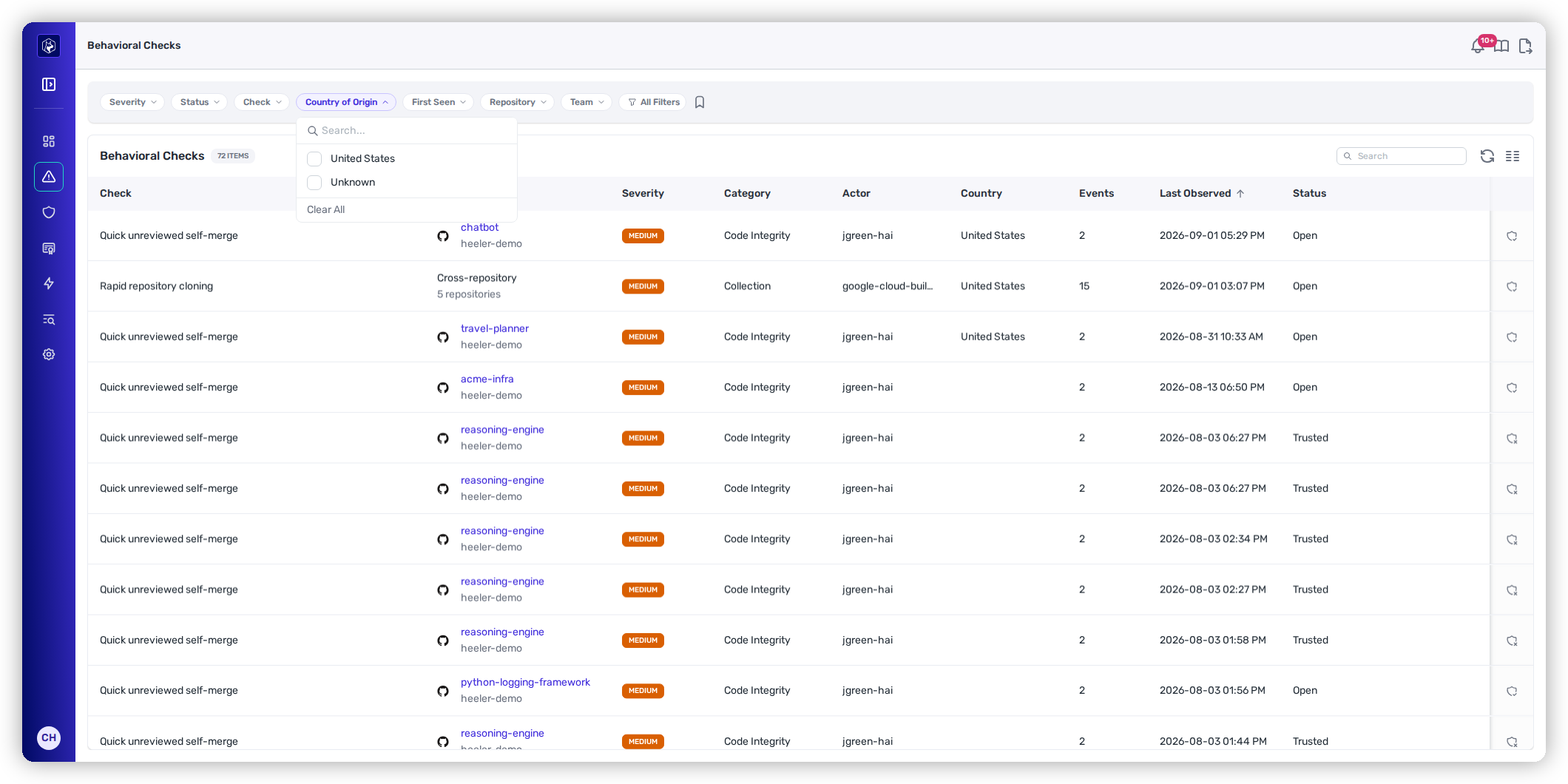
| **Country of origin**         | The country the activity came from, read from your provider's own audit record — Heeler does not geolocate addresses. Filterable in the listing, and backfilled onto history, so it is useful the first time you look. |

Beyond that, each detection carries evidence particular to its check — the branch and commits for a policy override, the source IP addresses and clone-burst count for rapid cloning, the pull request and time-to-merge for a self-merge. Those appear on the detection itself; see [Behavioral Check Findings](/mrecEO40m5D6bt7Pq5pE/findings/behavioral-checks/findings.md).

<figure><img src="https://414480750-files.gitbook.io/~/files/v0/b/gitbook-x-prod.appspot.com/o/spaces%2FXP3dp2kecwKA2KvYkntz%2Fuploads%2Fgit-blob-b5ae2e98b22895cce7825fedd78ae6c1fe988a8c%2Fcc-behavioral-country-of-origin.png?alt=media" alt="The Behavioral Checks listing with a Country of Origin filter chip beside Severity, Status, and Check, and a Country column in the table."><figcaption><p>Behavioral Checks — <strong>Country of Origin</strong> is a filter chip, and each detection carries its country in the listing.</p></figcaption></figure>

## Repository activity

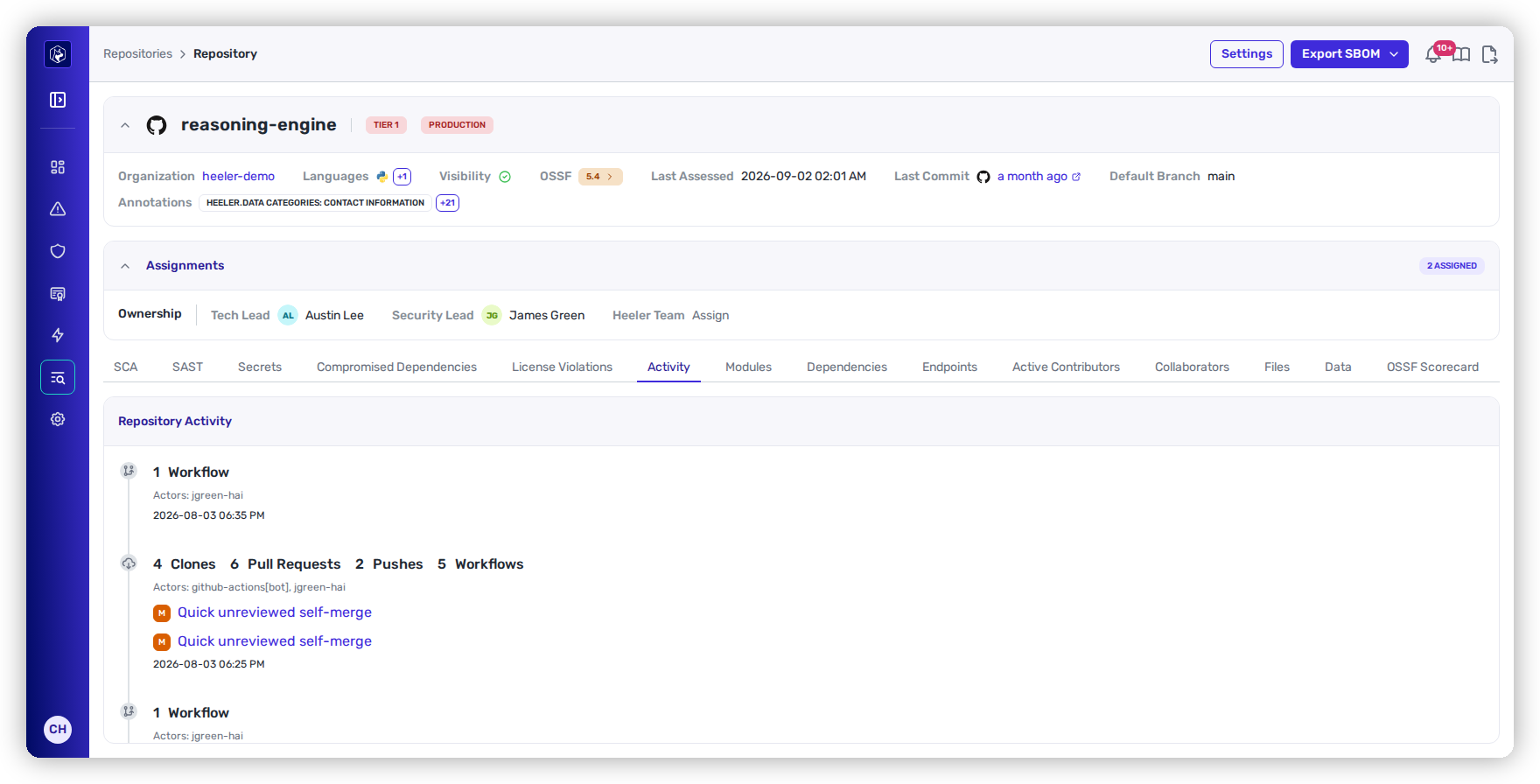
Activity is browsable in its own right, not only as evidence beneath a detection. Open a repository and select **Activity** for a timeline of its audit history: each entry is one five-minute bucket, showing the event counts by activity type and the actors involved, with any detections raised in that window linked inline. Selecting one opens the detection in the timeline.

<figure><img src="https://414480750-files.gitbook.io/~/files/v0/b/gitbook-x-prod.appspot.com/o/spaces%2FXP3dp2kecwKA2KvYkntz%2Fuploads%2Fgit-blob-4c677b2e035d995b18b9e10aee233f364e066b33%2Fcc-bc-activity.png?alt=media" alt="The Activity tab on a repository, showing five-minute activity buckets with detections linked inline."><figcaption><p>Repository → Activity — each entry is one five-minute bucket, with any detections raised in that window linked inline.</p></figcaption></figure>

Use it when you want to see what has been happening to a repository over a period without waiting for something to trip a check.

## Retention

Audit activity and the detections raised from it are kept for **90 days**. Retention is measured per repository against that repository's own most recent event — so a repository that goes quiet keeps its last 90 days of history rather than aging out entirely.

## Related

* [Behavioral Check Findings](/mrecEO40m5D6bt7Pq5pE/findings/behavioral-checks/findings.md) — browse, filter, and triage the detections.
* [Findings overview](/mrecEO40m5D6bt7Pq5pE/findings.md) — how findings work across every family.
* [Secrets](/mrecEO40m5D6bt7Pq5pE/findings/secrets.md) — the family most often relevant alongside a suspicious-activity detection.
* [Source Connections](/mrecEO40m5D6bt7Pq5pE/administer-and-monitor/connections-and-integrations/source-connections.md) — the GitHub connection this reads from.


---

# Agent Instructions
This documentation is published with GitBook. GitBook is the documentation platform designed so that both humans and AI agents can read, navigate, and reason over technical content effectively. Learn more at gitbook.com.

## Querying This Documentation
If you need additional information that is not directly available in this page, you can query the documentation dynamically by asking a question.

Perform an HTTP GET request on the current page URL with the `ask` query parameter, and the optional `goal` query parameter:

```
GET https://docs.heeler.com/mrecEO40m5D6bt7Pq5pE/findings/behavioral-checks.md?ask=<question>&goal=<endgoal>
```

`ask` is the immediate question: it should be specific, self-contained, and written in natural language.
`goal` is optional and describes the broader end goal you are ultimately trying to accomplish on behalf of the user. GitBook uses it to tailor the answer towards what is most useful for that goal.

The response will contain a direct answer to the question and relevant excerpts and sources from the documentation.

Use this mechanism when the answer is not explicitly present in the current page, you need clarification or additional context, or you want to retrieve related documentation sections.