> For the complete documentation index, see [llms.txt](https://docs.heeler.com/mrecEO40m5D6bt7Pq5pE/llms.txt). Markdown versions of documentation pages are available by appending `.md` to page URLs; this page is available as [Markdown](https://docs.heeler.com/mrecEO40m5D6bt7Pq5pE/findings/cicd-config.md).
# CI/CD Config
Build-pipeline configuration findings from your GitHub Actions workflows and Jenkins pipelines — unpinned actions, over-broad permissions, secret scope — kept in their own family so they don't bury yo
**CI/CD Config** lists configuration weaknesses in the pipelines that build and ship your code: an action pinned to a moving tag, a job granted write permissions it doesn't need, secrets inherited by a third-party workflow, a Jenkins shared library loaded from an unpinned reference. They come from the same analysis as [Code Security (SAST)](/mrecEO40m5D6bt7Pq5pE/findings/code-security-sast.md) findings, and they live in their own family for a practical reason — they're emitted **per pipeline file**, so at organization scale they outnumber every other finding family put together.
Keeping them separate means a workflow-hygiene backlog of tens of thousands of rows doesn't drown the injection finding you actually need to see. They are **not** counted in the SAST tile.
{% hint style="info" %}
**Configuration, not compromise.** Only the *hygiene* rules land here. The incident-shaped GitHub Actions detections — script injection, credential exfiltration, workflow\_run artifact execution, dangerous triggers, self-hosted runners on `pull_request_target` — stay in [SAST](/mrecEO40m5D6bt7Pq5pE/findings/code-security-sast.md), because those are attacks in progress rather than posture to work down. See [GitHub Actions Supply Chain](/mrecEO40m5D6bt7Pq5pE/findings/open-source-sca/github-actions.md) for how the surrounding pipeline risk is modeled.
{% endhint %}
## Two ways to read it
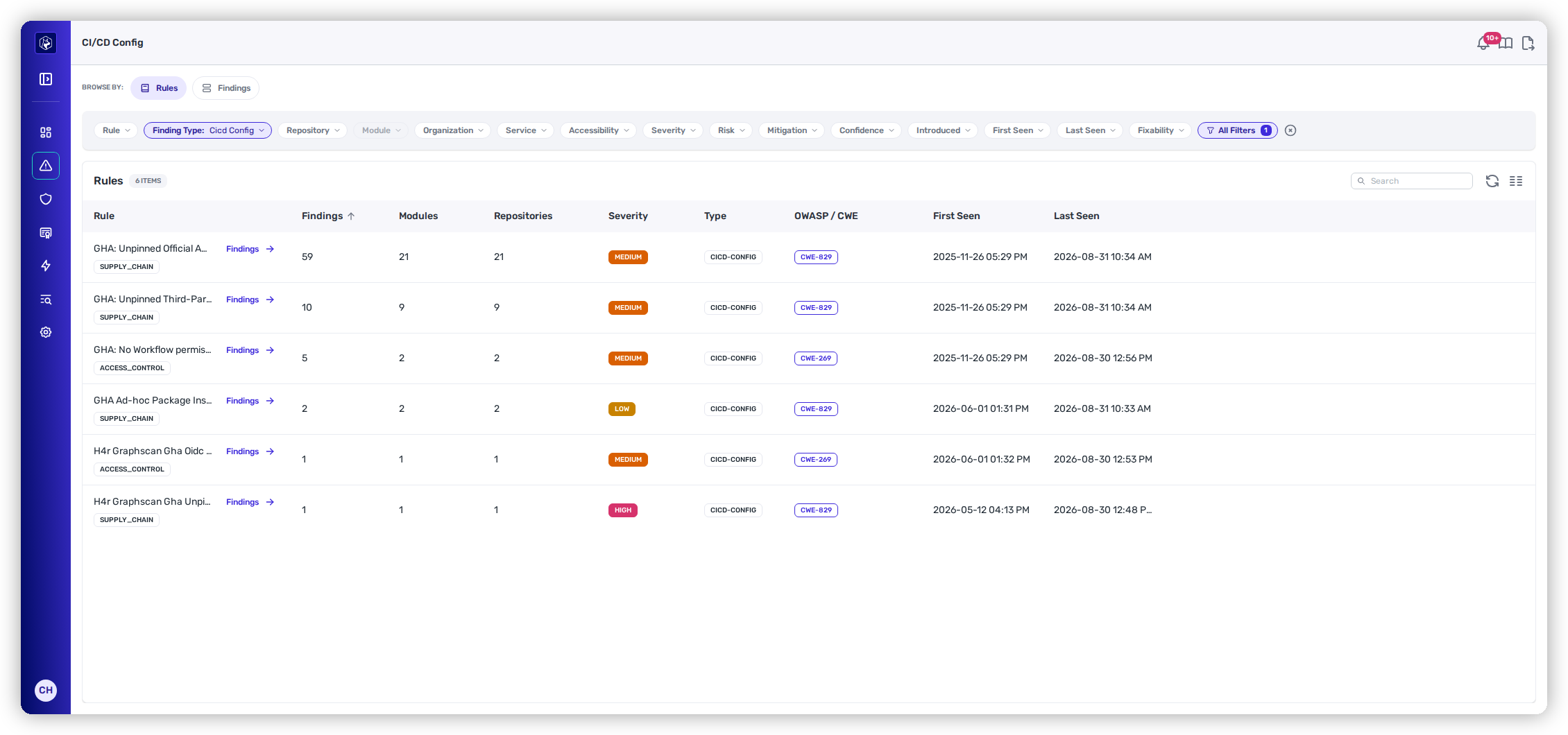
**Security → CI/CD Config** opens on **Rules**, not on the raw list — with a family this size, "how many repositories have unpinned actions" is the useful question, and one rule usually means one policy decision.
The CI/CD Config Rules view — each rule with its reach across modules and repositories.
{% tabs %}
{% tab title="Rules" %}
Findings grouped by the rule that produced them.
| Column | What it tells you |
| ------------------------------------- | --------------------------------------------------------------------------------------------------------------------- |
| **Rule** | The rule, with its weakness category tag (e.g. SUPPLY\_CHAIN, ACCESS\_CONTROL). |
| **Findings · Modules · Repositories** | How far the rule reaches — the numbers that tell you whether fixing it is a one-repository job or an estate-wide one. |
| **Severity** | The rule's severity band. |
| **Type** | `CICD-CONFIG`, so the family is visible even in a mixed view. |
| **OWASP / CWE** | The weakness the rule maps to. |
| **First Seen · Last Seen** | The rule's activity window in your workflows. |
**Findings →** on any row drops into the list scoped to that rule.
{% endtab %}
{% tab title="Findings" %}
The individual rows, one per place the rule fired.
| Column | What it tells you |
| ------------------------- | ------------------------------------------------- |
| **Rule** | What fired. |
| **Module · File** | Where — the module, and the workflow file itself. |
| **Risk** | The Heeler Risk band. |
| **Severity · Confidence** | How serious, and how sure. |
| **OWASP / CWE** | The weakness mapping. |
| **Mitigation** | Any recorded mitigation on the finding. |
| **Introduced** | When the configuration landed in your code. |
| **SLO** | The remediation clock, where one applies. |
| **Ticket** | The linked ticket, if one has been filed. |
| {% endtab %} | |
| {% endtabs %} | |
Both views carry the standard finding filters — repository, organization, service, severity, risk, confidence, accessibility, mitigation, fixability, first and last seen — and the shared listing controls; see [Filtering and Exports](/mrecEO40m5D6bt7Pq5pE/operate/dashboards/filtering-and-exports.md).
## What the rules cover
The family is a fixed list of rules rather than everything matching a pattern, so what rolls up here doesn't drift:
| Theme | What it flags |
| ------------------------ | --------------------------------------------------------------------------------------------------------------------------------------------------------------------------------------------------------------------------------------------------------------------------------------------------------------------------------------- |
| **Pinning** | Actions, reusable workflows, container images and tools referenced by a moving tag or a branch rather than a commit — official and third-party alike, with SHA-pinned and branch-pinned called out separately. |
| **Permissions** | A workflow relying on default token permissions, or a job granted more than it needs. |
| **Secret scope** | Secrets inherited by a called workflow, secrets scoped to a job that doesn't need them, and over-provisioned secret sets. `secrets: inherit` is judged by who is being called — a workflow in your own repository or organization is reported below a third-party one, because in your own estate the pattern is common and deliberate. |
| **Runners and packages** | Self-hosted runners, ad-hoc package installs during a run, and Dependabot cooldown configuration. |
| **OIDC** | Identity tokens issued to third-party actions, and identity tokens available on pull-request triggers. |
## Row actions
The **⋯** menu on a finding row carries the same actions as the other findings tables:
| Action | What it does |
| ---------------------------------------------------------- | -------------------------------------------------------------------------------- |
| **Override Risk** | Records a risk exception with a reason and an optional expiry. |
| **Override SLO** | Sets a custom remediation deadline. An override can only ever extend a deadline. |
| **Push to Jira** / **Push to Linear** / **Push to GitHub** | Creates a ticket in the connected tracker, linked back to the finding. |
Columns are **Rule**, **Module**, **File**, **Risk**, **Severity**, **Confidence**, **OWASP / CWE**, **Mitigation**, **Introduced**, **SLO** and **Ticket**.
## Related
* [Code Security (SAST)](/mrecEO40m5D6bt7Pq5pE/findings/code-security-sast.md) — the code findings these were separated from, including the incident-shaped Actions detections.
* [GitHub Actions Supply Chain](/mrecEO40m5D6bt7Pq5pE/findings/open-source-sca/github-actions.md) — compromised and malicious actions, and the dependency side of pipeline risk.
* [SAST Guardrails](/mrecEO40m5D6bt7Pq5pE/prevent/pr-guardrails/guardrail-types/sast-guardrails.md) — gate a pull request on new findings before they land.
---
# Agent Instructions
This documentation is published with GitBook. GitBook is the documentation platform designed so that both humans and AI agents can read, navigate, and reason over technical content effectively. Learn more at gitbook.com.
## Querying This Documentation
If you need additional information that is not directly available in this page, you can query the documentation dynamically by asking a question.
Perform an HTTP GET request on the current page URL with the `ask` query parameter, and the optional `goal` query parameter:
```
GET https://docs.heeler.com/mrecEO40m5D6bt7Pq5pE/findings/cicd-config.md?ask=&goal=
```
`ask` is the immediate question: it should be specific, self-contained, and written in natural language.
`goal` is optional and describes the broader end goal you are ultimately trying to accomplish on behalf of the user. GitBook uses it to tailor the answer towards what is most useful for that goal.
The response will contain a direct answer to the question and relevant excerpts and sources from the documentation.
Use this mechanism when the answer is not explicitly present in the current page, you need clarification or additional context, or you want to retrieve related documentation sections.