> For the complete documentation index, see [llms.txt](https://docs.heeler.com/mrecEO40m5D6bt7Pq5pE/llms.txt). Markdown versions of documentation pages are available by appending `.md` to page URLs; this page is available as [Markdown](https://docs.heeler.com/mrecEO40m5D6bt7Pq5pE/findings/cloud-events.md).

# Cloud Events

Write activity from your AWS, Google Cloud and Azure audit logs, the suspicious events Heeler-managed and custom rules flag in it, and how to triage those events and manage the rules.

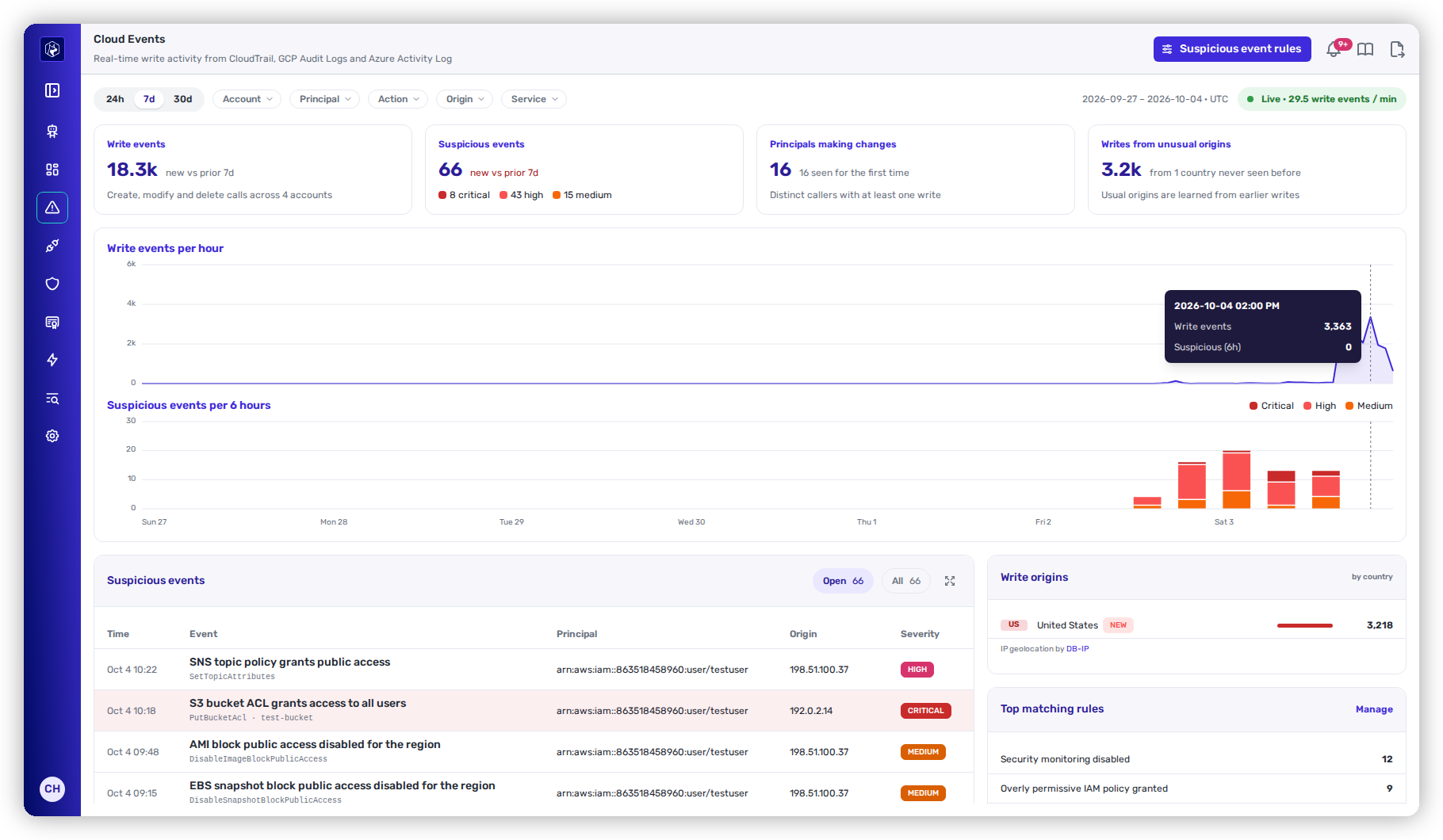
**Security → Cloud Events** shows the write activity in your connected cloud accounts and the suspicious events flagged in it. A write is a call that creates, modifies or deletes something. Each suspicious event is a write that matched at least one detection rule: a rule Heeler manages, or a custom rule your organization writes.
| Cloud            | Source           |
| ---------------- | ---------------- |
| **AWS**          | CloudTrail       |
| **Google Cloud** | Cloud Audit Logs |
| **Azure**        | Activity Log     |

{% hint style="info" %}
**Who this is for:** cloud security and incident-response teams who investigate changes made in your cloud accounts.
{% endhint %}

<figure><img src="https://414480750-files.gitbook.io/~/files/v0/b/gitbook-x-prod.appspot.com/o/spaces%2FXP3dp2kecwKA2KvYkntz%2Fuploads%2Fgit-blob-cabacf91d699b1571b9f521f37aeaf3a3ee3364f%2Fcc-cs-events.png?alt=media" alt="Security → Cloud Events with Suspicious event rules, the 24h, 7d and 30d range on 7d, the Account, Principal, Action, Origin and Service filters and the Live pill; the Write events, Suspicious events, Principals making changes and Writes from unusual origins cards; the Write events per hour and Suspicious events per 6 hours charts; and the Suspicious events list on Open beside the Write origins and Top matching rules panels."><figcaption><p>Security → Cloud Events — write activity and the suspicious events flagged in it.</p></figcaption></figure>

## Before you start

* Event collection is on for at least one cloud connection: [AWS](/mrecEO40m5D6bt7Pq5pE/get-started/cloud-and-runtime/amazon-web-services/aws-event-collection.md), [Google Cloud](/mrecEO40m5D6bt7Pq5pE/get-started/cloud-and-runtime/google-cloud-platform/gcp-event-collection.md) or [Azure](/mrecEO40m5D6bt7Pq5pE/get-started/cloud-and-runtime/microsoft-azure.md#event-collection).

**Cloud Events** appears in the sidebar once event collection is on for at least one AWS, Google Cloud or Azure connection. With event collection off for every connection, the page and its rules are not available.

Activity appears after the first collection run. Read-only calls are not counted as writes.

## Who sees what

Every role can open Cloud Events and the rules list.

| Role                                                                                                    | Events visible                                                                                                                                              |
| ------------------------------------------------------------------------------------------------------- | ----------------------------------------------------------------------------------------------------------------------------------------------------------- |
| **Administrator**, **Administrator (read-only)**, **Organization contributor**, **Organization viewer** | Events in every cloud account.                                                                                                                              |
| **Team contributor**, **Team viewer**                                                                   | Events in the cloud accounts their teams own. See [Assign cloud accounts to teams](/mrecEO40m5D6bt7Pq5pE/findings/cloud.md#assign-cloud-accounts-to-teams). |

The visible accounts decide every count, chart, list and backtest a person sees.

| Action                                                            | Role              |
| ----------------------------------------------------------------- | ----------------- |
| Mark an event **Not suspicious**, **Resolve** it or **Reopen** it | **Administrator** |
| Trust an external account while marking an event not suspicious   | **Administrator** |
| Turn a rule on or off                                             | **Administrator** |
| Create, edit or delete a custom rule                              | **Administrator** |

## Time range and filters

The time range control sets the window: **24h**, **7d** (the default) or **30d**. The page shows the window's start and end, in UTC.

| Filter        | Values                                            |
| ------------- | ------------------------------------------------- |
| **Account**   | Cloud accounts with writes in the last 30 days.   |
| **Principal** | The callers that made writes.                     |
| **Action**    | The API actions called.                           |
| **Origin**    | The country a write came from, by IP geolocation. |
| **Service**   | The cloud service called.                         |

The filters apply to the summary cards, the charts, the suspicious events list and the side panels. The time range, filters and the open event are kept in the page URL.

The **Live** pill shows the write events per minute, averaged over the last complete hour.

## Summary cards

| Card                            | What it counts                                                                                                                                                                |
| ------------------------------- | ----------------------------------------------------------------------------------------------------------------------------------------------------------------------------- |
| **Write events**                | Writes in the window, across the accounts that made them, with the change against the previous window of the same length.                                                     |
| **Suspicious events**           | Suspicious events in the window, split into **critical**, **high** and **medium**, with the change against the previous window.                                               |
| **Principals making changes**   | Distinct callers with at least one write, and how many of them are seen for the first time.                                                                                   |
| **Writes from unusual origins** | Writes from countries that sent no writes before the window. The caption names your usual origins: the three countries with the most writes in the 30 days before the window. |

Writes from private IP addresses have no country and do not count as an origin.

## Activity charts

The upper chart plots write events. The lower chart stacks suspicious events by severity. Hover over either chart to see the counts for that interval.

| Time range | Write events per | Suspicious events per |
| ---------- | ---------------- | --------------------- |
| **24h**    | Hour             | Hour                  |
| **7d**     | Hour             | 6 hours               |
| **30d**    | 6 hours          | Day                   |

## Suspicious events list

The list shows suspicious events in the window, newest first, 25 to a page.

| Column        | What it shows                                                                                             |
| ------------- | --------------------------------------------------------------------------------------------------------- |
| **Time**      | When the call was made.                                                                                   |
| **Event**     | The event title, then the action and the affected resource.                                               |
| **Principal** | The caller.                                                                                               |
| **Origin**    | The country code and source IP. A red country code marks a country that sent no writes before the window. |
| **Severity**  | The highest severity among the rules the event matched.                                                   |

* **Open** lists the open events, and is the default. **All** lists every event in the window, whatever its status. Each pill shows its count.
* The expand control shows every row of the current page at full width. Select it again to collapse the list.
* Open critical events have a shaded row.

Select a row to open the [event drawer](#event-drawer).

## Write origins and top matching rules

**Write origins** lists the countries that sent the most writes in the window, up to eight, with their counts. A country that sent no writes before the window carries a **New** badge, and is listed even below the top eight. IP geolocation is by DB-IP.

**Top matching rules** lists the five rules that matched the most events in the window. Custom rules carry a **Custom** badge. Select a rule to filter the suspicious events list to that rule and switch it to **All**. **Matching one rule** shows above the list while the filter is set; select **Clear** to remove it. **Manage** opens the [rules list](#suspicious-event-rules).

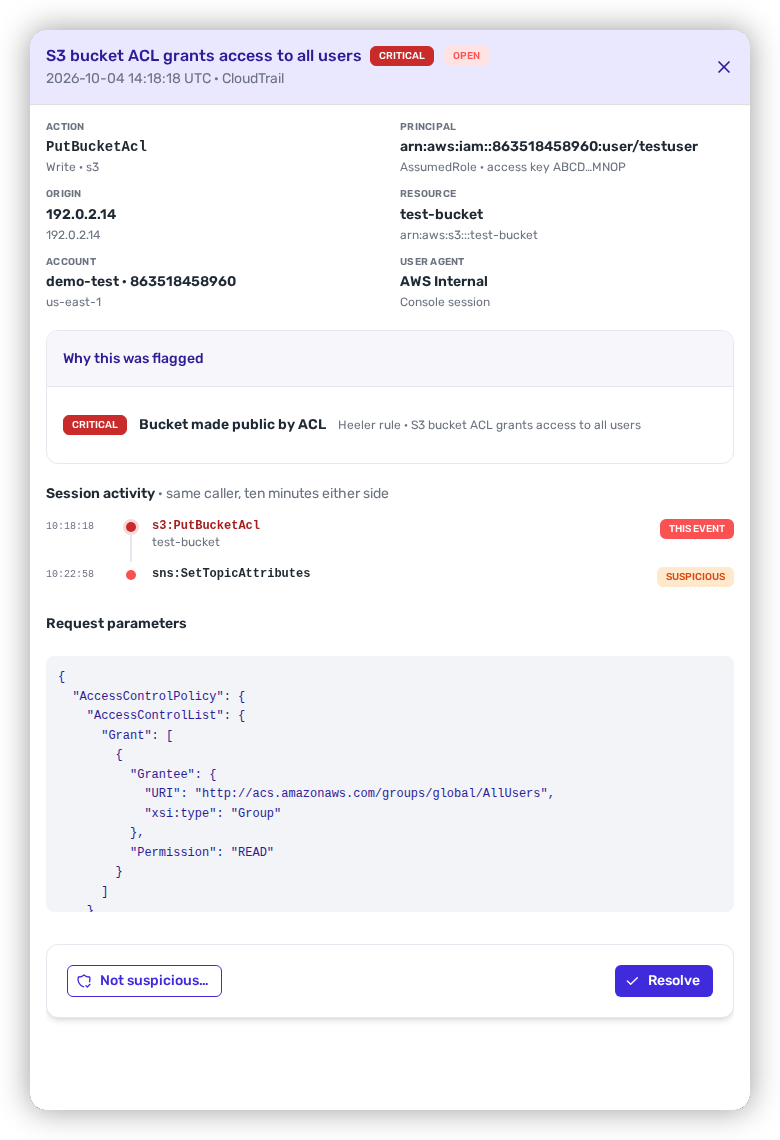
## Event drawer

The drawer header shows the event title, its severity and its status, then the time of the call in UTC and its source: **CloudTrail**, **GCP Audit Logs** or **Azure Activity Log**.

<figure><img src="https://414480750-files.gitbook.io/~/files/v0/b/gitbook-x-prod.appspot.com/o/spaces%2FXP3dp2kecwKA2KvYkntz%2Fuploads%2Fgit-blob-9502ed63a7647f522ea623be83ebcb75ef87d599%2Fcc-cs-event-drawer.png?alt=media" alt="The event drawer for a critical, open S3 bucket ACL grants access to all users event from CloudTrail, showing Action, Principal, Origin, Resource, Account and User agent, the Why this was flagged card naming the Bucket made public by ACL Heeler rule, Session activity with this event and one other suspicious write, the request parameters, and the Not suspicious… and Resolve actions."><figcaption><p>The event drawer — the call, why it was flagged, the caller's session and the request.</p></figcaption></figure>

### Event details

| Detail         | What it shows                                                                                                                                            |
| -------------- | -------------------------------------------------------------------------------------------------------------------------------------------------------- |
| **Action**     | The API action and the service.                                                                                                                          |
| **Principal**  | The caller. For AWS, also the principal type, the access key (first and last four characters) and **no MFA** when the session was not MFA-authenticated. |
| **Origin**     | The country and source IP. **first seen for this org** marks a country that sent no writes before the event.                                             |
| **Resource**   | The affected resource, and how many more the call touched.                                                                                               |
| **Account**    | The account name and ID, and the region.                                                                                                                 |
| **User agent** | The caller's user agent. **Console session** marks a call made from the provider's console.                                                              |

### Why this was flagged

Each rule the event matched, with its severity. A Heeler-managed rule shows **Heeler rule** and its message. A custom rule shows a **Custom** badge and a **View rule** link to the rule builder.

### Posture impact

When a resource the call touched fails one or more [checks](/mrecEO40m5D6bt7Pq5pE/findings/cloud/checks.md), **Posture impact** lists up to ten of those checks, each with the date it started failing.

### Session activity

**Session activity** lists the same caller's writes from ten minutes before to ten minutes after the event, up to 25, in time order. Each entry is labelled **This event**, **Suspicious** or **Write**.

An event recorded before session activity was kept shows "This event was recorded before session activity was kept."

### Request parameters

The call's request parameters as JSON. For Azure, this is the call's authorization block.

## Triage an event

Every suspicious event has one of three statuses:

| Status             | Meaning                                       |
| ------------------ | --------------------------------------------- |
| **Open**           | Not yet triaged. Every event starts here.     |
| **Not suspicious** | The activity was expected.                    |
| **Resolved**       | The activity was investigated and dealt with. |

**Prerequisite:** the **Administrator** role.

{% stepper %}
{% step %}

### Open the event

Select the event in the suspicious events list.
{% endstep %}

{% step %}

### Set the status

* To mark the event expected, select **Not suspicious…**, optionally enter a reason under **Why is this not suspicious?**, then select **Mark as not suspicious**. **Cancel** leaves the event open.
* To close the event as handled, select **Resolve**.
* To return a closed event to **Open**, select **Reopen**.
  {% endstep %}
  {% endstepper %}

When the status is not **Open**, the drawer shows who set it, when, and the reason they gave.

### Trust an external account

For a **Snapshot shared with an unknown account** event, **Not suspicious…** also offers **Trust the account this was shared with**, listing each external account the event shared with. Select the accounts to trust before you select **Mark as not suspicious**.

A trusted account changes two things:

* Later shares with that account are not flagged.
* Other open events flagged only because they shared with accounts that are all trusted move to **Not suspicious**. Their reason names the trusted accounts.

The confirmation names the accounts trusted and how many related events were closed.

## Suspicious event rules

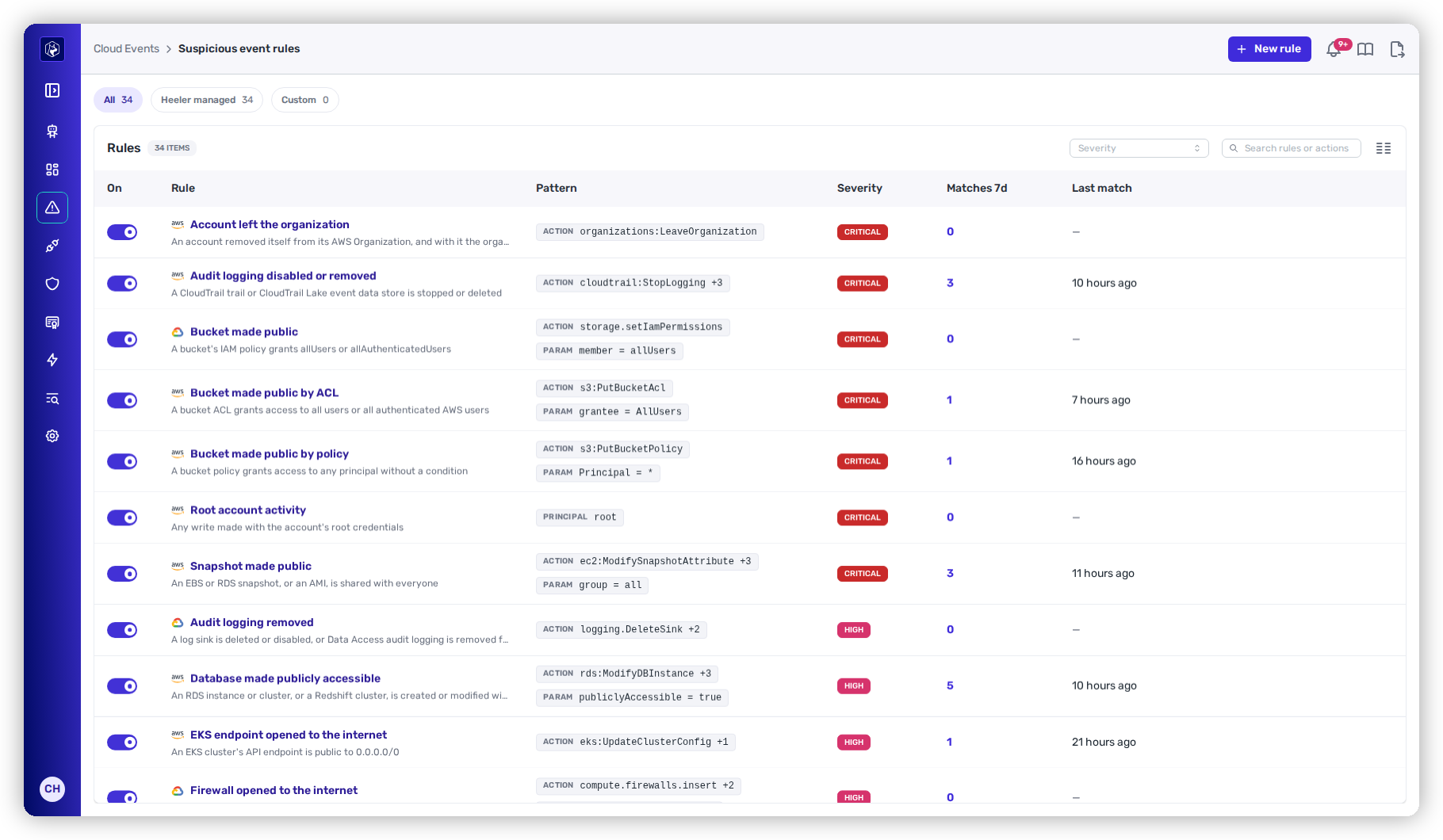
Select **Suspicious event rules** on Cloud Events, or **Manage** on **Top matching rules**, to open the rules list.

<figure><img src="https://414480750-files.gitbook.io/~/files/v0/b/gitbook-x-prod.appspot.com/o/spaces%2FXP3dp2kecwKA2KvYkntz%2Fuploads%2Fgit-blob-12e1ee9cb0bbc23e9343340bf10f0b5e684e212e%2Fcc-cs-event-rules.png?alt=media" alt="The Suspicious event rules list with New rule, the All 34, Heeler managed 34 and Custom 0 pills, the Severity selector and search, and the rules table with On, Rule, Pattern, Severity, Matches 7d and Last match columns, critical rules first."><figcaption><p>Cloud Events → Suspicious event rules.</p></figcaption></figure>

The **All**, **Heeler managed** and **Custom** pills filter the list by source, each with its count. The **Severity** selector filters by severity, and search matches rule names and actions.

| Column         | What it shows                                                                                               |
| -------------- | ----------------------------------------------------------------------------------------------------------- |
| **On**         | Whether the rule is evaluated. Turned-off rules are dimmed.                                                 |
| **Rule**       | The cloud, the rule name and its description. A custom rule's name opens it in the rule builder.            |
| **Pattern**    | A summary of what the rule matches, such as **ACTION**, **PARAM**, **PRINCIPAL** or **SCOPE**.              |
| **Severity**   | **Critical**, **High**, **Medium** or **Low**.                                                              |
| **Matches 7d** | Events the rule matched in the last seven days. Select the count to open Cloud Events filtered to the rule. |
| **Last match** | When the rule last matched.                                                                                 |

Custom rules list first, then by severity and name. Heeler-managed rules are listed only for the clouds with event collection on.

### Turn a rule on or off

**Prerequisite:** the **Administrator** role.

Use the **On** switch. A turned-off rule flags no further events; events it already flagged keep their status. A change to a Heeler-managed rule applies from the next collection run.

## Heeler-managed rules

### AWS

| Rule                                                  | Severity | What it detects                                                                                                                     |
| ----------------------------------------------------- | -------- | ----------------------------------------------------------------------------------------------------------------------------------- |
| **Audit logging disabled or removed**                 | Critical | A CloudTrail trail or CloudTrail Lake event data store is stopped or deleted.                                                       |
| **Root account activity**                             | Critical | Any write made with the account's root credentials.                                                                                 |
| **Account left the organization**                     | Critical | An account removed itself from its AWS Organization.                                                                                |
| **Bucket made public by ACL**                         | Critical | A bucket ACL grants access to all users or all authenticated AWS users.                                                             |
| **Bucket made public by policy**                      | Critical | A bucket policy grants access to any principal without a condition.                                                                 |
| **Snapshot made public**                              | Critical | An EBS or RDS snapshot, or an AMI, is shared with everyone.                                                                         |
| **Security monitoring disabled**                      | High     | GuardDuty, Security Hub, Config, Access Analyzer, Macie, Inspector or Detective is turned off or removed.                           |
| **Snapshot shared with an unknown account**           | High     | A snapshot or AMI is shared with, or used by, an account outside the organization and its trusted vendors.                          |
| **S3 Block Public Access disabled**                   | High     | Block Public Access is removed or turned off for a bucket or a whole account.                                                       |
| **Security group opened to the internet**             | High     | An ingress rule allows `0.0.0.0/0` or `::/0` on a port other than 80 or 443.                                                        |
| **Overly permissive IAM policy granted**              | High     | An administrator-level or privilege-escalating policy is created, made default, attached or put inline.                             |
| **Role trusts an unknown account**                    | High     | A role's trust policy lets any AWS principal, or an account outside the organization and its trusted vendors, assume it.            |
| **Resource policy grants public access**              | High     | A secret, KMS key, queue, topic, ECR repository, Lambda function or other resource policy allows any principal without a condition. |
| **Database made publicly accessible**                 | High     | An RDS instance or cluster, or a Redshift cluster, is created or modified with public accessibility.                                |
| **EKS endpoint opened to the internet**               | High     | An EKS cluster's API endpoint is public to `0.0.0.0/0`.                                                                             |
| **Account trail stopped under an organization trail** | Medium   | An account's own CloudTrail trail is stopped while an organization trail still logs the account.                                    |
| **Unencrypted storage created**                       | Medium   | An EBS volume or RDS instance or cluster is created without encryption.                                                             |
| **Regional public-sharing guardrail disabled**        | Medium   | Snapshot, AMI, SSM document or EMR block public access is turned off for a region.                                                  |
| **EBS encryption by default disabled**                | Medium   | New EBS volumes in a region are no longer encrypted by default.                                                                     |
| **EC2 serial console access enabled**                 | Medium   | Serial console access to instances is turned on for a region.                                                                       |
| **IMDSv1 allowed by default**                         | Medium   | The region's instance metadata default no longer requires IMDSv2.                                                                   |
| **Console password set for another user**             | Medium   | A console password is created or reset for an IAM user other than the caller.                                                       |
| **MFA device removed**                                | Medium   | An IAM user's MFA device is deactivated or deleted.                                                                                 |
| **SAML identity provider changed**                    | Medium   | A SAML provider that can federate into the account is created or updated.                                                           |
| **KMS key disabled or scheduled for deletion**        | Medium   | A KMS key is disabled or scheduled for deletion.                                                                                    |

### Google Cloud

| Rule                                         | Severity | What it detects                                                                                                               |
| -------------------------------------------- | -------- | ----------------------------------------------------------------------------------------------------------------------------- |
| **Bucket made public**                       | Critical | A bucket's IAM policy grants `allUsers` or `allAuthenticatedUsers`.                                                           |
| **Audit logging removed**                    | High     | A log sink is deleted or disabled, or Data Access audit logging is removed from an IAM policy.                                |
| **Resource made public**                     | High     | A resource's IAM policy grants `allUsers` or `allAuthenticatedUsers`.                                                         |
| **Firewall opened to the internet**          | High     | An enabled ingress firewall rule allows `0.0.0.0/0` or `::/0` on a port other than 80 or 443.                                 |
| **Overly permissive role granted**           | High     | A principal is granted owner or editor, or an IAM-administration or impersonation role, on a project, folder or organization. |
| **Role allows privilege escalation**         | High     | A custom role is created or updated with permissions that allow privilege escalation.                                         |
| **SQL instance exposed**                     | High     | A Cloud SQL instance gets a public IP or allows `0.0.0.0/0`.                                                                  |
| **Service account key created**              | Medium   | A long-lived key is created for a service account.                                                                            |
| **Default service account attached to a VM** | Medium   | A VM runs as the Compute Engine default service account.                                                                      |

### Azure

| Rule                                              | Severity | What it detects                                                                                        |
| ------------------------------------------------- | -------- | ------------------------------------------------------------------------------------------------------ |
| **Audit logging removed**                         | Critical | A diagnostic setting or legacy log profile is deleted.                                                 |
| **Storage account allows anonymous access**       | Critical | A storage account allows anonymous blob access.                                                        |
| **Privileged role assigned broadly**              | High     | Owner, Contributor or User Access Administrator is assigned at subscription or management-group scope. |
| **Custom role grants administrative permissions** | High     | A custom role definition grants `*` or role-assignment rights.                                         |
| **Network security group opened to the internet** | High     | A security rule allows inbound traffic from the internet to a sensitive port.                          |
| **SQL firewall open to the internet**             | High     | A SQL server firewall rule allows every address.                                                       |
| **Defender plan downgraded**                      | High     | A Microsoft Defender for Cloud plan is set to the free tier.                                           |
| **Disk or snapshot exported**                     | High     | A SAS download URL is generated for a managed disk or snapshot.                                        |
| **Command run on a VM**                           | Medium   | A command or script is run on a virtual machine through Run Command.                                   |
| **Resource lock or policy removed**               | Medium   | A resource lock or Azure Policy assignment is deleted, or a policy exemption is granted.               |
| **Key Vault access policy changed**               | Medium   | A Key Vault access policy grants or removes access.                                                    |

### AWS automation the managed rules do not flag

| Rule                                      | Not flagged                                                                                                                                                                                                                     |
| ----------------------------------------- | ------------------------------------------------------------------------------------------------------------------------------------------------------------------------------------------------------------------------------- |
| **Security group opened to the internet** | ICMP destination-unreachable (type 3) from any caller. Ports 30000 to 32767 opened by EKS (`eks.amazonaws.com`) or the Kubernetes cloud controller manager (a `kubernetes/` user agent). A rule for port 80 alone or 443 alone. |
| **Overly permissive IAM policy granted**  | `AWSServiceRoleForSSO` attaching a policy to an `AWSReservedSSO_` role. `AWSServiceRoleForCloudFormationStackSetsOrgMember` attaching a policy to a `stacksets-exec-` role. Both callers must be service-linked roles.          |
| **Unencrypted storage created**           | An EBS volume created from a snapshot.                                                                                                                                                                                          |
| **Audit logging disabled or removed**     | A stopped trail while another organization trail is logging the account. That event matches **Account trail stopped under an organization trail** at Medium severity instead.                                                   |

## Create or edit a custom rule

**Prerequisite:** the **Administrator** role.

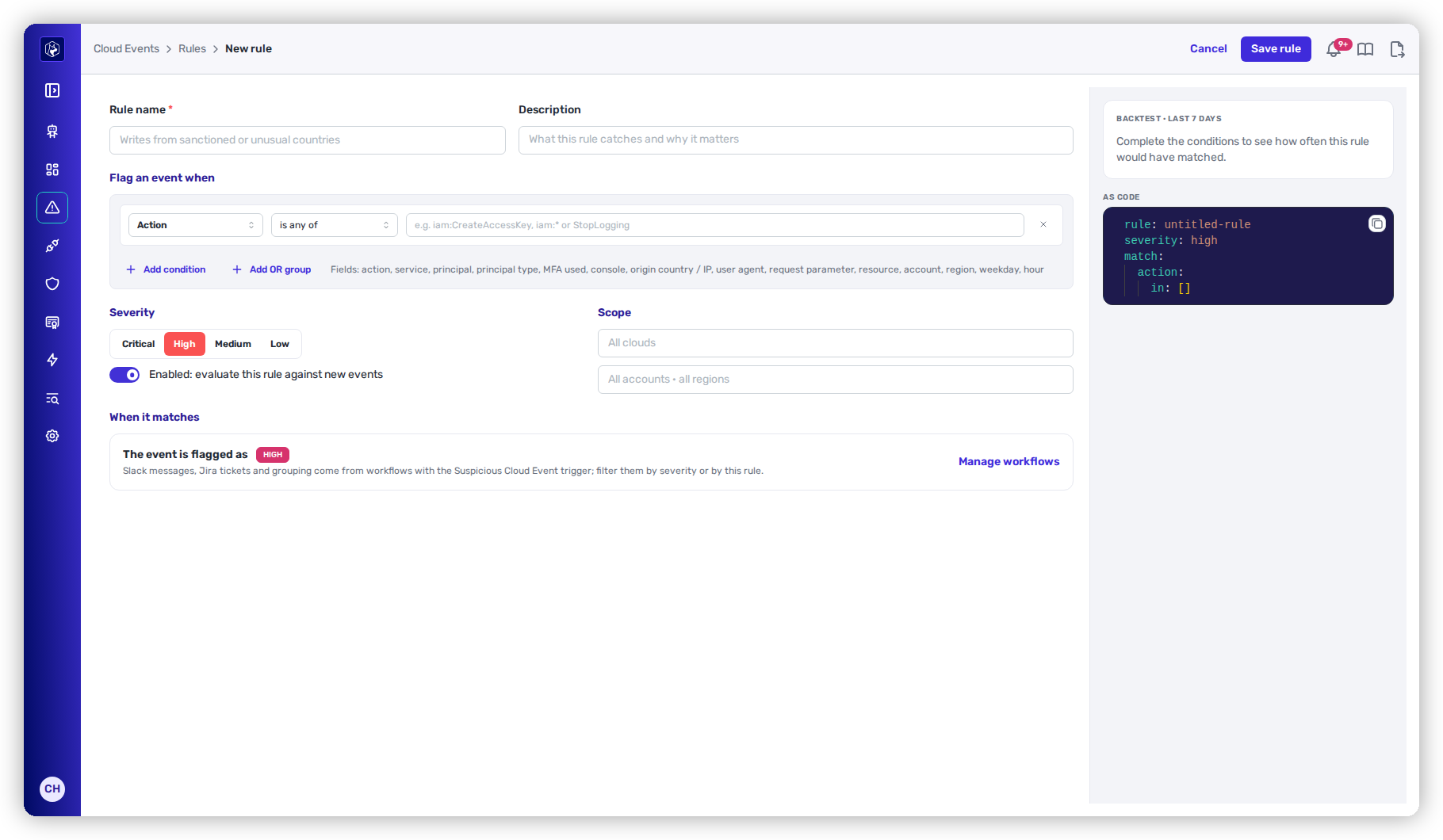
<figure><img src="https://414480750-files.gitbook.io/~/files/v0/b/gitbook-x-prod.appspot.com/o/spaces%2FXP3dp2kecwKA2KvYkntz%2Fuploads%2Fgit-blob-b7b87cb1deae07bcbfc64b8b091e057446a71797%2Fcc-cs-event-rule-builder.png?alt=media" alt="The New rule builder with Cancel and Save rule, the Rule name and Description fields, one Action is any of condition under Flag an event when with Add condition and Add OR group, the Critical, High, Medium and Low severity choice on High, the Enabled switch, the clouds and accounts scope fields, the When it matches card, and the backtest and AS CODE panel."><figcaption><p>The rule builder, before any condition is filled in.</p></figcaption></figure>

{% stepper %}
{% step %}

### Open the rule builder

On the rules list, select **New rule**. To edit a custom rule, select its name. Heeler-managed rules cannot be edited.
{% endstep %}

{% step %}

### Name the rule

| Field           | Required | What it sets                                                                                  |
| --------------- | -------- | --------------------------------------------------------------------------------------------- |
| **Rule name**   | Yes      | Up to 200 characters. A matched event without a Heeler-managed match takes this as its title. |
| **Description** | No       | Shown under the name on the rules list. Up to 2,000 characters.                               |
| {% endstep %}   |          |                                                                                               |

{% step %}

### Add conditions

Under **Flag an event when**, each condition is a field, an operator and values. Conditions joined by **AND** must all hold.

* **Add condition** adds an **AND** condition.
* **Add OR group** adds an **ANY OF THESE** group. At least one of its conditions must hold, alongside every **AND** condition. **+ Add alternative** adds another condition to the group.
* The remove control on a condition deletes it.

A rule needs at least one condition. See [Condition fields](#condition-fields) for each field.
{% endstep %}

{% step %}

### Set severity, state and scope

| Field                                              | What it sets                                                                                     |
| -------------------------------------------------- | ------------------------------------------------------------------------------------------------ |
| **Severity**                                       | **Critical**, **High** (the default), **Medium** or **Low**.                                     |
| **Enabled: evaluate this rule against new events** | On by default.                                                                                   |
| **Clouds**                                         | The clouds the rule applies to, from those with event collection on. Empty means **All clouds**. |
| **Accounts**                                       | The accounts the rule applies to. Empty means **All accounts · all regions**.                    |

The **When it matches** card below the form has no fields of its own. It reads **The event is flagged as** with the severity you chose, and notes that Slack messages, Jira tickets and grouping come from workflows with the **Suspicious Cloud Event** trigger. **Manage workflows** on the card opens Workflows. See [Notifications](#notifications).
{% endstep %}

{% step %}

### Check the backtest

The panel beside the form runs the rule against the stored writes of the last seven days in the accounts you can see:

* **BACKTEST · LAST 7 DAYS** — how many writes would have matched, from how many principals, with a chart by day. The panel names how many writes were scanned; **(most recent only)** marks a backtest capped at the most recent one million writes.
* **Sample matches** — up to eight matching writes.
* **AS CODE** — the rule as YAML, with a copy button. The YAML is read-only.

Tagging actions (`Tag*`, `Untag*`, `CreateTags`, `DeleteTags`, `Put*Tagging`, `Delete*Tagging`) are counted but not stored, so the backtest skips them and names them under **Not backtested**. Live evaluation still covers them.
{% endstep %}

{% step %}

### Save the rule

Select **Save rule**. The rules list opens and shows the rule.
{% endstep %}
{% endstepper %}

A custom rule evaluates writes collected after it is saved. It does not flag earlier writes. When a write matches a custom rule and a Heeler-managed rule, the event lists both, and takes the higher severity.

To delete a custom rule, open it and select **Delete**, then confirm. Events the rule already flagged stay flagged.

### Condition fields

| Field                 | Operators                                                            | Values                                                                                                                                                                                            |
| --------------------- | -------------------------------------------------------------------- | ------------------------------------------------------------------------------------------------------------------------------------------------------------------------------------------------- |
| **Action**            | **is any of**, **is not any of**, **contains**, **does not contain** | `service:Action`, such as `iam:CreateAccessKey`, matches that service's action. `iam:*` matches every action of a service. A bare name, such as `StopLogging`, matches the action in any service. |
| **Service**           | Same as **Action**                                                   | The cloud service.                                                                                                                                                                                |
| **Principal**         | Same as **Action**                                                   | The caller.                                                                                                                                                                                       |
| **Principal type**    | Same as **Action**                                                   | Suggestions: `Root`, `IAMUser`, `AssumedRole`, `FederatedUser`, `AWSService`, `ServiceAccount`, `User`, `ServicePrincipal`.                                                                       |
| **MFA used**          | **is**                                                               | **Yes** or **No**.                                                                                                                                                                                |
| **Console**           | **is**                                                               | **Yes** or **No**.                                                                                                                                                                                |
| **Origin country**    | **is any of**, **is not any of**, **is never seen before**           | Two-letter country codes, such as `RU`. **is never seen before** matches a country with no writes before the last day.                                                                            |
| **Origin IP**         | **is any of**, **is not any of**, **is in CIDR**, **is not in CIDR** | IP addresses, or IPv4 or IPv6 CIDR ranges such as `10.0.0.0/8`.                                                                                                                                   |
| **User agent**        | Same as **Action**                                                   | The caller's user agent.                                                                                                                                                                          |
| **Request parameter** | Same as **Action**, plus **is set** and **is not set**               | A **Key path** into the request parameters, with dots between keys and numbers for list positions, such as `bucketPolicy.Statement.0.Principal`. An object or list is compared as JSON text.      |
| **Resource**          | Same as **Action**                                                   | The resources the call touched.                                                                                                                                                                   |
| **Account**           | Same as **Action**                                                   | The account ID.                                                                                                                                                                                   |
| **Region**            | Same as **Action**                                                   | The region.                                                                                                                                                                                       |
| **Weekday**           | **is any of**, **is not any of**                                     | `mon` to `sun`, in UTC.                                                                                                                                                                           |
| **Hour (UTC)**        | **is between**                                                       | A from hour and a to hour, 0 to 24. The from hour is included and the to hour is not. A window such as 22 to 6 crosses midnight.                                                                  |

Matching rules:

* **is any of** and **is not any of** compare whole values and accept `*` as a wildcard. **contains** and **does not contain** match part of a value. Both ignore case.
* Separate values with a comma or press Enter. Each condition takes up to 500 values. A rule takes up to 50 **AND** conditions and 50 conditions in its OR group.
* A condition on a value the write does not carry never holds, whatever its operator. For example, a write from a private IP address has no origin country, so no **Origin country** condition matches it.

## Notifications

A rule flags events and sets their severity. Slack messages, Jira tickets and other responses come from [workflows](/mrecEO40m5D6bt7Pq5pE/operate/workflows/triggers.md) with the **Suspicious Cloud Event** trigger, which can filter by severity, rule and cloud. **Manage workflows** on the rule builder's **When it matches** card opens Workflows.

A workflow fires for an open event once. An event more than 24 hours old when Heeler first records it does not fire a workflow.

## Data kept

| Data                | Kept for                                                                                        |
| ------------------- | ----------------------------------------------------------------------------------------------- |
| Hourly write counts | 90 days. They back the charts, cards and origins, including the previous-window comparison.     |
| Individual writes   | 7 days. They back session activity and the backtest. Tagging actions are not kept individually. |

## Related

* [AWS Event Collection](/mrecEO40m5D6bt7Pq5pE/get-started/cloud-and-runtime/amazon-web-services/aws-event-collection.md) — stream CloudTrail events to Heeler.
* [GCP Event Collection](/mrecEO40m5D6bt7Pq5pE/get-started/cloud-and-runtime/google-cloud-platform/gcp-event-collection.md) — route Cloud Audit Logs to Heeler.
* [Microsoft Azure](/mrecEO40m5D6bt7Pq5pE/get-started/cloud-and-runtime/microsoft-azure.md#event-collection) — collect Activity Log events.
* [Cloud Checks](/mrecEO40m5D6bt7Pq5pE/findings/cloud/checks.md) — the checks behind **Posture impact**.
* [Workflow triggers](/mrecEO40m5D6bt7Pq5pE/operate/workflows/triggers.md) — respond to suspicious events.


---

# Agent Instructions
This documentation is published with GitBook. GitBook is the documentation platform designed so that both humans and AI agents can read, navigate, and reason over technical content effectively. Learn more at gitbook.com.

## Querying This Documentation
If you need additional information that is not directly available in this page, you can query the documentation dynamically by asking a question.

Perform an HTTP GET request on the current page URL with the `ask` query parameter, and the optional `goal` query parameter:

```
GET https://docs.heeler.com/mrecEO40m5D6bt7Pq5pE/findings/cloud-events.md?ask=<question>&goal=<endgoal>
```

`ask` is the immediate question: it should be specific, self-contained, and written in natural language.
`goal` is optional and describes the broader end goal you are ultimately trying to accomplish on behalf of the user. GitBook uses it to tailor the answer towards what is most useful for that goal.

The response will contain a direct answer to the question and relevant excerpts and sources from the documentation.

Use this mechanism when the answer is not explicitly present in the current page, you need clarification or additional context, or you want to retrieve related documentation sections.