> For the complete documentation index, see [llms.txt](https://docs.heeler.com/mrecEO40m5D6bt7Pq5pE/llms.txt). Markdown versions of documentation pages are available by appending `.md` to page URLs; this page is available as [Markdown](https://docs.heeler.com/mrecEO40m5D6bt7Pq5pE/findings/cloud/exemptions.md).
# Cloud Exemptions
Exclude cloud resources from a check, everywhere or for one framework, with a reason, a second-administrator approval and an end date.
**Security → Cloud → Exemptions** lists the resources excluded from specific checks. Each exemption carries a reason, an approver and an end date. An approved exemption removes its resources' failures from the scores it applies to, until it ends.
Cloud exemptions are separate from the finding exemptions elsewhere in Heeler.
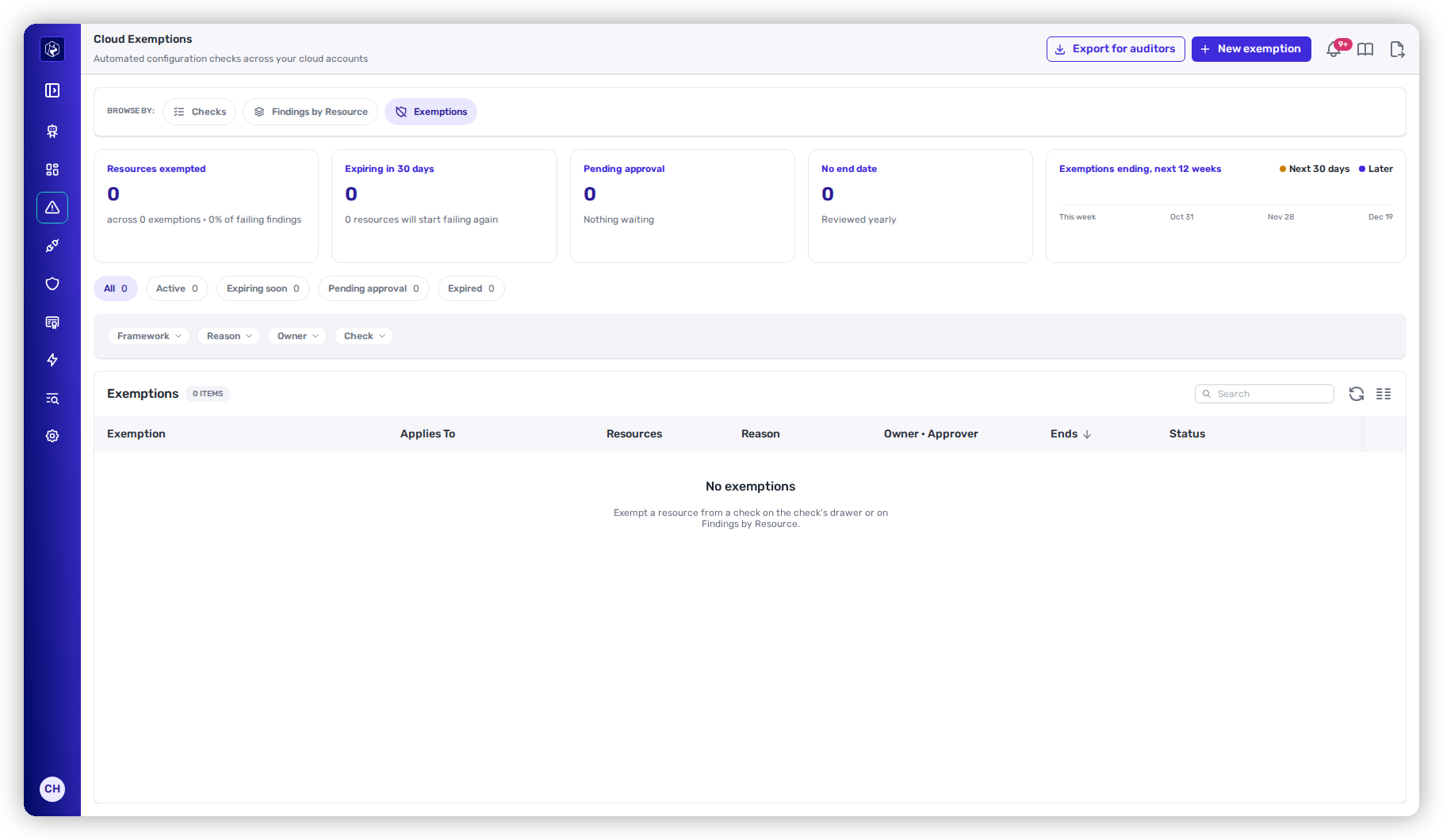
Security → Cloud → Exemptions.
## Request an exemption
**Prerequisite:** the **Administrator** role.
{% stepper %}
{% step %}
### Open the form
Go to **Security → Cloud**, open the **Exemptions** tab, and select **New exemption**.
{% endstep %}
{% step %}
### Fill in the exemption
| Field | Required | What it sets |
| --------------------------------- | ----------------------- | ------------------------------------------------------------------------------------------- |
| **Title** | Yes | Up to 200 characters. |
| **Check** | Yes | The check the resources are exempted from. |
| **Resources** | Yes | Resources currently failing the check. The picker lists up to 500. |
| **Applies to** | No | **All frameworks**, the default, or one adopted framework. |
| **Reason** | Yes | **Remediation planned**, **Accepted risk**, **Compensating control** or **False positive**. |
| **Justification** | No | Free text. |
| **Owner** | No | A team. |
| **Ticket** | No | A ticket reference. |
| **No end date (reviewed yearly)** | No | With no end date, the exemption is due for review 365 days out. |
| **Ends** | Yes, unless no end date | Today or later. |
| {% endstep %} | | |
{% step %}
### Submit it
Select **Request exemption**. The exemption is **Pending approval** and removes nothing yet.
{% endstep %}
{% endstepper %}
## Approve or reject
Another **Administrator** — not the person who requested it — approves or rejects a pending exemption from its row. The requester does not see either action.
Once approved, the exemption is **Active**.
Editing what an approved exemption covers — the check, framework, end date or resources — returns it to **Pending approval**.
## What an exemption changes
| Applies to | Effect |
| ------------------ | ------------------------------------------------------------------------------------------------------------------- |
| **All frameworks** | The resources stop counting as failing the check on Checks, Findings by Resource, the Overview and every framework. |
| One framework | The resources stop counting as failing only in that framework's score. The check stays failing everywhere else. |
An exemption covers only its named resources on its one check. When it ends, those resources count as failing again with no action from you. Score history is not recalculated for exemptions.
## The Exemptions page
### Summary cards
| Card | What it shows |
| ------------------------------------ | ------------------------------------------------------------------------------------------------- |
| **Resources exempted** | Resources under active exemptions, the number of exemptions, and their share of failing findings. |
| **Expiring in 30 days** | Resources that will start failing again within 30 days. |
| **Pending approval** | How long the oldest request has waited, or "Nothing waiting". |
| **No end date** | Exemptions under yearly review, and the next review date. |
| **Exemptions ending, next 12 weeks** | A weekly chart of exemptions ending, split into the next 30 days and later. |
### Status tabs
**All**, **Active**, **Expiring soon**, **Pending approval** and **Expired**, each with a count. **Active** includes **Expiring soon**.
### Columns
| Column | What it shows |
| -------------------- | -------------------------------------------------------------------------------------------------------- |
| **Exemption** | The title, its `EXM-` ID and its ticket. |
| **Applies To** | The check, and **All frameworks** or the framework. |
| **Resources** | The number of resources covered. |
| **Reason** | The reason. |
| **Owner · Approver** | The owner, and **Approved by**, **Waiting on approval**, **Rejected by** or **Revoked by**. |
| **Ends** | The end date or **No end date**, and how long until it ends or since it ended. |
| **Status** | **Active**, **Expiring soon**, **Pending approval**, **Expired · failing**, **Rejected** or **Revoked**. |
The table sorts by **Ends**, soonest first. You can also sort by created date, title or status. **Framework**, **Owner**, **Reason** and **Check** filter the list. The status tabs take the place of a status filter. These filters are separate from the filters on the **Checks** and **Findings by Resource** tabs, and do not carry over between them.
### Row actions
| Action | Available for |
| ----------------------- | ------------------------------------------------------------------ |
| **Edit** | Any exemption except a revoked one. |
| **Approve**, **Reject** | A pending exemption, by an Administrator other than the requester. |
| **Revoke** | An approved exemption. It stays on record as **Revoked**. |
| **Delete** | A pending or rejected exemption. |
## Who sees an exemption
Roles that see every cloud account see every exemption. A **Team viewer** or **Team contributor** sees an exemption only when all its resources are in accounts their teams own.
## Export for auditors
**Export for auditors** downloads `cloud-exemptions-.csv`, with one row per exempted resource. Any role can export. The file carries the exemption, check, framework, control, reason, justification, ticket, owner, requester, approval and review, status, end and next review dates, and the resource, its type and account.
## Related
* [Cloud Checks](/mrecEO40m5D6bt7Pq5pE/findings/cloud/checks.md) — the checks you exempt resources from.
* [Cloud Frameworks](/mrecEO40m5D6bt7Pq5pE/standards-and-compliance/cloud-frameworks.md) — how exemptions affect framework scores.
---
# Agent Instructions
This documentation is published with GitBook. GitBook is the documentation platform designed so that both humans and AI agents can read, navigate, and reason over technical content effectively. Learn more at gitbook.com.
## Querying This Documentation
If you need additional information that is not directly available in this page, you can query the documentation dynamically by asking a question.
Perform an HTTP GET request on the current page URL with the `ask` query parameter, and the optional `goal` query parameter:
```
GET https://docs.heeler.com/mrecEO40m5D6bt7Pq5pE/findings/cloud/exemptions.md?ask=&goal=
```
`ask` is the immediate question: it should be specific, self-contained, and written in natural language.
`goal` is optional and describes the broader end goal you are ultimately trying to accomplish on behalf of the user. GitBook uses it to tailor the answer towards what is most useful for that goal.
The response will contain a direct answer to the question and relevant excerpts and sources from the documentation.
Use this mechanism when the answer is not explicitly present in the current page, you need clarification or additional context, or you want to retrieve related documentation sections.