> For the complete documentation index, see [llms.txt](https://docs.heeler.com/mrecEO40m5D6bt7Pq5pE/llms.txt). Markdown versions of documentation pages are available by appending `.md` to page URLs; this page is available as [Markdown](https://docs.heeler.com/mrecEO40m5D6bt7Pq5pE/findings/code-security-sast/findings.md).

# SAST Findings

The SAST findings inventory — the Active/Fixed/Deployed lifecycle, the three Browse-by views, every way to search, filter, sort, save, and export, and the data-flow finding detail with its validated f

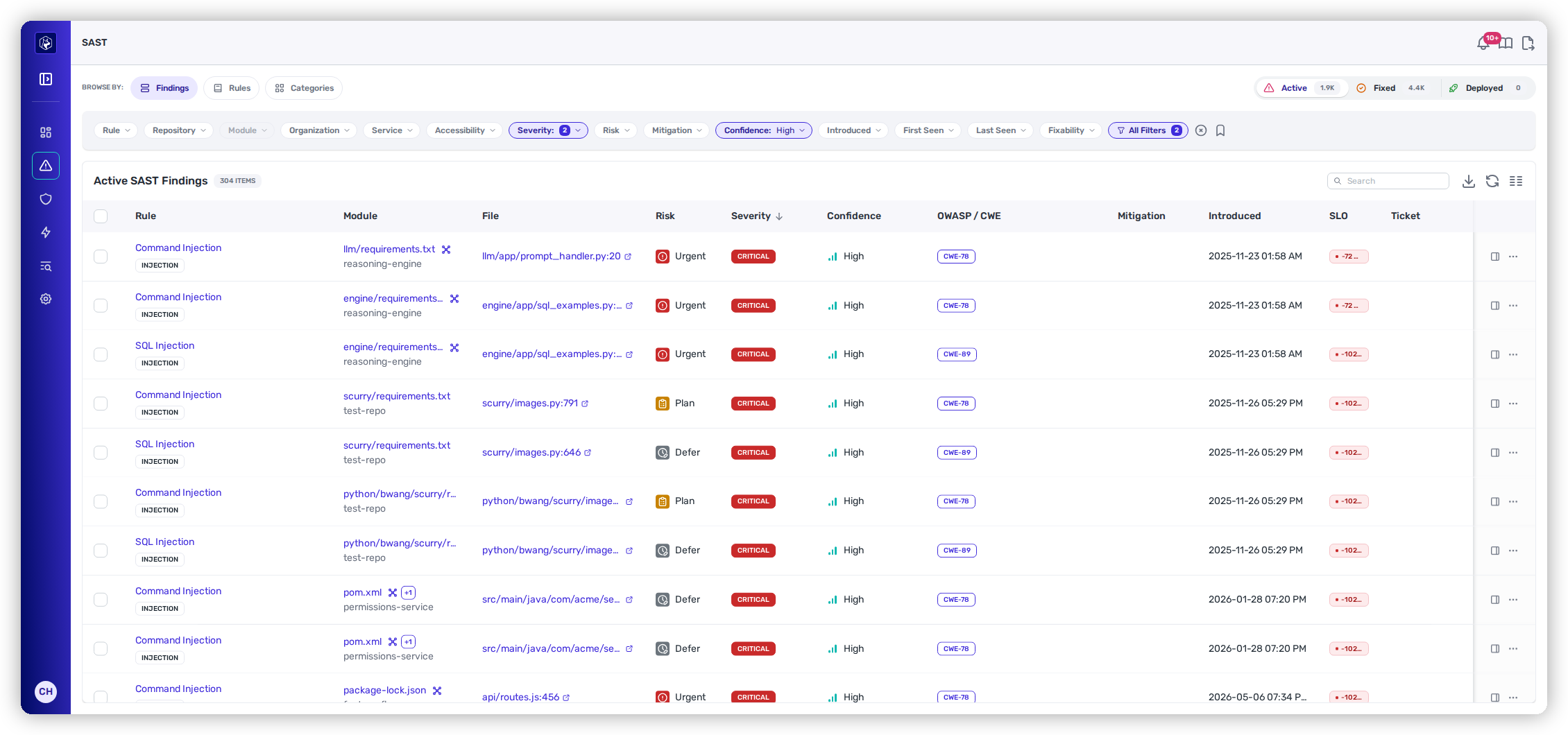
The **Findings** view (**Security → SAST →** *Findings*) lists your code-security findings — **one row per weakness Heeler found in your source**. It opens on **Active** with two filters already applied — **Severity** and **Confidence: High** — so you land on what's most likely real and serious rather than the raw firehose. Clear those chips any time to see everything.

<figure><img src="https://414480750-files.gitbook.io/~/files/v0/b/gitbook-x-prod.appspot.com/o/spaces%2FXP3dp2kecwKA2KvYkntz%2Fuploads%2Fgit-blob-b6ed9633f5541e727c718aff6605ad87b83f757c%2Fcc-sast-list.png?alt=media" alt="The SAST Findings view: lifecycle tabs, Browse-by rail, filter toolbar, and the findings table."><figcaption><p>The Findings view — opening on Active, High-confidence, one row per finding.</p></figcaption></figure>

## Active, Fixed, and Deployed

Like every finding type, SAST findings move through a lifecycle (see [the findings lifecycle](/mrecEO40m5D6bt7Pq5pE/findings.md#the-findings-lifecycle) for what each state means), and the tabs above the table switch between the stages:

{% tabs %}
{% tab title="Active" %}
**Open work** — a weakness present in your code and not yet fixed. This is the default tab.
{% endtab %}

{% tab title="Fixed" %}
**Fixed in code** — the weakness has been resolved in source. This tab adds a **Time to Fix** column.
{% endtab %}

{% tab title="Deployed" %}
**Rolled out** — the fix has reached your running deployments. For code findings this is often **0** until a fix ships, and unlike dependencies there's no per-deployment breakdown — SAST tracks the fix in code and its rollout, not a fleet of vulnerable artifacts.
{% endtab %}
{% endtabs %}

{% hint style="info" %}
The **Browse by** rail on the left offers three lenses on the same data: **Findings** (this page — every individual weakness), **Rules** (grouped by detection rule), and **Categories** (grouped by weakness class). See [Rules and Categories](/mrecEO40m5D6bt7Pq5pE/findings/code-security-sast/rules-and-categories.md) for the two aggregate views.
{% endhint %}

### What the columns mean

| Column         | What it shows                                                                                                                                |
| -------------- | -------------------------------------------------------------------------------------------------------------------------------------------- |
| **Rule**       | The detection that fired, with a **category** tag (e.g. INJECTION). Links to the finding detail.                                             |
| **Module**     | The module, and the repository under it.                                                                                                     |
| **File**       | The source file and line — links out to the code.                                                                                            |
| **Risk**       | The Heeler Risk band — **Urgent / Plan / Defer**. See [Prioritization](/mrecEO40m5D6bt7Pq5pE/findings/code-security-sast/prioritization.md). |
| **Severity**   | Critical / High / Medium / Low / None.                                                                                                       |
| **Confidence** | How sure Heeler is the finding is real — **High / Medium / Low**.                                                                            |

**OWASP / CWE**, **Mitigation** (any applied override), **Introduced**, **SLO**, and **Ticket** are available too — pinned or shown from [Manage Columns](#column-layout).

## Finding dates

**Introduced**, **First seen**, and **Last seen** mean the same thing for every finding type in Heeler, and the date filters built on them behave the same way — so a date range you reason about while triaging dependencies carries the same meaning when you switch to code findings or secrets.

| Term           | What it means                                                                                             |
| -------------- | --------------------------------------------------------------------------------------------------------- |
| **Introduced** | When the finding entered your code — the change that brought it in, not when Heeler noticed.              |
| **First seen** | When Heeler first detected it. Later than **Introduced** for anything that predates onboarding or a scan. |
| **Last seen**  | The most recent analysis that still found it. A finding that stops appearing stops advancing.             |

The distinction that matters in practice: **Introduced** is a fact about your code, while **First seen** is a fact about Heeler's visibility of it. Age and SLO are measured from **Introduced**, which is why a repository onboarded today can immediately show findings that are already overdue.

## Working the list

### Search

The **Search** box filters the current tab as you type, matching the rule name, file, and finding text. Clear it with the inline ✕.

### Filtering

SAST carries a rich filter set — the toolbar chips cover the common ones, and **All Filters** opens the rest (star any to pin it; *Restore default layout* resets). Stacking chips narrows the list (OR within a filter, AND across filters).

| Filter                                                  | Options / notes                                                                                                     |
| ------------------------------------------------------- | ------------------------------------------------------------------------------------------------------------------- |
| **Rule**                                                | Any detection rule.                                                                                                 |
| **Repository / Module / Organization / Service / Team** | Scope your estate (Module enables once a Repository is picked).                                                     |
| **Accessibility**                                       | Internet Facing · Internet Accessible.                                                                              |
| **Severity**                                            | Critical · High · Medium · Low · None.                                                                              |
| **Risk**                                                | Urgent · Plan · Defer.                                                                                              |
| **Confidence**                                          | High · Medium · Low.                                                                                                |
| **Fixability**                                          | **Auto-Fixable** — Heeler can generate a validated fix.                                                             |
| **Mitigation**                                          | Any Active Mitigation · False Positive · Inaccurate Severity · Environment Configuration · Risk Acceptance · Other. |
| **Introduced / Last Seen**                              | Last 24 hours · 3 · 7 · 30 · 90 days · Over 90 days.                                                                |

The **All Filters** drawer adds SAST-specific lenses you won't find on dependencies: **Category** (Injection, Access Control, Data Exposure, Supply Chain, …), **Finding Type** (Taint, Graphscan, or Heuristic — how the weakness was detected), **Language** (filter by source language — see [Supported Technologies](/mrecEO40m5D6bt7Pq5pE/supported-technologies.md) for the full list), and **ASVS** (the verification requirement a finding maps to — see [OWASP ASVS](/mrecEO40m5D6bt7Pq5pE/standards-and-compliance/owasp-asvs.md)). It also carries **Application**, **Domain** (the business grouping above applications — see [Domains](/mrecEO40m5D6bt7Pq5pE/catalog/domains.md)), **Has Ticket**, **Subgroup**, and **SLO Status**.

<figure><img src="https://414480750-files.gitbook.io/~/files/v0/b/gitbook-x-prod.appspot.com/o/spaces%2FXP3dp2kecwKA2KvYkntz%2Fuploads%2Fgit-blob-ae872851d99a51163f2869b4506d773ed9c98f3e%2Fcc-sast-allfilters.png?alt=media" alt="The SAST All Filters drawer."><figcaption><p>All Filters — including the SAST-specific Category, Finding Type, and Language.</p></figcaption></figure>

When filters are active, the **All Filters** badge shows the count and a **✕** clears them all at once.

### Saved views

The **bookmark icon** at the end of the filter row opens **Presets** — your saved views. Click one to apply it; choose **Save current filters…** (enabled once at least one filter is set) to name the current filter set and set its **Visibility** — **Private**, **Team**, or **Organization**. It works exactly like [SCA saved views](/mrecEO40m5D6bt7Pq5pE/findings/open-source-sca/findings.md#saved-views).

### Sorting

Click a column header to sort; click again to reverse. Sorting by **Severity** or **Risk** floats the most serious findings to the top.

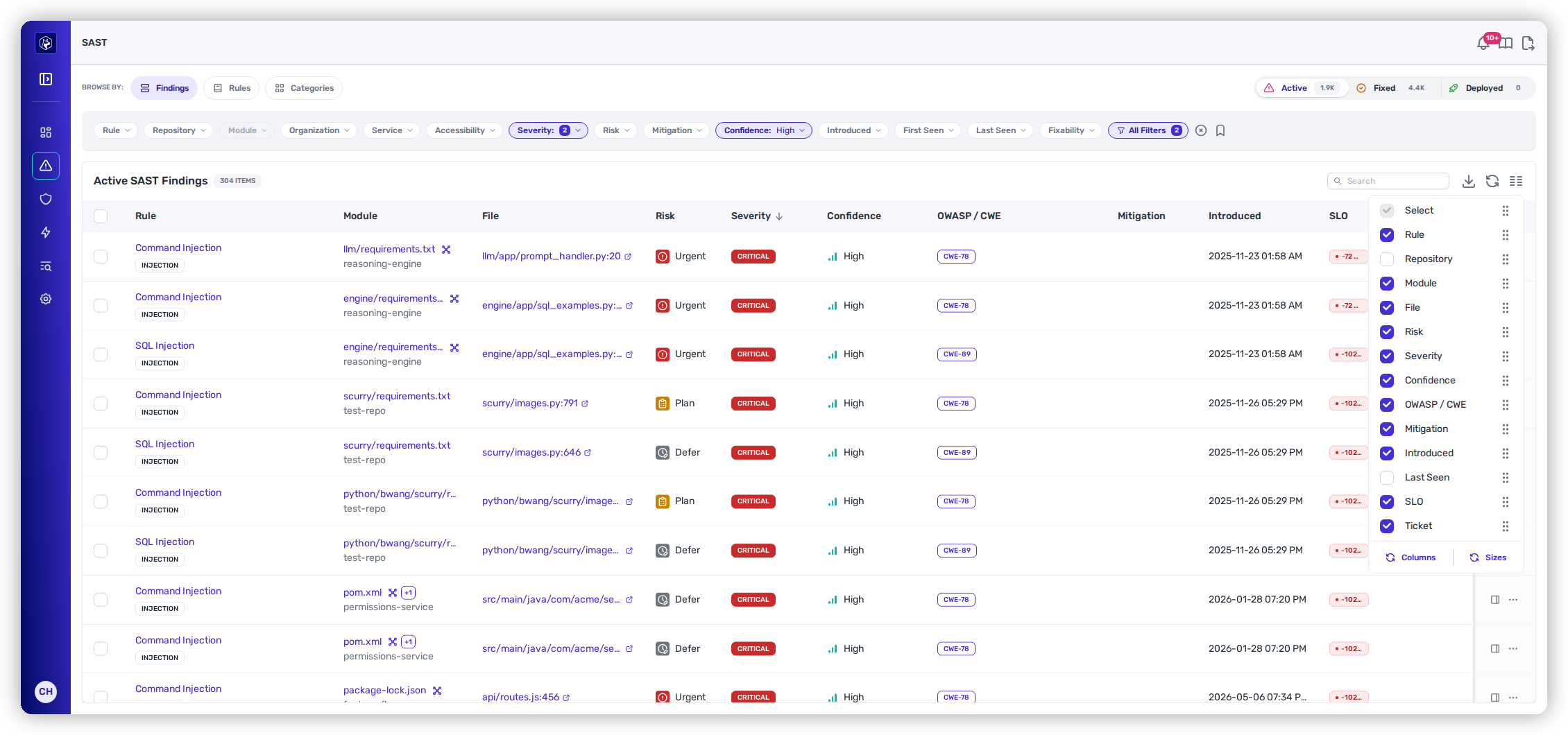
### Column layout

The **Manage Columns** icon lets you show or hide columns, drag to reorder, and set widths on a **Sizes** tab. Your layout is remembered per lifecycle tab.

<figure><img src="https://414480750-files.gitbook.io/~/files/v0/b/gitbook-x-prod.appspot.com/o/spaces%2FXP3dp2kecwKA2KvYkntz%2Fuploads%2Fgit-blob-20b8ed5c956c1fb2ec4cd34f2cbfce66d54acaaf%2Fcc-sast-columns.png?alt=media" alt="The SAST Manage Columns panel."><figcaption><p>Show, hide, reorder, and resize columns.</p></figcaption></figure>

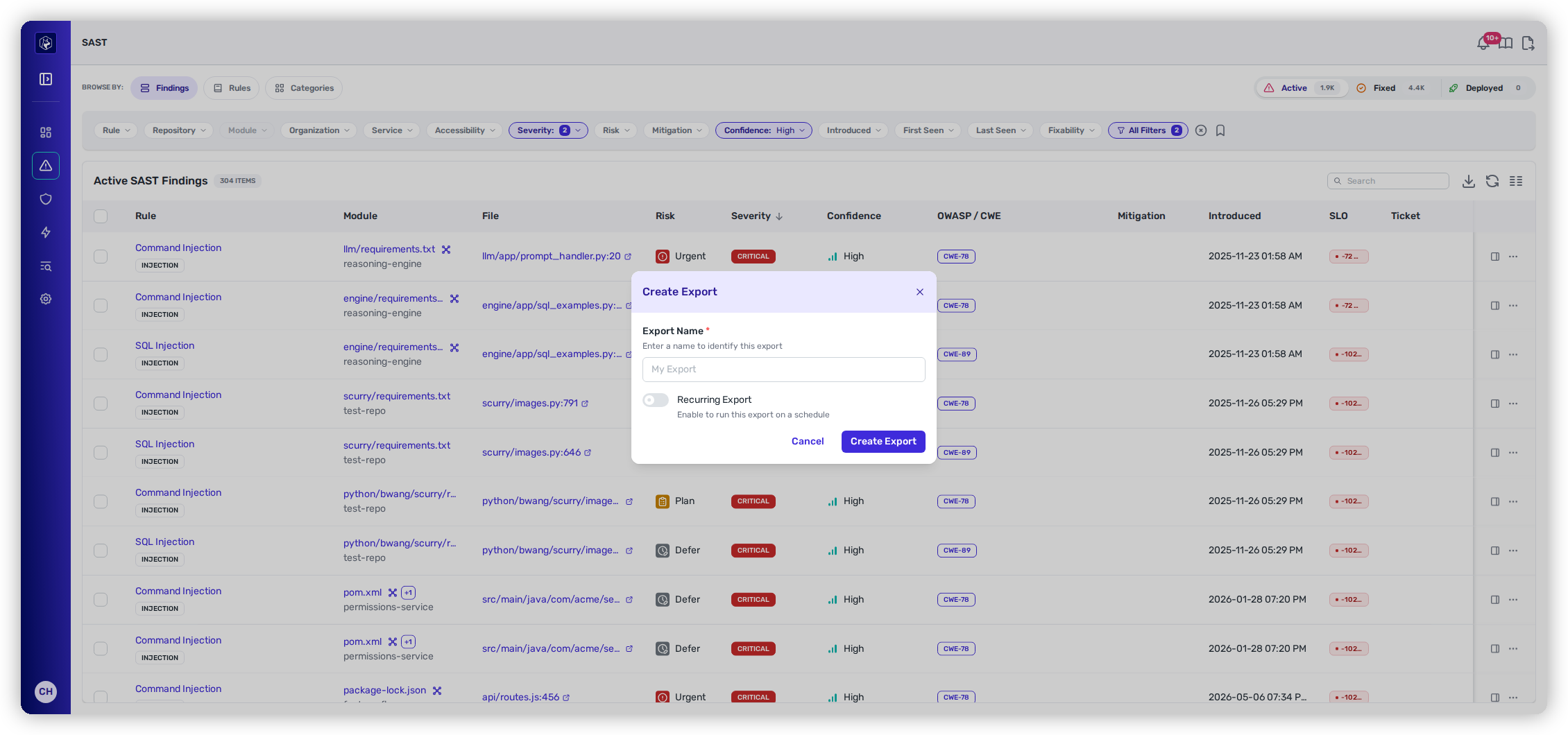
### Export

The **Export Data** icon opens **Create Export** — name it, and optionally turn on **Recurring Export** with a **Frequency** to have Heeler regenerate it on a schedule.

<figure><img src="https://414480750-files.gitbook.io/~/files/v0/b/gitbook-x-prod.appspot.com/o/spaces%2FXP3dp2kecwKA2KvYkntz%2Fuploads%2Fgit-blob-a13dc0c838361b904d46d2156237e4d87d06a4fb%2Fcc-sast-export.png?alt=media" alt="The SAST Create Export dialog."><figcaption><p>Export the current view, optionally on a recurring schedule.</p></figcaption></figure>

### Refresh and scrolling

The **Refresh** icon re-runs the current query in place. The list loads more rows as you scroll — the *N ITEMS* count next to the heading is the total.

{% hint style="info" %}
There's no multi-select on the findings list — you fix a SAST finding one at a time: from its **Suggested Fix** on the detail page, from **Fix Now** on an auto-fixable row (see [Row actions](#row-actions)), or automatically through [SAST Auto-Fix](/mrecEO40m5D6bt7Pq5pE/fix/sast-auto-fix.md) and [PR Guardrails](/mrecEO40m5D6bt7Pq5pE/prevent/pr-guardrails/guardrail-types/sast-guardrails.md).
{% endhint %}

***

## Reading a finding

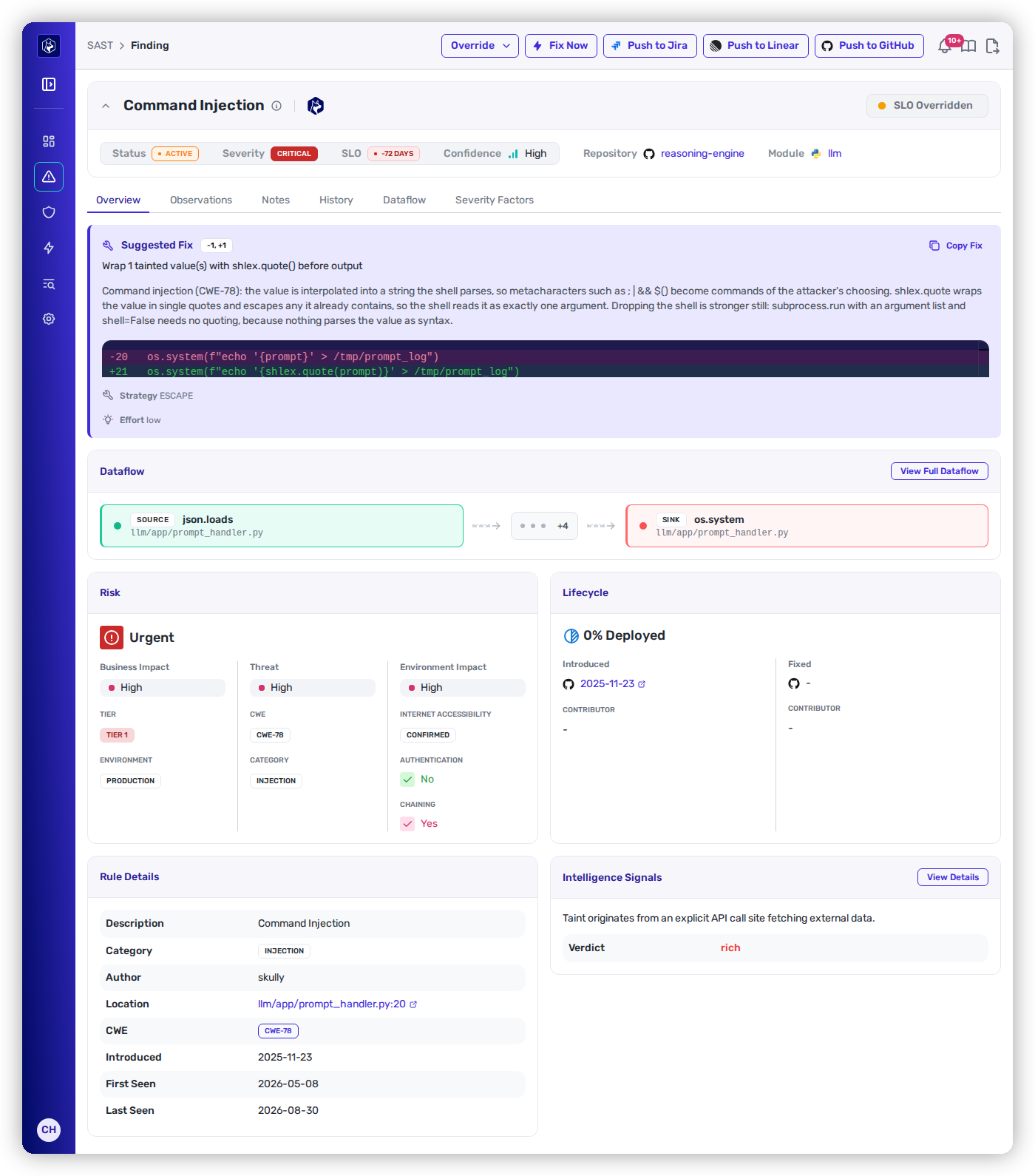
Open a finding to its detail. The header carries **Repository**, **Module**, **Status**, **Severity**, **SLO**, and **Confidence**, with **Override**, **Push to Jira**, **Push to Linear**, and **Push to GitHub** actions — and **five tabs**.

<figure><img src="https://414480750-files.gitbook.io/~/files/v0/b/gitbook-x-prod.appspot.com/o/spaces%2FXP3dp2kecwKA2KvYkntz%2Fuploads%2Fgit-blob-e909e23973ec05b1b457035c9149a90a7b4d7eae%2Fcc-sast-detail.png?alt=media" alt="A SAST finding detail: Suggested Fix, data flow, risk, lifecycle, and intelligence signals."><figcaption><p>The Overview tab — the validated fix, the source-to-sink trace, the Risk breakdown, and Intelligence Signals.</p></figcaption></figure>

### Overview

The Overview tab is built to get you from "what is this?" to "here's the fix" quickly:

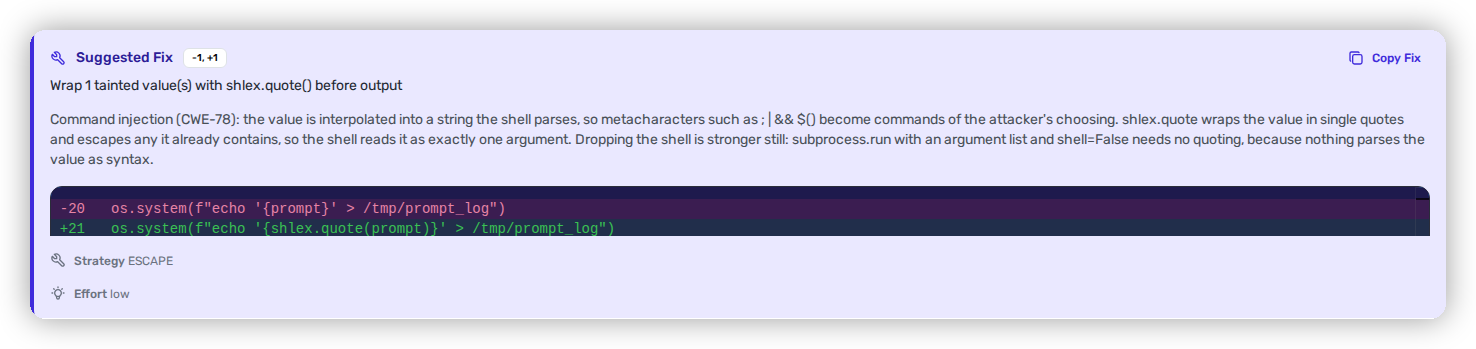
* **Suggested Fix** — a proposed change with a **± line badge**, a plain-language summary (e.g. *"Wrap 1 tainted value with `shlex.quote()` before output"*), the unified **diff**, an **Effort** rating, and a **Copy Fix** button.
* **Data flow** — a compact **SOURCE → SINK** trace, with **View Full Dataflow** for the complete path.
* **Risk** — the band and the three impacts behind it (see below).
* **Lifecycle** — a **% Deployed** header with **Introduced** and **Fixed** stages and their contributors. (Code findings track the fix through code and rollout; there's no per-deployment tab as there is for dependencies.)
* **Rule Details** — description, category, location (file : line : col), CWE, and first/last seen.
* **Intelligence Signals** — a plain-language signal about the finding, with a **Verdict** and **Confidence**. The Verdict here reflects the **quality of the evidence** behind the finding (how well-supported the taint proof is) — not a benign/malicious classification.

<figure><img src="https://414480750-files.gitbook.io/~/files/v0/b/gitbook-x-prod.appspot.com/o/spaces%2FXP3dp2kecwKA2KvYkntz%2Fuploads%2Fgit-blob-81294e2ee1a6bb43880b035a696d1a8b8f15f31b%2Fcc-sast-fix.png?alt=media" alt="The Suggested Fix panel with a diff, Copy Fix, and effort rating."><figcaption><p>Suggested Fix — a concrete diff you can copy, with an effort estimate.</p></figcaption></figure>

#### How the Risk band is set

The **Risk** panel shows the three impacts that combine into the band — the same model explained in full on [Prioritization](/mrecEO40m5D6bt7Pq5pE/findings/code-security-sast/prioritization.md):

* **Business impact** — the service's **Tier** and **Environment**.
* **Threat** — the weakness's **CWE** and **Category** (e.g. CWE-78, Injection).
* **Environment impact** — how exposed the vulnerable path is, from three factors: **Internet Accessibility** (a labeled badge, e.g. *Infrastructure* or *Not Accessible*), **Authentication**, and **Chaining**. Internet-accessible **and** unauthenticated is the combination that pushes exposure highest. ([Prioritization](/mrecEO40m5D6bt7Pq5pE/findings/code-security-sast/prioritization.md#seeing-it-on-a-finding) explains how the yes/no factor colors are read.)

### Data flow

The **Data flow** tab is the proof: the full taint trace, numbered step by step from **SOURCE** to **SINK**, each hop labeled by kind (SOURCE, ASSIGN, METHOD\_CALL, CONCAT, CALL\_ARG, SINK) with its file and line, plus the count of path hops and files crossed, a description, and the evidence.

<figure><img src="https://414480750-files.gitbook.io/~/files/v0/b/gitbook-x-prod.appspot.com/o/spaces%2FXP3dp2kecwKA2KvYkntz%2Fuploads%2Fgit-blob-f5c5695043855686f846abcb62e104624b27d3a6%2Fcc-sast-dataflow.png?alt=media" alt="The full data-flow tab tracing source to sink."><figcaption><p>The Dataflow tab — the numbered source-to-sink path Heeler traced.</p></figcaption></figure>

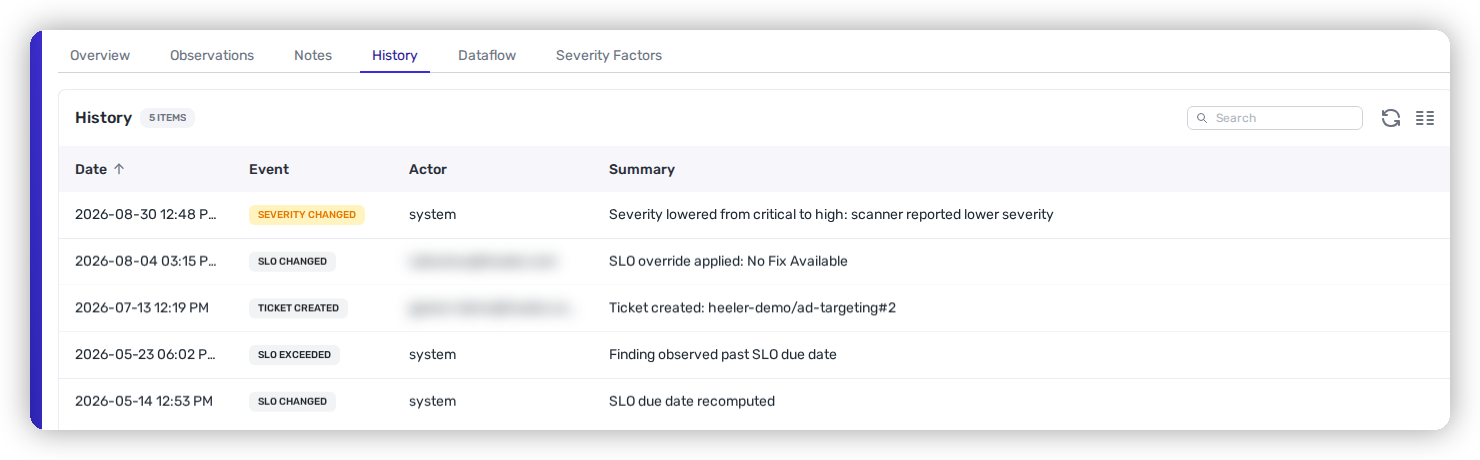
### History

Every recorded change to the finding, newest first — **Date**, **Event**, **Actor**, and a plain-language **Summary**.

<figure><img src="https://414480750-files.gitbook.io/~/files/v0/b/gitbook-x-prod.appspot.com/o/spaces%2FXP3dp2kecwKA2KvYkntz%2Fuploads%2Fgit-blob-be19a292c708b0a037dbefe5981d5a84c26c5b1f%2Fcc-sast-history.png?alt=media" alt="The History tab on a SAST finding, listing severity changes, SLO changes, an exceeded SLO and a ticket creation, each with its date, actor and summary."><figcaption><p>History — the finding's audit trail, including what Heeler changed on its own.</p></figcaption></figure>

It records the finding's whole life: **Created**, triage and fix status changes, **Severity Changed** and **Risk Changed**, suppression and false-positive reports and their reversals, **Fixed**, **Deployed**, **Reopened**, assignment, SLO changes and SLO breaches, ticket creation and updates, mitigations, and notes added.

The **Actor** column is the useful part. It reads `system` where Heeler made the change itself — a severity lowered because the scanner reported differently, an SLO due date recomputed, a finding observed past its due date — and a person where someone acted. That is how you tell "our policy changed" from "the finding changed".

{% hint style="info" %}
A **mitigation removed** entry records that someone revoked the dismissal. A **mitigation expired** entry records that the expiry set on it lapsed. The history keeps the two distinct.
{% endhint %}

### Observations, Notes, and Severity Factors

* **Observations** — the raw detections behind the finding (Observed At, Match, Score, Severity, File, Lines, Message).
* **Notes** — a log of notes and automatic events (such as SLO changes), with **Add Note**.
* **Severity Factors** — the signals that raised or lowered the finding's severity and confidence (for example, a *Concrete Call Site*), each explained.

***

## Recording an exception

When a finding shouldn't follow the default treatment, open the **Override** dropdown in the detail header — it offers **Risk** and **SLO**. The same two are on the row **⋯** menu, where they read **Override Risk** and **Override SLO**.

Each modal opens with read-only context, then a toggle that enables the fields. Leave the toggle off and nothing is recorded; switch it **off** on an existing override and saving **removes** that override.

### Several findings at once

Select findings with the row checkboxes and a bar appears at the foot of the table showing how many are selected, with **Override Risk** and **Override SLO** beside the count. The same modal opens, and what you record applies to every selected finding — so a decision that covers a whole rule, module, or triage session is one action rather than one per finding.

Selecting the header checkbox selects the rows currently loaded. Filter the table down to exactly what the decision covers before selecting, since the override applies to everything in the selection.

The same bulk actions are on the [SCA Findings](/mrecEO40m5D6bt7Pq5pE/findings/open-source-sca/findings.md) table, and License Violations offers bulk license overrides the same way.

{% tabs %}
{% tab title="Risk" %}
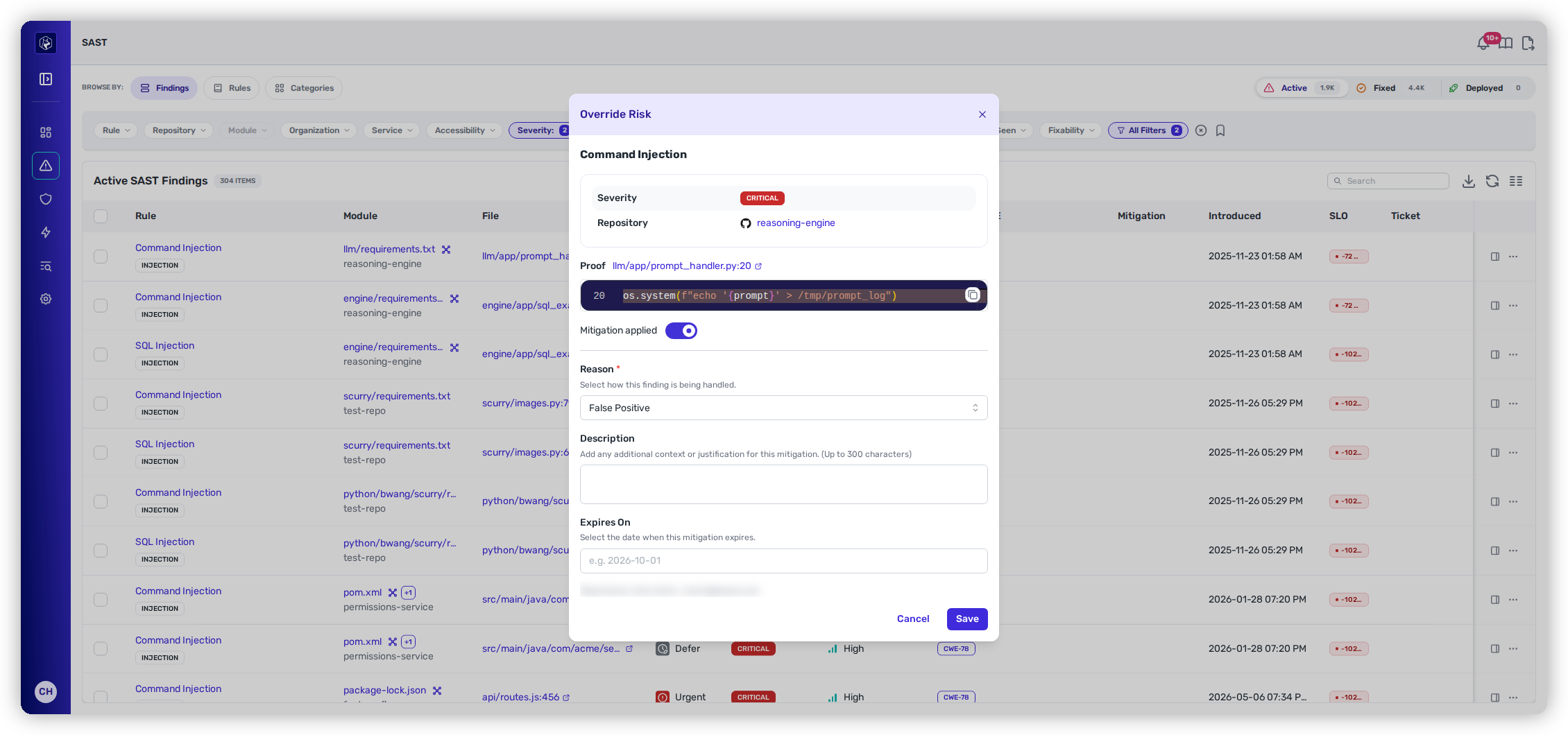
Records that the finding is mitigated or misjudged. For context it shows the rule name, the severity, the repository, and a **Proof** snippet of the code at the finding's location, with a link out to that file and line in your repository.

Turn on **Mitigation applied**, then:

* **Reason** *(required)* — False Positive · Risk Acceptance · Environment Configuration · Inaccurate Severity · Other
* **Description** — optional justification, up to 300 characters.
* **Expires On** — optional. When set, the override lapses on that date and the finding returns to its automatic risk; left empty, it stands until someone removes it. You can't pick a date in the past.

The modal records who you are on save, so the override carries its author.
{% endtab %}

{% tab title="SLO" %}
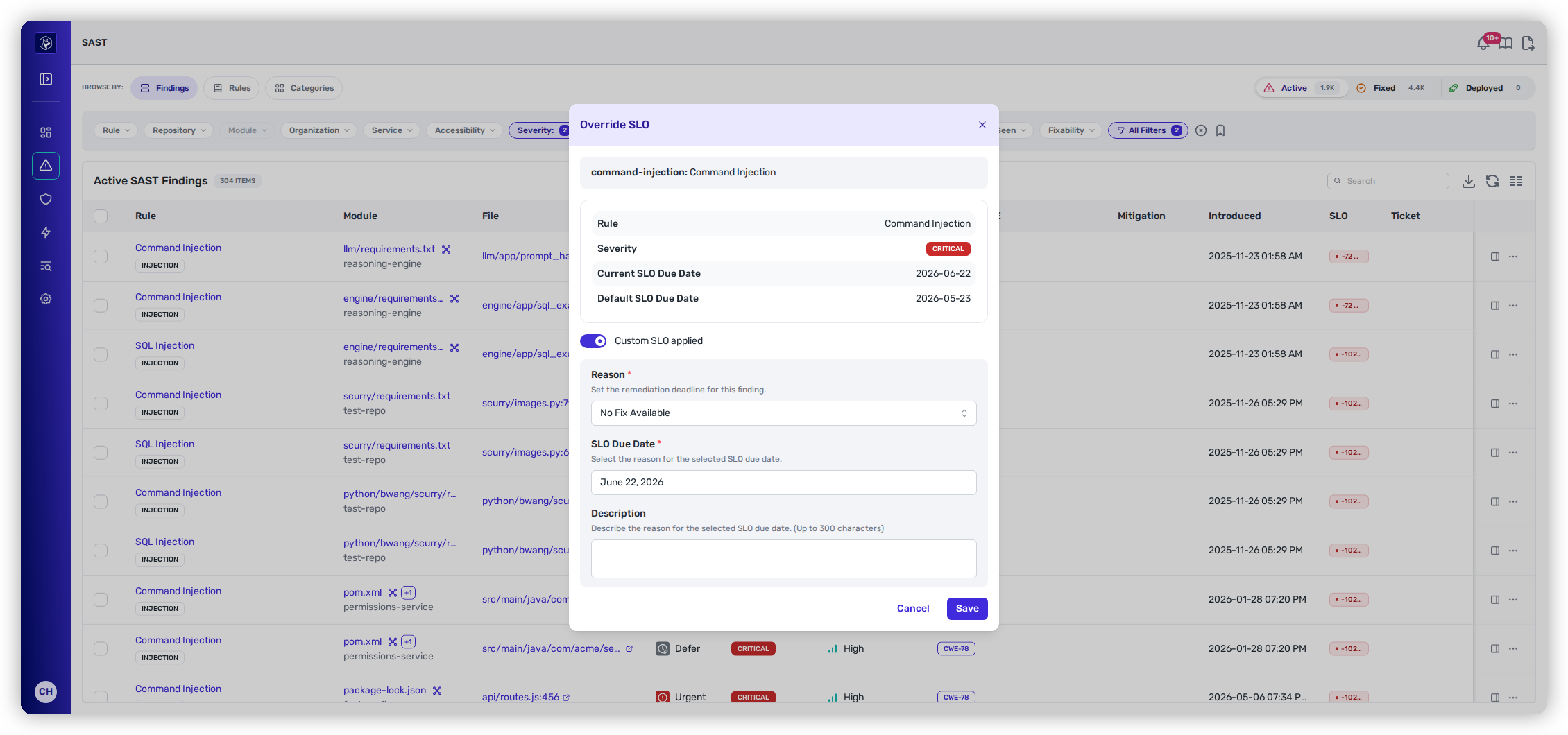
Sets a custom remediation deadline. For context it shows the rule, the severity, and both the current and default SLO due dates.

Turn on **Custom SLO applied**, then:

* **Reason** *(required)* — No Fix Available · Fix Complexity · Not a Priority · Other
* **SLO Due Date** *(required)* — bounded in both directions. It can't be earlier than the default due date (or today, if that date has already passed), and it can't be more than **one year** past the original. An SLO override extends a deadline; it can't pull one in or defer a finding indefinitely.
* **Description** — optional, up to 300 characters.
  {% endtab %}
  {% endtabs %}

<figure><img src="https://414480750-files.gitbook.io/~/files/v0/b/gitbook-x-prod.appspot.com/o/spaces%2FXP3dp2kecwKA2KvYkntz%2Fuploads%2Fgit-blob-58f0c7940182861cb644b27b7658da30a215259c%2Fcc-sast-override-risk.png?alt=media" alt="The Override Risk modal showing the Proof snippet and the Mitigation applied toggle."><figcaption><p>Override Risk — the Proof snippet at the finding's location, the <strong>Mitigation applied</strong> toggle, and the SAST-specific reason list.</p></figcaption></figure>

<figure><img src="https://414480750-files.gitbook.io/~/files/v0/b/gitbook-x-prod.appspot.com/o/spaces%2FXP3dp2kecwKA2KvYkntz%2Fuploads%2Fgit-blob-831943711a8a2a7733b34ad39bc25022e31ad949%2Fcc-sast-override-slo.png?alt=media" alt="The Override SLO modal with Custom SLO applied turned on, revealing the fields."><figcaption><p>Override SLO — current and default due dates for context, and the fields revealed once <strong>Custom SLO applied</strong> is on.</p></figcaption></figure>

After you save, the finding's header carries a **Risk Overridden** or **SLO Overridden** badge — hover it for the reason and expiry, or open **View Override Details** to go straight back into the modal.

Finding overridden findings again works differently on SAST than on dependencies. There's no "Risk Override" or "SLO Override" filter here:

* For risk overrides, use the **Mitigation** filter — **Any Active Mitigation** for all of them, or a specific reason.
* There's no SLO-override filter on this list. Use **SLO Status**, or the register below.

To review exceptions across the whole program rather than one finding at a time, see [Exceptions and Overrides](/mrecEO40m5D6bt7Pq5pE/operate/exceptions-and-overrides.md). SAST **SLO** overrides appear in that register; SAST **risk** overrides don't, so the **Mitigation** filter is how you audit those.

## Row actions

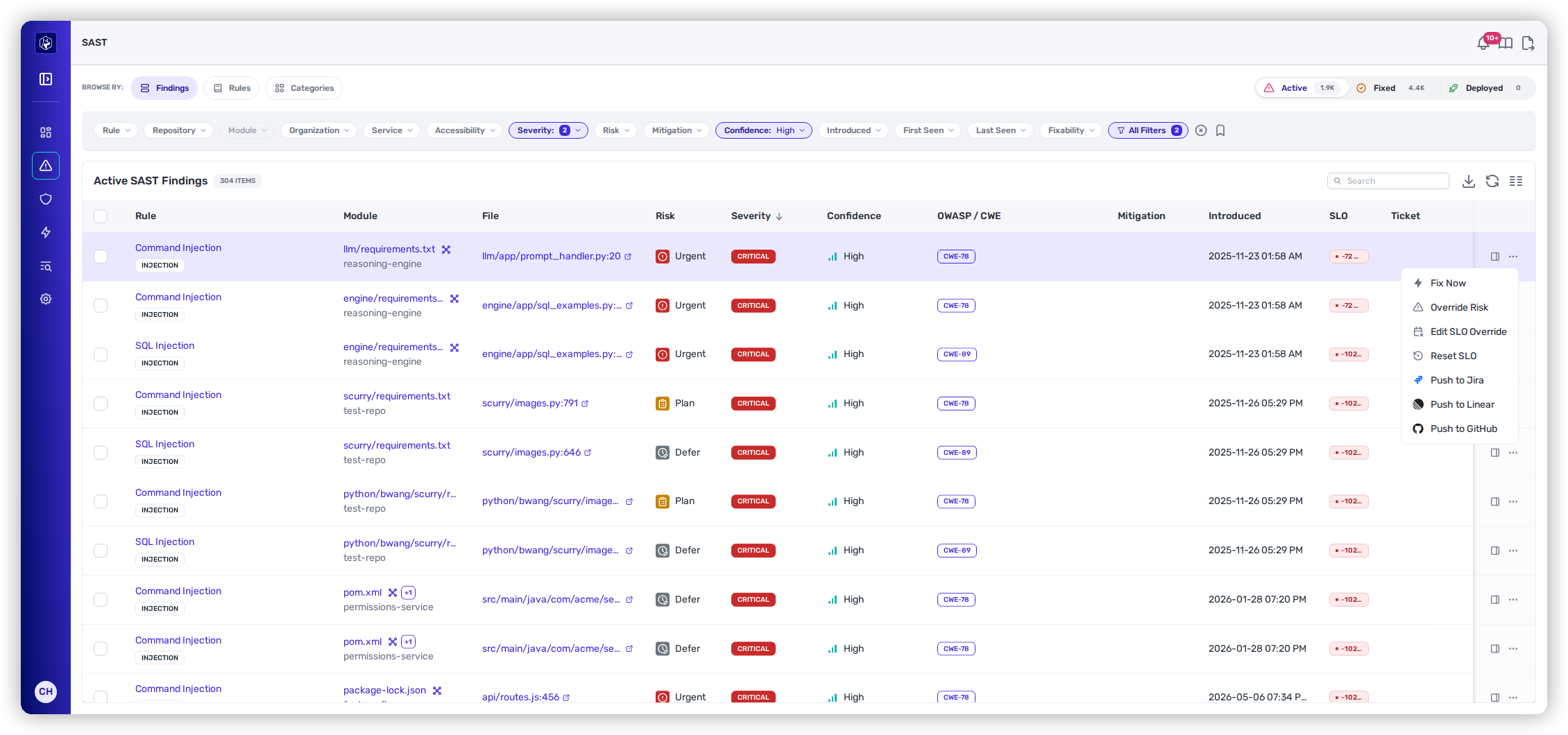
Each row has a **View Details** icon and an **Actions (⋯)** menu. The menu is built from the finding's state, so not every entry appears on every row:

| Action                                                     | What it does                                                                            | When it appears                                                                                                                                                                                                                                                                                                                                                                                                                            |
| ---------------------------------------------------------- | --------------------------------------------------------------------------------------- | ------------------------------------------------------------------------------------------------------------------------------------------------------------------------------------------------------------------------------------------------------------------------------------------------------------------------------------------------------------------------------------------------------------------------------------------ |
| **Fix Now**                                                | Generates a validated fix and opens a pull request.                                     | On auto-fixable findings, for users who can trigger remediation. Where the agent cannot carry the fix through, the entry is withheld or shown disabled with the reason on the button — for example **Fix Now (ticket required)** when your tenant requires a ticket and the finding has none. The full set of states, and what resolves each, is on [SCA Auto-Fix](/mrecEO40m5D6bt7Pq5pE/fix/sca-auto-fix.md#when-fix-now-is-unavailable). |
| **Override Risk**                                          | Opens the risk exception modal — see [Recording an exception](#recording-an-exception). | Always. Reads **Edit Risk Override** once one is in place.                                                                                                                                                                                                                                                                                                                                                                                 |
| **Override SLO**                                           | Opens the SLO exception modal.                                                          | Once Heeler has computed a default SLO date for the finding. Reads **Edit SLO Override** once one is in place.                                                                                                                                                                                                                                                                                                                             |
| **Reset SLO**                                              | Drops the override and returns the finding to its default due date.                     | An **additional** entry alongside **Edit SLO Override**, only while an SLO override exists.                                                                                                                                                                                                                                                                                                                                                |
| **Push to Jira** · **Push to Linear** · **Push to GitHub** | Creates a linked ticket.                                                                | Each appears only when that connection is configured. Jira and Linear read **Unlink from Jira** / **Unlink from Linear** once the finding is linked to that provider.                                                                                                                                                                                                                                                                      |

Tickets created from a SAST finding carry SAST-shaped content — the weakness with its CWE/OWASP references, the source→sink data flow, and the suggested fix — including when they're pushed through team-based routing.

<figure><img src="https://414480750-files.gitbook.io/~/files/v0/b/gitbook-x-prod.appspot.com/o/spaces%2FXP3dp2kecwKA2KvYkntz%2Fuploads%2Fgit-blob-e9ab514bea9b1b82e6ffb5d0995678d29e262499%2Fcc-sast-rowmenu.png?alt=media" alt="The SAST row actions menu."><figcaption><p>The row ⋯ menu — override the finding or push it to your tracker.</p></figcaption></figure>

## Related

* [Prioritization](/mrecEO40m5D6bt7Pq5pE/findings/code-security-sast/prioritization.md) — how the Risk band is set.
* [Rules and Categories](/mrecEO40m5D6bt7Pq5pE/findings/code-security-sast/rules-and-categories.md) — the two aggregate views.
* [SAST Guardrails](/mrecEO40m5D6bt7Pq5pE/prevent/pr-guardrails/guardrail-types/sast-guardrails.md) · [SAST Auto-Fix](/mrecEO40m5D6bt7Pq5pE/fix/sast-auto-fix.md)


---

# Agent Instructions
This documentation is published with GitBook. GitBook is the documentation platform designed so that both humans and AI agents can read, navigate, and reason over technical content effectively. Learn more at gitbook.com.

## Querying This Documentation
If you need additional information that is not directly available in this page, you can query the documentation dynamically by asking a question.

Perform an HTTP GET request on the current page URL with the `ask` query parameter, and the optional `goal` query parameter:

```
GET https://docs.heeler.com/mrecEO40m5D6bt7Pq5pE/findings/code-security-sast/findings.md?ask=<question>&goal=<endgoal>
```

`ask` is the immediate question: it should be specific, self-contained, and written in natural language.
`goal` is optional and describes the broader end goal you are ultimately trying to accomplish on behalf of the user. GitBook uses it to tailor the answer towards what is most useful for that goal.

The response will contain a direct answer to the question and relevant excerpts and sources from the documentation.

Use this mechanism when the answer is not explicitly present in the current page, you need clarification or additional context, or you want to retrieve related documentation sections.