> For the complete documentation index, see [llms.txt](https://docs.heeler.com/mrecEO40m5D6bt7Pq5pE/llms.txt). Markdown versions of documentation pages are available by appending `.md` to page URLs; this page is available as [Markdown](https://docs.heeler.com/mrecEO40m5D6bt7Pq5pE/findings/code-security-sast/prioritization.md).

# SAST Prioritization

How Heeler decides which code findings to fix first — sorting each weakness into Urgent, Plan, or Defer by how exposed and reachable the vulnerable path really is, not just its severity.

A CWE and a severity tell you what *class* of weakness you're looking at. They don't tell you whether *this* instance, in *this* service, is something an attacker could reach today. That's the gap Heeler closes. Every code finding is scored against **three impacts answered from your own code and environment** — how much the service is worth, how exposed the weak path is, and how dangerous the weakness class is — then combined into a single band.

## Urgent, Plan, and Defer

| Level         |                 | What it means                                                                                                                           |
| ------------- | --------------- | --------------------------------------------------------------------------------------------------------------------------------------- |
| 🔴 **Urgent** | **Fix now**     | A dangerous weakness on an exposed, high-value service — the kind an attacker could reach and abuse right now.                          |
| 🟠 **Plan**   | **Schedule it** | Real risk, but not immediate — lower exposure, or a lower-tier service. Fix within its SLO window.                                      |
| ⚪ **Defer**   | **Track it**    | Not currently exposed — an internal path with nothing sensitive or chainable in reach, or on a low-value service. Watched, not ignored. |

{% hint style="info" %}
**Levels aren't static.** As your services change — a new internet-facing route, a tier change, a fresh threat-intelligence signal — Heeler re-scores, so a finding's priority always reflects your environment today.
{% endhint %}

## Why SAST exposure is different

Your own code, by definition, runs — so for SAST the question isn't *whether* the code executes, it's **how exposed the vulnerable path is**. Heeler can answer that precisely because of two things it does the moment it analyzes your code:

**It discovers and models your APIs.** Heeler identifies the endpoints in your code and captures, for each: its **route** and **HTTP method(s)**, the **handler function** (and the middleware/handler chain in front of it), the **framework**, the **protocol** (HTTP/REST, WebSocket, and more), and whether the endpoint is **authenticated**.

**It traces the data flow to the sink.** Heeler's taint analysis follows untrusted input across functions and files — **interprocedurally and cross-file** — from the entry point (**source**) to the vulnerable operation (**sink**). That traced path is what connects a weakness to the endpoint that can actually reach it.

<figure><img src="https://414480750-files.gitbook.io/~/files/v0/b/gitbook-x-prod.appspot.com/o/spaces%2FXP3dp2kecwKA2KvYkntz%2Fuploads%2Fgit-blob-f5c5695043855686f846abcb62e104624b27d3a6%2Fcc-sast-dataflow.png?alt=media" alt="A finding&#x27;s Dataflow card: a SOURCE (json.loads) connected through intermediate steps to a SINK (os.system), across a file."><figcaption><p>The traced path — from a <strong>source</strong> (untrusted input) through intermediate steps to the <strong>sink</strong> (the vulnerable operation). Exposure is judged from this real path, not from whether the service merely happens to be public.</p></figcaption></figure>

## What sets the level: business, exposure, and threat

Three impacts, each reduced to **Low / Medium / High**. Business impact is scored on the same grid as [dependencies](/mrecEO40m5D6bt7Pq5pE/findings/open-source-sca/prioritization.md#business-impact-how-much-the-service-is-worth), though it combines differently at the final step (see [How the level is decided](#how-the-level-is-decided)); Environment and Threat are computed specifically for code.

### Business impact — how much the service is worth

A grid of the affected service's **tier (1–4)** and the **environment** it runs in. Production-like environments keep impact high; non-production drops it to Low regardless of tier; Tier 3–4 in production caps at Medium. For code findings, Low here caps the final level at **Plan** rather than deferring it.

|              | Production · Corporate · DR · *(Unassigned)* | Staging · Test · Dev · Sandbox |
| ------------ | -------------------------------------------- | ------------------------------ |
| **Tier 1–2** | 🔴 High                                      | ⚪ Low                          |
| **Tier 3–4** | 🟠 Medium                                    | ⚪ Low                          |

A finding takes the tier and environment of the code it lives in. (A service with no environment set yet is treated as high-impact, so nothing is under-counted by default.)

### Environment impact — how exposed the weak path is

Four factors set the level; a mitigation can then drop it. The whole assessment is **path-driven** — it reflects the reachable API surface in front of the weakness, established from the traced source→sink flow above.

<table><thead><tr><th width="185">Factor</th><th>What Heeler checks</th><th width="130">Effect</th></tr></thead><tbody><tr><td><strong>Internet accessibility</strong></td><td>Two signals combined — see below.</td><td>↑ Raises</td></tr><tr><td><strong>Authentication</strong></td><td>Does reaching the path require a logged-in user? Taken from the endpoint's auth context.</td><td>↓ Lowers when exposed</td></tr><tr><td><strong>Sensitive data</strong></td><td>Does the path handle <strong>credentials, PII/PHI, auth context, or financial data</strong> — including a <code>SELECT *</code> against a sensitive table (users, accounts, credentials, payments…)?</td><td>↑ Raises</td></tr><tr><td><strong>Chaining</strong></td><td>Can an attacker pivot — does the service reach a <strong>Tier-1 service</strong>, or is the endpoint an <strong>auth issuer</strong> (or reach one)?</td><td>↑ Raises</td></tr><tr><td><strong>Mitigation</strong></td><td>Is the finding <strong>suppressed</strong>, judged a <strong>false positive</strong>, or <strong>mitigated by a user</strong>?</td><td>↓ Collapses to Low</td></tr></tbody></table>

#### Internet accessibility

Heeler combines two signals rather than guessing from whether the service is public:

* **Infrastructure exposure** — an active deployment of the service runs on compute that's reachable from the internet (from your connected cloud and runtime).
* **Code-level network origin** — the traced data flow **starts at an inbound network entry point** (an HTTP or WebSocket handler that accepts external input), so the vulnerable path is reachable from outside.

The panel surfaces this as one of three states:

| State              | Meaning                                                                                                       |
| ------------------ | ------------------------------------------------------------------------------------------------------------- |
| **Confirmed**      | Exposed infrastructure **and** the path traces back to an inbound network entry point — the strongest signal. |
| **Infrastructure** | Exposed infrastructure, but the flow's origin is unknown — treated as accessible, pending better origin data. |
| **Not accessible** | Either the infrastructure isn't exposed, or the flow's origin is known and **not** a network entry point.     |

{% hint style="info" %}
**Path-driven, not service-driven.** Because it keys off the traced flow, a weakness whose input comes from a **non-network source** — a file, a scheduled job, config — is **Not accessible even on exposed infrastructure**. This factor records a reachable route from outside, which is not the same as a public service.
{% endhint %}

#### Sensitive data and mitigation — the two hidden inputs

Two of the five factors move the level but **don't** appear as their own Risk-panel rows:

* **Sensitive data** pushes the middle cases up — a weakness on a path that touches credentials, PII, auth context, or financial data (including a `SELECT *` over a sensitive table) is worth more to an attacker.
* **Mitigation** collapses the result to **Low** when the finding is **suppressed** by the scanner, carries a **false-positive** verdict, or has an active **user mitigation** (a recorded risk exception) — the same statement a dependency mitigation makes. *(Sanitizers observed in the data path are surfaced separately on the finding's **Severity Factors** tab; they inform the scanner's severity, but the environment-impact downgrade is driven by a suppression, false-positive verdict, or user mitigation, not by a sanitizer alone.)*

#### How the factors combine

Internet accessibility and authentication set the baseline; sensitive data or a chaining path lifts the middle cases; a mitigation then collapses the result to Low.

| Internet-accessible? | Authenticated? | Sensitive data or chaining? | Environment impact |
| -------------------- | -------------- | --------------------------- | ------------------ |
| Yes                  | No             | —                           | 🔴 High            |
| Yes                  | Yes            | Yes                         | 🔴 High            |
| Yes                  | Yes            | No                          | 🟠 Medium          |
| No                   | —              | Yes                         | 🟠 Medium          |
| No                   | —              | No                          | ⚪ Low              |

The intuition is the triage question you'd ask by hand: **who can reach this path?** Anyone on the internet — the most exposed there is. Any logged-in user — still exposed, lifted further if sensitive data or a pivot is in reach. Only someone already inside your network — then what matters isn't the login screen, it's whether **sensitive data or a chaining path** gives the weakness blast radius.

### Threat — how dangerous the weakness class is

There's no EPSS or KEV score for *your own* code, so SAST threat comes from the **weakness itself** and any active campaign context. Heeler routes each finding by its **lane**:

| Threat        | When                                                                                                                                                                     |
| ------------- | ------------------------------------------------------------------------------------------------------------------------------------------------------------------------ |
| 🔴 **High**   | The finding is an **indicator of compromise (IOC)**; or it matches an **active supply-chain campaign**; or its **CWE is a known-exploited weakness class** (KEV-ranked). |
| 🟠 **Medium** | The CWE is in the **CWE Top 25**; or it has a **high/medium CAPEC attack likelihood**; or it maps to an **OWASP** category; or it matches a **resolved** campaign.       |
| ⚪ **Low**     | Everything else.                                                                                                                                                         |

Two refinements sharpen this:

* **Language applicability** — Heeler drops CWEs that **can't manifest in the finding's language** (for example, memory-safety classes in a memory-safe language), so you're never warned about an impossible weakness.
* **Campaign elevation** — a CWE that an **active campaign is targeting** is promoted one level.

When a finding has no CWE threat data, threat falls back to the **rule's own severity**.

## How the level is decided

The three impacts combine through one fixed table. All three grids matter, because for code findings a **Low business impact does not automatically defer**:

{% tabs %}
{% tab title="High-value service" %}
Business impact **High**:

| Environment ↓ / Threat → | Low     | Medium    | High      |
| ------------------------ | ------- | --------- | --------- |
| **High**                 | 🟠 Plan | 🔴 Urgent | 🔴 Urgent |
| **Medium**               | 🟠 Plan | 🟠 Plan   | 🔴 Urgent |
| **Low**                  | ⚪ Defer | ⚪ Defer   | ⚪ Defer   |
| {% endtab %}             |         |           |           |

{% tab title="Mid-value service" %}
Business impact **Medium**:

| Environment ↓ / Threat → | Low     | Medium  | High      |
| ------------------------ | ------- | ------- | --------- |
| **High**                 | 🟠 Plan | 🟠 Plan | 🔴 Urgent |
| **Medium**               | 🟠 Plan | 🟠 Plan | 🟠 Plan   |
| **Low**                  | ⚪ Defer | ⚪ Defer | ⚪ Defer   |
| {% endtab %}             |         |         |           |

{% tab title="Non-production service" %}
Business impact **Low**:

| Environment ↓ / Threat → | Low     | Medium  | High    |
| ------------------------ | ------- | ------- | ------- |
| **High**                 | 🟠 Plan | 🟠 Plan | 🟠 Plan |
| **Medium**               | 🟠 Plan | 🟠 Plan | 🟠 Plan |
| **Low**                  | ⚪ Defer | ⚪ Defer | ⚪ Defer |

Code findings never reach **Urgent** at Low business impact — the worst case is **Plan**, so a non-production finding is scheduled rather than paged.
{% endtab %}
{% endtabs %}

Two rules explain most of what you'll see:

* **If it isn't exposed and touches nothing sensitive, it's Defer** — an internal path with no sensitive data or chaining route in reach isn't urgent, whatever its severity. Environment impact **Low** defers at every business impact.
* **If it's exposed but only runs outside production, it's Plan** — worth scheduling, never worth paging.

{% hint style="info" %}
**Code prioritization differs from dependencies here.** A code root's business impact is inferred from where it deploys, so **Low** means a *non-production environment*, not a worthless service. The same source often reaches production too, so a critical, internet-reachable finding in a repository labelled staging is capped at **Plan** rather than deferred outright. For dependencies, Low business impact still defers every combination — see [Dependency prioritization](/mrecEO40m5D6bt7Pq5pE/findings/open-source-sca/prioritization.md).
{% endhint %}

**Urgent** is reserved for the combinations that warrant dropping everything: a high-value service with real exposure and a dangerous weakness class — or a known-exploited weakness class on a high-value internal path that handles sensitive data or can pivot. Everything real but not-yet-urgent is **Plan**.

{% hint style="warning" %}
**One exception overrides the table.** A finding in the **indicator-of-compromise (IOC) lane** is pinned to **Urgent** — its environment and threat impacts are both forced High and its band to Urgent — regardless of business tier. Active-compromise evidence must never be deferred by a low-value service.
{% endhint %}

## Seeing it on a finding

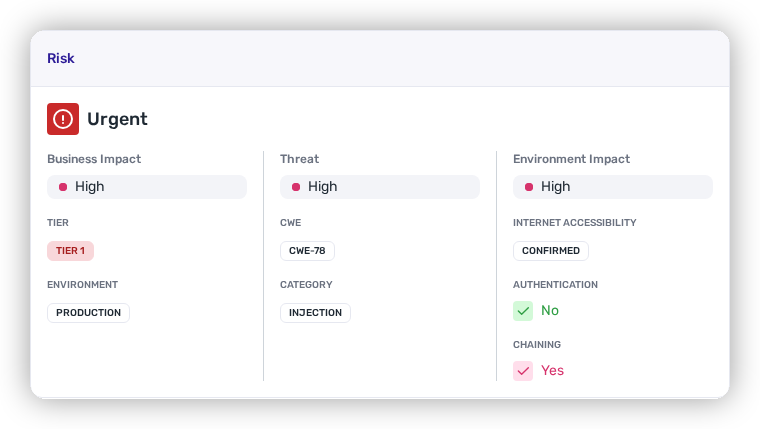
Open any finding and the **Risk** panel shows the band and the three impacts behind it — **Business** (Tier, Environment), **Threat** (CWE, Category), and **Environment** (Internet Accessibility, Authentication, Chaining).

<figure><img src="https://414480750-files.gitbook.io/~/files/v0/b/gitbook-x-prod.appspot.com/o/spaces%2FXP3dp2kecwKA2KvYkntz%2Fuploads%2Fgit-blob-f0d9c9555ac6d23dda2584aa9a881d65495ebf38%2Fcc-sast-risk-panel.png?alt=media" alt="A SAST finding&#x27;s Risk panel reading Urgent: Business Impact High (Tier 1), Threat High (CWE-78, Injection), Environment Impact High with Internet Accessibility Confirmed, Authentication No, Chaining Yes."><figcaption><p>The Risk panel: the band, plus the three impacts and the environment factors behind it. <strong>Sensitive data</strong> and <strong>mitigation</strong> also move the level but aren't shown as their own rows.</p></figcaption></figure>

Each impact is a colored dot (**High** red, lower levels amber). The yes/no environment factors carry a colored check that encodes the factor's **value** — **green for&#x20;*****No*****, pink for&#x20;*****Yes***. So a panel reading `Environment Impact: Low` with `Internet Accessibility: Not accessible` means the exposure gate closed the finding down and nothing sensitive or chainable lifted it back up.

## Using prioritization day to day

* **Work top-down.** Sort or filter the [findings list](/mrecEO40m5D6bt7Pq5pE/findings/code-security-sast/findings.md) by **Risk** and clear Urgent first, then Plan.
* **Put it on a clock.** Every finding carries an **SLO** — a remediation deadline from its priority band (default) or severity, per your tenant's [SLO policy](/mrecEO40m5D6bt7Pq5pE/administer-and-monitor/program-policy/service-level-objectives.md). Findings with Info, None, or Unknown severity have no SLO under the severity strategy; overdue items surface everywhere.
* **Correct the call when your context differs.** If Heeler's assessment is wrong for your situation, apply a [risk or SLO override](/mrecEO40m5D6bt7Pq5pE/findings/code-security-sast/findings.md#recording-an-exception) with a reason — it's recorded and reviewable.

The goal isn't to fix only what's Urgent — it's to drive **everything** down in the right order, riskiest and most exposed first.

## Worked example

{% content-ref url="/pages/2ucJQI28WyhzhNQvs51Y" %}
[Determine Exploitability in Production](/mrecEO40m5D6bt7Pq5pE/solutions-and-use-cases/determine-exploitability-in-production.md)
{% endcontent-ref %}


---

# Agent Instructions
This documentation is published with GitBook. GitBook is the documentation platform designed so that both humans and AI agents can read, navigate, and reason over technical content effectively. Learn more at gitbook.com.

## Querying This Documentation
If you need additional information that is not directly available in this page, you can query the documentation dynamically by asking a question.

Perform an HTTP GET request on the current page URL with the `ask` query parameter, and the optional `goal` query parameter:

```
GET https://docs.heeler.com/mrecEO40m5D6bt7Pq5pE/findings/code-security-sast/prioritization.md?ask=<question>&goal=<endgoal>
```

`ask` is the immediate question: it should be specific, self-contained, and written in natural language.
`goal` is optional and describes the broader end goal you are ultimately trying to accomplish on behalf of the user. GitBook uses it to tailor the answer towards what is most useful for that goal.

The response will contain a direct answer to the question and relevant excerpts and sources from the documentation.

Use this mechanism when the answer is not explicitly present in the current page, you need clarification or additional context, or you want to retrieve related documentation sections.