> For the complete documentation index, see [llms.txt](https://docs.heeler.com/mrecEO40m5D6bt7Pq5pE/llms.txt). Markdown versions of documentation pages are available by appending `.md` to page URLs; this page is available as [Markdown](https://docs.heeler.com/mrecEO40m5D6bt7Pq5pE/findings/code-security-sast/rules-and-categories.md).
# Rules and Categories
Two aggregate lenses on your code findings — grouped by the detection rule that fired, or by weakness category — for seeing patterns instead of one finding at a time.
The **Findings** list shows one weakness at a time. Often, though, you want the pattern: *which rule is responsible for the most findings? which weakness class is spreading across repositories?* The **Browse by** rail on the left gives you two aggregate lenses on exactly the same data — **Rules** and **Categories** — and both carry the same search, filters, sorting and column controls as the Findings list, including scoping by team or severity.
## Rules
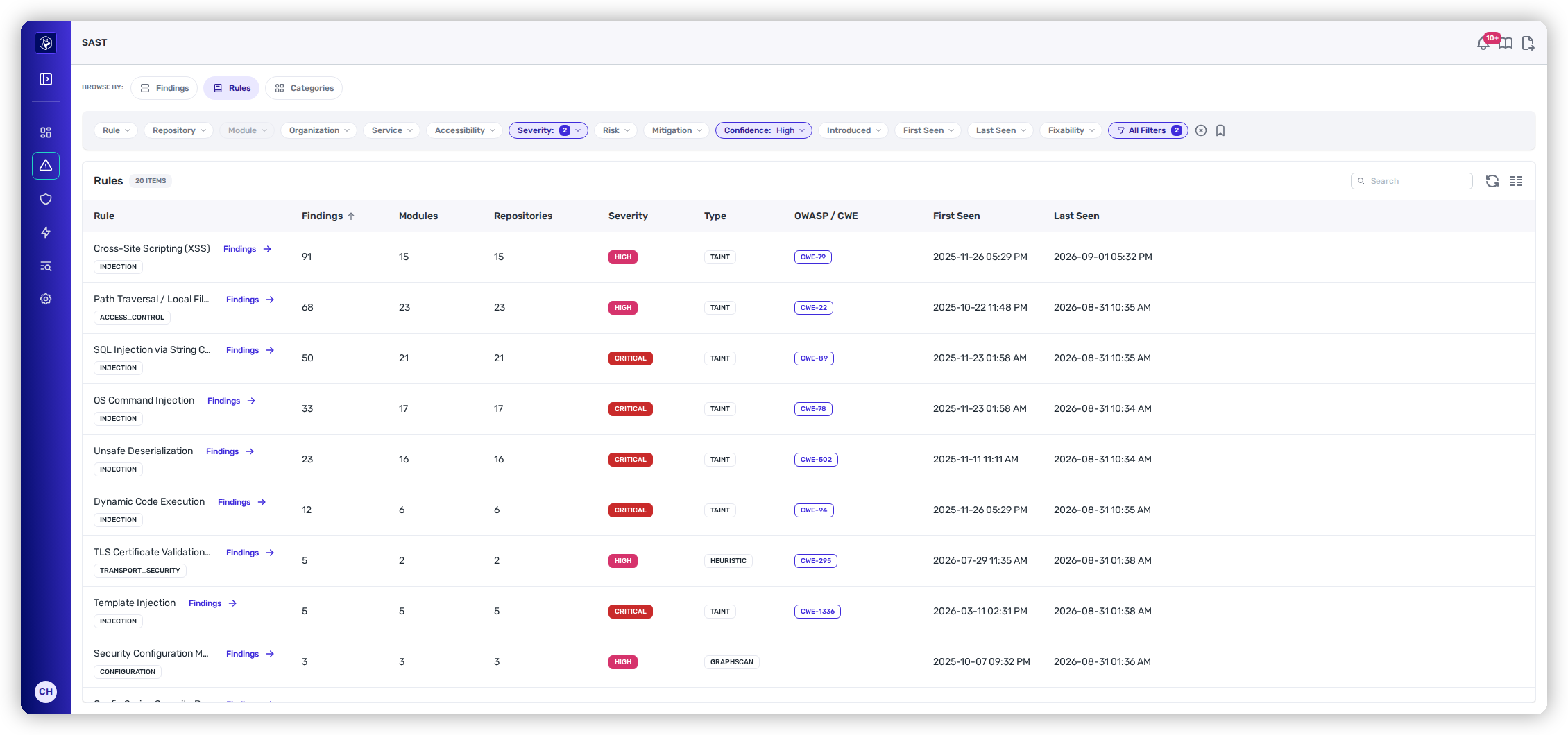
The **Rules** view groups every finding by the **detection rule** that produced it. It's the fastest way to judge a rule's footprint — how widely it fires and how serious it is — which is what you want when you're deciding what to enforce or tune.
Findings grouped by rule, with reach, severity, detection type, and CWE.
| Column | What it tells you |
| ------------------------------------- | ------------------------------------------------------------------------------------------- |
| **Rule** | The rule's name, with its weakness **category** tag (e.g. INJECTION). |
| **Findings · Modules · Repositories** | How widely the rule fires across your estate. |
| **Severity** | The rule's severity band. |
| **Type** | How the rule detects — **Taint** (data-flow, source→sink), **Graphscan**, or **Heuristic**. |
| **OWASP / CWE** | The weakness the rule maps to (e.g. CWE-89). |
| **First Seen · Last Seen** | The rule's activity window in your code. |
For example, in a typical estate you'll see high-impact taint rules like *SQL Injection* (CWE-89), *Path Traversal* (CWE-22), *Command Injection* (CWE-78), *Code Injection* (CWE-94), and *Unsafe Deserialization* (CWE-502) at the top by finding count. Click any rule to drop into the Findings list filtered to just that rule.
## Categories
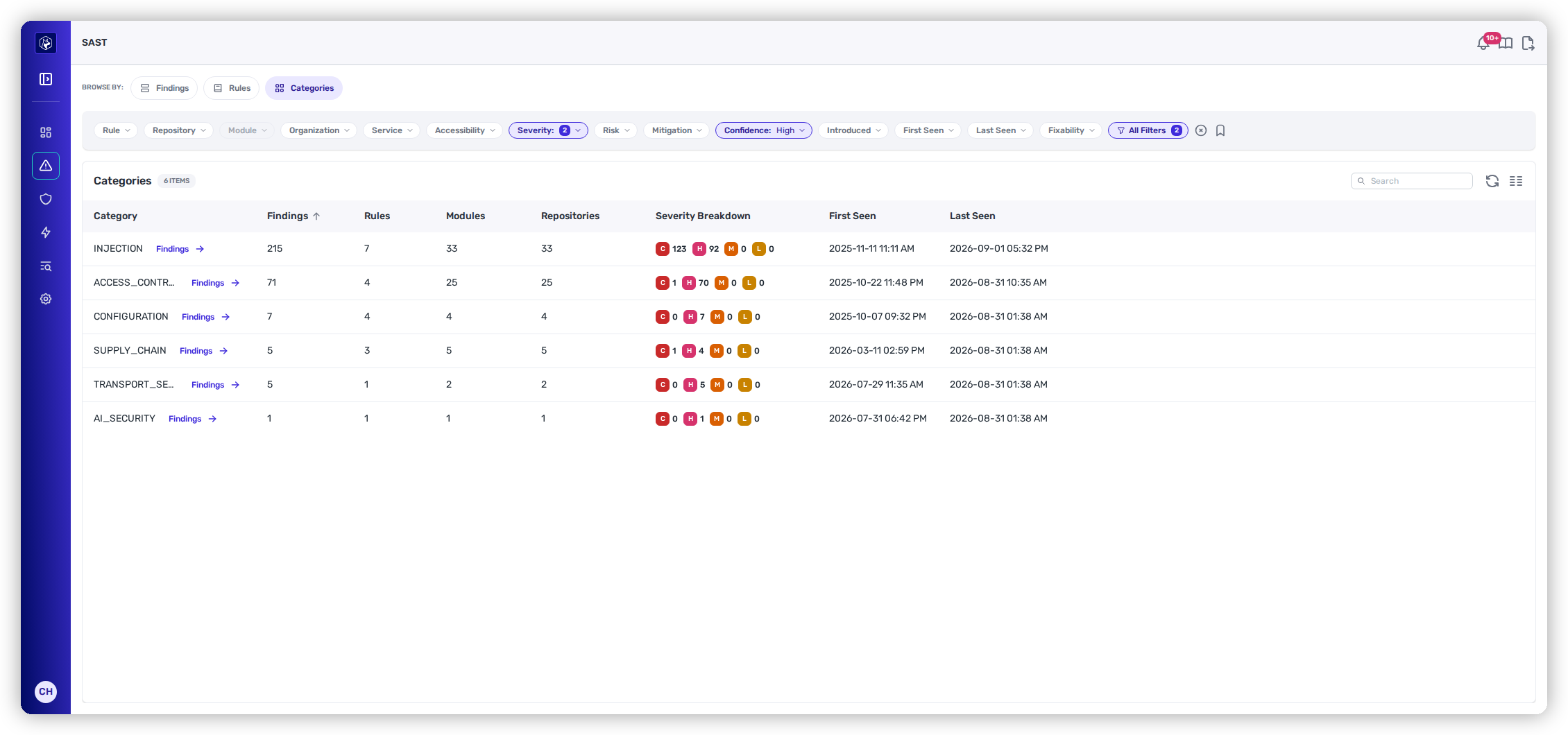
The **Categories** view groups findings by **weakness class** — Injection, Access Control, Data Exposure, Supply Chain, Transport Security, and so on. This is the lens for a program-level read: where your risk concentrates by *type* of weakness, regardless of which specific rule caught it.
Findings grouped by weakness category, each with a Critical/High/Medium/Low breakdown.
| Column | What it tells you |
| --------------------------------------------- | ---------------------------------------------------------------------------------------------------------------------- |
| **Category** | The weakness class (Injection, Access Control, Data Exposure, …). |
| **Findings · Rules · Modules · Repositories** | The category's scope — how many findings, from how many rules, across how much of your estate. |
| **Severity Breakdown** | A per-category tally of **Critical / High / Medium / Low**, so you can see at a glance where the serious ones cluster. |
| **First Seen · Last Seen** | The category's activity window. |
As with Rules, clicking a category drills into the Findings list scoped to it — a quick path from "Injection is our biggest class" to the individual findings behind it.
## Related
* [SAST Findings](/mrecEO40m5D6bt7Pq5pE/findings/code-security-sast/findings.md) — the individual weaknesses behind these aggregates.
* [Prioritization](/mrecEO40m5D6bt7Pq5pE/findings/code-security-sast/prioritization.md) — how each finding's Risk band is set.
---
# Agent Instructions
This documentation is published with GitBook. GitBook is the documentation platform designed so that both humans and AI agents can read, navigate, and reason over technical content effectively. Learn more at gitbook.com.
## Querying This Documentation
If you need additional information that is not directly available in this page, you can query the documentation dynamically by asking a question.
Perform an HTTP GET request on the current page URL with the `ask` query parameter, and the optional `goal` query parameter:
```
GET https://docs.heeler.com/mrecEO40m5D6bt7Pq5pE/findings/code-security-sast/rules-and-categories.md?ask=&goal=
```
`ask` is the immediate question: it should be specific, self-contained, and written in natural language.
`goal` is optional and describes the broader end goal you are ultimately trying to accomplish on behalf of the user. GitBook uses it to tailor the answer towards what is most useful for that goal.
The response will contain a direct answer to the question and relevant excerpts and sources from the documentation.
Use this mechanism when the answer is not explicitly present in the current page, you need clarification or additional context, or you want to retrieve related documentation sections.