> For the complete documentation index, see [llms.txt](https://docs.heeler.com/mrecEO40m5D6bt7Pq5pE/llms.txt). Markdown versions of documentation pages are available by appending `.md` to page URLs; this page is available as [Markdown](https://docs.heeler.com/mrecEO40m5D6bt7Pq5pE/findings/compromised-dependencies.md).
# Compromised Dependencies
Packages in your codebase that match Heeler's malicious-package intelligence — every place one landed, and the advisory behind it.
**Compromised Dependencies** lists packages in your codebase that match Heeler's malicious-package intelligence — a package that was published maliciously, or a trusted project whose release was compromised.
Treat this list differently from the rest of Findings. A vulnerable dependency is a weakness someone might exploit; a compromised one is code that was **built to do harm and is already in your repository**. There's no severity to weigh and no Heeler Risk band to sort by — the question is only where it landed and how fast you can get it out.
{% hint style="danger" %}
**There is no exception mechanism here, by design.** Every other findings list lets you record a risk or SLO override. This one doesn't — you can't mark malicious code as accepted. Remove the package, and if it ran anywhere, treat it as an incident and rotate what it could have reached.
{% endhint %}
{% hint style="info" %}
**One row per place, not per package.** The grain is module × package × version. The same compromised package pulled into four modules is four rows.
{% endhint %}
## The listing
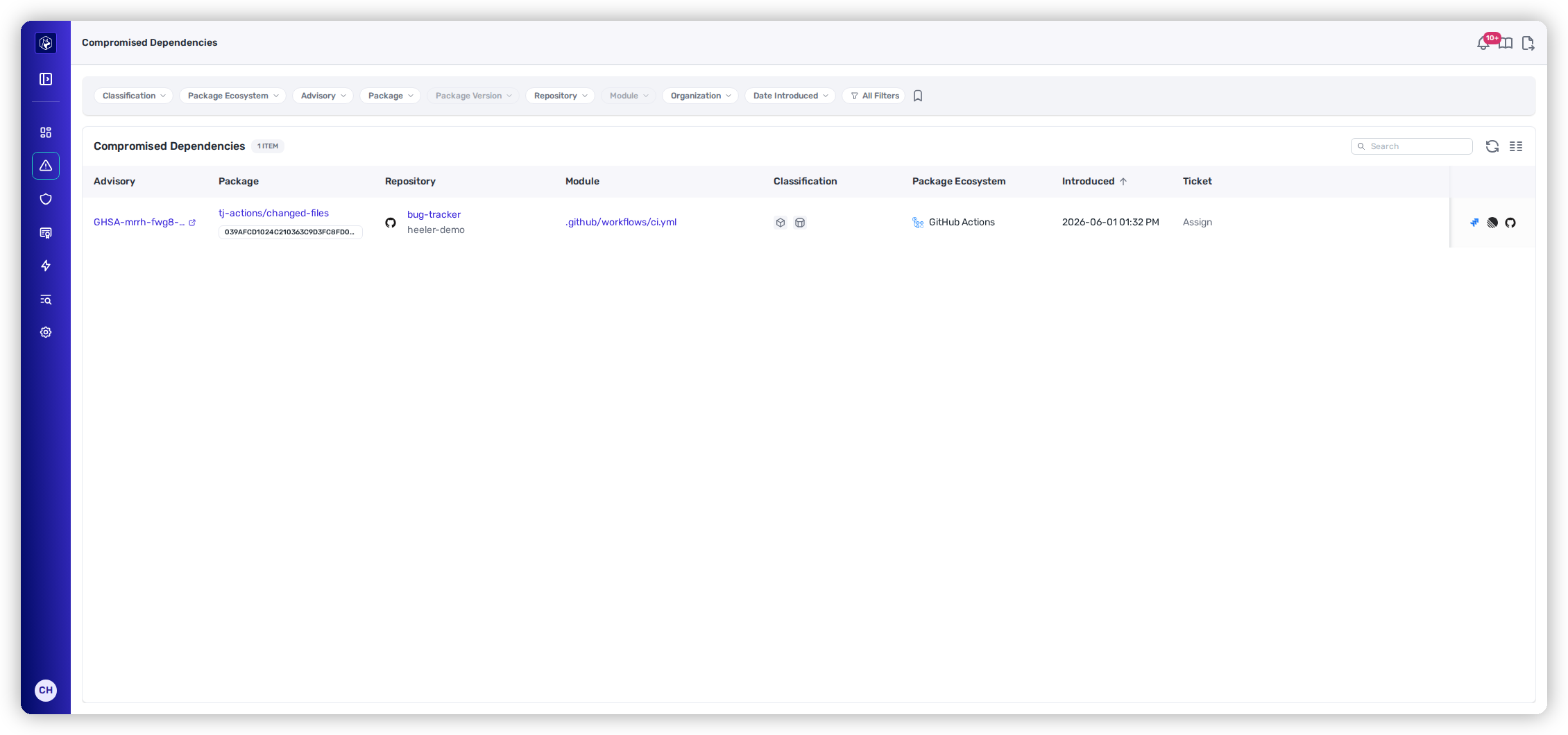
| Column | What it shows |
| --------------------- | ----------------------------------------------------------------------------------------------------------------------------------------- |
| **Advisory** | The advisory identifying the compromise, linking out to its full record. |
| **Package** | The package name, linking to its dependency overview, with the affected version on a badge beneath that opens that version in its module. |
| **Repository** | The repository the module belongs to, with its organization beneath. |
| **Module** | The manifest the dependency was declared in. |
| **Classification** | Icons describing how the dependency got in — **direct** or **transitive**, **first-party** or **third-party**, and **private registry**. |
| **Package Ecosystem** | The package manager the dependency came from. |
| **Introduced** | When the dependency first appeared — read this as roughly how long you've been exposed. |
| **Ticket** | The linked Jira, Linear, or GitHub issue, when one exists. |
Each row is one place a compromised package landed, with the advisory behind it.
The list opens sorted by **Introduced**, newest first. **Package**, **Repository**, **Package Ecosystem**, **Introduced**, and **Ticket** are sortable; **Module** and **Classification** are not.
There's no compromised icon in the Classification column — every row on this list is compromised, so the column is left to tell you the part that varies: whether it's direct or transitive, and where it came from. **Transitive** matters most here: a transitive compromise means the package isn't in your manifest and you'll have to find which of your direct dependencies pulled it in.
### Filtering
Standard listing controls apply — filter chips, an **All Filters** drawer, saved views, and column management. See [Filtering and Exports](/mrecEO40m5D6bt7Pq5pE/operate/dashboards/filtering-and-exports.md).
Filter by **Advisory**, **Package**, **Package Version**, **Package Ecosystem**, **Classification**, **Repository**, **Module**, **Organization**, **Service**, **Team**, **Application**, **Date Introduced**, and **Has Ticket**.
Filtering by **Service** or **Team** is usually the fastest first move — it turns "we have a compromised package" into "these teams own the repositories it's in," which is what you need to hand the work out.
## Pushing to your tracker
The row action menu can push a compromised dependency to **Jira**, **Linear**, or **GitHub** — each appears only when that connection is configured. Once a row is linked, the matching entry becomes **Unlink from Jira** or **Unlink from Linear**.
Tickets are keyed at module, package, and ecosystem, so one ticket covers every affected version of that package on that module.
## Related
* [Open Source (SCA)](/mrecEO40m5D6bt7Pq5pE/findings/open-source-sca.md) — vulnerability and supply-chain risk in the same dependencies.
* [Dependency (SCA) Guardrails](/mrecEO40m5D6bt7Pq5pE/prevent/pr-guardrails/guardrail-types/dependency-sca-guardrails.md) — block a known-bad package at the pull request, before it ever lands here.
* [Package-Manager Cooldown](/mrecEO40m5D6bt7Pq5pE/prevent/package-manager-cooldown.md) — refuse brand-new releases, which is when most malicious versions are caught.
---
# Agent Instructions
This documentation is published with GitBook. GitBook is the documentation platform designed so that both humans and AI agents can read, navigate, and reason over technical content effectively. Learn more at gitbook.com.
## Querying This Documentation
If you need additional information that is not directly available in this page, you can query the documentation dynamically by asking a question.
Perform an HTTP GET request on the current page URL with the `ask` query parameter, and the optional `goal` query parameter:
```
GET https://docs.heeler.com/mrecEO40m5D6bt7Pq5pE/findings/compromised-dependencies.md?ask=&goal=
```
`ask` is the immediate question: it should be specific, self-contained, and written in natural language.
`goal` is optional and describes the broader end goal you are ultimately trying to accomplish on behalf of the user. GitBook uses it to tailor the answer towards what is most useful for that goal.
The response will contain a direct answer to the question and relevant excerpts and sources from the documentation.
Use this mechanism when the answer is not explicitly present in the current page, you need clarification or additional context, or you want to retrieve related documentation sections.