> For the complete documentation index, see [llms.txt](https://docs.heeler.com/mrecEO40m5D6bt7Pq5pE/llms.txt). Markdown versions of documentation pages are available by appending `.md` to page URLs; this page is available as [Markdown](https://docs.heeler.com/mrecEO40m5D6bt7Pq5pE/findings/containers/image-detail.md).

# Container Image Detail

One container image in full — its overview, contents, build and timeline blocks, its five tabs, and the SBOM export.

Open an image from the [Images listing](/mrecEO40m5D6bt7Pq5pE/findings/containers/images.md) to see everything one digest carries. The page header holds four blocks of facts; the tabs below hold the lists.

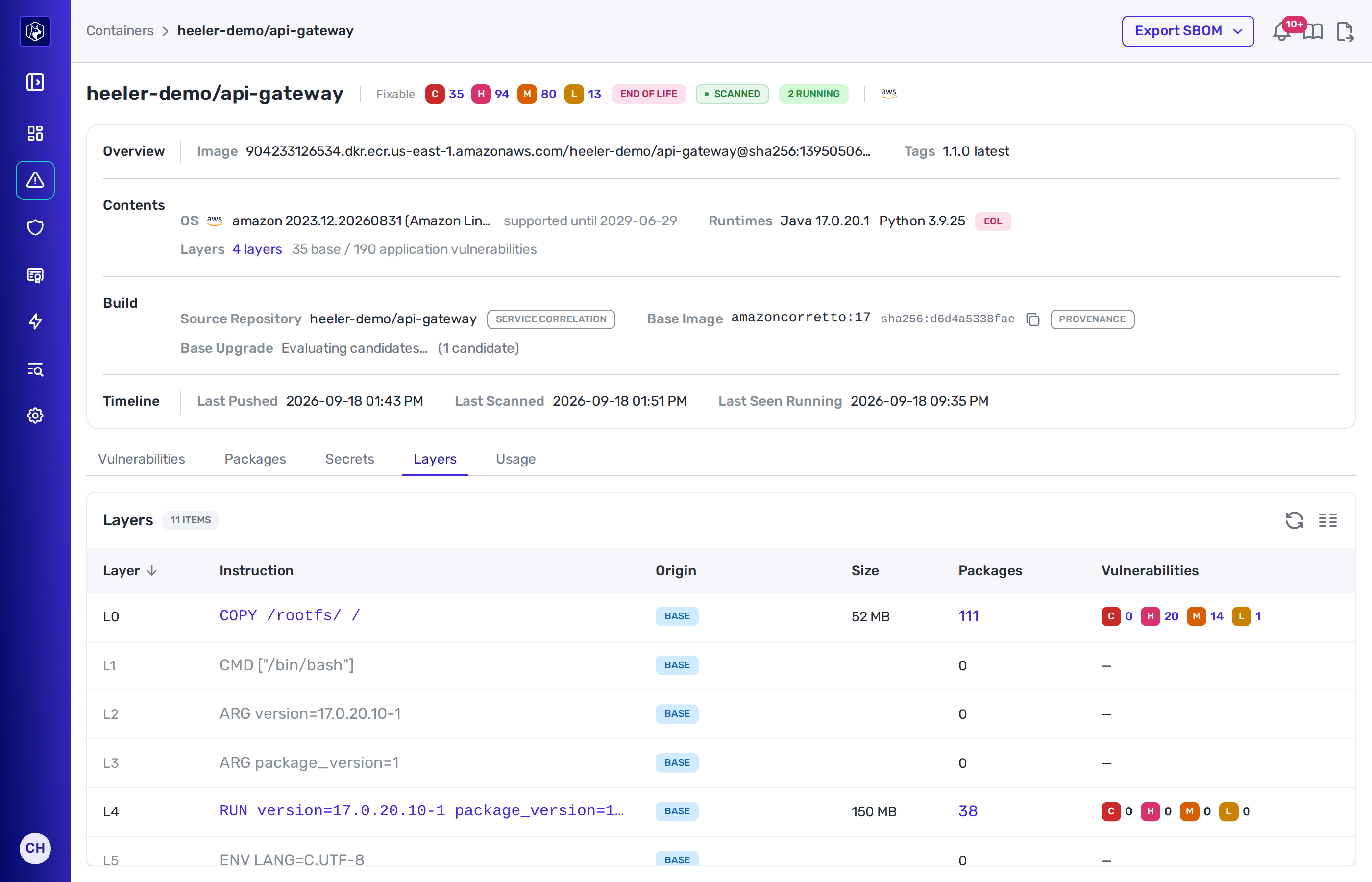
<figure><img src="https://414480750-files.gitbook.io/~/files/v0/b/gitbook-x-prod.appspot.com/o/spaces%2FXP3dp2kecwKA2KvYkntz%2Fuploads%2Fgit-blob-0e4df5e0bc3772ecd5fcf4c412e1fc22e300e067%2Fcc-containers-image-detail.png?alt=media" alt="A container image detail page: the repository name with Fixable severity badges, an end-of-life badge, a scan badge and a running badge, above the Overview, Contents, Build and Timeline blocks, then the Vulnerabilities, Packages, Secrets, Layers and Usage tabs with the Vulnerabilities list open."><figcaption><p>An image's detail page, open on the <strong>Vulnerabilities</strong> tab. <strong>Export SBOM</strong> sits in the top right.</p></figcaption></figure>

## Header badges

| Badge              | What it shows                                                                                                                                        |
| ------------------ | ---------------------------------------------------------------------------------------------------------------------------------------------------- |
| **Fixable** counts | Critical, high, medium and low counts, limited to vulnerabilities with a fix available. Select one to open the Vulnerabilities tab at that severity. |
| Support badge      | **End of life soon** or **End of life** for the operating system, with its date in the tooltip.                                                      |
| Scan badge         | **Queued**, **Scanning**, **Scanned** or **Failed**.                                                                                                 |
| Running badge      | **N running**, or **Not running**.                                                                                                                   |

**Export SBOM** is in the top-right. It downloads the image's bill of materials as **CycloneDX 1.6 (JSON)** or **SPDX 2.3 (JSON)**.

## Overview

| Term        | What it shows                                                                                          |
| ----------- | ------------------------------------------------------------------------------------------------------ |
| **Image**   | The full image reference: registry host, repository and digest.                                        |
| **Also In** | The other repositories holding this digest, each linked to its own page. Shown only when there is one. |
| **Tags**    | Every tag on the digest.                                                                               |

## Contents

| Term         | What it shows                                                                                                                                                                                                     |
| ------------ | ----------------------------------------------------------------------------------------------------------------------------------------------------------------------------------------------------------------- |
| **OS**       | The distribution and release, with its distribution icon, and **supported until** or **support ended** with the date.                                                                                             |
| **Runtimes** | Each language runtime found in the image with its version and a support badge. **None detected** when there are none.                                                                                             |
| **Layers**   | The layer count, linking to the Layers tab, followed by the split of vulnerabilities into **base** and **application**. Findings that cannot be attributed to a layer are counted separately as **unattributed**. |

The base and application split tells you which vulnerabilities came in with the base image and which your own build added.

## Build

| Term                  | What it shows                                                                                                                                                                                                                       |
| --------------------- | ----------------------------------------------------------------------------------------------------------------------------------------------------------------------------------------------------------------------------------- |
| **Source Repository** | The connected repositories the image was matched to, each with a badge for how the match was made. When no connected repository matched, the source URL the build declared is shown instead, marked **not a connected repository**. |
| **Base Image**        | The base image name, its short digest with a copy control, and a badge naming how it was declared. When the base is itself a scanned image, the name links to it. **Not declared** when nothing named a base.                       |
| **Base Upgrade**      | The state of the upgrade evaluation, and the candidates when there are any. See [Base Image Upgrades](/mrecEO40m5D6bt7Pq5pE/findings/containers/base-image-upgrades.md).                                                            |

### Base image sources

| Badge          | Meaning                                                                                                                                                           |
| -------------- | ----------------------------------------------------------------------------------------------------------------------------------------------------------------- |
| **Provenance** | Named by the build's provenance — an image the build consumed whose layers are the first layers of this image.                                                    |
| **Annotation** | Named by the OCI base image annotations on the image manifest.                                                                                                    |
| **Label**      | Named by the OCI base image labels in the image config. A build inherits these from its own base unless it overrides them, so they can name the base of the base. |
| **Inferred**   | A best guess, where neither the build nor the image named a base.                                                                                                 |

## Timeline

| Term                  | What it shows                                       |
| --------------------- | --------------------------------------------------- |
| **Last Pushed**       | When the digest was last pushed to the registry.    |
| **Last Scanned**      | When the last completed scan finished.              |
| **Last Seen Running** | When a running workload last referenced the digest. |

## Tabs

### Vulnerabilities

One row per package and advisory. The tab opens filtered to **Fix Available**; clear that filter to see every advisory, including those the distribution has no fix for.

| Column            | What it shows                                       |
| ----------------- | --------------------------------------------------- |
| **Vulnerability** | The advisory identifier.                            |
| **Severity**      | Critical, High, Medium, Low or Unknown.             |
| **Package**       | The package the advisory applies to.                |
| **Installed**     | The version in the image.                           |
| **Fixed In**      | The version that carries the fix, where one exists. |

### Packages

Everything installed in the image, highest vulnerability count first.

| Column              | What it shows                                 |
| ------------------- | --------------------------------------------- |
| **Package**         | The package name.                             |
| **Version**         | The installed version.                        |
| **Type**            | The package ecosystem.                        |
| **Vulnerabilities** | The count of advisories against this package. |
| **Layer**           | The layer that installed it.                  |
| **Licenses**        | The licenses declared for it.                 |
| **Package URL**     | The package URL.                              |

### Secrets

Credentials found in files the image's layers wrote.

| Column         | What it shows                             |
| -------------- | ----------------------------------------- |
| **Severity**   | The severity of the match.                |
| **Secret**     | The rule that matched.                    |
| **Category**   | The category the rule belongs to.         |
| **Location**   | The file path inside the image.           |
| **Match**      | The matched text.                         |
| **Layer**      | The layer that wrote the file.            |
| **First Seen** | When the secret first appeared in a scan. |

### Layers

The filesystem layers in build order.

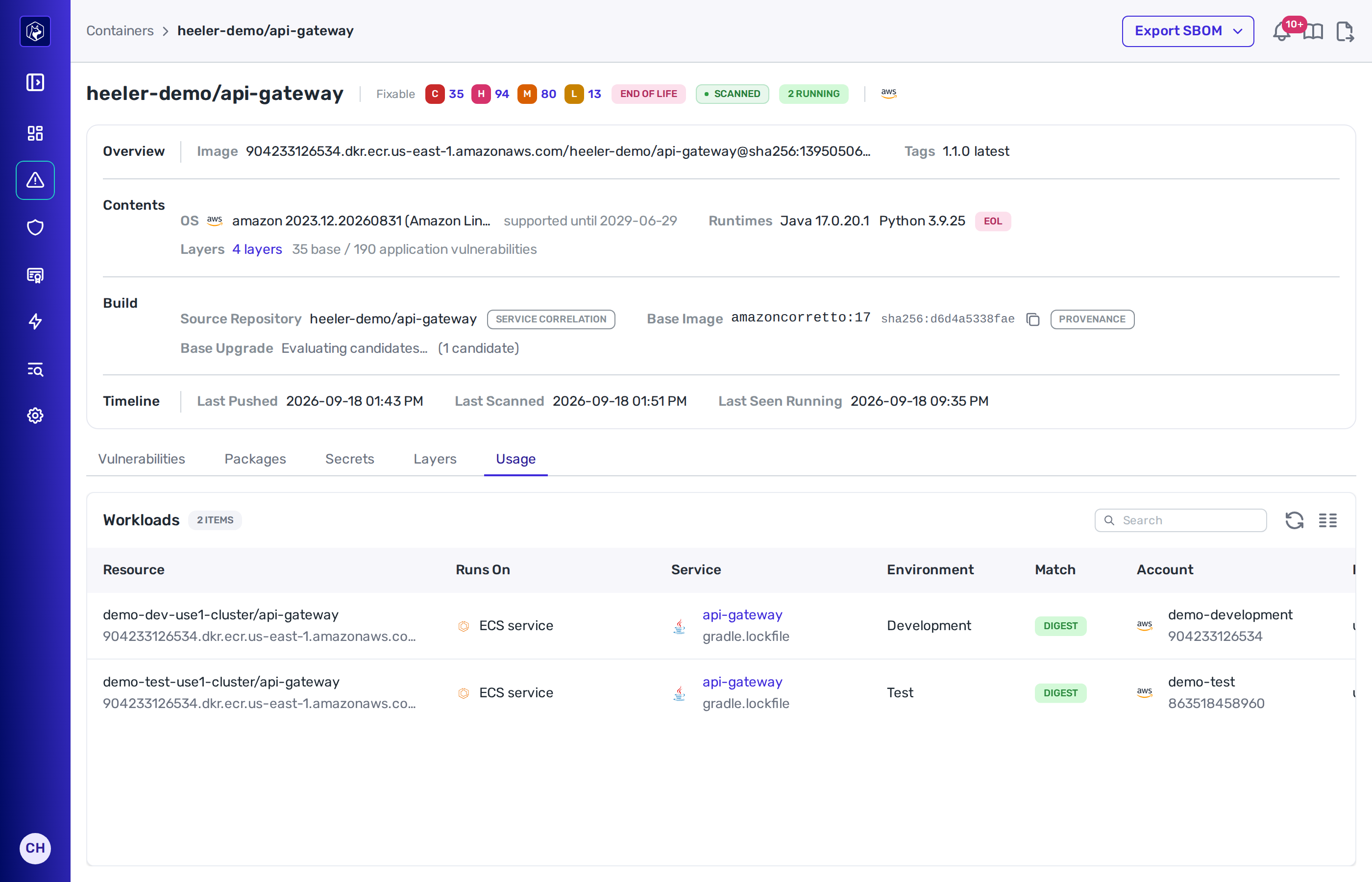
<figure><img src="https://414480750-files.gitbook.io/~/files/v0/b/gitbook-x-prod.appspot.com/o/spaces%2FXP3dp2kecwKA2KvYkntz%2Fuploads%2Fgit-blob-0eee4ab56adbbad80982cada1b38f1609ce0dba7%2Fcc-containers-image-layers.png?alt=media" alt="The Layers tab of a container image, listing each layer by index with its build instruction, a Base badge in the Origin column, its size, its package count and its per-severity vulnerability counts."><figcaption><p>The <strong>Layers</strong> tab — the <strong>Origin</strong> column marks the layers that came from the base image.</p></figcaption></figure>

| Column              | What it shows                                                                                           |
| ------------------- | ------------------------------------------------------------------------------------------------------- |
| **Layer**           | The layer's position in the image.                                                                      |
| **Instruction**     | The build instruction that created it.                                                                  |
| **Origin**          | A **Base** badge when the layer came from the base image, and a note when other images share the layer. |
| **Size**            | The layer's size.                                                                                       |
| **Packages**        | The packages this layer installed.                                                                      |
| **Vulnerabilities** | The vulnerabilities in those packages.                                                                  |

Select a layer's package or vulnerability count to scope the Packages or Vulnerabilities tab to that layer. A **Scoped to** badge appears above the list; clear it to return to the whole image.

### Usage

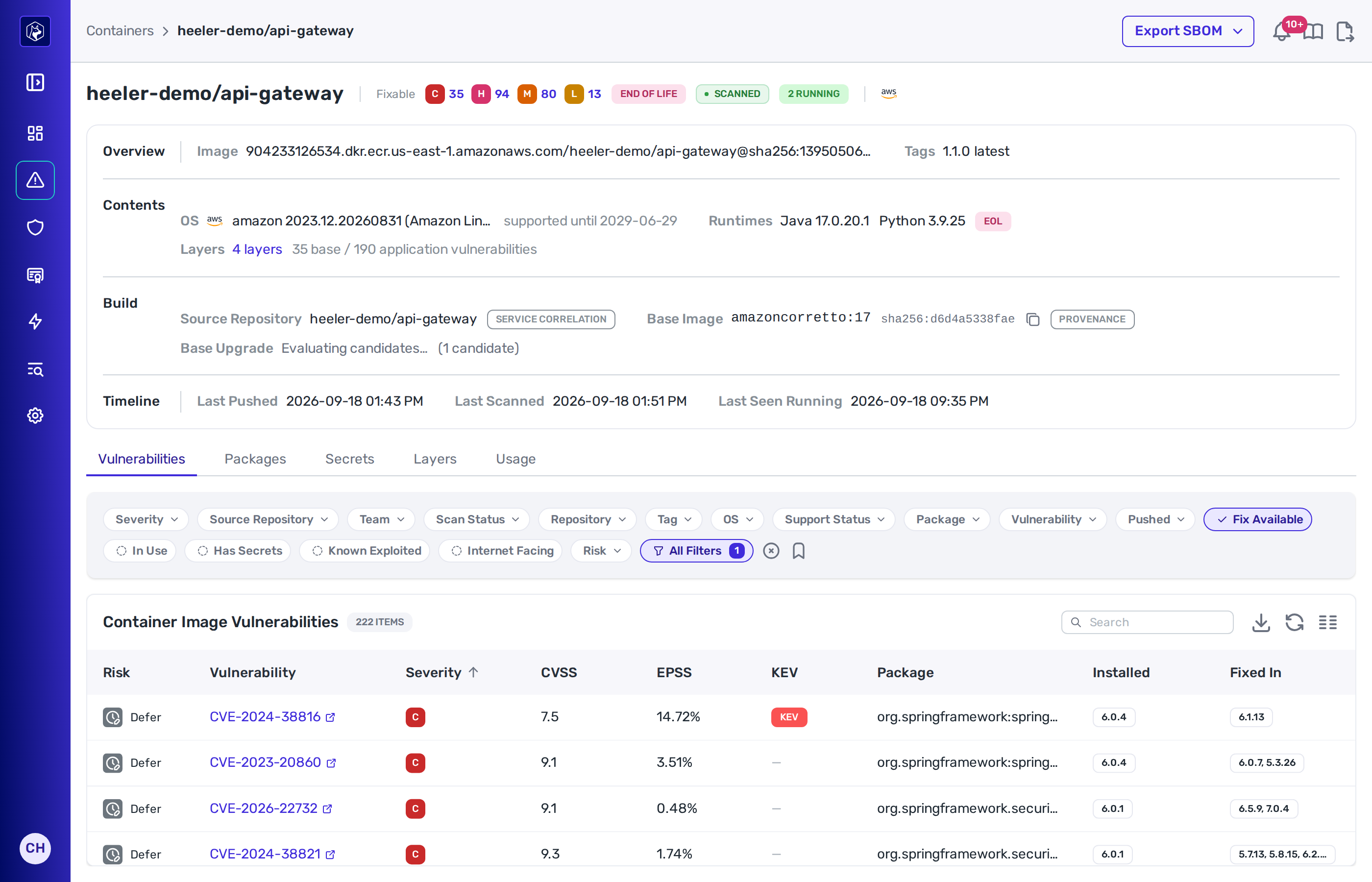
The live workloads running this digest, listed under **Workloads**.

<figure><img src="https://414480750-files.gitbook.io/~/files/v0/b/gitbook-x-prod.appspot.com/o/spaces%2FXP3dp2kecwKA2KvYkntz%2Fuploads%2Fgit-blob-7d1ff1ff1e2320426fd517a872d6f6f9835ce02f%2Fcc-containers-image-usage.png?alt=media" alt="The Usage tab of a container image, listing each running workload with its resource name and registry host, what it runs on, the service and manifest it belongs to, its environment, how the image reference was matched, and the cloud account."><figcaption><p>The <strong>Usage</strong> tab — each row is a workload observed running this digest.</p></figcaption></figure>

| Column          | What it shows                                                                                                  |
| --------------- | -------------------------------------------------------------------------------------------------------------- |
| **Resource**    | The workload.                                                                                                  |
| **Runs On**     | ECS service, ECS task, Kubernetes workload, Kubernetes pod, Cloud Run revision, or Lambda function.            |
| **Service**     | The Heeler service it belongs to.                                                                              |
| **Environment** | The environment it runs in.                                                                                    |
| **Match**       | **Digest** when the runtime reported this exact digest, or **Tag** when it was resolved from the declared tag. |
| **Account**     | The cloud account or project.                                                                                  |
| **Region**      | The cloud region.                                                                                              |
| **First Seen**  | When the workload was first observed running this image.                                                       |
| **Last Seen**   | When it was last observed.                                                                                     |

## Related

* [Container Images](/mrecEO40m5D6bt7Pq5pE/findings/containers/images.md) — the listing this page opens from.
* [Base Image Upgrades](/mrecEO40m5D6bt7Pq5pE/findings/containers/base-image-upgrades.md) — the candidates behind the Base Upgrade term.
* [Software Bill of Materials (SBOM)](/mrecEO40m5D6bt7Pq5pE/catalog/sbom.md) — SBOMs for your repositories.


---

# Agent Instructions
This documentation is published with GitBook. GitBook is the documentation platform designed so that both humans and AI agents can read, navigate, and reason over technical content effectively. Learn more at gitbook.com.

## Querying This Documentation
If you need additional information that is not directly available in this page, you can query the documentation dynamically by asking a question.

Perform an HTTP GET request on the current page URL with the `ask` query parameter, and the optional `goal` query parameter:

```
GET https://docs.heeler.com/mrecEO40m5D6bt7Pq5pE/findings/containers/image-detail.md?ask=<question>&goal=<endgoal>
```

`ask` is the immediate question: it should be specific, self-contained, and written in natural language.
`goal` is optional and describes the broader end goal you are ultimately trying to accomplish on behalf of the user. GitBook uses it to tailor the answer towards what is most useful for that goal.

The response will contain a direct answer to the question and relevant excerpts and sources from the documentation.

Use this mechanism when the answer is not explicitly present in the current page, you need clarification or additional context, or you want to retrieve related documentation sections.