> For the complete documentation index, see [llms.txt](https://docs.heeler.com/mrecEO40m5D6bt7Pq5pE/llms.txt). Markdown versions of documentation pages are available by appending `.md` to page URLs; this page is available as [Markdown](https://docs.heeler.com/mrecEO40m5D6bt7Pq5pE/findings/containers/vulnerabilities.md).
# Container Vulnerabilities
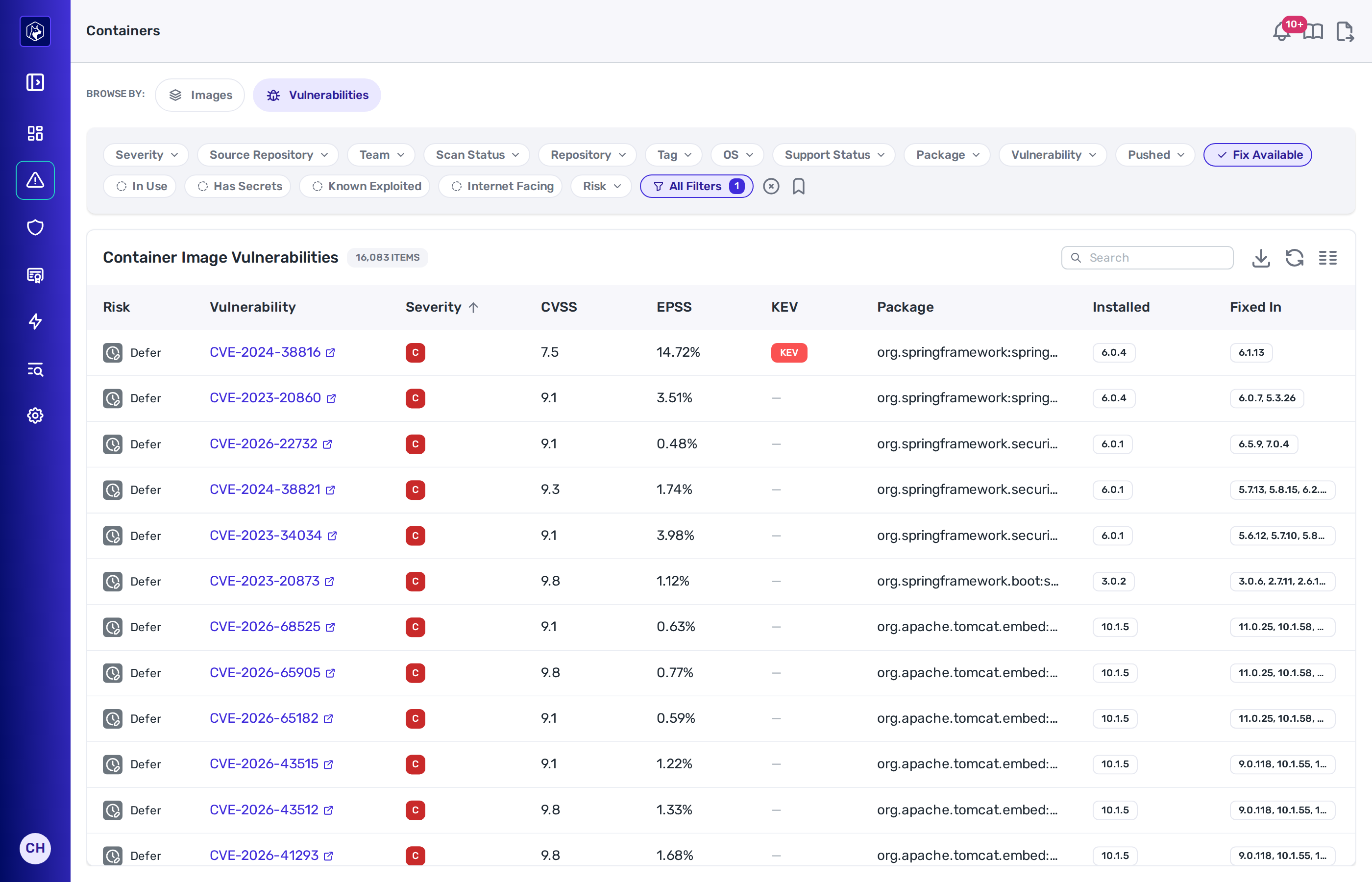
The Vulnerabilities view under Security → Containers — one row per image, package and advisory, across every scanned image.
**Security → Containers → Vulnerabilities** gives one row per image, package and advisory. Use it to see where a single CVE appears across your images and which of those images are running.
The list opens filtered to **Fix Available**. Clear that filter to see every advisory, including those the distribution has not fixed.
Rows are ordered by severity, highest first.
Security → Containers → Vulnerabilities — the Fix Available filter is applied when the view opens.
## Columns
| Column | What it shows |
| ----------------- | -------------------------------------------------------------------- |
| **Risk** | Urgent, Plan or Defer for this finding on this image. |
| **Vulnerability** | The advisory identifier. |
| **Severity** | Critical, High, Medium, Low or Unknown. |
| **CVSS** | The CVSS score. |
| **EPSS** | The EPSS probability. |
| **KEV** | Whether the advisory is on the Known Exploited Vulnerabilities list. |
| **Package** | The affected package. |
| **Installed** | The version in the image. |
| **Fixed In** | The version that carries the fix, where one exists. |
| **Fix** | Whether a fix is available. |
| **Type** | The package ecosystem. |
| **Repository** | The image's registry repository. |
| **Exposure** | Whether the image is running somewhere reachable from the internet. |
| **Tier** | The tier of the service running the image. |
| **In Use** | Whether a live workload references the image. |
| **Tags** | The tags on the image digest. |
| **First Seen** | When the finding first appeared in a scan. |
| **Image Pushed** | When the image digest was last pushed. |
## Risk
Each row carries a **Heeler Risk** band — **Urgent**, **Plan** or **Defer** — set from three inputs:
| Input | Where it comes from |
| ------------------ | -------------------------------------------------------------------------- |
| Business impact | The tier of the service running the image, and the environment it runs in. |
| Environment impact | Whether a workload running the image is reachable from the internet. |
| Threat | The advisory's exploit likelihood and what an attacker gains from it. |
Where an image has no running workload, Heeler has no deployment context for it and bands it on the conservative assumptions: highest tier, unassigned environment, no internet exposure.
## Filters
This view uses the same filters as the [Images listing](/mrecEO40m5D6bt7Pq5pE/findings/containers/images.md#filters). Here each filter applies to the individual finding.
## Related
* [Container Images](/mrecEO40m5D6bt7Pq5pE/findings/containers/images.md) — the same data rolled up per image.
* [Container Image Detail](/mrecEO40m5D6bt7Pq5pE/findings/containers/image-detail.md) — one image's own vulnerability list.
* [Prioritize (Heeler Risk)](/mrecEO40m5D6bt7Pq5pE/fix/prioritize-heeler-risk.md) — how the bands are built.
---
# Agent Instructions
This documentation is published with GitBook. GitBook is the documentation platform designed so that both humans and AI agents can read, navigate, and reason over technical content effectively. Learn more at gitbook.com.
## Querying This Documentation
If you need additional information that is not directly available in this page, you can query the documentation dynamically by asking a question.
Perform an HTTP GET request on the current page URL with the `ask` query parameter, and the optional `goal` query parameter:
```
GET https://docs.heeler.com/mrecEO40m5D6bt7Pq5pE/findings/containers/vulnerabilities.md?ask=&goal=
```
`ask` is the immediate question: it should be specific, self-contained, and written in natural language.
`goal` is optional and describes the broader end goal you are ultimately trying to accomplish on behalf of the user. GitBook uses it to tailor the answer towards what is most useful for that goal.
The response will contain a direct answer to the question and relevant excerpts and sources from the documentation.
Use this mechanism when the answer is not explicitly present in the current page, you need clarification or additional context, or you want to retrieve related documentation sections.