> For the complete documentation index, see [llms.txt](https://docs.heeler.com/mrecEO40m5D6bt7Pq5pE/llms.txt). Markdown versions of documentation pages are available by appending `.md` to page URLs; this page is available as [Markdown](https://docs.heeler.com/mrecEO40m5D6bt7Pq5pE/findings/iac/findings.md).

# IaC Findings

The IaC findings inventory — the Active/Fixed/Deployed lifecycle, filtering by resource type and framework, and the finding detail where you read and resolve a misconfiguration.

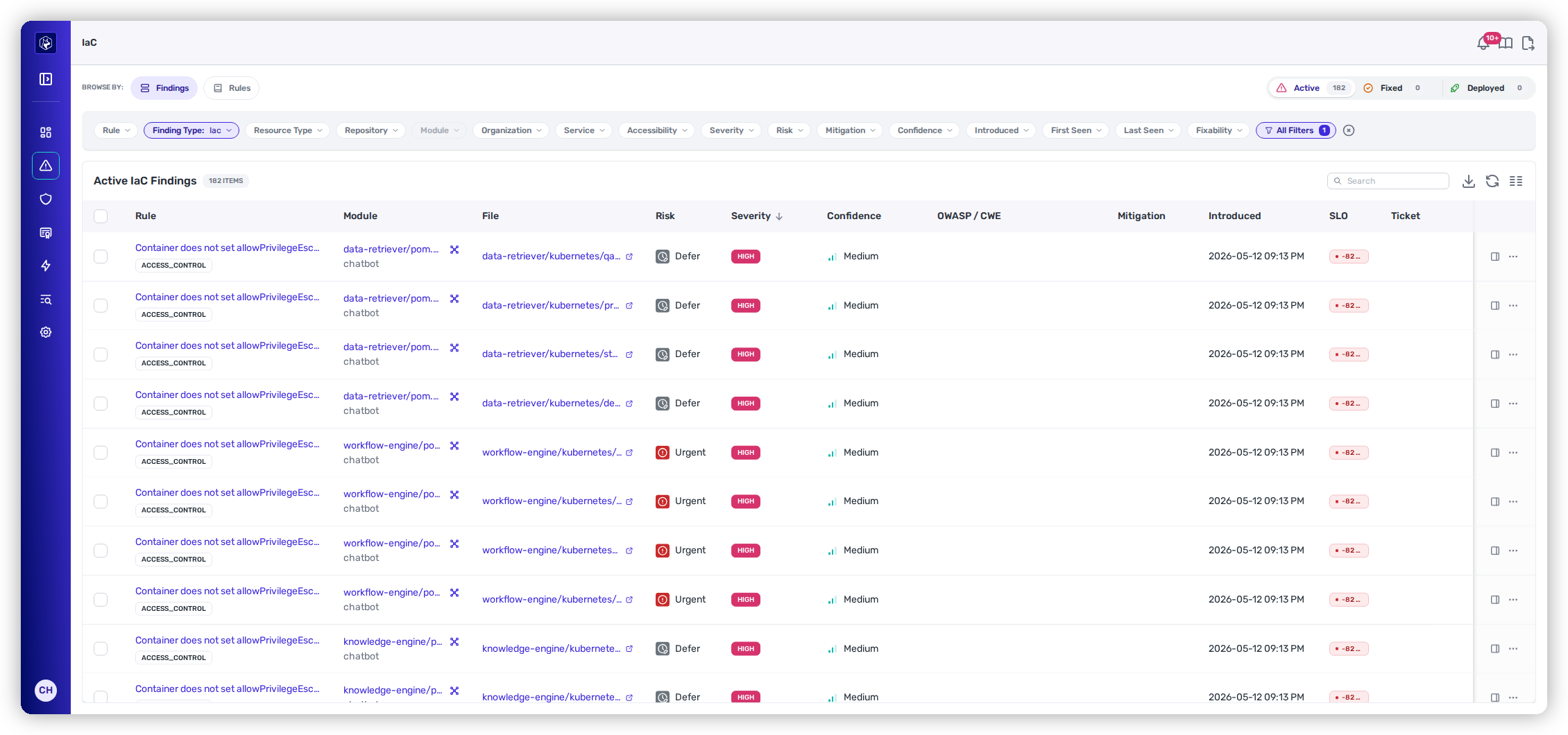
The **Findings** view (**Security → IaC →** *Findings*) lists your infrastructure misconfigurations — **one row per defect Heeler found in an infrastructure definition**. Unlike the [SAST findings list](/mrecEO40m5D6bt7Pq5pE/findings/code-security-sast/findings.md), it opens **unfiltered**: every severity, every confidence. An IaC estate is usually small enough to read whole, and a Low-severity finding on a production resource often matters more than a High one on a sandbox.

<figure><img src="https://414480750-files.gitbook.io/~/files/v0/b/gitbook-x-prod.appspot.com/o/spaces%2FXP3dp2kecwKA2KvYkntz%2Fuploads%2Fgit-blob-3084e0c706e091cb1834c5d4ffcd171617aeac23%2Fcc-iac-findings.png?alt=media" alt="The IaC Findings view with the Active/Fixed/Deployed lifecycle counts, the Browse By pills, a filter toolbar including Resource Type, and the findings table."><figcaption><p>The Findings list — lifecycle control up top, the locked Finding Type chip, and one row per misconfiguration.</p></figcaption></figure>

{% hint style="info" %}
**Scoped to IaC.** The section pins a **Finding Type: IaC** filter you can't remove — that's what makes this list IaC-only. It shows as a locked chip in the toolbar (hover it and Heeler tells you *"IaC findings are scoped to this section"*). Every other filter stacks on top of it. Code findings live in [Code Security (SAST)](/mrecEO40m5D6bt7Pq5pE/findings/code-security-sast/findings.md); nothing appears in both lists.
{% endhint %}

## Active, Fixed, and Deployed

The control above the table switches between the three lifecycle stages (see [the findings lifecycle](/mrecEO40m5D6bt7Pq5pE/findings.md#the-findings-lifecycle) for what each state means):

{% tabs %}
{% tab title="Active" %}
**Open work** — the misconfiguration is present in your infrastructure definitions and not yet fixed. This is the default tab.
{% endtab %}

{% tab title="Fixed" %}
**Fixed in code** — the definition has been corrected in source. This tab adds a **Time to Fix** column.
{% endtab %}

{% tab title="Deployed" %}
**Rolled out** — the corrected definition has reached your running deployments. Expect this to sit at **0** until a fix ships; a definition fixed in `main` isn't a fixed environment until it's applied.
{% endtab %}
{% endtabs %}

The tab you're on is carried in the URL (`?fix_status=active`), and it's preserved when you switch between **Findings** and [**IaC Rules**](/mrecEO40m5D6bt7Pq5pE/findings/iac/rules.md) in the Browse By rail — so moving between the two lenses never silently changes which stage you're looking at.

### What the columns mean

| Column         | What it shows                                                                                  |
| -------------- | ---------------------------------------------------------------------------------------------- |
| **Rule**       | The misconfiguration check that fired, with its **category** tag. Links to the finding detail. |
| **Repository** | The repository holding the definition.                                                         |
| **Module**     | The module the definition sits in.                                                             |
| **File**       | The definition file and line — links out to the code.                                          |
| **Risk**       | The Heeler Risk band — **Urgent / Plan / Defer**.                                              |
| **Severity**   | Critical / High / Medium / Low / Info / None / Unknown.                                        |
| **Confidence** | How sure Heeler is the finding is real — **High / Medium / Low / Unknown**.                    |

**OWASP / CWE**, **Mitigation** (any applied override), **Introduced**, **Last Seen**, **SLO**, **Time to Fix** (on the Fixed tab), and **Ticket** are available too — pinned or shown from **Manage Columns**. The table sorts by **Severity** by default.

## Working the list

### Filtering

The toolbar chips cover the common filters and **All Filters** opens the rest; star any to pin it. Stacking chips narrows the list (OR within a filter, AND across filters).

| Filter                                                                           | Options / notes                                                                                                                                                                                                                                                      |
| -------------------------------------------------------------------------------- | -------------------------------------------------------------------------------------------------------------------------------------------------------------------------------------------------------------------------------------------------------------------- |
| **Resource Type**                                                                | The resource the definition builds — S3 bucket, security group, Kubernetes deployment, and so on. **The IaC-specific filter**, and usually the fastest way to scope this list.                                                                                       |
| **Language**                                                                     | The definition framework — Terraform, OpenTofu, CloudFormation, Pulumi, Kubernetes.                                                                                                                                                                                  |
| **Rule**                                                                         | Any misconfiguration check.                                                                                                                                                                                                                                          |
| **Category**                                                                     | The defect class the rule belongs to.                                                                                                                                                                                                                                |
| **ASVS**                                                                         | The [OWASP Application Security Verification Standard](/mrecEO40m5D6bt7Pq5pE/standards-and-compliance/owasp-asvs.md) requirement the rule maps to, carrying its level — for example `V1.2.5 (L1) Verify that the application protects against OS command injection`. |
| **Repository / Module / Organization / Service / Team / Application / Subgroup** | Scope your estate (Module enables once a Repository is picked).                                                                                                                                                                                                      |
| **Domain**                                                                       | The business domain the finding's service belongs to, from [Catalog → Domains](/mrecEO40m5D6bt7Pq5pE/catalog.md).                                                                                                                                                    |
| **Severity**                                                                     | Critical · High · Medium · Low · Info · None · Unknown.                                                                                                                                                                                                              |
| **Risk**                                                                         | Urgent · Plan · Defer.                                                                                                                                                                                                                                               |
| **Confidence**                                                                   | High · Medium · Low · Unknown.                                                                                                                                                                                                                                       |
| **Accessibility**                                                                | Internet Facing · Internet Accessible.                                                                                                                                                                                                                               |
| **SLO Status**                                                                   | Overdue · 0–2 weeks · 3–4 weeks · 4+ weeks.                                                                                                                                                                                                                          |
| **Fixability**                                                                   | **Auto-Fixable** — Heeler can generate a validated fix.                                                                                                                                                                                                              |
| **Mitigation**                                                                   | Any Active Mitigation · False Positive · Inaccurate Severity · Environment Configuration · Risk Acceptance · Other.                                                                                                                                                  |
| **Introduced / First Seen / Last Seen**                                          | Last 24 hours · 3 · 7 · 30 · 90 days · Over 90 days.                                                                                                                                                                                                                 |
| **Has Ticket**                                                                   | Whether the finding is linked to a tracker issue.                                                                                                                                                                                                                    |

{% hint style="success" %}
**Resource Type is the filter that makes this list useful.** "Every public-bucket finding across all 40 repositories" is one chip. Combine it with **Accessibility: Internet Facing** and you have the short list worth waking someone up for.
{% endhint %}

<figure><img src="https://414480750-files.gitbook.io/~/files/v0/b/gitbook-x-prod.appspot.com/o/spaces%2FXP3dp2kecwKA2KvYkntz%2Fuploads%2Fgit-blob-d77bdfe07cccd504fbf8ba353c6a72602972e509%2Fcc-iac-filters.png?alt=media" alt="The All Filters drawer open over the IaC findings list, showing the facet list with Finding Type pinned to Iac, alongside the Resource Type chip in the toolbar behind it."><figcaption><p>All Filters — every facet, with <strong>Finding Type: Iac</strong> pinned and unremovable.</p></figcaption></figure>

### Search, saved views, sorting, columns, and export

These work exactly as they do on the [SAST findings list](/mrecEO40m5D6bt7Pq5pE/findings/code-security-sast/findings.md#working-the-list):

* **Search** filters the current tab as you type, matching rule name, file, and finding text.
* **Presets** (the bookmark icon) save the current filter set with **Private**, **Team**, or **Organization** visibility.
* **Sorting** — click a column header to sort, again to reverse.
* **Manage Columns** — show, hide, reorder, and resize columns; the layout is remembered per lifecycle tab.
* **Export Data** — name an export and optionally make it **Recurring** on a schedule.
* **Refresh** re-runs the current query; the list loads more rows as you scroll, and the *N ITEMS* count is the total.

## Reading a finding

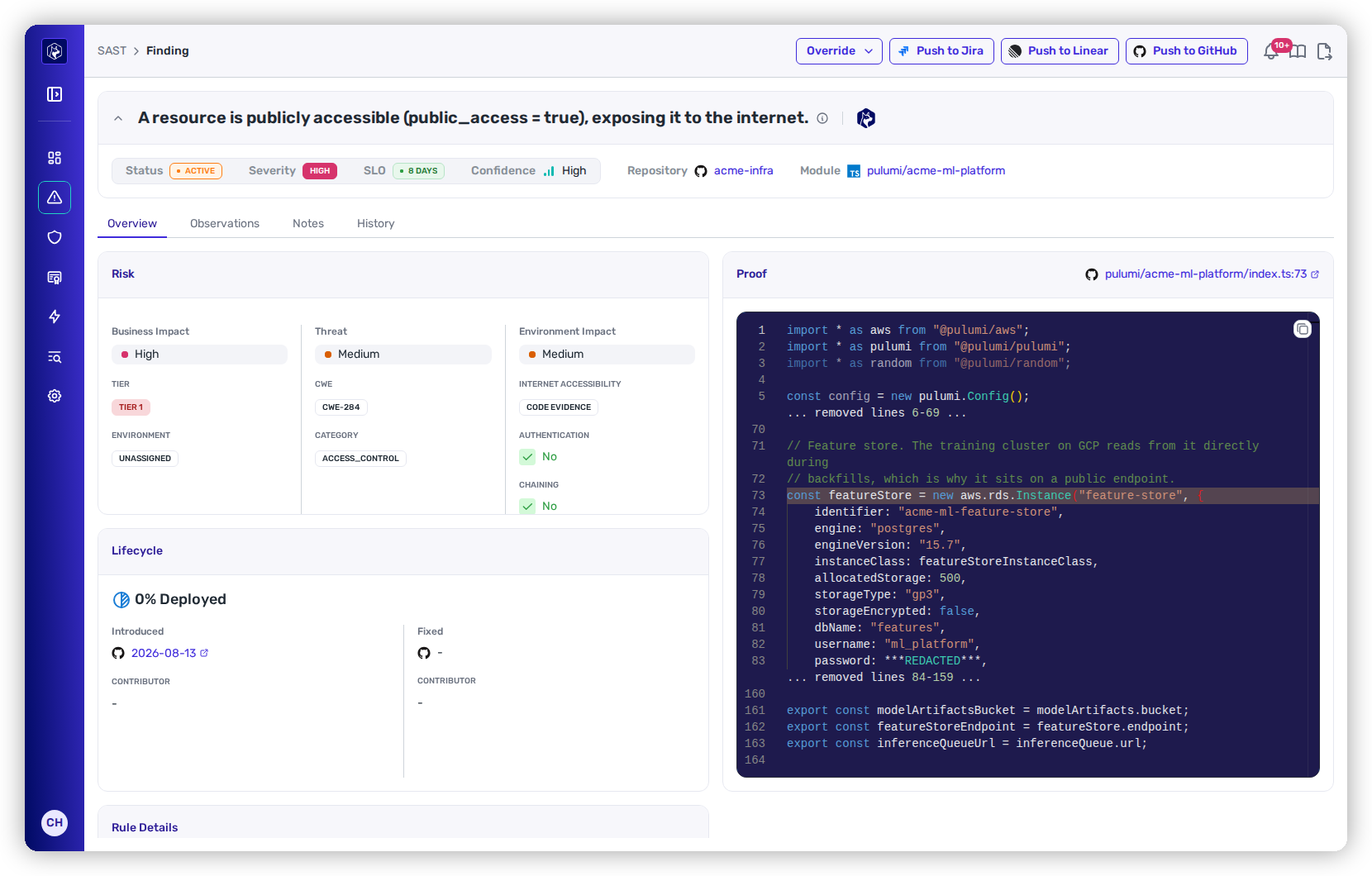
Open a finding and you get **the same detail view as a code finding** — IaC and SAST share it. The header carries **Repository**, **Module**, **Status**, **Severity**, **SLO**, and **Confidence**, with **Override** and **Push to Jira / Linear / GitHub** actions.

<figure><img src="https://414480750-files.gitbook.io/~/files/v0/b/gitbook-x-prod.appspot.com/o/spaces%2FXP3dp2kecwKA2KvYkntz%2Fuploads%2Fgit-blob-bcfff1d3df74a880fbd105901bbf7fe48ac92d7e%2Fcc-iac-detail.png?alt=media" alt="An IaC finding detail: header with status, severity, SLO and confidence, a Risk card showing business, threat and environment impact, and a Proof panel with the offending definition lines highlighted."><figcaption><p>An IaC finding — the Risk card explains the band, and Proof shows the exact lines in the definition that produced it.</p></figcaption></figure>

What you'll use most on an IaC finding:

* **Suggested Fix** — the proposed change to the definition, with a unified **diff**, a plain-language summary, an **Effort** rating, and **Copy Fix**.
* **Rule Details** — the check's description, its category, the location (file : line : col), and first/last seen.
* **Risk** — the band and the three impacts behind it.
* **Lifecycle** — the **% Deployed** header with **Introduced** and **Fixed** stages.
* **Observations** — the raw detections behind the finding, including the evaluated resource.
* **Notes** — a log of notes and automatic events, with **Add Note**.

The **Data flow** tab is where IaC and SAST differ. A source-to-sink taint trace is a property of application code; a misconfiguration is a property of a declaration, so there's no dataflow path to walk. The evidence for an IaC finding is **the resource and the setting itself** — read it in **Rule Details** and **Observations** rather than looking for a trace.

See [Reading a finding](/mrecEO40m5D6bt7Pq5pE/findings/code-security-sast/findings.md#reading-a-finding) for the full tour of the detail view.

## Recording an exception

When a misconfiguration shouldn't follow the default treatment — a deliberately public bucket serving static assets, say — record it rather than leaving it open. The **Override** dropdown in the detail header offers **Risk** and **SLO**, and the row **⋯** menu carries the same two as **Override Risk** and **Override SLO**.

Both behave exactly as they do for code findings, including the requirement that an SLO override can only ever **extend** a deadline (never pull one in, never defer indefinitely), and the bulk path where selecting several rows applies one decision to all of them. See [Recording an exception](/mrecEO40m5D6bt7Pq5pE/findings/code-security-sast/findings.md#recording-an-exception) for the fields, the reason lists, and the expiry rules.

To review exceptions across the whole program, see [Exceptions and Overrides](/mrecEO40m5D6bt7Pq5pE/operate/exceptions-and-overrides.md).

## Row actions

Each row has a **View Details** icon and an **Actions (⋯)** menu, built from the finding's state — **Fix Now** on auto-fixable findings, **Override Risk**, **Override SLO**, **Reset SLO** while an override exists, and **Push to Jira / Linear / GitHub** for each configured connection. See [Row actions](/mrecEO40m5D6bt7Pq5pE/findings/code-security-sast/findings.md#row-actions) for when each appears.

## Related

* [IaC Rules](/mrecEO40m5D6bt7Pq5pE/findings/iac/rules.md) — the same findings grouped by the check that fired.
* [IaC Guardrails](/mrecEO40m5D6bt7Pq5pE/prevent/pr-guardrails/guardrail-types/iac-guardrails.md) — stop new misconfigurations at the pull request.
* [Catalog → Infrastructure](/mrecEO40m5D6bt7Pq5pE/catalog/infrastructure.md) — the running resources these definitions build.


---

# Agent Instructions
This documentation is published with GitBook. GitBook is the documentation platform designed so that both humans and AI agents can read, navigate, and reason over technical content effectively. Learn more at gitbook.com.

## Querying This Documentation
If you need additional information that is not directly available in this page, you can query the documentation dynamically by asking a question.

Perform an HTTP GET request on the current page URL with the `ask` query parameter, and the optional `goal` query parameter:

```
GET https://docs.heeler.com/mrecEO40m5D6bt7Pq5pE/findings/iac/findings.md?ask=<question>&goal=<endgoal>
```

`ask` is the immediate question: it should be specific, self-contained, and written in natural language.
`goal` is optional and describes the broader end goal you are ultimately trying to accomplish on behalf of the user. GitBook uses it to tailor the answer towards what is most useful for that goal.

The response will contain a direct answer to the question and relevant excerpts and sources from the documentation.

Use this mechanism when the answer is not explicitly present in the current page, you need clarification or additional context, or you want to retrieve related documentation sections.