> For the complete documentation index, see [llms.txt](https://docs.heeler.com/mrecEO40m5D6bt7Pq5pE/llms.txt). Markdown versions of documentation pages are available by appending `.md` to page URLs; this page is available as [Markdown](https://docs.heeler.com/mrecEO40m5D6bt7Pq5pE/findings/iac/rules.md).
# IaC Rules
Your IaC misconfigurations grouped by the check that produced them — the lens for seeing which policy fails most widely across your infrastructure.
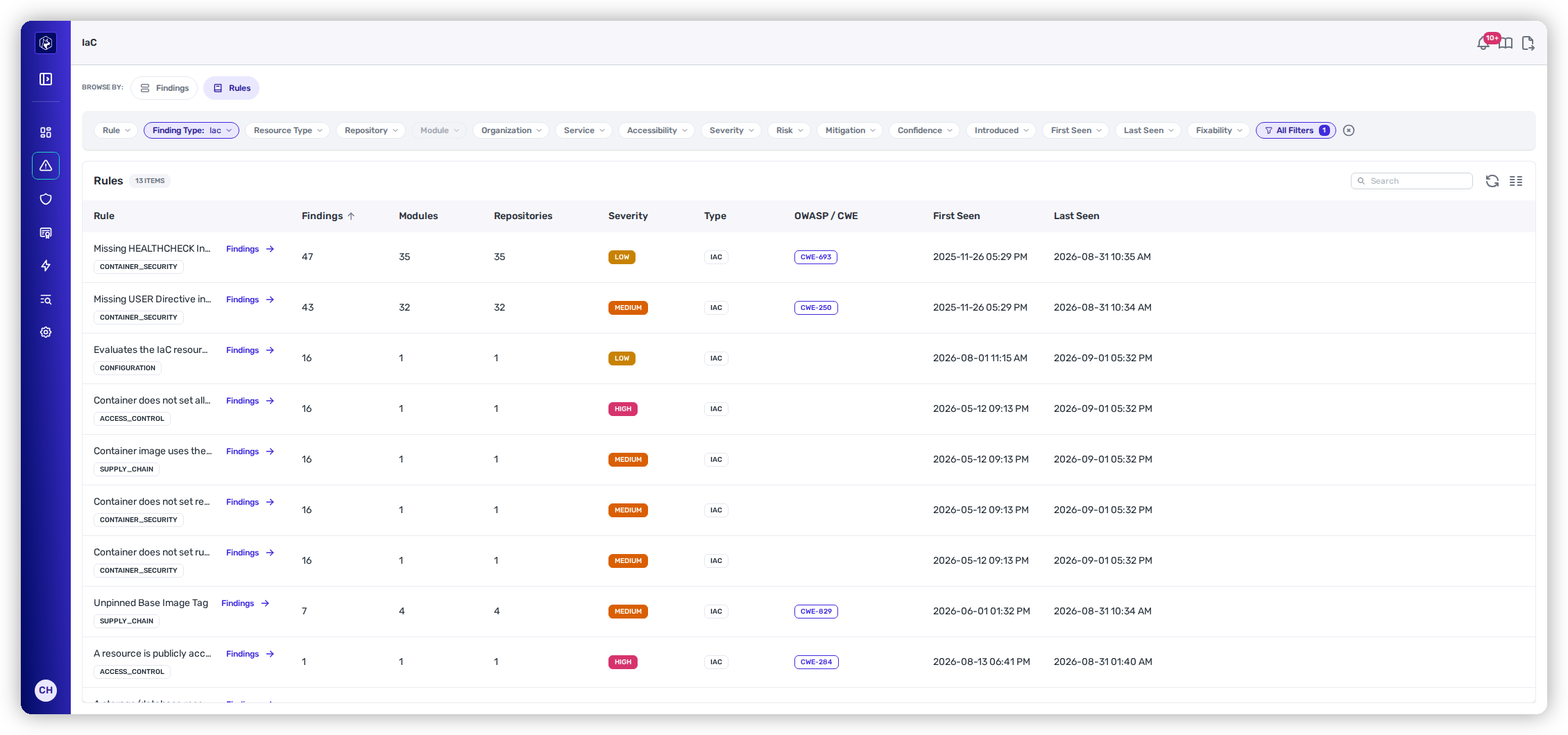
The [IaC Findings](/mrecEO40m5D6bt7Pq5pE/findings/iac/findings.md) list shows one misconfiguration at a time. The **Rules** view (**Security → IaC →** *Rules*) answers the other question: *which check is failing, and how far has it spread?* It groups every IaC finding by the **rule** that produced it, sorted by finding count so the widest problem is at the top.
That ordering is the point. One repository with a public bucket is a ticket; the same check failing in thirty repositories is a module that needs fixing once, or a default that needs changing at the platform level. The Rules view is how you tell those apart before you start filing work.
The Rules view — one row per check, with how far each has spread across modules and repositories.
## What the columns mean
| Column | What it tells you |
| ------------------------------------- | -------------------------------------------------------------------------------------------------------------------------------------------------------------------------------------------------------------------------------------------------------------------------------------- |
| **Rule** | The check's name, with its **category** tag. |
| **Findings · Modules · Repositories** | How widely the rule fires across your estate — the reach that separates a one-off from a systemic default. |
| **Severity** | The rule's severity band. |
| **Type** | The finding family the rule belongs to. Every rule in this section is IaC, so it reads the same down the column here — it's the column that distinguishes detection methods on the [SAST Rules view](/mrecEO40m5D6bt7Pq5pE/findings/code-security-sast/rules-and-categories.md#rules). |
| **OWASP / CWE** | The weakness the check maps to, where it has one. |
| **First Seen · Last Seen** | The rule's activity window in your infrastructure definitions. |
## Drilling in
Click any rule to drop into the [IaC Findings](/mrecEO40m5D6bt7Pq5pE/findings/iac/findings.md) list filtered to just that rule, with whatever filters you'd already set carried across. So the workflow is: scope the Rules view to a team or a framework, find the check with the worst reach, click it, and you're looking at exactly those findings — ready to override in bulk, push to a tracker, or fix.
The lifecycle stage carries across too. If you're on **Fixed** in the Rules view, you land on **Fixed** in the Findings list, so "which check did we clear the most of this quarter?" is a question this view can answer rather than one it silently reframes.
## Filters, search, and layout
The Rules view carries **the same search, filters, sorting, column controls, and export** as the Findings list — including the IaC-specific **Resource Type** and **Language** filters and the pinned IaC scope. Scope first, then read the aggregate: "Terraform only," or "this team's repositories only," reshapes the reach numbers to match the question you're actually asking.
See [Working the list](/mrecEO40m5D6bt7Pq5pE/findings/iac/findings.md#working-the-list) for the full filter set.
## Related
* [IaC Findings](/mrecEO40m5D6bt7Pq5pE/findings/iac/findings.md) — the individual misconfigurations behind these aggregates.
* [IaC Guardrails](/mrecEO40m5D6bt7Pq5pE/prevent/pr-guardrails/guardrail-types/iac-guardrails.md) — once you know which check matters, enforce it at the pull request. A guardrail can target specific **Rule IDs**, so a rule with bad reach here is a rule worth gating there.
---
# Agent Instructions
This documentation is published with GitBook. GitBook is the documentation platform designed so that both humans and AI agents can read, navigate, and reason over technical content effectively. Learn more at gitbook.com.
## Querying This Documentation
If you need additional information that is not directly available in this page, you can query the documentation dynamically by asking a question.
Perform an HTTP GET request on the current page URL with the `ask` query parameter, and the optional `goal` query parameter:
```
GET https://docs.heeler.com/mrecEO40m5D6bt7Pq5pE/findings/iac/rules.md?ask=&goal=
```
`ask` is the immediate question: it should be specific, self-contained, and written in natural language.
`goal` is optional and describes the broader end goal you are ultimately trying to accomplish on behalf of the user. GitBook uses it to tailor the answer towards what is most useful for that goal.
The response will contain a direct answer to the question and relevant excerpts and sources from the documentation.
Use this mechanism when the answer is not explicitly present in the current page, you need clarification or additional context, or you want to retrieve related documentation sections.