> For the complete documentation index, see [llms.txt](https://docs.heeler.com/mrecEO40m5D6bt7Pq5pE/llms.txt). Markdown versions of documentation pages are available by appending `.md` to page URLs; this page is available as [Markdown](https://docs.heeler.com/mrecEO40m5D6bt7Pq5pE/findings/open-source-sca/github-actions.md).

# GitHub Actions Supply Chain

Your CI/CD pipelines are a supply chain too. Heeler inventories the GitHub Actions your workflows depend on, scores them for risk, checks your workflow configuration, and gates risky changes at the pu

Every `.github/workflows` file pulls in code you didn't write — third-party actions, reusable workflows, and everything *they* depend on — and it runs with access to your repository, your secrets, and your build. Heeler treats that CI/CD supply chain as a first-class dependency ecosystem: the actions your pipelines reference are inventoried, risk-scored, and gated at the pull request, right alongside your npm, Maven, PyPI, and Go dependencies.

## Where you'll see it

GitHub Actions risk shows up in the places you already work — there's no separate console to learn:

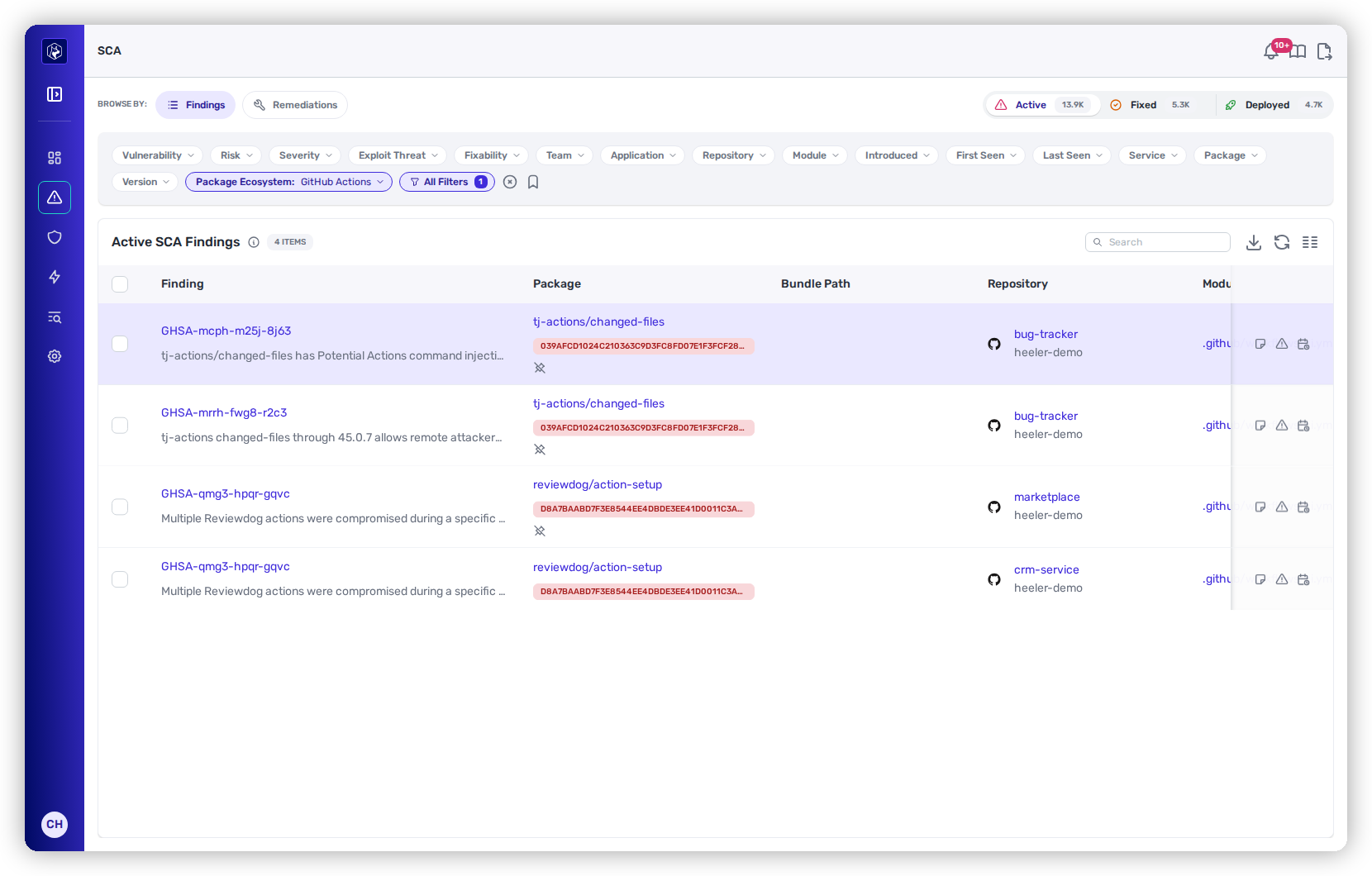
* **In** [**SCA Findings**](/mrecEO40m5D6bt7Pq5pE/findings/open-source-sca/findings.md) — filter **Package Ecosystem** to **GitHub Actions** to see vulnerable and risky actions as ordinary dependency findings, with the same Risk, Severity, SLO, and remediation flow as any package.
* **In** [**SAST**](/mrecEO40m5D6bt7Pq5pE/findings/code-security-sast.md) — problems in your *workflow configuration* (unpinned actions, over-broad tokens, dangerous triggers) land in the code-security inventory and triage flow.
* **In** [**PR Guardrails**](/mrecEO40m5D6bt7Pq5pE/prevent/pr-guardrails.md) — the rules that block or warn on risky action changes before they merge.

<figure><img src="https://414480750-files.gitbook.io/~/files/v0/b/gitbook-x-prod.appspot.com/o/spaces%2FXP3dp2kecwKA2KvYkntz%2Fuploads%2Fgit-blob-9205ccbc91bf38b89ed6dd91a99c4d03ff0ef1fe%2Fgithub-actions-sca-findings.png?alt=media" alt="SCA Findings filtered to Package Ecosystem = GitHub Actions, showing compromised actions tj-actions/changed-files and reviewdog/action-setup with GHSA advisories and pinned commit SHAs."><figcaption><p>SCA Findings filtered to <strong>Package Ecosystem = GitHub Actions</strong> — vulnerable and compromised actions appear as ordinary dependency findings.</p></figcaption></figure>

## What Heeler inventories

Heeler reads every workflow file in each monitored repository and resolves the actions and reusable workflows it references — including the composite actions and reusable workflows those pull in, several layers deep. For JavaScript actions, the packages an action bundles inside itself are tracked too, so a vulnerability buried inside an action surfaces the same way one of your own dependencies would.

Each action is recorded with the exact version your workflow points at — whether that's a commit SHA, a tag, or a branch — so advisories and pin checks match precisely. Actions also appear in your **SBOM** export alongside the rest of your dependencies.

## How actions are risk-scored

Beyond known vulnerabilities, Heeler weighs supply-chain risk signals that feed into the standard [Heeler Risk](/mrecEO40m5D6bt7Pq5pE/findings/open-source-sca/prioritization.md) classification:

| Signal                    | What it tells you                                                                                                                                        |
| ------------------------- | -------------------------------------------------------------------------------------------------------------------------------------------------------- |
| **Pin status**            | Whether the action is pinned to a full commit SHA, or floats on a mutable tag or branch that could change under you.                                     |
| **Publisher trust**       | Verified-publisher status, marketplace listing, and how established the publisher is.                                                                    |
| **Provenance**            | Whether the resolved version carries a signed build attestation proving where it came from.                                                              |
| **Source health**         | An open-source health score covering maintenance, branch protection, token permissions, signed releases, and more.                                       |
| **Trust score**           | A single composite "adopt or avoid" score you can also use as a guardrail threshold.                                                                     |
| **Known vulnerabilities** | Advisories against the action itself, routed through the same pipeline as a compromised npm or PyPI package.                                             |
| **Bundled package CVEs**  | Vulnerabilities inside a JavaScript action's bundled packages, each inheriting the full finding treatment — severity, reachability, exploit threat, SLO. |

## Integrity checks

Some risks aren't a CVE at all — they're an action that isn't what it claims to be. Heeler flags:

* **Impostor commits** — an action pinned to a commit that exists only in a fork, not the real repository.
* **Typosquats** — a name that mimics a popular action but resolves to a different owner.
* **Abandoned sources** — an action whose source repository has been archived.

## Workflow configuration checks

Heeler also reviews the workflow files themselves for the misconfigurations that turn a pipeline into an attack path. These appear in your [SAST](/mrecEO40m5D6bt7Pq5pE/findings/code-security-sast.md) findings:

* **Unpinned actions** — references on a tag or branch instead of a fixed commit, ranked by how much you're trusting the source.
* **Compromised actions** — matches against advisories and any list your team supplies (for example, the 2025 `tj-actions/changed-files` incident).
* **Excessive `GITHUB_TOKEN` permissions** — `write-all` or scopes broader than the job needs.
* **OIDC misuse** — cloud-credential requests exposed on public triggers.
* **Dangerous triggers** — `pull_request_target` and similar patterns that can run untrusted code with your secrets.
* **Expression injection** — untrusted input from event payloads, inputs, or job outputs flowing into shell commands, tracked across steps and jobs.
* **Other hygiene** — secret-exfiltration patterns, self-hosted runner risks, hardcoded credentials, and unverified artifact downloads.

## Gating changes at the pull request

The most effective place to stop a bad action is before it merges. Any of the above can drive a [PR Guardrail](/mrecEO40m5D6bt7Pq5pE/prevent/pr-guardrails.md) that will:

* **Block** pull requests that introduce **unpinned** actions.
* Enforce a **minimum age** on actions and their bundled packages, so a freshly published malicious release can't slip straight into your pipeline.
* **Block or warn** on **compromised** actions the moment a matching advisory or list entry lands.

Guardrails run in [Observe, Warn, or Block](/mrecEO40m5D6bt7Pq5pE/prevent/pr-guardrails.md) mode, just like any other rule.

## Good to know

{% hint style="info" %}

* **A tag or branch isn't a pin.** `@v3`, `@main`, and `@latest` can all change under you, so Heeler treats them as unpinned — pin to a full commit SHA to lock an action down.
* **Bundled-package analysis is JavaScript-only today.** Docker and composite actions are inventoried and risk-scored, but the dependencies *inside* them aren't yet broken out individually.
  {% endhint %}

## Related

* [Open Source (SCA)](/mrecEO40m5D6bt7Pq5pE/findings/open-source-sca.md) — the dependency findings this feeds into.
* [Dependency (SCA) Guardrails](/mrecEO40m5D6bt7Pq5pE/prevent/pr-guardrails/guardrail-types/dependency-sca-guardrails.md) — gate risky actions on pull requests.
* [Build a Supply Chain Security Program](/mrecEO40m5D6bt7Pq5pE/solutions-and-use-cases/building-a-proactive-supply-chain-security-program.md) — where CI/CD supply chain fits the bigger picture.


---

# Agent Instructions
This documentation is published with GitBook. GitBook is the documentation platform designed so that both humans and AI agents can read, navigate, and reason over technical content effectively. Learn more at gitbook.com.

## Querying This Documentation
If you need additional information that is not directly available in this page, you can query the documentation dynamically by asking a question.

Perform an HTTP GET request on the current page URL with the `ask` query parameter, and the optional `goal` query parameter:

```
GET https://docs.heeler.com/mrecEO40m5D6bt7Pq5pE/findings/open-source-sca/github-actions.md?ask=<question>&goal=<endgoal>
```

`ask` is the immediate question: it should be specific, self-contained, and written in natural language.
`goal` is optional and describes the broader end goal you are ultimately trying to accomplish on behalf of the user. GitBook uses it to tailor the answer towards what is most useful for that goal.

The response will contain a direct answer to the question and relevant excerpts and sources from the documentation.

Use this mechanism when the answer is not explicitly present in the current page, you need clarification or additional context, or you want to retrieve related documentation sections.
