> For the complete documentation index, see [llms.txt](https://docs.heeler.com/mrecEO40m5D6bt7Pq5pE/llms.txt). Markdown versions of documentation pages are available by appending `.md` to page URLs; this page is available as [Markdown](https://docs.heeler.com/mrecEO40m5D6bt7Pq5pE/findings/open-source-sca/prioritization.md).

# SCA Prioritization

How Heeler decides what to fix first — sorting every dependency vulnerability into Urgent, Plan, or Defer by real-world exploitability, not raw severity.

A scanner hands you thousands of CVEs and calls it a day. Heeler's job is to tell you which handful can actually hurt you **right now**, and to keep everything else on a clock. It does that by scoring each dependency vulnerability against **three questions answered from your own code and cloud** — how much the service is worth, how exposed the flaw is right now, and what attackers are doing in the wild — then combining them with a consistent, inspectable rule set.

## Urgent, Plan, and Defer

| Level         |                 | What it means                                                                                                                           |
| ------------- | --------------- | --------------------------------------------------------------------------------------------------------------------------------------- |
| 🔴 **Urgent** | **Fix now**     | Reachable and exposed on a high-value service, with a threat signal tipping it over. The runtime gate is open and attackers are moving. |
| 🟠 **Plan**   | **Schedule it** | Real risk, but not immediate — partial exposure or a mid-tier service. Fix within its SLO window.                                       |
| ⚪ **Defer**   | **Track it**    | Not currently exploitable — unreachable, undeployed, mitigated, or low-value. Watched, not ignored.                                     |

{% hint style="info" %}
**Levels aren't static.** Priority reflects your environment *today*, and Heeler re-scores continuously as that changes — so a **Defer** flips to **Urgent** the moment its service goes internet-facing or an exploit lands, with no rescan or re-import needed. You don't chase priority; it comes to you.
{% endhint %}

## What sets the level: business, exposure, and threat

Every level is built from three impacts, each reduced to **Low / Medium / High**. Open any finding's **Risk** panel to see all three and the factors behind them.

### Business impact — how much the service is worth

Business impact is a grid of two things: the service's **tier** and the **environment** it runs in.

* You assign each service a **tier from 1 (most critical) to 4**, reflecting data sensitivity, compliance scope, and revenue.
* Because one dependency usually lives in many repositories, Heeler applies the **highest tier of any active service that uses it** — a library shared between a sandbox and your payments service is treated as payments-critical. The environment is likewise the **highest-impact** one across those services' running deployments.

|              | Production · Corporate · DR · *(Unassigned)* | Staging · Test · Dev · Sandbox |
| ------------ | -------------------------------------------- | ------------------------------ |
| **Tier 1–2** | 🔴 High                                      | ⚪ Low                          |
| **Tier 3–4** | 🟠 Medium                                    | ⚪ Low                          |

The environment isn't a gentle nudge — a vulnerability that only runs in **staging, dev, or sandbox collapses to Low business impact regardless of tier**, and a Tier 3–4 service in production is capped at Medium. (A service with no environment data yet is treated as high-impact, so nothing is under-counted by default.)

### Environment impact — how exposed it is right now

This is where Heeler separates the theoretical from the exploitable. It runs a two-stage assessment: first a **gate** — is the vulnerability exploitable *at all* in your environment? — and only then, for the ones that clear it, **how much damage** it could do.

A vulnerability clears the exploitability gate only when **all three** of the checks below hold. If any one fails, it **isn't exploitable, environment impact drops to Low, and the finding lands in Defer** — however high the CVSS score. On the finding, this shows as the **Exploitability: Not exploitable** verdict.

#### Reachability

Being *listed* in a manifest isn't the same as being *run*. Heeler combines two independent checks and treats a vulnerability as reachable only when both agree:

* **Runtime reachability** — the vulnerable library is actually **loaded in a running deployment**, established by correlating your live deployed services against the dependency. A library that ships in an image but never runs — or sits in a repository with no active deployment — is not runtime-reachable.
* **Static, function-level reachability** — Heeler resolves the specific **vulnerable functions** for the CVE and traces your **call graph** to check whether your code actually calls any of them. This applies to the languages Heeler builds a call graph for. If the vulnerable symbols exist but nothing in your code path reaches them, the finding is automatically mitigated as **“no reachable vulnerable functions”** — even though the library is loaded.

Combining the two is what removes most false urgency: a library can be loaded in production and *still* be safely unreachable because your code never calls the vulnerable function. (For ecosystems without verified call-graph support, Heeler uses runtime reachability alone and errs toward *reachable*, so nothing is silently dropped.)

{% hint style="info" %}
**See the path.** When static reachability applies, the finding shows a **call-graph card** — the traced path from an entry point to the vulnerable function, with a count of reachable vulnerable functions. Reachability is treated as **yes/no** for scoring; where Heeler records a confidence for a reachable symbol it's shown for context and doesn't change the band.

A static verdict needs two things to line up: Heeler resolves the vulnerable functions for the advisory, which it does across a broad set of ecosystems, and Heeler builds a call graph for the language the code is written in. Where the functions resolve but no call graph is built, runtime reachability decides on its own.
{% endhint %}

#### Internet exposure

Heeler answers this from your **connected cloud and runtime**, not a guess. A finding is internet-exposed when an **active deployment** of the affected service runs on a compute resource that is **reachable from the internet**. The identical vulnerability is far more exploitable fronting a public endpoint than buried on an internal-only service — so an internal service pulls environment impact down, and a public one pushes it up.

#### Mitigation

A mitigation flips exploitability to **off**, dropping environment impact to Low. Heeler recognizes two kinds:

* **Automatic** — a **sanitizer detected in the data path**, or the **“no reachable vulnerable functions”** result from the call-graph analysis above.
* **Applied by you** — a **risk override** (for example *Not reachable* or *False positive*) recorded with a reason on the finding. See [recording an exception](/mrecEO40m5D6bt7Pq5pE/findings/open-source-sca/findings.md#recording-an-exception).

#### How bad is it? — compromise and chaining

For the findings that *do* clear the gate, two more factors decide Medium vs High:

* **Compromise** — the damage the flaw can do, from its CVSS **confidentiality / integrity / availability** impact: **Total** when confidentiality or integrity is High, **Partial** for lesser or availability-only impact, **None** when all three are none. (An active secret exposed in the deployment counts as **Total**.)
* **Chaining** — whether the deployment can reach **datastores, secrets, or a Tier-1 service**, giving an attacker somewhere to pivot next.

| Exploitable? | Compromise | Chaining | Environment impact |
| ------------ | ---------- | -------- | ------------------ |
| No           | —          | —        | ⚪ Low              |
| Yes          | Total      | —        | 🔴 High            |
| Yes          | Partial    | Yes      | 🔴 High            |
| Yes          | Partial    | No       | 🟠 Medium          |
| Yes          | None       | —        | ⚪ Low              |

### Threat — what's happening in the wild

Threat comes from real exploitation signals, reduced to three levels:

* 🔴 **High (actively exploited)** — the CVE has **confirmed** exploitation on **CISA KEV** or **VulnCheck KEV**, or the package itself is **malicious / compromised**. (KEV *membership* alone isn't enough — provisional canary entries don't count.)
* 🟠 **Medium (possibly exploited)** — its **EPSS score is ≥ 0.40** (a high predicted probability of exploitation).
* ⚪ **Low** — no active-exploitation signal.

On the finding, this rolls up to the **Exploit Threat** field — **Confirmed** (actively exploited), **Probable** (EPSS-elevated), or **Unlikely**. Known-ransomware association and CWE weakness data are shown on the finding for context but don't change the threat level.

## How the level is decided

Heeler combines the three impacts with a fixed, inspectable rule set — the same table computed everywhere priority is shown. Because a **Low business impact always lands in Defer**, only two grids matter:

{% tabs %}
{% tab title="High-value service" %}
Business impact **High**:

| Environment ↓ / Threat → | Low     | Medium    | High      |
| ------------------------ | ------- | --------- | --------- |
| **High**                 | 🟠 Plan | 🔴 Urgent | 🔴 Urgent |
| **Medium**               | 🟠 Plan | 🟠 Plan   | 🔴 Urgent |
| **Low**                  | ⚪ Defer | ⚪ Defer   | ⚪ Defer   |
| {% endtab %}             |         |           |           |

{% tab title="Mid-value service" %}
Business impact **Medium**:

| Environment ↓ / Threat → | Low     | Medium  | High      |
| ------------------------ | ------- | ------- | --------- |
| **High**                 | 🟠 Plan | 🟠 Plan | 🔴 Urgent |
| **Medium**               | 🟠 Plan | 🟠 Plan | 🟠 Plan   |
| **Low**                  | ⚪ Defer | ⚪ Defer | ⚪ Defer   |
| {% endtab %}             |         |         |           |

{% tab title="Low-value service" %}
Business impact **Low**: every combination is ⚪ **Defer**. A flaw on a throwaway or sandbox service stays low no matter what.
{% endtab %}
{% endtabs %}

Two rules explain almost everything you'll see:

* **If it isn't exploitable, it's Defer.** An unreachable, undeployed, or mitigated vulnerability drops environment impact to Low — and Low environment impact is always Defer, however severe the CVSS.
* **If the service barely matters, it's Defer.** Low business impact is always Defer.

**Urgent is deliberately rare** — only four combinations reach it: a high-value service that is *both* exposed *and* under active threat, or one where exposure and threat are both maxed with the third factor at least medium. Everything real but not-yet-urgent is **Plan** — work you schedule against its SLO. When Heeler is missing data to score a finding, it fails **safe**, treating it as higher-priority rather than hiding it.

### Worked example: two production findings

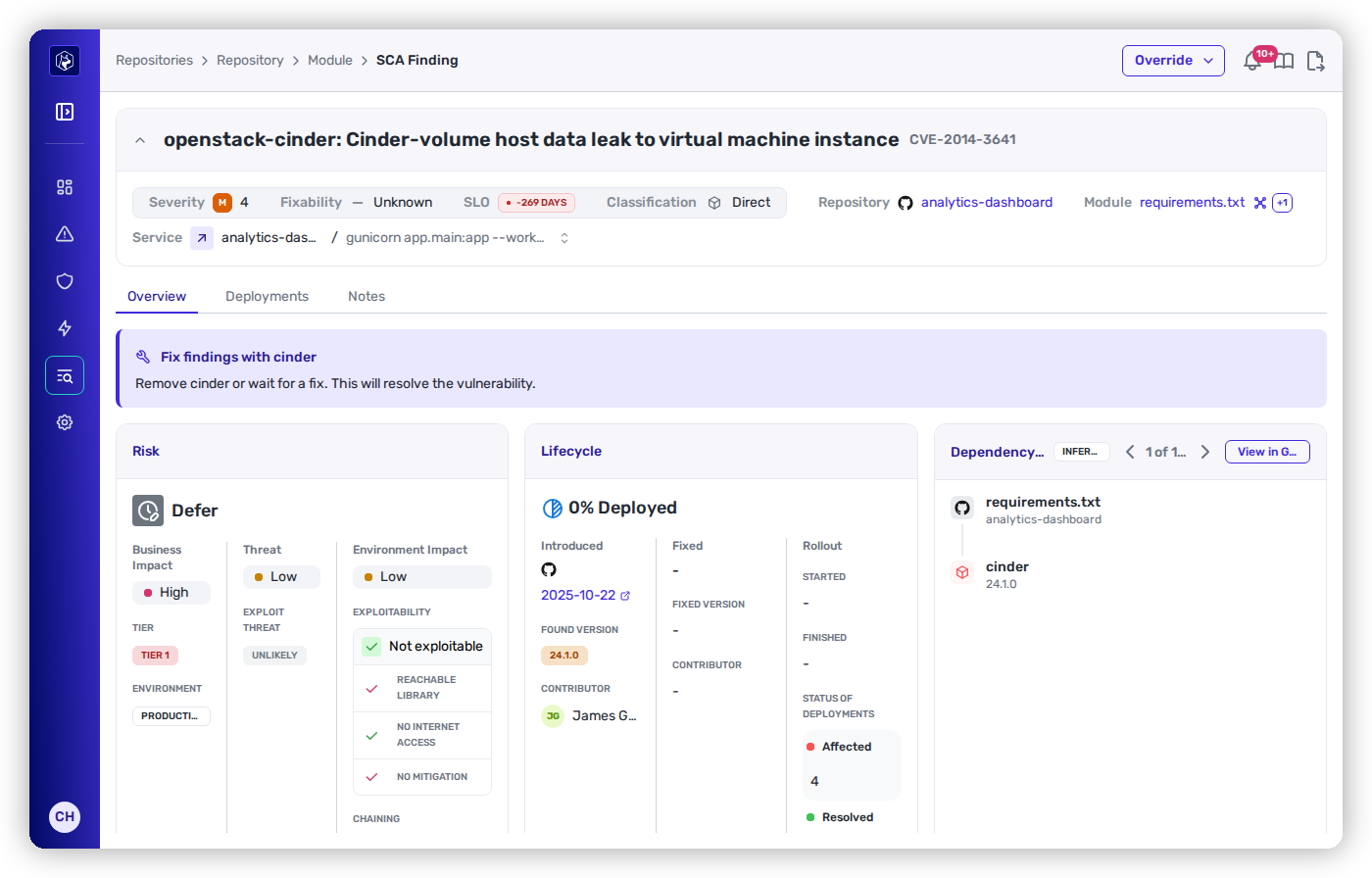
<div data-full-width="true"><figure><img src="https://414480750-files.gitbook.io/~/files/v0/b/gitbook-x-prod.appspot.com/o/spaces%2FXP3dp2kecwKA2KvYkntz%2Fuploads%2Fgit-blob-fc38433e56a4adac90254c014be83a7b16ff3bef%2Fcc-risk-detail.png?alt=media" alt="An SCA finding&#x27;s Risk panel showing Defer: Business Impact High (Tier 1, Production), Threat Low, Environment Impact Low with Exploitability &#x27;Not exploitable&#x27; and &#x27;No internet access&#x27;."><figcaption><p><strong>Defer</strong> — <code>CVE-2014-3641</code> on a Tier 1 / Production service. The library is reachable, but the service has <em>no internet access</em>, so it isn't exploitable — environment impact is Low.</p></figcaption></figure></div>

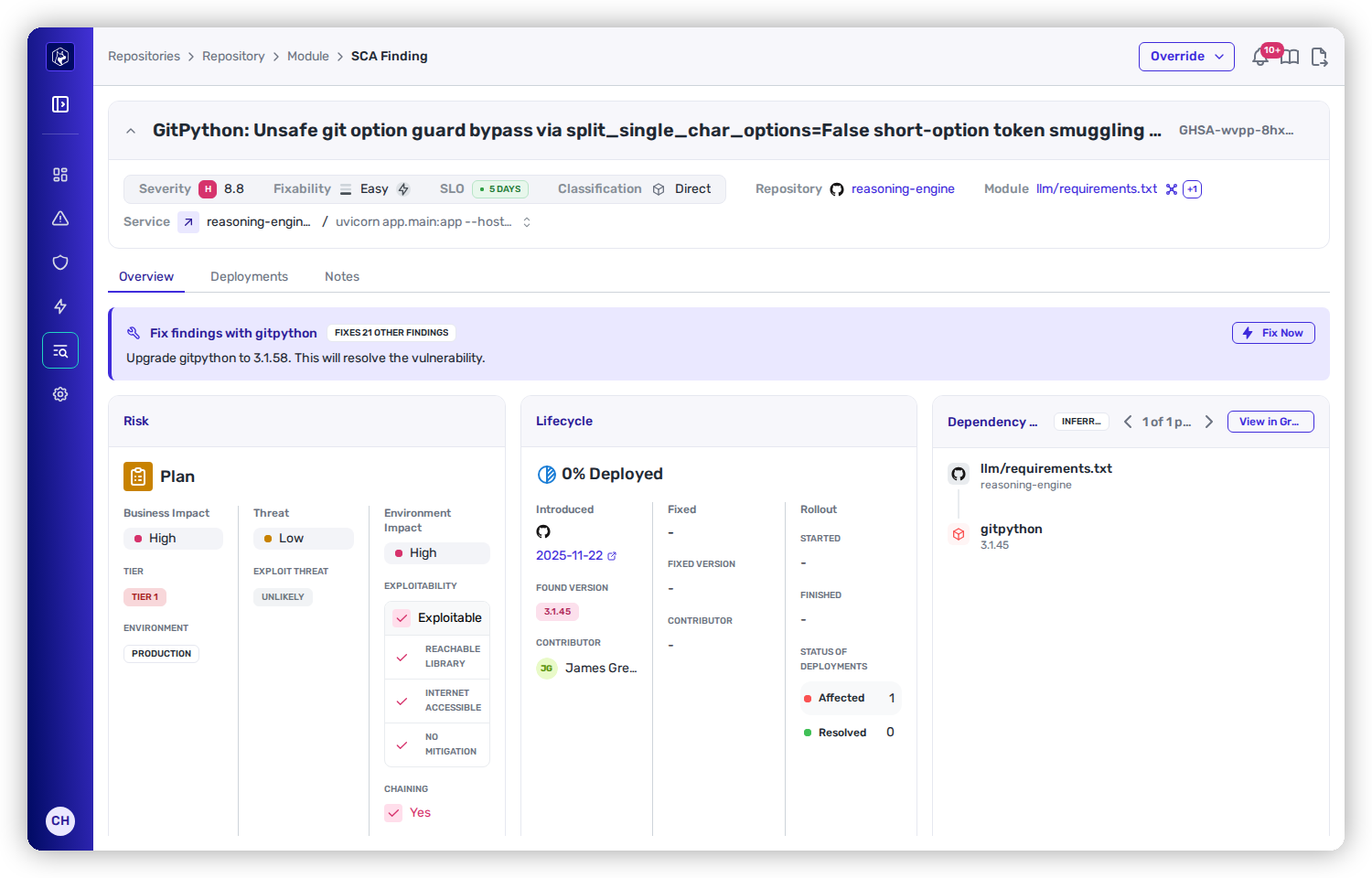
<div data-full-width="true"><figure><img src="https://414480750-files.gitbook.io/~/files/v0/b/gitbook-x-prod.appspot.com/o/spaces%2FXP3dp2kecwKA2KvYkntz%2Fuploads%2Fgit-blob-01ace7c3b345414039d4e0be19338229cf1de1fc%2Fcc-fix-heeler-risk-detail.png?alt=media" alt="An SCA finding&#x27;s Risk panel showing Plan: Business Impact High (Tier 1, Production), Threat Low, Environment Impact High with Exploitability &#x27;Exploitable&#x27;, Internet Accessible, Chaining Yes."><figcaption><p><strong>Plan</strong> — <code>GHSA-wvpp-8hx9-p66j</code> on another Tier 1 / Production service: exploitable <em>and</em> internet-accessible, so environment impact is High — but Threat is Low, so it's Plan, not Urgent.</p></figcaption></figure></div>

Both sit on **Tier 1, Production** services — identical business impact — yet one is Defer and the other Plan. The difference is entirely **exposure**: whether the vulnerable code is actually reachable from the internet. And neither is Urgent, because no active-exploitation signal has landed — add a KEV listing to the second and it flips to Urgent immediately.

## Using prioritization day to day

Prioritization isn't just a label — it's how you drive the queue:

* **Work top-down.** Filter or sort the [findings list](/mrecEO40m5D6bt7Pq5pE/findings/open-source-sca/findings.md) by **Risk** and clear Urgent first, then Plan.
* **Put it on a clock.** Each finding carries an **SLO** deadline tied to its level; overdue items surface everywhere so nothing quietly ages out.
* **Correct the call when your context differs.** If Heeler's assessment is wrong for your situation, apply a [risk or SLO override](/mrecEO40m5D6bt7Pq5pE/findings/open-source-sca/findings.md#recording-an-exception) with a reason — it's recorded and reviewable, and it feeds back into exploitability (an override can mitigate a finding to Defer).

The goal isn't to fix only what's Urgent — it's to drive **everything** down in the right order, with the riskiest, most reachable issues first.

## Worked example

The same capability inside a full triage workflow:

{% content-ref url="/pages/2ucJQI28WyhzhNQvs51Y" %}
[Determine Exploitability in Production](/mrecEO40m5D6bt7Pq5pE/solutions-and-use-cases/determine-exploitability-in-production.md)
{% endcontent-ref %}


---

# Agent Instructions
This documentation is published with GitBook. GitBook is the documentation platform designed so that both humans and AI agents can read, navigate, and reason over technical content effectively. Learn more at gitbook.com.

## Querying This Documentation
If you need additional information that is not directly available in this page, you can query the documentation dynamically by asking a question.

Perform an HTTP GET request on the current page URL with the `ask` query parameter, and the optional `goal` query parameter:

```
GET https://docs.heeler.com/mrecEO40m5D6bt7Pq5pE/findings/open-source-sca/prioritization.md?ask=<question>&goal=<endgoal>
```

`ask` is the immediate question: it should be specific, self-contained, and written in natural language.
`goal` is optional and describes the broader end goal you are ultimately trying to accomplish on behalf of the user. GitBook uses it to tailor the answer towards what is most useful for that goal.

The response will contain a direct answer to the question and relevant excerpts and sources from the documentation.

Use this mechanism when the answer is not explicitly present in the current page, you need clarification or additional context, or you want to retrieve related documentation sections.