> For the complete documentation index, see [llms.txt](https://docs.heeler.com/mrecEO40m5D6bt7Pq5pE/llms.txt). Markdown versions of documentation pages are available by appending `.md` to page URLs; this page is available as [Markdown](https://docs.heeler.com/mrecEO40m5D6bt7Pq5pE/findings/open-source-sca/remediations.md).

# Remediations

Where you plan and knock out dependency fixes — grouped into per-package fix units, with search, filters, one-click and bulk auto-fix, and every fix tracked to production.

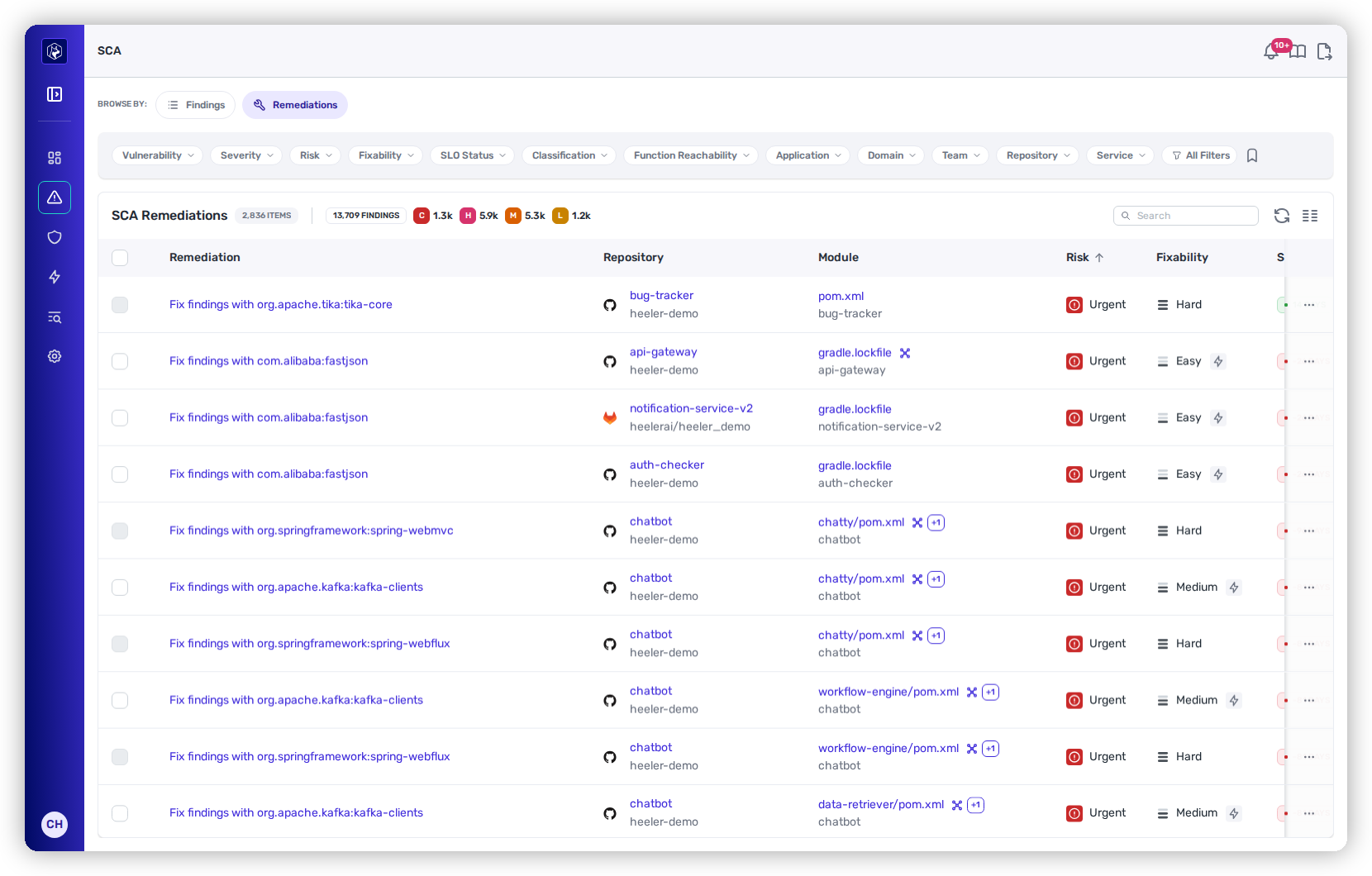
**Remediations is where the SCA area opens** — it's the default of the two **Browse By** views (Findings is the other), because most of the time you're here to fix, not to browse CVEs. Instead of a flat list of every CVE, Heeler groups vulnerabilities into **fix units** — one per package, per place it's used — because a single upgrade usually clears several findings at once. Every row is a *"Fix findings with "* you can act on directly.

The header carries a count of fix units and a tally of the findings behind them, broken down **Critical / High / Medium / Low**.

<figure><img src="https://414480750-files.gitbook.io/~/files/v0/b/gitbook-x-prod.appspot.com/o/spaces%2FXP3dp2kecwKA2KvYkntz%2Fuploads%2Fgit-blob-ca039da969647899cf5dc742daae5aad7d7c9e34%2Fcc-sca-remediations.png?alt=media" alt="The Remediations view — findings grouped into per-package fix units, each with a checkbox."><figcaption><p>Fixes grouped by package — one upgrade, several findings cleared. Each row has a checkbox for bulk action.</p></figcaption></figure>

## Working the list

Remediations shares the same toolbar as [Findings](/mrecEO40m5D6bt7Pq5pE/findings/open-source-sca/findings.md) — **Search**, **Manage Columns**, **Refresh**, saved-view **Presets**, and **Export** all behave the same way. The default columns are the remediation (*"Fix findings with …"*), its **Repository**, and **Module**; use Manage Columns to show more.

### Filtering

The chips narrow the list to the batch you care about — a few that matter most here:

* **Fixability → Auto-Fixable** — the fixes Heeler can generate for you.
* **Classification** — goes beyond direct-vs-transitive to include **Code Reachable** (and Runtime Reachable), plus First Party / Third Party / Open Source / Vendor.
* **SLO Status → Overdue** — what's already past its deadline.
* **Severity** — because a remediation groups several findings, this filters on the **highest severity present in the group**.
* Plus **Vulnerability**, **Risk**, **Application**, **Team**, **Repository**, and **Service**, with the full set under **All Filters**.

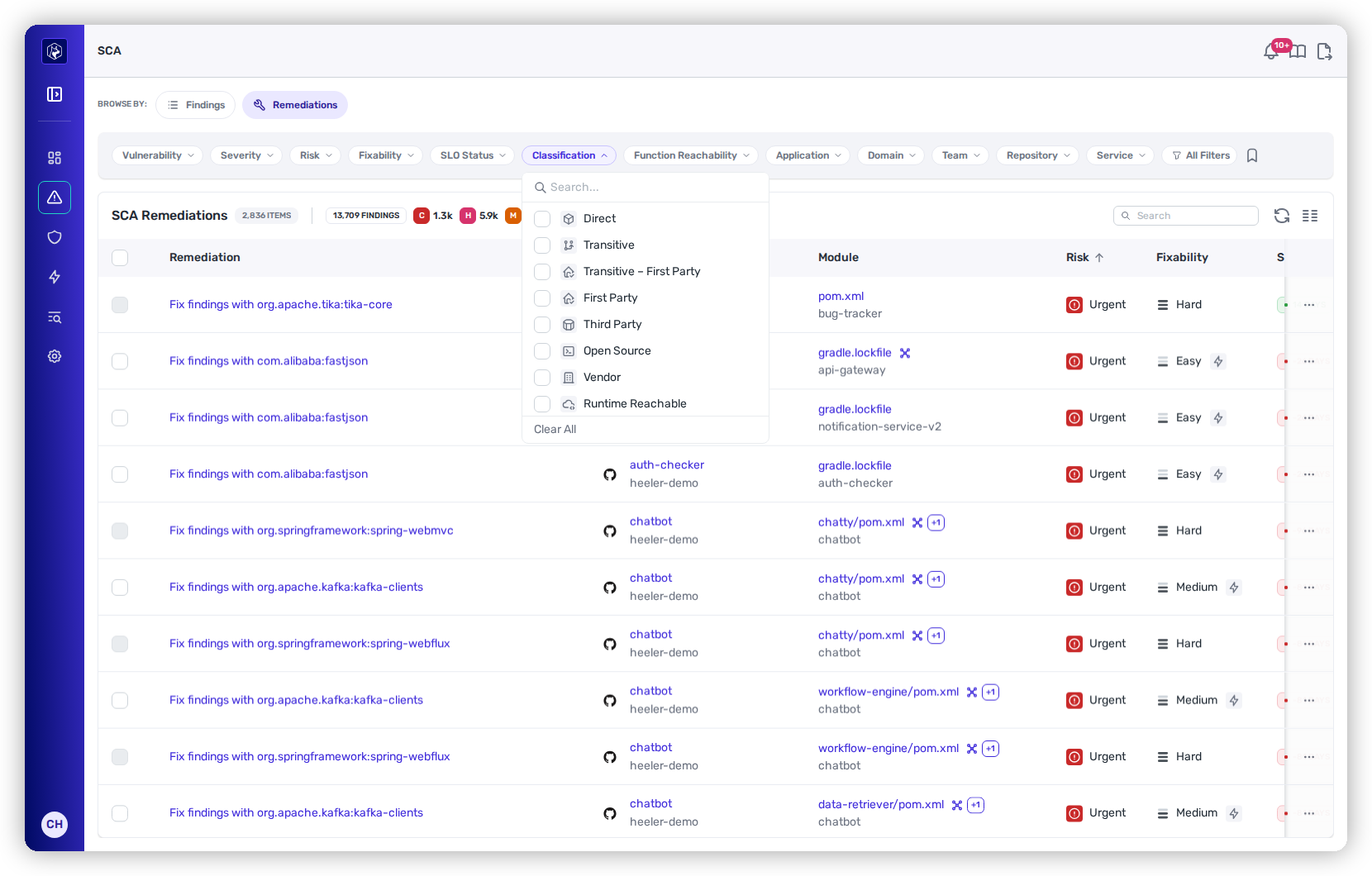
<figure><img src="https://414480750-files.gitbook.io/~/files/v0/b/gitbook-x-prod.appspot.com/o/spaces%2FXP3dp2kecwKA2KvYkntz%2Fuploads%2Fgit-blob-c912852757e99a595f9dacb9b6dc42ee9e9aa87f%2Fcc-rem-classification.png?alt=media" alt="The Classification filter open, showing Direct, Transitive, Code Reachable and more."><figcaption><p>Classification includes reachability — narrow to the dependencies that actually run.</p></figcaption></figure>

A combination worth remembering: **Risk = Urgent + Fixability = Auto-Fixable + Classification = Code Reachable** gives you the high-impact, reachable fixes Heeler can make right now — add **SLO Status = Overdue** and you're looking at exactly what to hand the agent first.

## Fix one, or a whole batch

Every remediation can be actioned on its own or in bulk.

### A single remediation

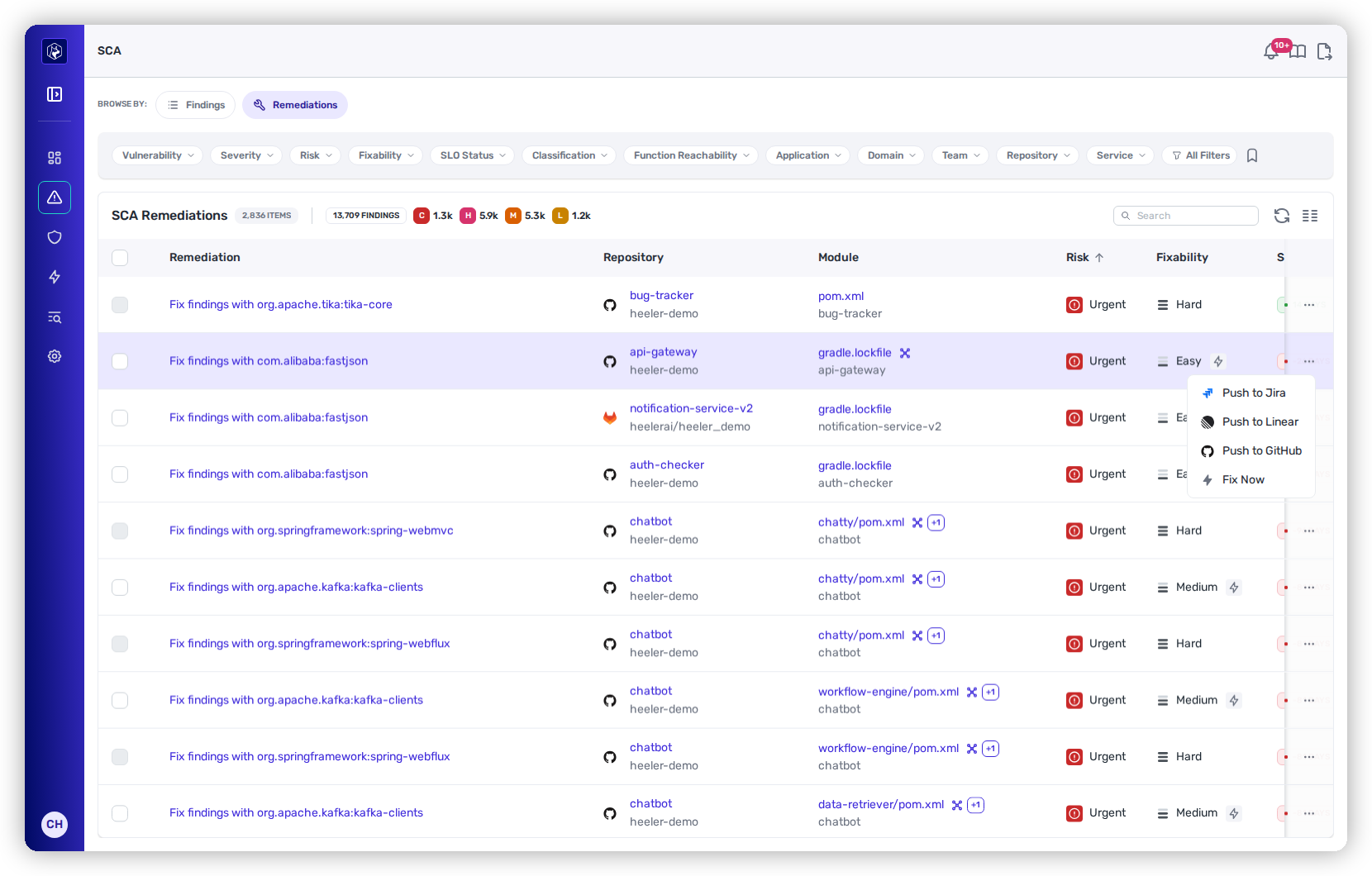
Hover a row for its **⋯** menu: open a ticket in **Jira**, **Linear**, or **GitHub** (the ticketing options appear once a **ticketing integration is connected**; once a ticket is linked, that entry flips to **Unlink from Jira/Linear**), or — when the fix is auto-fixable — choose **Fix Now** to have Heeler's agent generate the change and open a pull request.

<figure><img src="https://414480750-files.gitbook.io/~/files/v0/b/gitbook-x-prod.appspot.com/o/spaces%2FXP3dp2kecwKA2KvYkntz%2Fuploads%2Fgit-blob-1276babaeb0b0e24f00249420fb35cb02912bbeb%2Fcc-rem-rowmenu.png?alt=media" alt="The remediation row menu with Push to Jira/Linear/GitHub and Fix Now."><figcaption><p>The row ⋯ menu — push to a tracker, or Fix Now to let the agent open a PR.</p></figcaption></figure>

### A batch at once

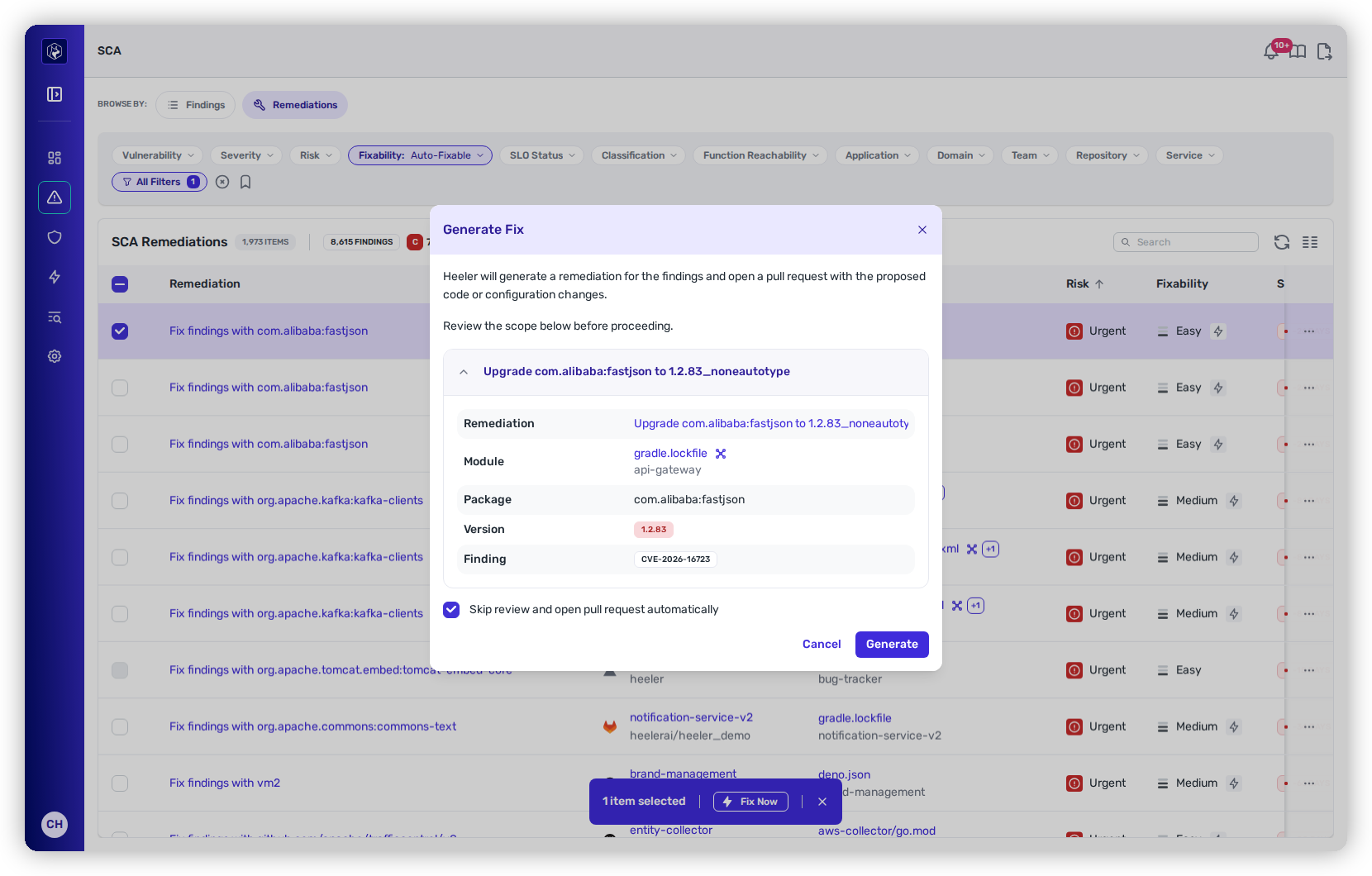
Tick the checkboxes down the left (or the header box to select all). A **"N items selected"** bar appears with **Fix Now**. Pressing it opens the **Generate Fix** dialog, which lists the scope before anything happens — one card per remediation, each showing the upgrade, module, package, target version, and the findings it resolves — and decide how the pull requests land:

* **Open pull requests automatically** — pre-set from your tenant's [pull request default](/mrecEO40m5D6bt7Pq5pE/administer-and-monitor/program-policy/remediation-agent.md#pull-request-defaults-for-sca-and-sast-autofix), and changed here for this batch. Off, each fix is built and held at **Awaiting Approval** in [Agent Executions](/mrecEO40m5D6bt7Pq5pE/fix/agent-executions.md#approve-or-discard-a-held-fix) for an administrator to approve.
* **Open separate PRs for each remediation** — off by default; otherwise Heeler batches them into **one pull request per module**.

<figure><img src="https://414480750-files.gitbook.io/~/files/v0/b/gitbook-x-prod.appspot.com/o/spaces%2FXP3dp2kecwKA2KvYkntz%2Fuploads%2Fgit-blob-2adf5585ebd88a12c0da3c4c2fc6b05557765a45%2Fcc-rem-bulkfix.png?alt=media" alt="The Generate Fix dialog with per-remediation scope cards and the two PR options."><figcaption><p>Review the scope and choose how the PRs land before Heeler opens them.</p></figcaption></figure>

Heeler then upgrades each dependency, **validates the fix by building it**, and opens the pull request(s) — see [SCA Auto-Fix](/mrecEO40m5D6bt7Pq5pE/fix/sca-auto-fix.md) for what happens under the hood.

{% hint style="success" %}
**What success looks like:** the fix generates asynchronously, and you can follow it in the remediation's **Agent Executions** log (below). A successful run moves through Pending → Running → (Awaiting Approval) → **Completed** and posts a link straight to the **pull request** Heeler opened.
{% endhint %}

{% hint style="warning" %}
**What failure looks like:** the run ends in **Failed** — open that Agent Execution row to see why (for example, the build didn't pass validation), fix the cause, and re-run **Fix Now**.
{% endhint %}

## Inside a remediation

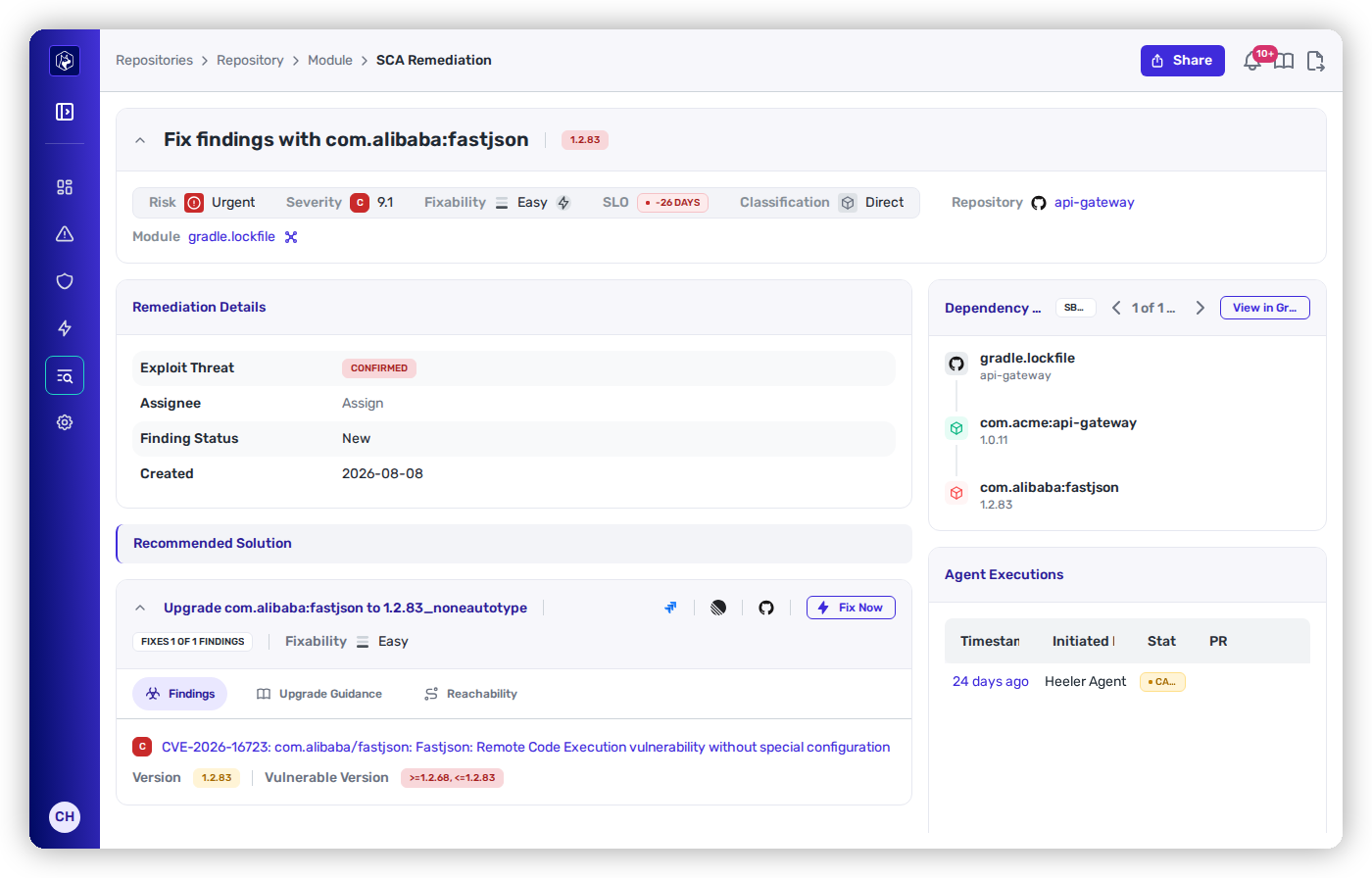
Open any remediation for the full picture. A summary bar carries its **Risk**, **Severity** (with CVSS), **Fixability**, **SLO**, **Dependency Type**, **Repository**, and **Module**.

<figure><img src="https://414480750-files.gitbook.io/~/files/v0/b/gitbook-x-prod.appspot.com/o/spaces%2FXP3dp2kecwKA2KvYkntz%2Fuploads%2Fgit-blob-00f085757b1b16ab9d17b5567bd7b82370fdddd1%2Fcc-rem-detail.png?alt=media" alt="A remediation detail — recommended solution, findings, dependency path, and Agent Executions."><figcaption><p>The remediation detail — the fix, the findings it clears, the dependency path, and the agent's progress.</p></figcaption></figure>

* **Remediation Details** — the **Exploit Threat**, **Assignee**, **Finding Status**, and when it was created.
* **Recommended Solution** — the exact upgrade (e.g. *"Upgrade org.apache.commons:commons-text to 1.10.0"*) and how many findings it clears. A **Findings** tab lists each CVE with its affected and fixed version ranges; an **Upgrade Guidance** tab generates a migration guide for the version bump when you want one. The tracker and **Fix Now** actions are here too.
* **Dependency Path** — how the package is pulled in, from the manifest down to the vulnerable version, with a pager for each route in and a **View in Graph** option.
* **Agent Executions** — a live log of every automated fix attempt: the **timestamp**, who **initiated** it, its **status** as it moves from Pending → Running → Awaiting Approval → Completed (or **Failed**), and a link straight to the **PR** Heeler opened.

## Related

* [Findings](/mrecEO40m5D6bt7Pq5pE/findings/open-source-sca/findings.md) — the individual CVEs behind these fix units.
* [SCA Auto-Fix](/mrecEO40m5D6bt7Pq5pE/fix/sca-auto-fix.md) — how the agent generates and validates each fix.


---

# Agent Instructions
This documentation is published with GitBook. GitBook is the documentation platform designed so that both humans and AI agents can read, navigate, and reason over technical content effectively. Learn more at gitbook.com.

## Querying This Documentation
If you need additional information that is not directly available in this page, you can query the documentation dynamically by asking a question.

Perform an HTTP GET request on the current page URL with the `ask` query parameter, and the optional `goal` query parameter:

```
GET https://docs.heeler.com/mrecEO40m5D6bt7Pq5pE/findings/open-source-sca/remediations.md?ask=<question>&goal=<endgoal>
```

`ask` is the immediate question: it should be specific, self-contained, and written in natural language.
`goal` is optional and describes the broader end goal you are ultimately trying to accomplish on behalf of the user. GitBook uses it to tailor the answer towards what is most useful for that goal.

The response will contain a direct answer to the question and relevant excerpts and sources from the documentation.

Use this mechanism when the answer is not explicitly present in the current page, you need clarification or additional context, or you want to retrieve related documentation sections.