> For the complete documentation index, see [llms.txt](https://docs.heeler.com/mrecEO40m5D6bt7Pq5pE/llms.txt). Markdown versions of documentation pages are available by appending `.md` to page URLs; this page is available as [Markdown](https://docs.heeler.com/mrecEO40m5D6bt7Pq5pE/fix/agent-executions.md).

# Agent Executions

The audit trail of every Heeler agent run — what it did, whether it opened a pull request, and how to review, re-run, approve, or discard it.

Every time Heeler's agent runs — fixing a dependency, remediating a SAST finding, resolving a guardrail — it's recorded here. **Administration → Agent Executions** is the complete, filterable trail: what ran, who triggered it, whether it produced a pull request, and how it ended. It's where you go to review the agent's work, retry a failed run, or approve fixes waiting on you.

{% hint style="info" %}
Administration is admin-only — you need an **Administrator (read-only)** or **Administrator** role to view this page.
{% endhint %}

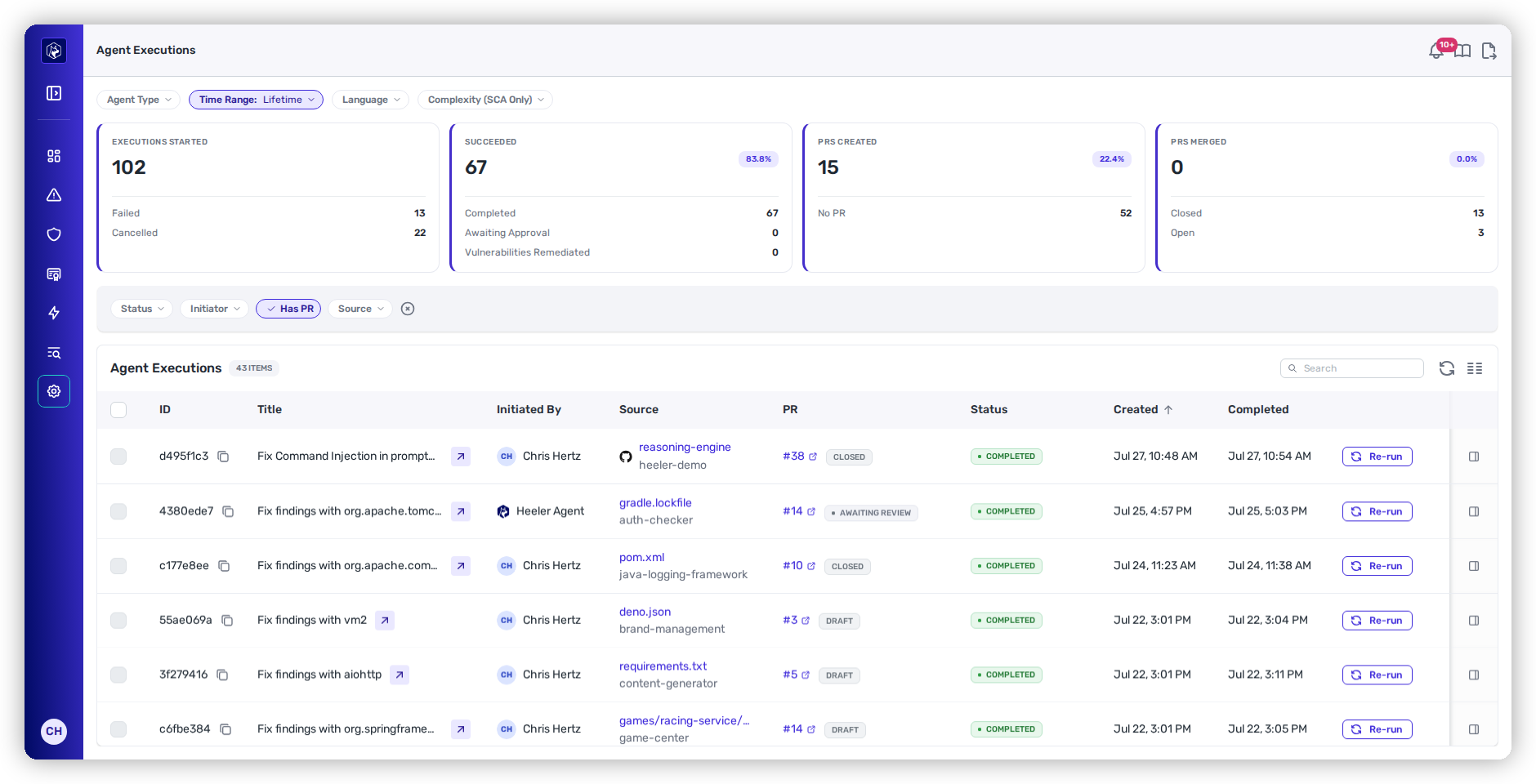
<figure><img src="https://414480750-files.gitbook.io/~/files/v0/b/gitbook-x-prod.appspot.com/o/spaces%2FXP3dp2kecwKA2KvYkntz%2Fuploads%2Fgit-blob-05bbbc593e4f4ef75c3e05e42ce6493607fbbfec%2Fam-agent-executions.png?alt=media" alt="The Agent Executions page: filter pills across the top, then the Executions Started, Succeeded, PRs Created and PRs Merged cards with their sub-totals and rate badges, above the executions table filtered to runs that opened a pull request, with each PR link carrying a status chip such as Closed, Awaiting review, or Draft."><figcaption><p>Agent Executions — the headline numbers across the top, then one row per run. Here, filtered to runs that opened a pull request, so each PR's status chip is visible.</p></figcaption></figure>

## How the agent is doing overall

Four cards across the top summarise the runs currently in scope.

<table><thead><tr><th width="200">Card</th><th>What it counts</th></tr></thead><tbody><tr><td><strong>Executions Started</strong></td><td>Every run in scope, with <strong>Failed</strong> and <strong>Cancelled</strong> broken out beneath it.</td></tr><tr><td><strong>Succeeded</strong></td><td>Runs that produced a fix — <strong>Completed</strong> plus <strong>Awaiting Approval</strong> — with the success rate as a percentage badge, and <strong>Vulnerabilities Remediated</strong> where that number is available.</td></tr><tr><td><strong>PRs Created</strong></td><td>How many of those successful runs opened a pull request, as a count and a percentage, with <strong>No PR</strong> for the remainder.</td></tr><tr><td><strong>PRs Merged</strong></td><td>How many of those pull requests actually landed, with <strong>Closed</strong> and <strong>Open</strong> beneath. This is the number that says the loop is closing.</td></tr></tbody></table>

**Succeeded** and **PRs Created** answer different questions, and the gap between them is the useful part: a high success rate with a low PR rate means the agent is producing fixes that aren't reaching anyone.

### Drill into a number

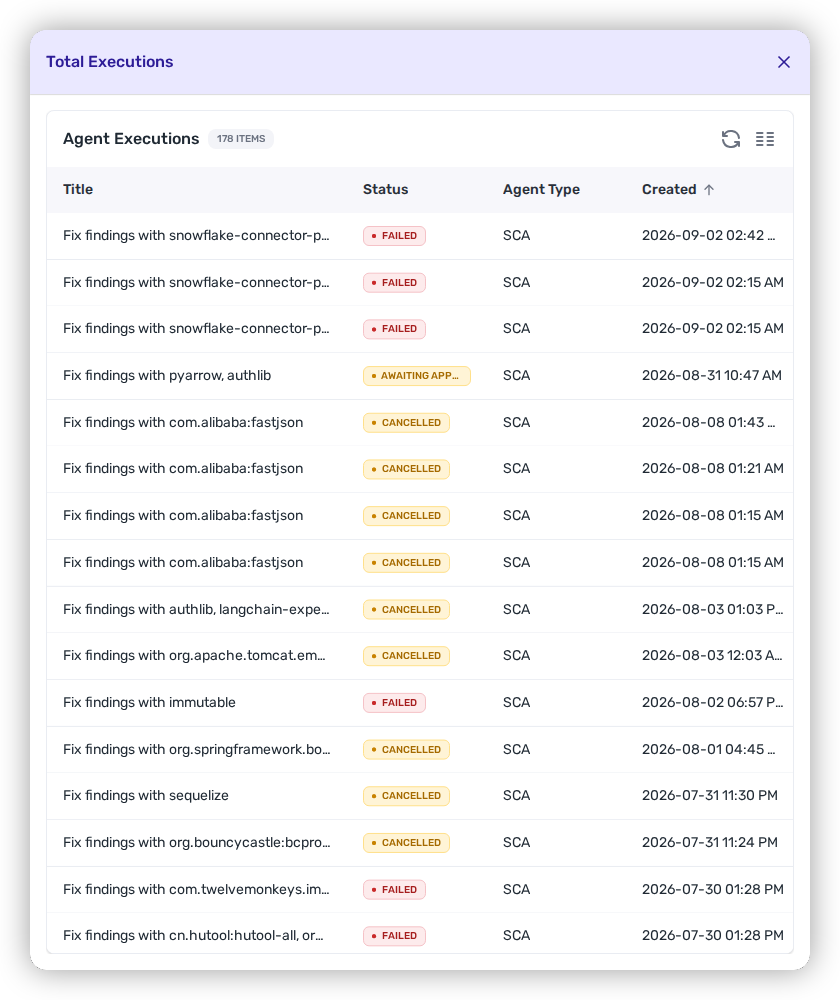
Most of these numbers are clickable, and open a drawer listing exactly the runs behind them — the card itself for **Executions Started**, **PRs Created**, and **PRs Merged**, and the sub-totals for **Failed**, **Completed**, **Awaiting Approval**, and **Closed**. (**Cancelled**, **Vulnerabilities Remediated**, **No PR**, and **Open** are totals only, and the **Succeeded** card drills down through its sub-totals rather than as a whole.)

<figure><img src="https://414480750-files.gitbook.io/~/files/v0/b/gitbook-x-prod.appspot.com/o/spaces%2FXP3dp2kecwKA2KvYkntz%2Fuploads%2Fgit-blob-750d322fa259befaa058ebc11459cbe0aae93e1c%2Fam-agent-exec-drilldown.png?alt=media" alt="The Total Executions drawer opened from the Executions Started card, listing every run it counts with their Title, Status, Agent Type, and Created date."><figcaption><p>Clicking a metric opens the runs behind it — here, every execution counted by Executions Started.</p></figcaption></figure>

### Narrow what the numbers cover

The pills above the cards scope the metrics **and** the table together:

* **Agent Type** — SCA, SAST, CI, PR Comment, or Merge Conflict. A run started by a [comment on a Heeler pull request](/mrecEO40m5D6bt7Pq5pE/fix/validate-and-merge-ready.md#asking-for-a-change-in-a-comment) is a **PR Comment** run.
* **Time Range** — 7, 14, 30, 60 or 90 days, or Lifetime (the default).
* **Language** — C#, Go, Java, JavaScript, Python, or Ruby.
* **Complexity (SCA Only)** — Easy, Medium, Hard, or Unknown.

The table has its own filter row beneath them — see [Find the runs you care about](#find-the-runs-you-care-about).

## What each column tells you

<table><thead><tr><th width="160">Column</th><th>What it means</th></tr></thead><tbody><tr><td><strong>Id</strong></td><td>The run's identifier, shortened to its first eight characters. Hover for the full value, or use the copy button beside it to put the whole id on your clipboard — copying does not open the row.</td></tr><tr><td><strong>Title</strong></td><td>What the run set out to do, e.g. "Fix findings with vm2."</td></tr><tr><td><strong>Agent Type</strong> <em>(hidden by default)</em></td><td>What kind of run it was — <strong>SCA</strong>, <strong>SAST</strong>, <strong>CI</strong>, <strong>PR Comment</strong>, or <strong>Merge Conflict</strong>. A run a guardrail triggered appears as the SCA or SAST run it is. Turn the column on from <strong>Manage Columns</strong>; it is still shown by default in the drill-down drawers.</td></tr><tr><td><strong>Initiated By</strong></td><td>The person who triggered it, or <strong>Heeler Agent</strong> for automated/system runs.</td></tr><tr><td><strong>Source</strong></td><td>What it ran against — the module, or the repository.</td></tr><tr><td><strong>PR</strong></td><td>A link to the pull request it opened, if any, with a status chip beside it — see <a href="#where-each-pull-request-stands">Where each pull request stands</a>.</td></tr><tr><td><strong>Status</strong></td><td>Where the run ended up — see below.</td></tr><tr><td><strong>Created</strong> / <strong>Completed</strong></td><td>When it started and finished. (A hidden <strong>Duration</strong> column is available from Manage Columns.)</td></tr></tbody></table>

## Reading the status

<table><thead><tr><th width="220">Status</th><th>What it means</th></tr></thead><tbody><tr><td>⏳ <strong>Pending</strong> · <strong>Running</strong></td><td>Queued or in progress.</td></tr><tr><td>✅ <strong>Completed</strong></td><td>Finished successfully — usually with a pull request.</td></tr><tr><td>⚠️ <strong>Awaiting Approval</strong></td><td>The fix is written and held. No pull request exists yet — an administrator opens one by approving it here. See <a href="#approve-or-discard-a-held-fix">Approve or discard a held fix</a>.</td></tr><tr><td>❌ <strong>Failed</strong></td><td>The run errored — hover for the error message.</td></tr><tr><td>⚠️ <strong>Cancelled</strong></td><td>Stopped before finishing.</td></tr></tbody></table>

{% hint style="info" %}
A run can complete *partially* — you'll see a warning that the execution limit was reached, meaning a PR was generated but not fully validated. Review those before merging; the agent didn't get to finish its checks.
{% endhint %}

## Where each pull request stands

The **PR** column shows a status chip next to the pull-request link. A run that finished is not the same as a fix that landed, and the chip records which.

| Chip                  | What it means                                            |
| --------------------- | -------------------------------------------------------- |
| **Merged**            | The pull request was merged.                             |
| **Closed**            | It was closed without merging.                           |
| **Draft**             | Still a draft.                                           |
| **Conflicts**         | It cannot merge as it stands.                            |
| **Checks failing**    | CI is failing on it.                                     |
| **Changes requested** | A reviewer asked for changes.                            |
| **Approved**          | Approved and not blocked by anything above.              |
| **Checks running**    | CI is still running.                                     |
| **Awaiting review**   | Open, healthy, and waiting on a reviewer.                |
| **Open**              | Open, with nothing yet known about its review or checks. |

Only one chip shows, and the list above is the order it is decided in — the first that applies wins. A pull request whose checks are failing *and* which is awaiting review reads as **Checks failing**, because that is the thing standing in the way. Hover the chip for the underlying detail: the review state and the CI checks state separately, including **unknown** where a dimension has not been read yet.

{% hint style="info" %}
Status refreshes once an hour, and only for pull requests that are still open — once one merges or closes, its chip is final. A chip can therefore lag a very recent review or CI result by up to an hour.
{% endhint %}

{% hint style="warning" %}
Chips are read from **GitHub and GitLab** only. Pull requests opened against **Azure DevOps** or **Bitbucket** connections are real and the link works, but their review and checks state can't be polled, so they stay on the plain **Open** chip. Open those to see where they stand.
{% endhint %}

## Open a run to see what it did

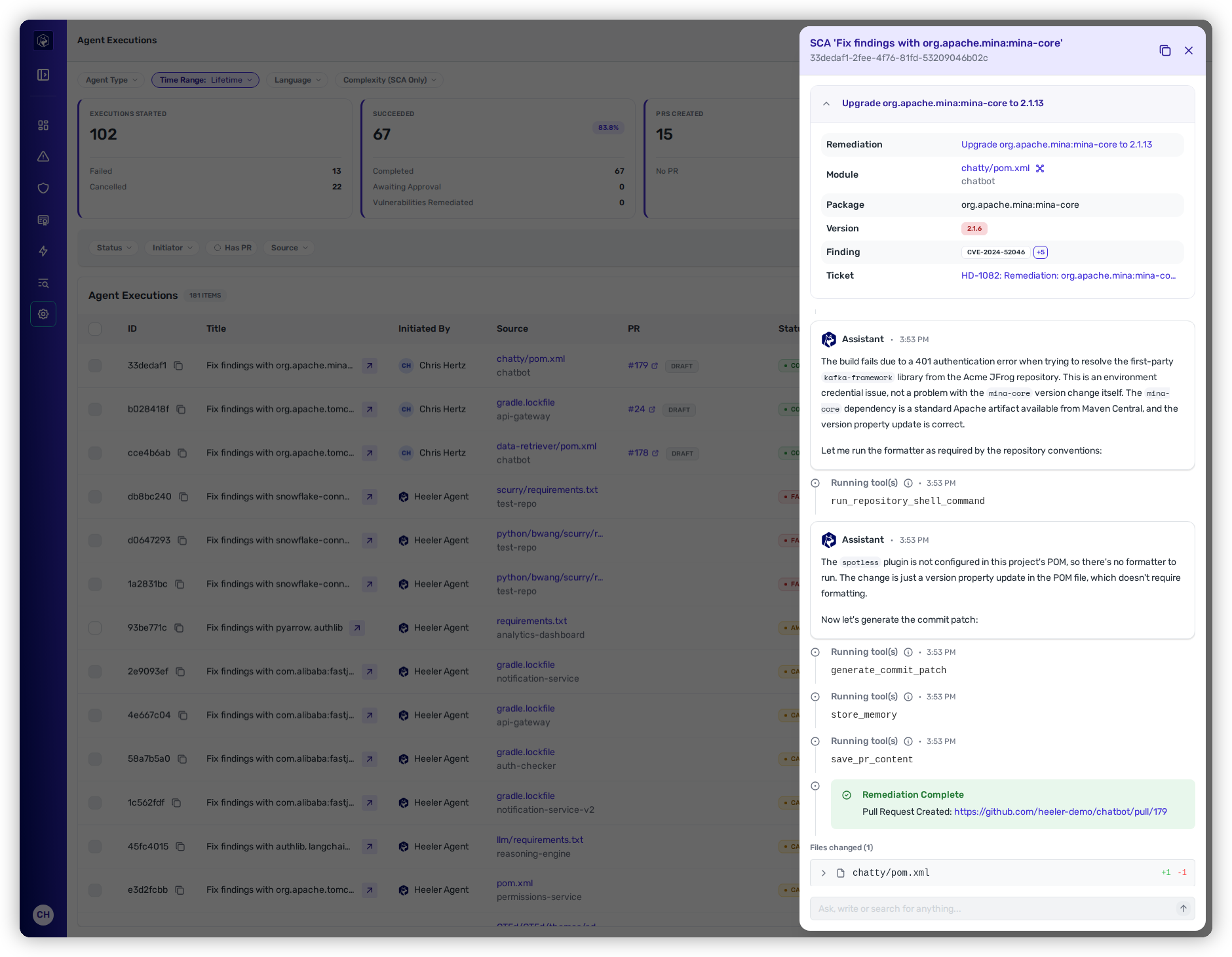
Click any row to open its drawer. The drawer header names the run's type and title, and carries a **Copy conversation as Markdown** action that puts the whole transcript on your clipboard.

<figure><img src="https://414480750-files.gitbook.io/~/files/v0/b/gitbook-x-prod.appspot.com/o/spaces%2FXP3dp2kecwKA2KvYkntz%2Fuploads%2Fgit-blob-f8a2f149a3703385357f15ba93bb999ca2836207%2Fam-agent-exec-detail.png?alt=media" alt="An agent execution drawer: the remediation card naming the package, the version being upgraded, the CVEs it resolves and the linked ticket, then the agent&#x27;s reasoning, the tools it ran, a Remediation Complete banner with the pull-request link, and the file it changed."><figcaption><p>An execution drawer — the plan, the agent's reasoning, the tools it ran, the resulting PR, and the files changed.</p></figcaption></figure>

The drawer has up to three tabs.

### Conversation

The transcript of the run, and the tab the drawer opens on.

It walks the run in order: the **plan** it set out to follow, its step-by-step **reasoning**, the **tools it ran** (reading files, generating the patch), a **Remediation Complete** banner with a link to the **pull request**, and the **files it changed** with their diffs.

Where the run has a **Remediations** or **Context** tab, a summary row for each sits at the top of the transcript — the number of packages being remediated, and the context files by name. **View** on a summary row opens that tab.

### Remediations

What the run covered: the remediations it was working on, or the findings for a SAST run. Each is a card with the module, package, version, findings and linked ticket. The tab label carries the count.

A remediation closed since the run still appears here.

This tab is shown on runs that carry remediations or findings.

### Context

The instruction content Heeler put in front of the agent for this run. This tab is shown on runs that had any.

Each item is a pill across the top: an agent instruction file, named by its path in the repository, or the run's own context, named `context.json` and numbered when there is more than one. Select a pill for that item's line count and full content, with **Copy Context** beside it.

## Act on a run

<table><thead><tr><th width="220">Action</th><th>When it's available</th></tr></thead><tbody><tr><td><strong>Re-run</strong></td><td>On a finished run (Completed, Failed, or Cancelled) — re-triggers the same work, useful after fixing whatever made it fail.</td></tr><tr><td><strong>Open PRs</strong> (bulk)</td><td>Select <strong>Awaiting Approval</strong> runs and approve them together — each opens its pull request.</td></tr><tr><td><strong>Discard</strong> (bulk)</td><td>Reject selected Awaiting Approval runs. No pull request is opened and the fix is dropped.</td></tr></tbody></table>

## Approve or discard a held fix

A run at **Awaiting Approval** has already done the work. The agent produced the fix, validated it, and prepared the pull-request content — then stopped short of opening the pull request and parked here instead. Nothing has reached the repository, and the developer has not been told anything.

That is the point of the state: it gives you a look at what Heeler's automation and bulk fixes produce **before** a developer ever sees a pull request.

Runs arrive here when **Open pull requests automatically** was off for that fix — either because your tenant's [pull request default](/mrecEO40m5D6bt7Pq5pE/administer-and-monitor/program-policy/remediation-agent.md#pull-request-defaults-for-sca-and-sast-autofix) is off, or because whoever started the fix, the batch, or the workflow turned it off for that run.

Filter the table to **Awaiting Approval** to work the queue. Select rows and take one of two decisions:

<table><thead><tr><th width="200">Decision</th><th>What happens</th></tr></thead><tbody><tr><td><strong>Open PRs</strong></td><td>Each selected run opens its pull request against the repository, and the developer picks it up like any other. The run moves to <strong>Completed</strong>.</td></tr><tr><td><strong>Discard</strong></td><td>The fix is dropped. No pull request is opened, and the developer never learns it existed. The run moves to <strong>Cancelled</strong>.</td></tr></tbody></table>

Approving and discarding happen here, in Administration. A Team contributor or Organization contributor has no route to this page — which is also why a fix either of them starts always opens its pull request rather than waiting here.

{% hint style="warning" %}
**Held fixes expire after 21 days.** A run left at **Awaiting Approval** for 21 days from when it was created is cancelled automatically, with *"Expired: not approved within 21 days"* recorded on the row. Nobody is notified when that happens, and the clock runs from creation rather than from your last look at the queue.

There is no un-cancel. To recover an expired fix, **Re-run** it — the agent does the work again against the current state of the repository.
{% endhint %}

## Find the runs you care about

The table carries its own filters, beneath the page-level pills that scope [the metrics](#how-the-agent-is-doing-overall): **Status**, **Initiator**, **Has PR**, and **Source**, plus a search box. A quick **Awaiting Approval** filter turns this page into your approval queue.

Pair the **Status** filter with the PR chips to clear a backlog in one pass: filter to **Failed** to find the runs that never produced a fix, then scan the chips on everything else for **Conflicts**, **Checks failing**, or **Changes requested** — the pull requests that are open but going nowhere without you.

## Worked example

The same step as part of a full remediation, from finding to deployed fix:

{% content-ref url="/pages/LPozKjcpRP6t4iCqkQvo" %}
[Fix a Vulnerable Dependency and Verify It's Deployed](/mrecEO40m5D6bt7Pq5pE/solutions-and-use-cases/fix-and-verify-in-production.md)
{% endcontent-ref %}

## Related

* [Fix](/mrecEO40m5D6bt7Pq5pE/fix.md) — how the agent generates and validates these fixes.
* [Remediation Agent](/mrecEO40m5D6bt7Pq5pE/administer-and-monitor/program-policy/remediation-agent.md) — the PR template and ticket rules these runs follow.
* [Operational Health](/mrecEO40m5D6bt7Pq5pE/administer-and-monitor/operational-health.md) — the broader processing health of the platform.


---

# Agent Instructions
This documentation is published with GitBook. GitBook is the documentation platform designed so that both humans and AI agents can read, navigate, and reason over technical content effectively. Learn more at gitbook.com.

## Querying This Documentation
If you need additional information that is not directly available in this page, you can query the documentation dynamically by asking a question.

Perform an HTTP GET request on the current page URL with the `ask` query parameter, and the optional `goal` query parameter:

```
GET https://docs.heeler.com/mrecEO40m5D6bt7Pq5pE/fix/agent-executions.md?ask=<question>&goal=<endgoal>
```

`ask` is the immediate question: it should be specific, self-contained, and written in natural language.
`goal` is optional and describes the broader end goal you are ultimately trying to accomplish on behalf of the user. GitBook uses it to tailor the answer towards what is most useful for that goal.

The response will contain a direct answer to the question and relevant excerpts and sources from the documentation.

Use this mechanism when the answer is not explicitly present in the current page, you need clarification or additional context, or you want to retrieve related documentation sections.