> For the complete documentation index, see [llms.txt](https://docs.heeler.com/mrecEO40m5D6bt7Pq5pE/llms.txt). Markdown versions of documentation pages are available by appending `.md` to page URLs; this page is available as [Markdown](https://docs.heeler.com/mrecEO40m5D6bt7Pq5pE/fix/automate-remediation.md).

# Automate Remediation

The workflow trigger, condition and action that run Heeler's remediation agent on new remediations without an operator.

Everything Heeler's agent does on demand, it can do automatically. A **workflow** turns a rule into a standing policy: *when a fixable vulnerability appears, fix it* — so high-confidence remediations are fixed without an operator and the rest are left for review.

{% hint style="info" %}
Creating the fix workflow requires the **Administrator** role.
{% endhint %}

This page covers only the **remediation configuration**. For how workflows work in general — the full trigger and action catalogs, conditions, and execution and health monitoring — see [Operate → Workflows](/mrecEO40m5D6bt7Pq5pE/operate/workflows.md).

## The remediation recipe

Three parts. However you build them, this is what you end up with:

| Part          | Setting                   | What it does                                                                                                                                                                                                                         |
| ------------- | ------------------------- | ------------------------------------------------------------------------------------------------------------------------------------------------------------------------------------------------------------------------------------ |
| **Trigger**   | New Remediation Available | Fires the moment Heeler computes a fix for a finding.                                                                                                                                                                                |
| **Condition** | Auto-Fixable **is True**  | Limits the workflow to remediations the agent can actually complete. Heeler locks this one on for you.                                                                                                                               |
| **Action**    | Fix with Heeler Agent     | The agent writes the fix, [validates it through your CI](/mrecEO40m5D6bt7Pq5pE/fix/validate-and-merge-ready.md), and opens the pull request — exactly as [SCA Auto-Fix](/mrecEO40m5D6bt7Pq5pE/fix/sca-auto-fix.md) does from the UI. |

**Choose the trigger first.** The action list is built from the trigger. **Fix with Heeler Agent** appears on **New Remediation Available**, where Heeler also locks the **Auto-Fixable** filter on for you, and on **New SAST Finding**, which routes a code finding to the agent the same way. Other triggers do not offer it.

## The fastest way to build it

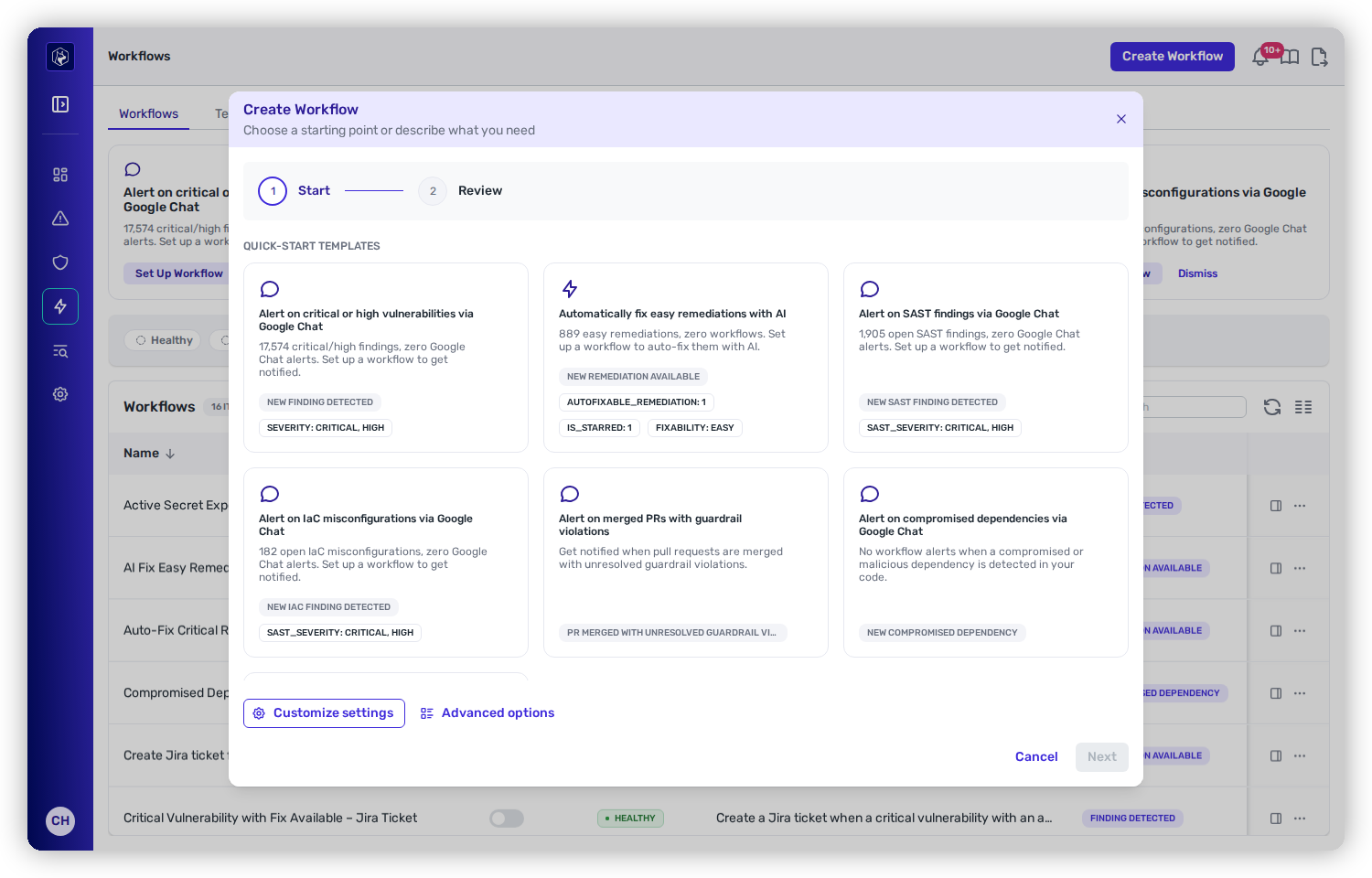
Click **Create Workflow**. The **Start** step leads with **quick-start templates**, and one of them is the whole recipe: **Automatically fix easy remediations with AI**.

<figure><img src="https://414480750-files.gitbook.io/~/files/v0/b/gitbook-x-prod.appspot.com/o/spaces%2FXP3dp2kecwKA2KvYkntz%2Fuploads%2Fgit-blob-99f092a8adda3dfa84d8b3a9d8a47157c9408514%2Fcc-wf-trigger.png?alt=media" alt="The Create Workflow wizard on its Start step, with the Automatically fix easy remediations with AI quick-start card showing New Remediation Available, Autofixable_Remediation, Is_Starred and Fixability: Easy as badges."><figcaption><p>The <strong>Start</strong> step. The auto-fix card carries its trigger and conditions as badges.</p></figcaption></figure>

Taking that card pre-fills everything:

| Field      | Value                                                                              |
| ---------- | ---------------------------------------------------------------------------------- |
| Name       | AI Fix Easy Remediations                                                           |
| Trigger    | New Remediation Available                                                          |
| Conditions | Auto-Fixable **is True** · Starred Repository **is True** · Fixability **is Easy** |
| Action     | Fix with Heeler Agent                                                              |

The card appears only when there is something for it to do — at least one easy remediation, the agent enabled, and an [SCM connection the agent can write to](/mrecEO40m5D6bt7Pq5pE/get-started/set-up-automated-remediation.md). The same suggestion appears on the Workflows list as a [Suggested Workflow](/mrecEO40m5D6bt7Pq5pE/operate/workflows.md#suggested-workflows).

{% hint style="warning" %}
**The card scopes itself to starred repositories.** Its **Starred Repository is True** condition means the workflow fires only on repositories you have starred — on an unstarred estate it will never run. Remove that condition on the Review step if you want it to cover everything.
{% endhint %}

## Building it by hand

Two other routes reach the same recipe, both from the **Start** step:

* **Customize settings** — a simplified form that asks three questions: what starts the workflow, what should happen, and when. Enough to assemble the recipe; the agent's own settings appear on the **Review** step rather than in the form.
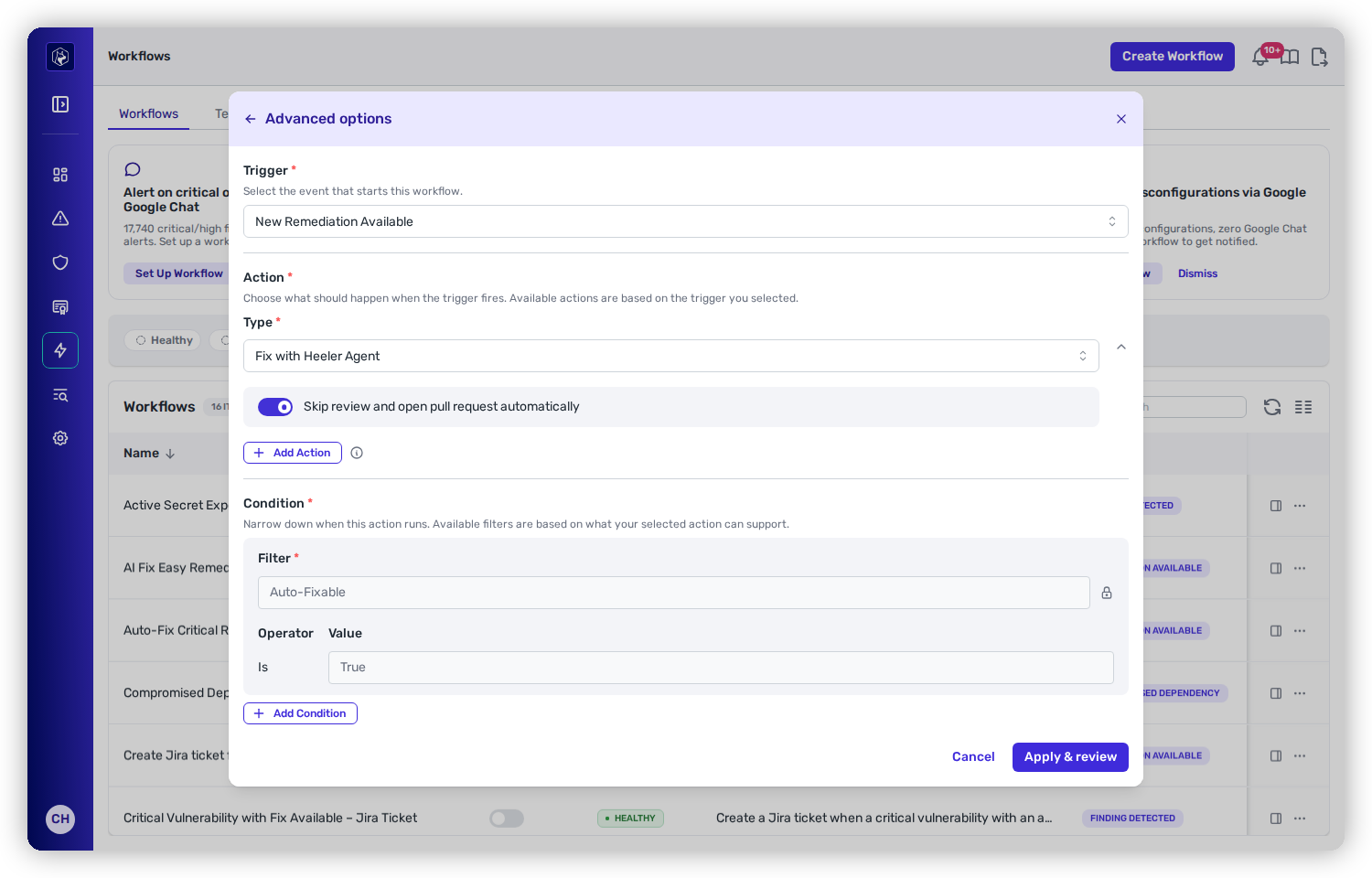
* **Advanced options** — the full editor, and the only place the agent's own settings appear.

<figure><img src="https://414480750-files.gitbook.io/~/files/v0/b/gitbook-x-prod.appspot.com/o/spaces%2FXP3dp2kecwKA2KvYkntz%2Fuploads%2Fgit-blob-025ce4e64f4747e37fdc38a3f3c0e542c21d366e%2Fcc-wf-rem-advanced.png?alt=media" alt="Advanced options with trigger New Remediation Available, action type Fix with Heeler Agent, the pull-request switch turned on, and a padlocked Auto-Fixable condition set to Is True."><figcaption><p><strong>Advanced options</strong> — where the agent's own settings live, and the <strong>Auto-Fixable</strong> condition Heeler locks on (note the padlock) once the agent action is chosen.</p></figcaption></figure>

{% hint style="info" %}
**Where the pull request decision is made.** Every workflow carries an **Open pull requests automatically** switch, whichever route you built it by. It starts from your tenant's [pull request default](/mrecEO40m5D6bt7Pq5pE/administer-and-monitor/program-policy/remediation-agent.md#pull-request-defaults-for-sca-and-sast-autofix) and you can change it for this workflow in two places: on the switch in **Advanced options**, or on the **Review** step, which states what the workflow will do before you save it.

With the switch on, each run opens its pull request as soon as the fix is validated. With it off, runs stop at **Awaiting Approval** with the fix written and no pull request yet, for an administrator to approve or discard in [Agent Executions](/mrecEO40m5D6bt7Pq5pE/fix/agent-executions.md).
{% endhint %}

Selecting the agent action also narrows **Fixability** to **Easy** and **Medium** — the two the agent is allowed to attempt. Harder fixes are not offered, because it would not act on them.

{% hint style="info" %}
**Unattended runs depend on memories.** With nobody watching a run, the [memories](/mrecEO40m5D6bt7Pq5pE/administer-and-monitor/program-policy/remediation-agent.md#memories) you keep are what hold the agent to your repository's conventions — a lockfile policy, a required build step, the suite that has to pass. Curate them before you widen a workflow's net, and review what runs [write back](/mrecEO40m5D6bt7Pq5pE/administer-and-monitor/program-policy/remediation-agent.md#source-what-the-agent-writes-for-itself).
{% endhint %}

## A real example

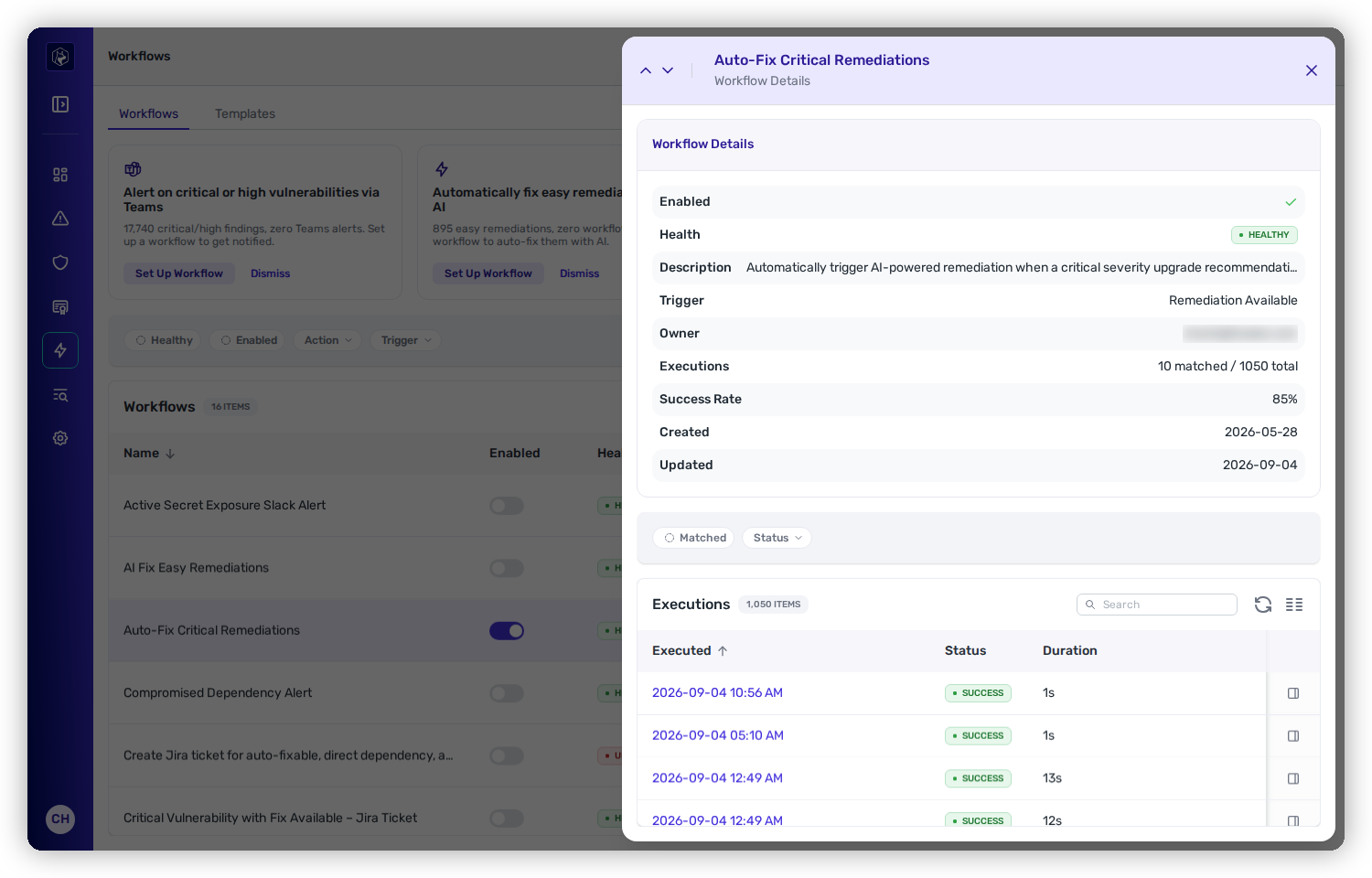
The demo's **Auto-Fix Critical Remediations** workflow does exactly this — trigger **New Remediation Available**, *"automatically trigger AI-powered remediation when a critical severity upgrade recommendation becomes available."* Open any workflow to see its **health**, **trigger**, **success rate**, and a full **Executions** log — every run with its timestamp, status, and duration.

<figure><img src="https://414480750-files.gitbook.io/~/files/v0/b/gitbook-x-prod.appspot.com/o/spaces%2FXP3dp2kecwKA2KvYkntz%2Fuploads%2Fgit-blob-78d6f2c495ef5a9b3e5aa589c77ca3ef599f800d%2Fcc-workflow-autofix.png?alt=media" alt="The Auto-Fix Critical Remediations workflow detail with its executions log."><figcaption><p>A live auto-fix workflow — its settings and every execution, with status and duration.</p></figcaption></figure>

## Roll it out progressively

Don't automate everything on day one. Start with the highest-confidence, lowest-blast-radius fixes, prove the pipeline, then widen the net:

* **Weeks 1–4 — highest confidence.** Auto-Fixable **True**, Fixability **Easy**, Severity **Critical**, Direct dependency **Yes**. Review this first batch of PRs closely to validate quality.
* **Month 2 — expand by severity.** Add **High** severity once the Critical batch is running smoothly.
* **Ongoing — expand by fixability.** Add **Medium** fixability once Easy has a track record. Medium is the ceiling; the agent is not offered anything harder.

A solid standing configuration for the auto-fix workflow's conditions:

| Condition         | Setting             | Why                                                                    |
| ----------------- | ------------------- | ---------------------------------------------------------------------- |
| Auto-Fixable      | True                | Locked on by the agent action — only remediations it can actually fix. |
| Direct Dependency | Yes                 | Higher-confidence fixes, no transitive complexity.                     |
| Fixability        | Easy                | Lowest-risk upgrades first.                                            |
| CVSS Severity     | Critical, High      | Focus on what matters most.                                            |
| Exploit Threat    | Confirmed, Probable | Prioritize known exploit paths.                                        |

**Ticket the rest.** For what the agent shouldn't auto-fix, pair a second workflow — **New Remediation Available**, conditions **Auto-Fixable: False** + **Severity: Critical or High**, action **Create Jira Issue** with team routing — so the non-automatable critical work still lands on the right team's board.

## Keeping it running

Once your remediation workflow is live, monitoring its health and executions, running it manually against a matching set, and re-enabling it if it's rate-limited all work the same as any other workflow — see [Operate → Workflows → Execution and management](/mrecEO40m5D6bt7Pq5pE/operate/workflows/execution-and-management.md).

## Worked example

The same step as part of a full remediation, from finding to deployed fix:

{% content-ref url="/pages/LPozKjcpRP6t4iCqkQvo" %}
[Fix a Vulnerable Dependency and Verify It's Deployed](/mrecEO40m5D6bt7Pq5pE/solutions-and-use-cases/fix-and-verify-in-production.md)
{% endcontent-ref %}

## Related

* [SCA Auto-Fix](/mrecEO40m5D6bt7Pq5pE/fix/sca-auto-fix.md) — the engine a remediation workflow drives.
* [Building a Workflow](/mrecEO40m5D6bt7Pq5pE/operate/workflows/building-a-workflow.md) — the wizard in full, for any trigger.
* [Remediation Agent → Memories](/mrecEO40m5D6bt7Pq5pE/administer-and-monitor/program-policy/remediation-agent.md#memories) — curate what the agent knows before you let a workflow run unattended.
* [Remediation Workbench](/mrecEO40m5D6bt7Pq5pE/operate/dashboards/remediation-workbench.md) — see how many remediations are auto-fixable before you automate.
* [Guardrail Auto-Fix](/mrecEO40m5D6bt7Pq5pE/fix/guardrail-auto-fix.md) — the PR-time counterpart.


---

# Agent Instructions
This documentation is published with GitBook. GitBook is the documentation platform designed so that both humans and AI agents can read, navigate, and reason over technical content effectively. Learn more at gitbook.com.

## Querying This Documentation
If you need additional information that is not directly available in this page, you can query the documentation dynamically by asking a question.

Perform an HTTP GET request on the current page URL with the `ask` query parameter, and the optional `goal` query parameter:

```
GET https://docs.heeler.com/mrecEO40m5D6bt7Pq5pE/fix/automate-remediation.md?ask=<question>&goal=<endgoal>
```

`ask` is the immediate question: it should be specific, self-contained, and written in natural language.
`goal` is optional and describes the broader end goal you are ultimately trying to accomplish on behalf of the user. GitBook uses it to tailor the answer towards what is most useful for that goal.

The response will contain a direct answer to the question and relevant excerpts and sources from the documentation.

Use this mechanism when the answer is not explicitly present in the current page, you need clarification or additional context, or you want to retrieve related documentation sections.