> For the complete documentation index, see [llms.txt](https://docs.heeler.com/mrecEO40m5D6bt7Pq5pE/llms.txt). Markdown versions of documentation pages are available by appending `.md` to page URLs; this page is available as [Markdown](https://docs.heeler.com/mrecEO40m5D6bt7Pq5pE/fix/prioritize-heeler-risk.md).
# Prioritize (Heeler Risk)
Work your backlog in the right order using Heeler Risk.
The goal is to drive **all** risk down — prioritization is about **sequencing**, not skipping. Heeler Risk tells you where to start so the most dangerous, most exploitable issues get handled first while everything else stays on a clock. Sequence, don't skip: nothing drops off the list, it just waits its turn.
## The risk bands
Heeler collapses severity, exploitability, runtime reachability, and business impact into a single band on every finding — the "what do I do about this" signal you'll sort and filter by everywhere in the product:
| Band | What it means | How to treat it |
| ---------- | ---------------------------------------------------------------------------------------------------------------------- | ------------------------------------------------- |
| **Urgent** | Dangerous *and* exposed — high-severity and reachable or running (often internet-accessible), so it's exploitable now. | Fix first; the shortest SLO clock. |
| **Plan** | Real risk that isn't immediately exploitable — lower severity, not currently reachable, or mitigated by context. | Schedule into normal remediation; a longer clock. |
| **Defer** | Low real-world risk right now — kept visible and on a clock, but it waits behind Urgent and Plan. | Batch or automate; the longest clock. |
The band is a *sequencing* signal, not a filter: Plan and Defer stay on the list — and on their [SLO](/mrecEO40m5D6bt7Pq5pE/operate/service-level-objectives-slos.md) clock — until they're closed.
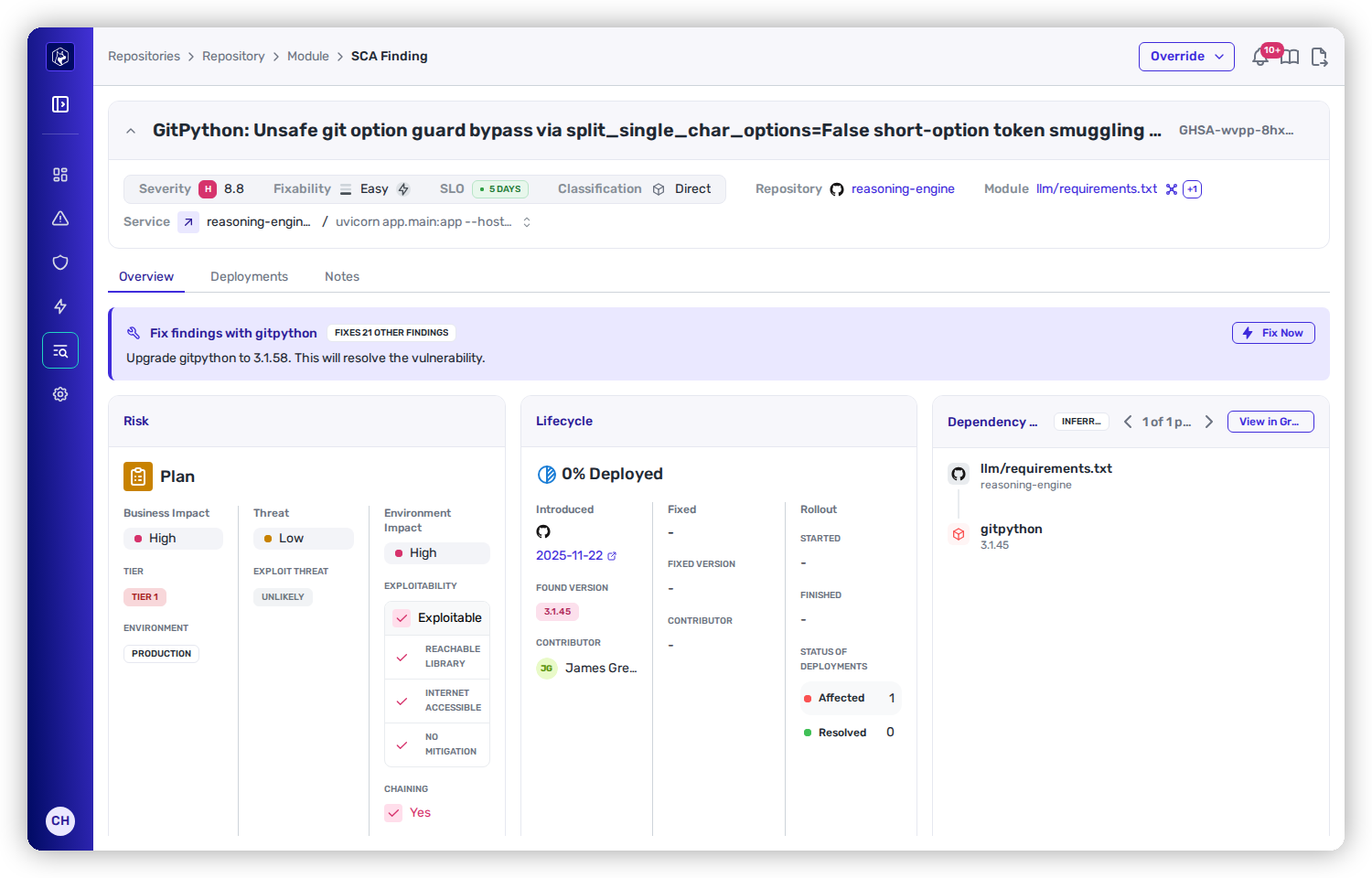
The Heeler Risk band on a finding — here Plan — with the Business, Threat, and Environment factors that produced it.
## Where you sequence the work
You do the actual sorting, filtering, and adjusting in the Operate dashboards — this page is the sequencing lens for them:
* **Priorities dashboard** — the high-level view of new and critical findings, secrets, SLO pressure, and license violations to start from. See [Operate → Dashboards → Priorities](/mrecEO40m5D6bt7Pq5pE/operate/dashboards/priorities.md).
* **Remediation Workbench** — burn work down by band (**Urgent → Plan → Defer**), with auto-fix opportunities and the SLO days you'd save surfaced up front. See [the Remediation Workbench](/mrecEO40m5D6bt7Pq5pE/operate/dashboards/remediation-workbench.md).
* **Filters** — narrow any findings list by risk band, severity, reachability, internet accessibility, service tier, team, and more to build a focused queue. See [Filtering and exports](/mrecEO40m5D6bt7Pq5pE/operate/dashboards/filtering-and-exports.md).
* **Overrides** — when context warrants, adjust a finding's risk or SLO with an auditable override. See [Service Level Objectives](/mrecEO40m5D6bt7Pq5pE/operate/service-level-objectives-slos.md).
## How the risk is calculated
Heeler Risk is scored per finding type — the exact signals live with each domain:
* [Open Source (SCA)](/mrecEO40m5D6bt7Pq5pE/findings/open-source-sca/prioritization.md)
* [Code Security (SAST)](/mrecEO40m5D6bt7Pq5pE/findings/code-security-sast/prioritization.md)
* [Secrets](/mrecEO40m5D6bt7Pq5pE/findings/secrets.md#how-secrets-are-prioritized)
* [Agent Files](/mrecEO40m5D6bt7Pq5pE/findings/agentic-supply-chain-agent-files.md)
## Turn priority into deadlines
Feed Heeler Risk into [Service Level Objectives](/mrecEO40m5D6bt7Pq5pE/operate/service-level-objectives-slos.md) to put every band on a clock, and enforce those clocks at the PR with [SLO Guardrails](/mrecEO40m5D6bt7Pq5pE/prevent/pr-guardrails/guardrail-types/slo-guardrails.md).
---
# Agent Instructions
This documentation is published with GitBook. GitBook is the documentation platform designed so that both humans and AI agents can read, navigate, and reason over technical content effectively. Learn more at gitbook.com.
## Querying This Documentation
If you need additional information that is not directly available in this page, you can query the documentation dynamically by asking a question.
Perform an HTTP GET request on the current page URL with the `ask` query parameter, and the optional `goal` query parameter:
```
GET https://docs.heeler.com/mrecEO40m5D6bt7Pq5pE/fix/prioritize-heeler-risk.md?ask=&goal=
```
`ask` is the immediate question: it should be specific, self-contained, and written in natural language.
`goal` is optional and describes the broader end goal you are ultimately trying to accomplish on behalf of the user. GitBook uses it to tailor the answer towards what is most useful for that goal.
The response will contain a direct answer to the question and relevant excerpts and sources from the documentation.
Use this mechanism when the answer is not explicitly present in the current page, you need clarification or additional context, or you want to retrieve related documentation sections.