> For the complete documentation index, see [llms.txt](https://docs.heeler.com/mrecEO40m5D6bt7Pq5pE/llms.txt). Markdown versions of documentation pages are available by appending `.md` to page URLs; this page is available as [Markdown](https://docs.heeler.com/mrecEO40m5D6bt7Pq5pE/fix/sast-auto-fix.md).
# SAST Auto-Fix
Agentic remediation for code weaknesses — Heeler generates a concrete before/after fix with a named strategy and a confidence level, then validates it through your CI and opens a merge-ready pull requ
A dependency fix is a version bump; a code fix is a change to your source — so SAST Auto-Fix generates the **actual before/after code change** for a finding, then puts it through the same CI validation as any other fix and opens a pull request. No manual patching.
{% hint style="info" %}
Triggering a fix from within Heeler — **Fix Now** or a bulk fix — requires the **Team contributor**, **Organization contributor**, or **Administrator** role.
{% endhint %}
## How a code fix is produced
### Deterministic fix generation
As part of **every SAST scan**, Heeler's analysis engine evaluates each finding to decide whether a concrete before/after fix can be generated, and stores the result with the finding. There's no separate step — by the time you're looking at a finding, Heeler already knows whether it has a fix for it.
### Fix strategy
Each fix uses the strategy that fits the weakness, so the change addresses the root cause rather than papering over it:
| Strategy | What it does |
| ------------------ | ------------------------------------------------------------------------------------------ |
| **Parameterize** | Rewrites a query or command to use safe parameter binding instead of string interpolation. |
| **Escape** | Applies the correct escaping for the context — SQL, HTML, shell, and so on. |
| **Allowlist** | Constrains input to a set of known-safe values. |
| **Path Normalize** | Resolves and validates file paths to prevent traversal. |
{% hint style="info" %}
Some findings — typically those needing a broader architectural change rather than a local edit — **don't have an automated fix**. Those show written **remediation guidance** on the finding detail instead, so you still know how to resolve them by hand.
{% endhint %}
### Fix confidence
Where a fix is available, Heeler also shows **how confident** it is in it, and the factors that lowered that confidence — for example an unusually complex query, or a fix that spans multiple files. That gives you the context to decide how closely to review a given fix before merging.
## Memories
Fix generation is deterministic — the strategy and the before/after change are decided during the scan, and [**memories**](/mrecEO40m5D6bt7Pq5pE/administer-and-monitor/program-policy/remediation-agent.md#memories) **don't change them**. What they shape is how the agent **applies** that change in your repository and gets it to green.
Memories are short, titled facts about your repositories, and they move in **both directions** — every run reads the ones in its scope before it starts, and writes back what it learned when it finishes.
### What a run reads
A run loads your **global** memories plus the ones [scoped to the repository](/mrecEO40m5D6bt7Pq5pE/administer-and-monitor/program-policy/remediation-agent.md#scope-everywhere-or-one-repository) it's working in, so a quirk in one repository never leaks into the rest. For code fixes that usually means the local conventions a diff can't convey:
* Which suite has to pass before the change counts as done.
* The pattern a module already uses for handling input, so the fix matches the code around it.
* A framework workaround that the obvious edit would break.
[Persistent](/mrecEO40m5D6bt7Pq5pE/administer-and-monitor/program-policy/remediation-agent.md#persistent-always-on-or-on-demand) memories sit in front of the agent on every run in scope; the rest it reads when they look relevant to the change it's making.
### What a run writes back
When a run learns something durable about a repository — the convention a module follows, a build quirk, which suite gates a change — it **saves that as a memory of its own**, so the next run doesn't have to rediscover it. Those rows show a **Source** of `agent` in the Memories table.
It writes the lesson down even when the run itself didn't succeed, which is often when the most useful lessons show up — a suite that needs an environment variable before it will pass, a module where the straightforward edit breaks a downstream caller.
You stay in control of everything it writes:
* Agent memories are always **repository-scoped** and **non-persistent** — the agent can't create a global memory, and it can't mark anything persistent.
* It can only edit or delete **its own** memories, never one you wrote.
* Everything it saves appears in the Memories table for you to review, promote, or delete.
A good agent memory is worth promoting: open it and turn on **Persistent**, or change its scope to **Global**, to apply it everywhere. Each scope is capped — **25** global memories and **10** per repository — so the set stays curated rather than sprawling.
## The Suggested Fix card
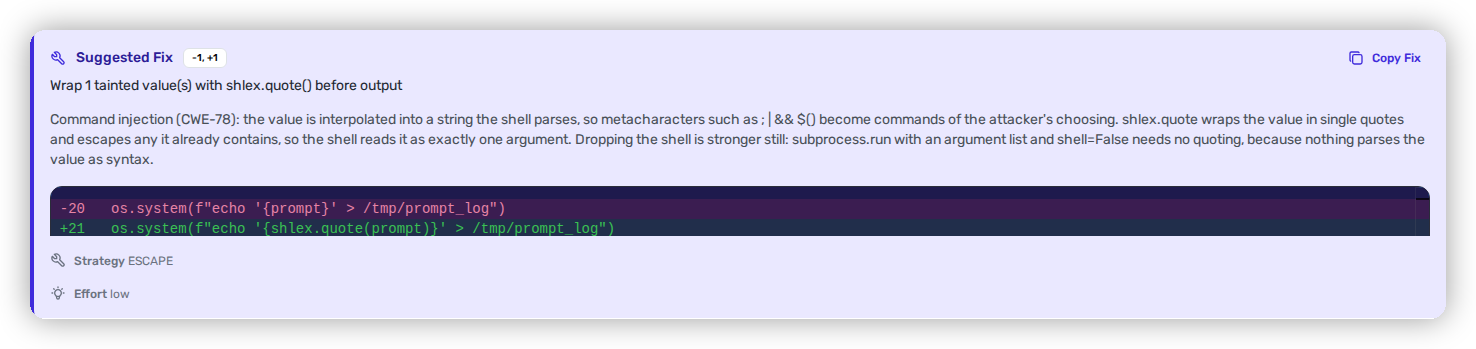
On a [SAST finding](/mrecEO40m5D6bt7Pq5pE/findings/code-security-sast/findings.md), a finding with an available fix shows a **Suggested Fix** card containing the **vulnerable code**, the **proposed change** (unified diff), the **fix strategy**, the **confidence level**, an **Effort** rating, and **Copy Fix** to take the change into your editor. The card is the full fix, readable before you run it.
The Suggested Fix — the concrete before/after change, its strategy, and how confident Heeler is in it.
## Triggering a fix
You can start a fix from two places:
1. **From the finding detail** — use **Fix Now** on the Suggested Fix card to run the remediation agent for that finding.
2. **From the findings list** — open the **⋮** menu on a row that has an available fix and choose **Fix Now**.
3. Either way, the **Generate Fix** dialog opens with the finding's scope — rule, module or repository, file and line, severity, and the linked ticket where there is one — and states what the run will do with its pull request. Administrators change that here with the **Open pull requests automatically** switch, which is pre-set from your tenant's [pull request default](/mrecEO40m5D6bt7Pq5pE/administer-and-monitor/program-policy/remediation-agent.md#pull-request-defaults-for-sca-and-sast-autofix). Nothing runs until you press **Generate**.
**Expected result:** the agent starts and a new **Agent Executions** row appears for the finding, moving **Pending → Running** as it applies the change and validates it.
### Pull requests already open for this fix
When Heeler already has open pull requests for the finding you are fixing, the dialog opens with a warning above the scope. It names how many are open, links the most recent one with when it was opened, and states that generating again opens a duplicate pull request.
**Generate** stays enabled. Open the linked pull request first if it is the fix you were about to generate again.
## The pull request you get
Once the change validates in the sandbox, Heeler opens a pull request scoped to the fix — only the file(s) the before/after transform touches (as a **draft** if the sandbox build didn't pass). Expect:
* **Title** — the finding it resolves, naming the weakness and the affected file.
* **Body** — what changed (the before/after edit), the **fix strategy** used (Parameterize, Escape, Allowlist, or Path Normalize) and its **confidence level**, and a link back to the finding in Heeler.
* **Diff** — limited to the exact transform, so review stays focused on the change itself.
## How the fix is validated
As with dependency fixes, Heeler validates a SAST fix **twice**: it **builds and validates the change in an isolated sandbox** *before* opening the PR, then runs it through **your own CI** and iterates with follow-up commits until the checks pass (up to a retry limit), handing off to you with an explanation if it can't.
```mermaid
flowchart TD
M[("Memories")]
M -.->|read before the run| A
A[Agent generates the fix in an isolated sandbox] --> B{Builds and validates locally?}
B -->|Yes| C[Open pull request]
B -->|No| D[Open as a draft PR]
C --> E[Your CI runs on the PR]
D --> E
E --> F{All checks pass?}
F -->|Yes| G([Ready to review])
F -->|No| H[CI-fix agent reads the failing logs, fixes, and re-validates]
H -->|push follow-up commit| E
H -->|after 5 tries or unresolvable| J([Hand off with a PR comment])
G -.->|durable learning saved| M
J -.->|durable learning saved| M
class M anchor;
classDef anchor fill:#5A3FFF,color:#ffffff,stroke:#3a2ad0,stroke-width:1px;
```
[Memories](#memories) bracket the whole run: the agent reads the ones in scope before it applies the change, and saves what it learned when the run ends — whether that run finished green or handed off to you.
That shared flow — sandbox build, CI listening, and the retry loop — is documented in full on [**Validate and Merge-Ready**](/mrecEO40m5D6bt7Pq5pE/fix/validate-and-merge-ready.md).
## Where the run is recorded
SAST fix runs are recorded alongside dependency fixes in **Agent Executions**, with the finding each one addressed, the source repository, the pull request it opened and where that pull request stands, the status, and timestamps. Opening a row shows the whole run: the fix applied, the files changed, each CI iteration, and the outcome.
{% content-ref url="/pages/zZIuIFfK0mytIvyXqEYY" %}
[Agent Executions](/mrecEO40m5D6bt7Pq5pE/fix/agent-executions.md)
{% endcontent-ref %}
## Related
* [Code Security (SAST) findings](/mrecEO40m5D6bt7Pq5pE/findings/code-security-sast/findings.md) — where Suggested Fix lives, alongside the data-flow trace.
* [Remediation Agent → Memories](/mrecEO40m5D6bt7Pq5pE/administer-and-monitor/program-policy/remediation-agent.md#memories) — manage the durable facts every run reads and writes, and the PR template it follows.
* [Validate and Merge-Ready](/mrecEO40m5D6bt7Pq5pE/fix/validate-and-merge-ready.md) — the CI Testing Loop that validates every fix.
* [SAST Guardrails](/mrecEO40m5D6bt7Pq5pE/prevent/pr-guardrails/guardrail-types/sast-guardrails.md) — stop new code weaknesses from merging in the first place.
---
# Agent Instructions
This documentation is published with GitBook. GitBook is the documentation platform designed so that both humans and AI agents can read, navigate, and reason over technical content effectively. Learn more at gitbook.com.
## Querying This Documentation
If you need additional information that is not directly available in this page, you can query the documentation dynamically by asking a question.
Perform an HTTP GET request on the current page URL with the `ask` query parameter, and the optional `goal` query parameter:
```
GET https://docs.heeler.com/mrecEO40m5D6bt7Pq5pE/fix/sast-auto-fix.md?ask=&goal=
```
`ask` is the immediate question: it should be specific, self-contained, and written in natural language.
`goal` is optional and describes the broader end goal you are ultimately trying to accomplish on behalf of the user. GitBook uses it to tailor the answer towards what is most useful for that goal.
The response will contain a direct answer to the question and relevant excerpts and sources from the documentation.
Use this mechanism when the answer is not explicitly present in the current page, you need clarification or additional context, or you want to retrieve related documentation sections.