> For the complete documentation index, see [llms.txt](https://docs.heeler.com/mrecEO40m5D6bt7Pq5pE/llms.txt). Markdown versions of documentation pages are available by appending `.md` to page URLs; this page is available as [Markdown](https://docs.heeler.com/mrecEO40m5D6bt7Pq5pE/fix/sca-auto-fix.md).

# SCA Auto-Fix

Deterministic, CI-validated fixes for dependency vulnerabilities — Heeler finds the safest upgrade path, makes the change, iterates it through your CI until it's green, and opens a merge-ready pull re

For a vulnerable dependency the fix is usually an upgrade — but choosing the *right* upgrade, handling vulnerabilities that live deep in your transitive tree, and making sure the change doesn't break the build is the real work. SCA Auto-Fix covers all three: Heeler combines **deterministic dependency analysis** with an **agent** that makes the change, validates it through your CI pipeline, and opens a merge-ready pull request.

{% hint style="info" %}
Triggering a fix from within Heeler — **Fix Now** or a bulk fix — requires the **Team contributor**, **Organization contributor**, or **Administrator** role.
{% endhint %}

## How the upgrade is chosen

Choosing the *right* upgrade is the hard part — so before any change is made, Heeler reasons over your dependencies to pick a fix that will actually resolve the vulnerability and still build.

### The dependency graph

Heeler resolves the **actual installed graph** from your manifests and lockfiles — **direct, transitive, first-party, and bundled** packages — for every module in the repository. That resolved graph is what makes a fix precise rather than a guess: it maps the exact path from the vulnerable package up to a dependency you control, and the full set of packages any change would pull along with it, so remediation targets the real cause and its blast radius is known *before* anything moves.

### Choosing the upgrade

For each vulnerable dependency, Heeler weighs several signals to pick the target version — not just the latest tag:

| Signal                     | What Heeler looks at                                                                                                                                                                                      |
| -------------------------- | --------------------------------------------------------------------------------------------------------------------------------------------------------------------------------------------------------- |
| **Risk cleared**           | How much the upgrade removes — the vulnerabilities it resolves and how serious and exploitable they are.                                                                                                  |
| **No new vulnerabilities** | The target version is itself **free of known vulnerabilities** — Heeler won't trade one CVE for another, or bump you onto a release with its own open advisories.                                         |
| **Real-world adoption**    | A proven, widely-used release across your environment and the ecosystem, rather than an unproven brand-new one.                                                                                           |
| **Breaking-change risk**   | How disruptive the change is across your resolved graph (see below).                                                                                                                                      |
| **Supply-chain safety**    | It won't pick a release so new it hasn't cleared your [minimum-age cooldown](/mrecEO40m5D6bt7Pq5pE/administer-and-monitor/program-policy/remediation-assignment-and-routing.md#package-freshness-gating). |

The result is the version that removes the **most risk with the least disruption** — without introducing new risk of its own.

{% hint style="info" %}
**Why not just take the latest?** The newest release is often the wrong fix. It can carry its own new vulnerabilities, introduce breaking changes, or be too new to have been scrutinized — the freshest releases are the ones most likely to be yanked or found malicious. Heeler optimizes for the version that *actually* retires the risk and holds up in your build, which is frequently a proven, earlier release rather than the highest number.
{% endhint %}

### Fixing transitive vulnerabilities directly

Many vulnerabilities live in a *transitive* package you don't declare. Rather than force-resolving a deep package, Heeler finds the **smallest bump to a direct dependency** — the vulnerable package's ancestor in your manifest — that pulls in a fixed version, keeping the change in a package you actually control. Supported for **npm**, **Go** (resolved through the module graph, honoring `replace` and `exclude`), and **Cargo**. When no direct upgrade resolves it, Heeler says so rather than proposing a change that won't fix the issue.

### Breaking-change detection

Before the agent touches anything, the proposed upgrade is checked against the full resolved graph for conflicts and incompatible requirements — so Heeler won't hand you a change that can't install or that drags in a conflicting update.

## Memories

Everything above is deterministic — Heeler picks the target version before the agent starts, and [**memories**](/mrecEO40m5D6bt7Pq5pE/administer-and-monitor/program-policy/remediation-agent.md#memories) **don't change that choice**. What they shape is how the agent **carries the change out**: the conventions it follows in your repository, and what it treats as finished.

Memories are short, titled facts about your repositories, and they move in **both directions** — every run reads the ones in its scope before it starts, and writes back what it learned when it finishes.

### What a run reads

A run loads your **global** memories plus the ones [scoped to the repository](/mrecEO40m5D6bt7Pq5pE/administer-and-monitor/program-policy/remediation-agent.md#scope-everywhere-or-one-repository) it's working in, so a quirk in one repository never leaks into the rest. For dependency work that usually means the rules your manifests don't state:

* How lockfiles are handled in each ecosystem — committed, regenerated by CI, or left alone.
* A build step the project always needs before the change will compile.
* The test command that has to pass before a change counts as done.

[Persistent](/mrecEO40m5D6bt7Pq5pE/administer-and-monitor/program-policy/remediation-agent.md#persistent-always-on-or-on-demand) memories sit in front of the agent on every run in scope; the rest it reads when they look relevant to the change it's making.

### What a run writes back

When a run learns something durable about a repository — how dependencies are pinned there, a build quirk, which suite gates a change — it **saves that as a memory of its own**, so the next run doesn't have to rediscover it. Those rows show a **Source** of `agent` in the Memories table.

It writes the lesson down even when the run itself didn't succeed. *"This package can't go past v4 until the API migration lands"* is worth keeping **because** the attempt failed — the next run starts from that instead of repeating it.

You stay in control of everything it writes:

* Agent memories are always **repository-scoped** and **non-persistent** — the agent can't create a global memory, and it can't mark anything persistent.
* It can only edit or delete **its own** memories, never one you wrote.
* Everything it saves appears in the Memories table for you to review, promote, or delete.

A good agent memory is worth promoting: open it and turn on **Persistent**, or change its scope to **Global**, to apply it everywhere. Each scope is capped — **25** global memories and **10** per repository — so the set stays curated rather than sprawling.

With the right fix chosen and its memories loaded, the agent makes the change and puts it through validation — [see below](#how-the-fix-is-validated).

## Finding what's auto-fixable

Remediations Heeler can fix are marked **Auto-Fixable** in [Remediations](/mrecEO40m5D6bt7Pq5pE/findings/open-source-sca/remediations.md). Filter by it — and combine with **Classification: Direct** — to start with the low-risk, high-confidence fixes.

{% hint style="info" %}
A dependency is auto-fixable when it's in a supported ecosystem — **Java, Go, JavaScript, Python, C#, Ruby** — the upgrade is **low-to-moderate complexity**, and a fix is available (either a direct upgrade, or a direct-upgrade path to a transitive fix).
{% endhint %}

## Triggering a fix

{% tabs %}
{% tab title="Fix Now — one remediation" %}

1. In [Remediations](/mrecEO40m5D6bt7Pq5pE/findings/open-source-sca/remediations.md), find an **Auto-Fixable** remediation.
2. Hover the row and open the **⋯** menu (or open the remediation detail page).
3. Choose **Fix Now**. It is available only when the remediation is Auto-Fixable.
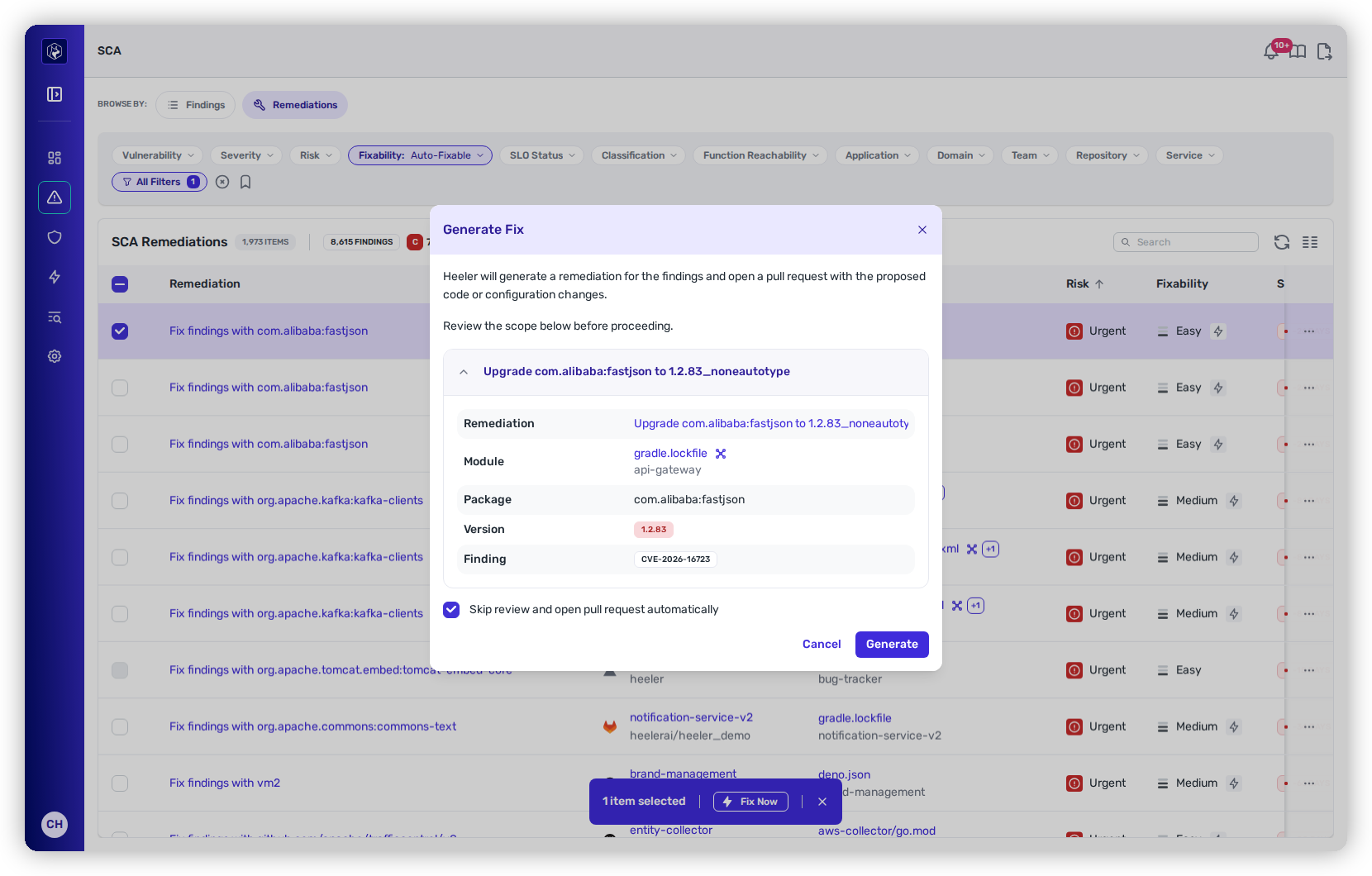
4. The **Generate Fix** dialog opens with the scope to confirm — the remediation, module, package, version and finding — and one option, **Open pull requests automatically**. Nothing runs until you press **Generate**.

**Expected result:** the dialog closes and a new **Agent Executions** row appears for the remediation, moving **Pending → Running** as the agent works.
{% endtab %}

{% tab title="Bulk fix — many at once" %}

1. Select remediations with the row checkboxes; a bar appears with the count and a **Fix Now** button.
2. Click **Fix Now** to open the **Generate Fix** overlay, which shows the scope — remediation, module, package, version, and findings — before you confirm, with two choices:
   * **Open pull requests automatically** — one decision for the whole batch
   * **Open separate PRs for each remediation** (off by default — otherwise Heeler batches into one PR per module)
3. Confirm to launch the run.

**Expected result:** the **Generate Fix** overlay closes and one **Agent Executions** row per fix moves **Pending → Running**.
{% endtab %}
{% endtabs %}

<figure><img src="https://414480750-files.gitbook.io/~/files/v0/b/gitbook-x-prod.appspot.com/o/spaces%2FXP3dp2kecwKA2KvYkntz%2Fuploads%2Fgit-blob-2adf5585ebd88a12c0da3c4c2fc6b05557765a45%2Fcc-rem-bulkfix.png?alt=media" alt="The Generate Fix dialog with per-remediation scope cards and PR options."><figcaption><p>The bulk Generate Fix overlay — review the scope and choose how the PRs land.</p></figcaption></figure>

{% hint style="info" %}
**Where that option starts.** **Open pull requests automatically** is pre-set from your tenant's [pull request default](/mrecEO40m5D6bt7Pq5pE/administer-and-monitor/program-policy/remediation-agent.md#pull-request-defaults-for-sca-and-sast-autofix), and you change it here for this fix or this batch. Leave it off and the fix is built and held at **Awaiting Approval** in [Agent Executions](/mrecEO40m5D6bt7Pq5pE/fix/agent-executions.md) until an administrator approves it. The option appears only for administrators — a fix you start as a **Team contributor** or **Organization contributor** always opens its pull request.
{% endhint %}

### Pull requests already open for this fix

When Heeler already has open pull requests for the remediation you are fixing, the **Generate Fix** dialog opens with a warning above the scope. It names how many are open, links the most recent one with when it was opened, and states that generating again opens a duplicate pull request.

**Generate** stays enabled. Open the linked pull request first if it is the fix you were about to generate again.

The warning appears for a single remediation. It does not appear on a bulk selection.

## When Fix Now is unavailable

**Fix Now** is offered on a remediation the agent can carry through to a pull request. Otherwise Heeler withholds the action, or shows it disabled with the reason on the button.

### States that withhold the action

**Fix Now** does not appear at all in these states.

| State                    | What it means                                                                                                                                                                                         |
| ------------------------ | ----------------------------------------------------------------------------------------------------------------------------------------------------------------------------------------------------- |
| Not automatable          | The module's language, or the complexity of the upgrade, is outside the supported set. See [Finding what's auto-fixable](#finding-whats-auto-fixable).                                                |
| Repository not cloneable | The repository's source is uploaded directly to its hosting platform rather than stored in a connected git repository, so no pull request can be opened against it.                                   |
| Repository unhealthy     | Heeler cannot clone or analyze the repository, so the agent has nothing to work in. Check the repository on [Operational Health](/mrecEO40m5D6bt7Pq5pE/administer-and-monitor/operational-health.md). |
| Not open                 | The remediation's finding is fixed or otherwise closed.                                                                                                                                               |

### States that disable the action

**Fix Now** stays on the menu, disabled, with the reason on the button. Hover it for the full explanation. Where there is a page that resolves it, the button links there.

| The button reads                         | What it means                                                                                                                                                         | What resolves it                                                                                                                                                           |
| ---------------------------------------- | --------------------------------------------------------------------------------------------------------------------------------------------------------------------- | -------------------------------------------------------------------------------------------------------------------------------------------------------------------------- |
| **Fix Now (connection needs attention)** | The source-control connection for this repository needs attention. It may be failing, or waiting on permissions an administrator has not approved.                    | Open the connection on [Source Connections](/mrecEO40m5D6bt7Pq5pE/administer-and-monitor/connections-and-integrations/source-connections.md) and give it what it asks for. |
| **Fix Now (registry not connected)**     | The module depends on a private package registry that has no connection in Heeler, so the agent cannot resolve its dependencies.                                      | Add the registry connection under [Registries](/mrecEO40m5D6bt7Pq5pE/administer-and-monitor/connections-and-integrations/registries.md).                                   |
| **Fix Now (registry unreachable)**       | The module depends on a private package registry whose connection is not healthy.                                                                                     | Repair the registry connection under [Registries](/mrecEO40m5D6bt7Pq5pE/administer-and-monitor/connections-and-integrations/registries.md).                                |
| **Fix Now (language end-of-life)**       | The module runs on a language runtime version that is past its end-of-life date.                                                                                      | Move the module to a supported runtime version.                                                                                                                            |
| **Fix Now (ticket required)**            | [Ticket enforcement](/mrecEO40m5D6bt7Pq5pE/administer-and-monitor/program-policy/remediation-agent.md#ticket-enforcement) is on and the finding has no ticket linked. | Push the finding to your tracker, or link an existing ticket.                                                                                                              |

Only one reason is named at a time — the first that applies. Resolving it can reveal another, so re-check the button after each change.

### Runtimes past end-of-life

Heeler does not open an automated dependency upgrade against a language runtime that is past its end-of-life date.

This holds for every supported language. Heeler compares the runtime version detected on the module with that runtime's published end-of-life date.

Where the detected version has passed that date, **Fix Now** is disabled, the button reads **Fix Now (language end-of-life)**, and the tooltip names the version Heeler detected.

Move the module to a supported runtime version and **Fix Now** returns on the next analysis. Meanwhile the remediation stays in the list, keeps its SLO, and can be fixed by hand.

## The remediation detail

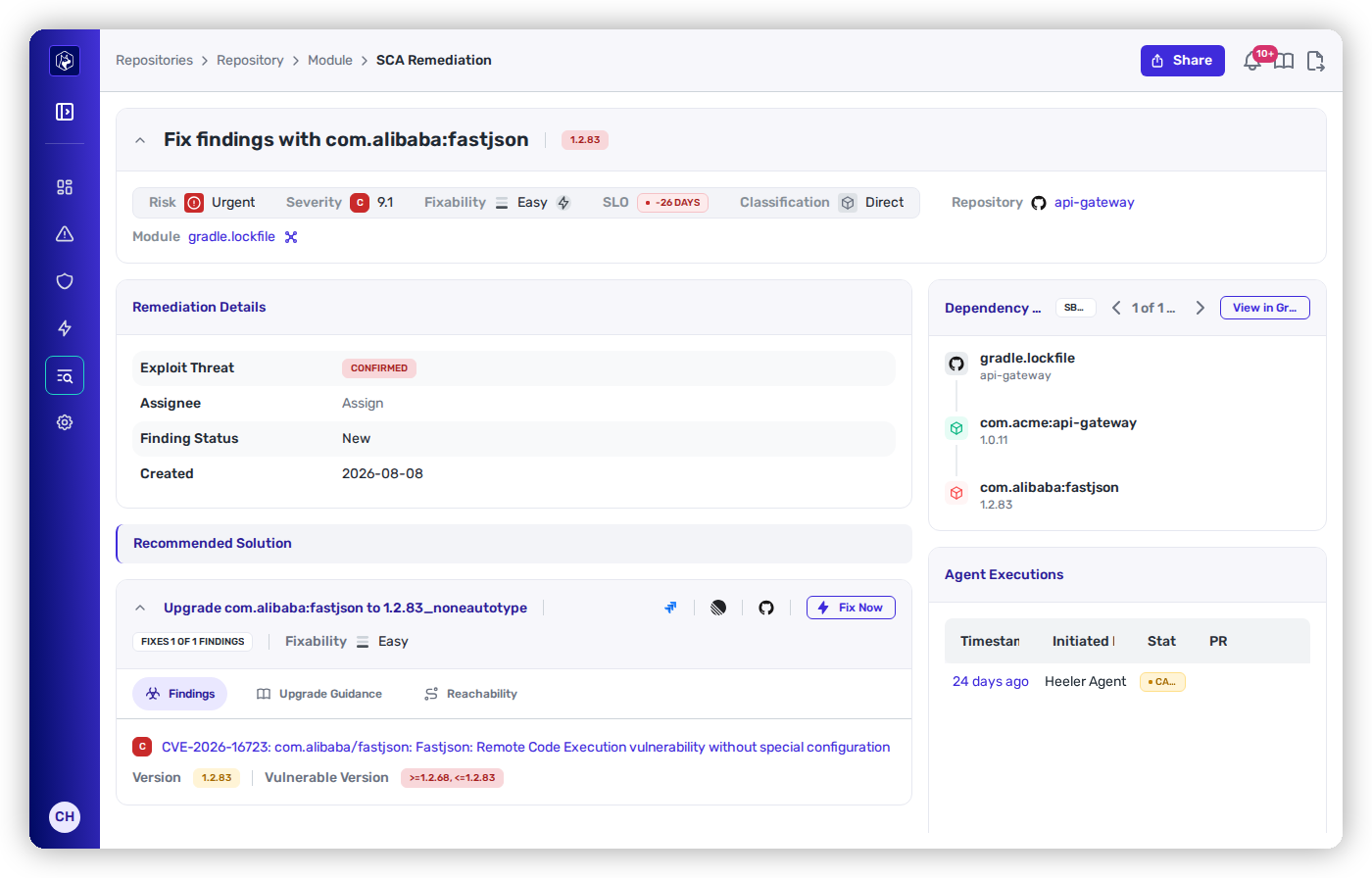
Opening a remediation shows the full context for the fix — the recommended upgrade, affected module, risk, SLO, dependency type, exploit threat, and every CVE the upgrade resolves. Two parts matter most for auto-fix:

* **Upgrade Guidance** — a generated analysis of what the upgrade involves: breaking changes, language/runtime version requirements, API migrations, and required actions — so you understand the scope before merging.
* **Agent Executions** — the log of automated fix attempts for this remediation (see below).

<figure><img src="https://414480750-files.gitbook.io/~/files/v0/b/gitbook-x-prod.appspot.com/o/spaces%2FXP3dp2kecwKA2KvYkntz%2Fuploads%2Fgit-blob-00f085757b1b16ab9d17b5567bd7b82370fdddd1%2Fcc-rem-detail.png?alt=media" alt="A remediation detail with Upgrade Guidance and the Agent Executions log."><figcaption><p>The remediation detail — the recommended upgrade, the CVEs it clears, Upgrade Guidance, and the agent's progress.</p></figcaption></figure>

## How the fix is validated

Heeler validates every fix **twice**. First it **builds and validates the change in an isolated sandbox** — with your project's real toolchain — *before* opening the PR, so the change is already known to build cleanly (compiling the code for compiled languages, installing and resolving dependencies for interpreted ones). Then, once the PR is open, it runs the change through **your own CI** and iterates with follow-up commits until the checks pass (up to a retry limit), handing off to you with an explanation if it can't.

```mermaid
flowchart TD
    M[("Memories")]
    M -.->|read before the run| A
    A[Agent generates the fix<br/>in an isolated sandbox] --> B{Builds and<br/>validates locally?}
    B -->|Yes| C[Open pull request]
    B -->|No| D[Open as a draft PR]
    C --> E[Your CI runs on the PR]
    D --> E
    E --> F{All checks pass?}
    F -->|Yes| G([Ready to review])
    F -->|No| H[CI-fix agent reads the failing<br/>logs, fixes, and re-validates]
    H -->|push follow-up commit| E
    H -->|after 5 tries or unresolvable| J([Hand off with a PR comment])
    G -.->|durable learning saved| M
    J -.->|durable learning saved| M
    class M anchor;
    classDef anchor fill:#5A3FFF,color:#ffffff,stroke:#3a2ad0,stroke-width:1px;
```

[Memories](#memories) bracket the whole run: the agent reads the ones in scope before it makes the change, and saves what it learned when the run ends — whether that run finished green or handed off to you.

The full flow — the sandbox build, CI listening, and the retry loop — is documented in full on [**Validate and Merge-Ready**](/mrecEO40m5D6bt7Pq5pE/fix/validate-and-merge-ready.md).

## The pull request you get

Once the change validates in the sandbox, Heeler opens a pull request scoped to the fix — the manifest and lockfile bump (plus any first-party code changes the upgrade required), and nothing unrelated. (If the sandbox build didn't pass, the PR still opens, as a **draft**, so you're flagged rather than left waiting.) Expect:

* **Title** — the remediation, in the form *"Fix \<package> \<current> → \<fixed>"* (batched PRs name the module).
* **Body** — what changed (the upgrade and any code edits), the **CVEs addressed** by the bump, and a link back to the finding in Heeler.
* **Diff** — limited to the dependency change and the files the upgrade touched, so review stays quick.

## Where the run is recorded

Every auto-fix run across your organization lands in **Agent Executions** — the audit trail of what the agent did, whether it opened a pull request, and where that pull request now stands. It's also where you approve fixes waiting on you, re-run one that failed, and read the full transcript of a run.

{% content-ref url="/pages/zZIuIFfK0mytIvyXqEYY" %}
[Agent Executions](/mrecEO40m5D6bt7Pq5pE/fix/agent-executions.md)
{% endcontent-ref %}

## Related

* [Remediations](/mrecEO40m5D6bt7Pq5pE/findings/open-source-sca/remediations.md) — plan and launch fixes.
* [Remediation Agent → Memories](/mrecEO40m5D6bt7Pq5pE/administer-and-monitor/program-policy/remediation-agent.md#memories) — manage the durable facts every run reads and writes, and the PR template it follows.
* [Validate and Merge-Ready](/mrecEO40m5D6bt7Pq5pE/fix/validate-and-merge-ready.md) — the CI Testing Loop that validates every fix.
* [Guardrail Auto-Fix](/mrecEO40m5D6bt7Pq5pE/prevent/pr-guardrails/guardrail-auto-fix.md) — the same engine, from a PR.
* [Automate Remediation](/mrecEO40m5D6bt7Pq5pE/fix/automate-remediation.md) — run it from a workflow, without an operator.


---

# Agent Instructions
This documentation is published with GitBook. GitBook is the documentation platform designed so that both humans and AI agents can read, navigate, and reason over technical content effectively. Learn more at gitbook.com.

## Querying This Documentation
If you need additional information that is not directly available in this page, you can query the documentation dynamically by asking a question.

Perform an HTTP GET request on the current page URL with the `ask` query parameter, and the optional `goal` query parameter:

```
GET https://docs.heeler.com/mrecEO40m5D6bt7Pq5pE/fix/sca-auto-fix.md?ask=<question>&goal=<endgoal>
```

`ask` is the immediate question: it should be specific, self-contained, and written in natural language.
`goal` is optional and describes the broader end goal you are ultimately trying to accomplish on behalf of the user. GitBook uses it to tailor the answer towards what is most useful for that goal.

The response will contain a direct answer to the question and relevant excerpts and sources from the documentation.

Use this mechanism when the answer is not explicitly present in the current page, you need clarification or additional context, or you want to retrieve related documentation sections.