> For the complete documentation index, see [llms.txt](https://docs.heeler.com/mrecEO40m5D6bt7Pq5pE/llms.txt). Markdown versions of documentation pages are available by appending `.md` to page URLs; this page is available as [Markdown](https://docs.heeler.com/mrecEO40m5D6bt7Pq5pE/fix/validate-and-merge-ready.md).

# Validate and Merge-Ready

How Heeler proves every auto-fix is merge-ready — built and validated in an isolated sandbox before the PR, then driven through your own CI until the checks pass — and how a fix is tracked past merge

Every fix is **built and validated in an isolated sandbox before the pull request exists**, then validated again through **your own CI** once the PR is open. Heeler iterates on failures until the checks pass, or hands off with an explanation of what it could not resolve. This page describes that validation, which is shared by both [SCA Auto-Fix](/mrecEO40m5D6bt7Pq5pE/fix/sca-auto-fix.md) and [SAST Auto-Fix](/mrecEO40m5D6bt7Pq5pE/fix/sast-auto-fix.md).

{% hint style="info" %}
**When this happens:** automatically, every time a fix is triggered — from **Fix Now**, a bulk fix, or a [remediation workflow](/mrecEO40m5D6bt7Pq5pE/fix/automate-remediation.md). Validation itself has nothing to configure; the [memories](/mrecEO40m5D6bt7Pq5pE/administer-and-monitor/program-policy/remediation-agent.md#memories) you keep are the one thing that changes how the agent works a fix. The second phase uses the CI pipeline you already run on pull requests; if a repository has no CI, Heeler still validates the fix in the sandbox and opens the PR.
{% endhint %}

## Two phases of validation

Heeler validates a fix **twice** — first locally, before the PR is opened; then through your CI, after it. Local build-to-green comes first, so a change is already known to build cleanly before it ever becomes a pull request.

```mermaid
flowchart TD
    M[("Memories")]
    M -.->|read before the run| A
    A[Agent generates the fix<br/>in an isolated sandbox] --> B{Builds and<br/>validates locally?}
    B -->|Yes| C[Open pull request]
    B -->|No| D[Open as a draft PR]
    C --> E[Your CI runs on the PR]
    D --> E
    E --> F{All checks pass?}
    F -->|Yes| G([Ready to review])
    F -->|No| H[CI-fix agent reads the failing<br/>logs, fixes, and re-validates]
    H -->|push follow-up commit| E
    H -->|after 5 tries or unresolvable| J([Hand off with a PR comment])
    G -.->|durable learning saved| M
    J -.->|durable learning saved| M
    class M anchor;
    classDef anchor fill:#5A3FFF,color:#ffffff,stroke:#3a2ad0,stroke-width:1px;
```

[Memories](#when-a-hand-off-will-recur-write-it-down) bracket the run at both ends — read before the change is made, written back when it ends.

### Phase 1 — Build and validate in an isolated sandbox

Before any branch or PR exists, the fix is generated and proven in a clean, isolated sandbox:

{% stepper %}
{% step %}

### Provision the sandbox

Heeler spins up an isolated sandbox and installs your project's **real build toolchain**, with the language and runtime **version matched to the repository** — Java (Maven/Gradle), Node.js, Go, .NET, or Python, and the right package manager for each.
{% endstep %}

{% step %}

### Load your code

A snapshot of the repository — **source only, no git history** — is loaded into the sandbox, and a baseline is recorded so the exact change can be captured as a diff later.
{% endstep %}

{% step %}

### Apply the change

The agent explores the project and makes the fix — the dependency upgrade (plus any first-party code changes the upgrade requires), or the SAST before/after code transform. It reads your [memories](/mrecEO40m5D6bt7Pq5pE/administer-and-monitor/program-policy/remediation-agent.md#memories) for this repository first, so repository-specific rules apply from the first attempt rather than being discovered by failing.
{% endstep %}

{% step %}

### Build and validate

The agent **builds the project with your ecosystem's real build and package manager**, confirming the change builds cleanly and dependencies resolve. What that means depends on the language: for **compiled** languages (Java, Go, C#) it compiles the code — for example `mvn clean verify` for Maven; for **interpreted** languages (Python, JavaScript) it installs and resolves the dependency graph and runs the project's build. Either way it's a true build, not a surface check, and the agent won't finish until it runs. (See [what Heeler builds](#what-heeler-can-build) for each ecosystem.)
{% endstep %}

{% step %}

### Capture a validated patch

The agent records the change as a **patch** plus the pull-request content, and marks whether the build validated. If it can't apply the fix cleanly, it stops here rather than pushing a broken change.
{% endstep %}
{% endstepper %}

### Phase 2 — Branch, commit, and open the PR

Once the sandbox produces a patch, Heeler creates the branch, applies the patch, commits, and opens the pull request. Two outcomes depend on state:

* **Opened as a draft if the local build didn't pass** — Heeler still opens the PR so you're aware of the proposed change, but flags it as a draft rather than presenting an unvalidated fix as ready.
* **Held at Awaiting Approval if the fix waits for approval** — with **Open pull requests automatically** off for this fix, the run pauses at **Awaiting Approval** with the patch ready and no pull request. It opens only once an administrator approves it in [Agent Executions](/mrecEO40m5D6bt7Pq5pE/fix/agent-executions.md#approve-or-discard-a-held-fix). Where that starting position comes from: [pull request defaults](/mrecEO40m5D6bt7Pq5pE/administer-and-monitor/program-policy/remediation-agent.md#pull-request-defaults-for-sca-and-sast-autofix).

{% hint style="info" %}
**Guardrail auto-fix works differently.** When the fix is for a violation on a developer's *existing* pull request, Heeler commits the fix to that PR's branch (or posts it as a review suggestion) instead of opening a new PR. See [Guardrail Auto-Fix](/mrecEO40m5D6bt7Pq5pE/prevent/pr-guardrails/guardrail-auto-fix.md).
{% endhint %}

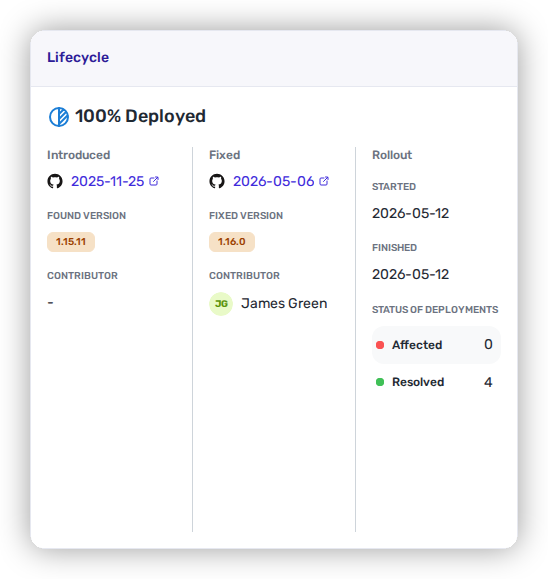
<figure><img src="https://414480750-files.gitbook.io/~/files/v0/b/gitbook-x-prod.appspot.com/o/spaces%2FXP3dp2kecwKA2KvYkntz%2Fuploads%2Fgit-blob-500eb8b52c779688c9d7920ff3fe0bddf786f8b5%2Fcc-fix-sca-pr.png?alt=media" alt="A completed agent execution: a Summary showing the dependency upgraded and &#x27;mvn clean verify passed successfully&#x27;, a Vulnerabilities Resolved table, a Pull Request Created link, and Files changed."><figcaption><p>A completed, validated fix — the build Heeler ran (<code>mvn clean verify</code>), the CVEs the upgrade resolves, the pull request it opened, and the files changed.</p></figcaption></figure>

### Phase 3 — The CI Testing Loop

With the PR open, your own pipeline validates the fix in your real environment — and Heeler works the results until they're green:

{% stepper %}
{% step %}

### CI runs

Your CI runs automatically on the PR. Heeler **listens for the check results from your SCM as they complete** — it reacts to your checks the moment they finish, rather than polling.
{% endstep %}

{% step %}

### Read the failures

When a check fails, Heeler pulls that run's logs and a CI-fix agent **localizes the cause** in the failing output — attributing the failure to the change the fix introduced.
{% endstep %}

{% step %}

### Fix and re-validate

The agent edits and re-validates the change in the sandbox, then pushes a **follow-up commit to the same PR branch**, which re-triggers CI. Earlier attempts are fed back in, so it doesn't repeat an approach that already failed.
{% endstep %}

{% step %}

### Iterate or hand off

The loop repeats until CI is green or the limit is reached — then Heeler either marks the PR ready or hands off to you (below).
{% endstep %}
{% endstepper %}

The loop ends in one of three ways:

| Outcome                    | What it means                                                                           |
| -------------------------- | --------------------------------------------------------------------------------------- |
| ✅ **Success**              | All CI checks pass — the PR is ready for review.                                        |
| 🔁 **Retry limit reached** | The agent made **up to 5 follow-up commits** trying to get to green, and stopped.       |
| ⛔ **Early exit**           | The agent determined the failure was unlikely to be resolved automatically and stopped. |

On a retry-limit or early-exit, Heeler **hands off** — it posts a comment on the PR explaining what it couldn't resolve, and leaves every intermediate commit and CI result in place.

{% hint style="success" %}
**Non-breaking by design.** Because a fix is built and validated before the PR *and* then driven through your own CI, automation never quietly hands you a broken build — and when it can't get to green, it tells you exactly why instead of guessing.
{% endhint %}

How long the loop takes tracks your own pipeline — roughly your CI runtime × up to 5 iterations before the agent reaches green or hands off.

## When a hand-off will recur, write it down

A hand-off tells you exactly what the agent couldn't resolve. When the cause is durable rather than a one-off — a suite that needs an environment variable, a build step the project always requires, a lockfile the project regenerates rather than commits — record it as a [memory](/mrecEO40m5D6bt7Pq5pE/administer-and-monitor/program-policy/remediation-agent.md#memories) so the next run starts with it instead of rediscovering it. Mark it [persistent](/mrecEO40m5D6bt7Pq5pE/administer-and-monitor/program-policy/remediation-agent.md#persistent-always-on-or-on-demand) when a run getting it wrong would produce a bad pull request.

Note the difference in reach. Within a single run, earlier failed attempts are already fed back to the agent, so it won't repeat an approach that already failed. Memories are what carry a lesson **across** runs.

Runs write memories of their own, too. When a run learns something durable about a repository, it saves a repository-scoped, non-persistent memory with a **Source** of `agent` — which appears in the Memories table for you to review, promote, or delete. See [what the agent writes for itself](/mrecEO40m5D6bt7Pq5pE/administer-and-monitor/program-policy/remediation-agent.md#source-what-the-agent-writes-for-itself).

## What Heeler can build

The sandbox validates the change with each ecosystem's real build and package manager — so a passing build means the change actually builds, with dependencies resolved (a compile for compiled languages; a full install and dependency resolution for interpreted ones):

| Ecosystem                   | How Heeler builds & validates                                                         |
| --------------------------- | ------------------------------------------------------------------------------------- |
| **Java**                    | Maven (`mvn clean verify`) or Gradle.                                                 |
| **JavaScript / TypeScript** | Install and build with **npm, pnpm, or Yarn** (classic or Berry).                     |
| **Python**                  | Install with **pip, uv, or Poetry**; regenerates hashes for hash-pinned requirements. |
| **Go**                      | `go build` and `go mod tidy`, honoring `replace` and `exclude` directives.            |
| **C# / .NET**               | `dotnet build` and dependency restore.                                                |

## Following a run

Every attempt — the initial fix and each CI iteration — is recorded in **Agent Executions**, with a status you can watch:

| Status                | Meaning                                                                      |
| --------------------- | ---------------------------------------------------------------------------- |
| **Pending / Running** | The fix is queued or the agent is working in the sandbox.                    |
| **Awaiting Approval** | The fix is ready and held; an administrator approves it before the PR opens. |
| **Completed**         | The agent generated a validated fix and opened the pull request.             |
| **Failed**            | The agent couldn't produce a passing fix after exhausting the CI retry loop. |
| **Cancelled**         | The run was stopped before it finished.                                      |

For the full audit trail — columns, filters, and the per-run detail with the agent's tool calls and each CI iteration — see [Agent Executions](/mrecEO40m5D6bt7Pq5pE/fix/agent-executions.md).

## Full transparency

Every step is traceable. For any fix you can see the sequence of agent attempts, CI results across iterations, and all code changes made along the way — with the agent's reasoning at each step. Every automated fix is auditable and explainable, even when automation did the work.

## Asking for a change in a comment

You can ask Heeler for a change on a pull request it opened, by commenting on the pull request. Heeler responds on the PR, works on the PR's own branch, and pushes the change back.

Two forms trigger it, both case-insensitive:

| Form          | Where it can appear                                                                                        |
| ------------- | ---------------------------------------------------------------------------------------------------------- |
| **`@heeler`** | Anywhere in the comment — `Hey @heeler, can you pin this instead?`                                         |
| **`/heeler`** | At the **start** of the comment, following the usual slash-command convention — `/heeler pin this instead` |

The trigger itself is stripped before the rest of the comment is read as the instruction, so you write the comment the way you would to a colleague. A word boundary is required, so an email address such as `foo@heeler.com`, a handle such as `@heelerbot`, and a run-together `/heelerfix` do **not** trigger it.

**Bots can be let in without a mention.** Named bot accounts — a code-review bot such as Cursor Bugbot or CodeRabbit, say — can have their comments treated as a request automatically, so their findings reach the agent without anyone relaying them. That list is opt-in and empty by default; you choose the accounts under [**Administration → Program → Agent**](/mrecEO40m5D6bt7Pq5pE/administer-and-monitor/program-policy/remediation-agent.md#comment-triggers). Everything below applies to those comments unchanged.

**What it applies to.** Only pull requests **Heeler opened**. A comment on any other pull request is ignored — there is nothing for the agent to revise. It runs on **GitHub**, on newly posted comments only (editing an existing comment does not re-trigger it), and comments from Heeler's own bot accounts are always ignored so it cannot answer itself — that exclusion holds even if one is somehow named in the bot list.

**Limits.** One response runs at a time per pull request; a second comment while one is in flight is skipped rather than queued. Each pull request allows up to **five** responses, and a single hard failure stops further attempts. When a limit is reached Heeler says so on the pull request rather than going quiet. The cap does real work once bots are in the mix: a review bot that re-reviews after every push would otherwise keep the agent answering itself indefinitely.

Each response is recorded in [Agent Executions](/mrecEO40m5D6bt7Pq5pE/fix/agent-executions.md) like any other run, so the comment, what the agent did, and the resulting commit are all on the audit trail.

{% hint style="warning" %}
On **GitLab**, a merge-request comment of exactly `/heeler fix` is a different, narrower action: it queues a remediation rather than answering an instruction, and it requires **Developer** access or higher on the project.
{% endhint %}

## A pull request that fixes a finding is recognised

When a pull request contains a change that resolves an open security finding, Heeler recognises the fix and posts a comment on the pull request naming the finding it closes. The comment appears on pull requests Heeler already analyses, alongside the guardrail check comment.

This applies to any pull request Heeler analyses, not only ones it opened itself — a fix made by hand is recognised the same way. Where fix recognition is enabled, a pull request is analysed even when no guardrail applies to it, so a pull request that only fixes things is still examined.

Fix recognition is **off unless an Administrator turns it on**, under **Administration → Program → Fix Recognition** — see [Fix Recognition](/mrecEO40m5D6bt7Pq5pE/administer-and-monitor/program-policy/fix-recognition.md) for what the comment contains and how it is kept up to date as the pull request changes.

## When a pull request closes itself

If the finding a pull request was opened for is resolved some other way — someone upgrades the dependency by hand, another pull request lands first, or the dependency is removed — the remediation reaches its closed state and the pull request it opened is no longer needed. Heeler comments on the pull request to say so and then closes it, rather than leaving a stale fix sitting open for someone to work out later.

This works across **GitHub**, **GitLab**, **Azure DevOps** and **Bitbucket**; on Azure DevOps the pull request is *abandoned* and on Bitbucket *declined*, which are those providers' equivalents. A pull request that has already merged or closed is left alone.

Two things are deliberate. A remediation with a **run still in progress** is not closed, so an in-flight fix is never cut off mid-attempt. And the comment is best-effort: if Heeler cannot comment — because the token lacks permission, say — it still closes the pull request.

## Merge isn't the finish line — Deployed is

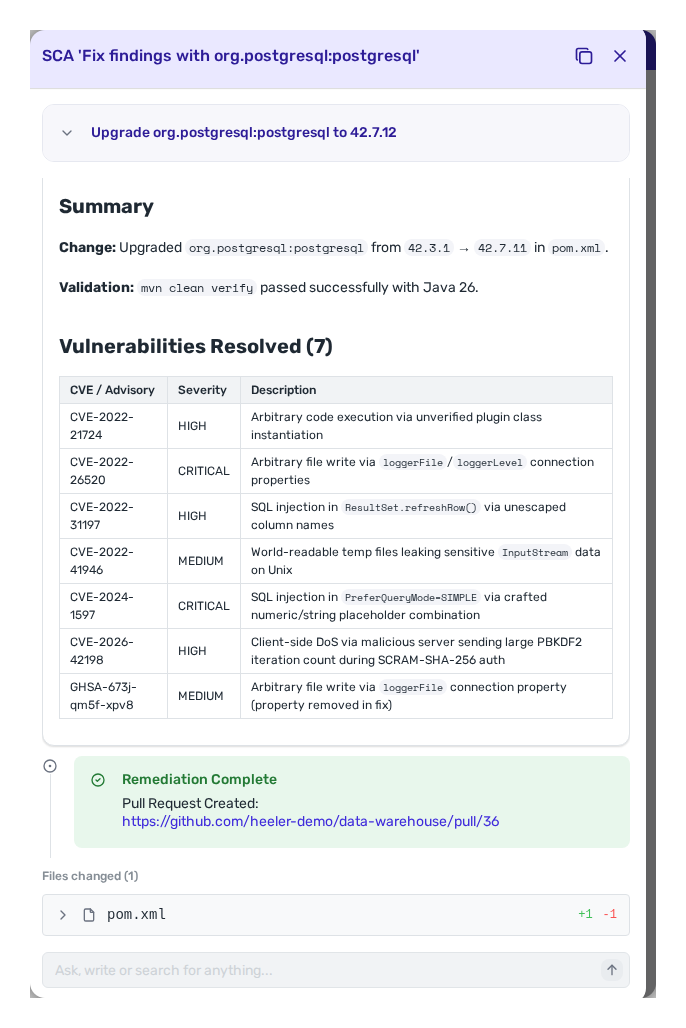
A merged fix is not confirmed until it is running. Because Heeler correlates running deployments back to source, it tracks each fix past merge and records when the vulnerable code is no longer present. A finding moves **Active → Fixed → Deployed**; only **Deployed** means the fix reached every deployment that ran the vulnerable code.

<figure><img src="https://414480750-files.gitbook.io/~/files/v0/b/gitbook-x-prod.appspot.com/o/spaces%2FXP3dp2kecwKA2KvYkntz%2Fuploads%2Fgit-blob-87607de0d1e522b23ff1138c368fcf4a7f4abf73%2Fcc-lifecycle-deployed.png?alt=media" alt="The finding Lifecycle panel at 100% Deployed."><figcaption><p>A fix isn't done at merge — Heeler tracks rollout to <strong>Deployed</strong>, confirmed from runtime.</p></figcaption></figure>

See [the findings lifecycle](/mrecEO40m5D6bt7Pq5pE/findings/open-source-sca/findings.md#the-lifecycle-tracking-a-fix-to-production) for how the Deployed state is tracked per deployment.

## Worked example

The same step as part of a full remediation, from finding to deployed fix:

{% content-ref url="/pages/LPozKjcpRP6t4iCqkQvo" %}
[Fix a Vulnerable Dependency and Verify It's Deployed](/mrecEO40m5D6bt7Pq5pE/solutions-and-use-cases/fix-and-verify-in-production.md)
{% endcontent-ref %}

## Related

* [SCA Auto-Fix](/mrecEO40m5D6bt7Pq5pE/fix/sca-auto-fix.md) · [SAST Auto-Fix](/mrecEO40m5D6bt7Pq5pE/fix/sast-auto-fix.md) — the deterministic fixes this loop validates.
* [Remediation Agent → Memories](/mrecEO40m5D6bt7Pq5pE/administer-and-monitor/program-policy/remediation-agent.md#memories) — record what a hand-off taught you so the next run starts with it.
* [Agent Executions](/mrecEO40m5D6bt7Pq5pE/fix/agent-executions.md) — the audit trail of every run and CI iteration.


---

# Agent Instructions
This documentation is published with GitBook. GitBook is the documentation platform designed so that both humans and AI agents can read, navigate, and reason over technical content effectively. Learn more at gitbook.com.

## Querying This Documentation
If you need additional information that is not directly available in this page, you can query the documentation dynamically by asking a question.

Perform an HTTP GET request on the current page URL with the `ask` query parameter, and the optional `goal` query parameter:

```
GET https://docs.heeler.com/mrecEO40m5D6bt7Pq5pE/fix/validate-and-merge-ready.md?ask=<question>&goal=<endgoal>
```

`ask` is the immediate question: it should be specific, self-contained, and written in natural language.
`goal` is optional and describes the broader end goal you are ultimately trying to accomplish on behalf of the user. GitBook uses it to tailor the answer towards what is most useful for that goal.

The response will contain a direct answer to the question and relevant excerpts and sources from the documentation.

Use this mechanism when the answer is not explicitly present in the current page, you need clarification or additional context, or you want to retrieve related documentation sections.