> For the complete documentation index, see [llms.txt](https://docs.heeler.com/mrecEO40m5D6bt7Pq5pE/llms.txt). Markdown versions of documentation pages are available by appending `.md` to page URLs; this page is available as [Markdown](https://docs.heeler.com/mrecEO40m5D6bt7Pq5pE/get-started/cloud-and-runtime/amazon-web-services/aws-event-collection.md).

# AWS Event Collection

Add near-real-time AWS change detection by streaming CloudTrail events to Heeler through an SQS queue.

Event collection gives Heeler **near-real-time** updates when meaningful things change in your AWS environment, between the regular inventory polls. Heeler harvests **CloudTrail** events delivered to an **SQS queue** it can read.

## Choose an implementation

Both options deliver the same data — the trade-off is **cost vs. latency**:

|                 | Option 1 · S3 → SQS (recommended)    | Option 2 · CloudWatch Logs → SQS                     |
| --------------- | ------------------------------------ | ---------------------------------------------------- |
| **Flow**        | CloudTrail → S3 → SNS → SQS → Heeler | CloudTrail → CloudWatch Logs → Lambda → SQS → Heeler |
| **Cost**        | Lower — can be \~1/100th of Option 2 | Higher — per-event CloudWatch ingestion + Lambda     |
| **Latency**     | \~5–10 min (CloudTrail's S3 cadence) | Under 60 s                                           |
| **Choose when** | **Default** — most customers         | Only if sub-minute latency is a hard requirement     |

## Shared prerequisite

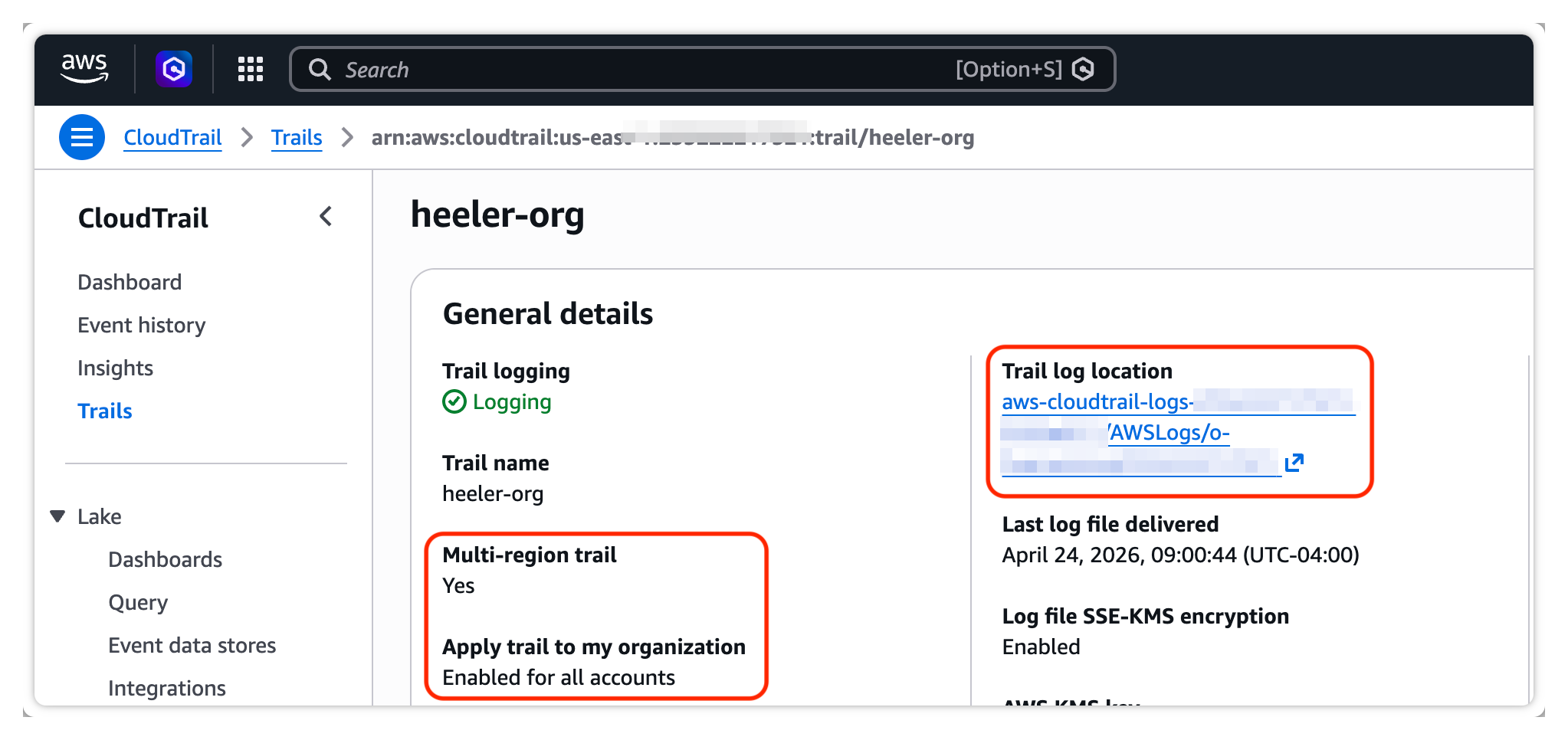
Both options need an **organization-wide CloudTrail** (most orgs already have one), configured for **all accounts**, **multi-region**, and **all management events**. It must deliver to an **S3 bucket in the payer/org-management account** (Option 1) or have **CloudWatch Logs enabled** (Option 2).

<figure><img src="https://414480750-files.gitbook.io/~/files/v0/b/gitbook-x-prod.appspot.com/o/spaces%2FXP3dp2kecwKA2KvYkntz%2Fuploads%2Fgit-blob-42e80ade40750f575b42ddbce4c8255656f0c874%2Fcc-cloud-awsevent-01.png?alt=media" alt="The AWS CloudTrail trail details page showing a multi-region trail applied to all accounts in the organization and its S3 trail log location."><figcaption><p>Confirm the trail is multi-region and applied to the whole organization.</p></figcaption></figure>

## Before you start (per option)

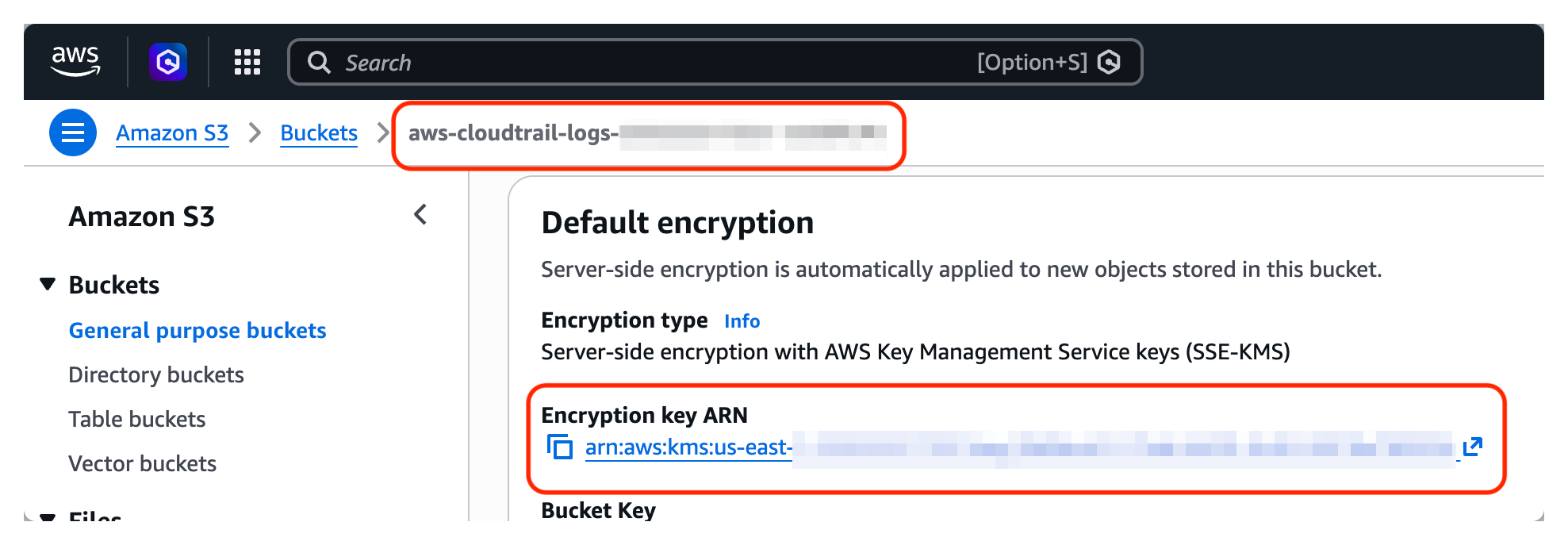
* **Option 1 (S3 → SQS)** — note the **S3 bucket name** the trail delivers to, and, if that bucket is encrypted with a customer-managed KMS key (SSE-KMS, not the default SSE-S3), the **KMS key ARN**. You'll pass both to the module.

  <figure><img src="https://414480750-files.gitbook.io/~/files/v0/b/gitbook-x-prod.appspot.com/o/spaces%2FXP3dp2kecwKA2KvYkntz%2Fuploads%2Fgit-blob-1f530bbe8157fb9355be6c75ffd9282e1209f8f1%2Fcc-cloud-awsevent-02.png?alt=media" alt="The AWS S3 bucket default-encryption panel showing the CloudTrail bucket name and its SSE-KMS encryption key ARN."><figcaption><p>Grab the CloudTrail bucket name and, if it uses a customer-managed key, the encryption key ARN.</p></figcaption></figure>
* **Option 2 (CloudWatch Logs → SQS)** — the trail must have **CloudWatch Logs enabled**. If you enable it now, set the new Log Group's retention to **1 day**: Heeler ingests events in near real time and doesn't need them retained, so short retention keeps costs down.

## Deploy the resources (Terraform)

Download the Event Collection Terraform module for your chosen option and apply it in the **payer/org-management account**. It provisions the queue and the cross-account IAM role Heeler assumes to read it:

**Option 1 — CloudTrail S3 bucket:**

{% file src="/files/rmQPoRBZSwTCza2qiW02" %}

**Option 2 — CloudWatch Logs:**

{% file src="/files/gZGCLhneauG23IpTohnN" %}

* **Option 1** creates (as needed) an **SNS topic** wired to the bucket's `s3:ObjectCreated:*` events, an **SQS queue** + **DLQ** (captures messages that fail after four delivery attempts), a **KMS key**, and the **IAM role/policy** Heeler assumes to receive messages and fetch the referenced CloudTrail objects. When the bucket uses a customer-managed KMS key, it also adds a **KMS grant** so the harvest role can decrypt retrieved objects.
* **Option 2** creates a **CloudWatch subscription filter** (dropping non-security events), a **Lambda** that forwards to an **SQS queue** + DLQ, a **KMS key**, and the **IAM role/policy** Heeler assumes.

Populate the module inputs in `var.auto.tfvars`:

* **`account_id`** — the payer/org-management account ID.
* **`heeler_external_id`** — a secret you choose, shared between Heeler and the IAM role it assumes.
* **`heeler_security_role_arns`** — the role ARNs Heeler provides.
* **`queues`** — one entry per consumer, pre-filled with a single entry named **`main`**. Leave it as shipped: one queue is the normal shape, and the `main` name keeps queue names stable across module versions. (`message_retention_seconds` bounds how stale a redelivered event can be; `max_receive_count` is how many delivery attempts a message gets before parking on the dead-letter queue.)
* Option 1 also takes **`s3_cloudtrail_bucket_name`**, **`s3_cloudtrail_bucket_kms_key_arn`** (or `"None"` for SSE-S3), and **`sns_s3_event_notification_name`** (an existing SNS topic name, or `"None"` to let the module create one).
* Option 2 also takes **`log_group_name`** — the CloudWatch Log Group receiving the org-wide trail's events.

Then run `terraform init` → `plan` → `apply`. The apply prints three outputs you'll need next:

```
heeler_event_queue_urls       = {
  "main" = "https://sqs.us-east-1.amazonaws.com/…/heeler_event_collection_queue"
}
heeler_event_role_arn         = "arn:aws:iam::…:role/heeler_event_collection_sqs_role"
heeler_event_role_external_id = "…"
```

Use the `main` entry's URL as the Event Queue URL below.

## Upgrading from an earlier module version

If you deployed an earlier version of either module (a single queue, no `queues` variable), the new version upgrades in place — **nothing is destroyed and your queue URL does not change**:

1. Replace the module files with the new download, keeping your existing `var.auto.tfvars` values, and add the `queues` block exactly as it appears in the shipped file — **the entry must be named `main`**. That name keeps your existing queue's name and URL.
2. Run `terraform plan`. The module migrates its internal state addresses automatically — you'll see informational `(moved from …)` lines; no `terraform state mv` commands are needed.
3. Review the plan: expect **no destroys**. Option 2 shows an in-place update to the forwarding Lambda (its code now reads the queue list from configuration); behavior is unchanged for a single queue. A plan proposing to **destroy a queue or KMS key** means the `queues` entry was not named `main` — stop and fix the name before applying.
4. Apply. Your Heeler Event Collection settings need no changes.

## Enable it in Heeler

{% stepper %}
{% step %}

### Open Event Collection settings

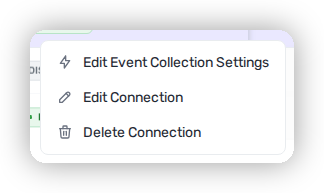
Go to **Connections → Cloud Organizations**, click the **⋯** menu on the AWS organization, and choose **Edit Event Collection Settings**.

<figure><img src="https://414480750-files.gitbook.io/~/files/v0/b/gitbook-x-prod.appspot.com/o/spaces%2FXP3dp2kecwKA2KvYkntz%2Fuploads%2Fgit-blob-21154363973a53f624f709c327a05846b4227782%2Fcc-cloud-awsevent-04.png?alt=media" alt="The Cloud Organizations row overflow menu in Heeler showing Edit Event Collection Settings, Edit Connection, and Delete Connection."><figcaption><p>Open the <strong>⋯</strong> menu on the AWS organization and choose <strong>Edit Event Collection Settings</strong>.</p></figcaption></figure>
{% endstep %}

{% step %}

### Enter the values

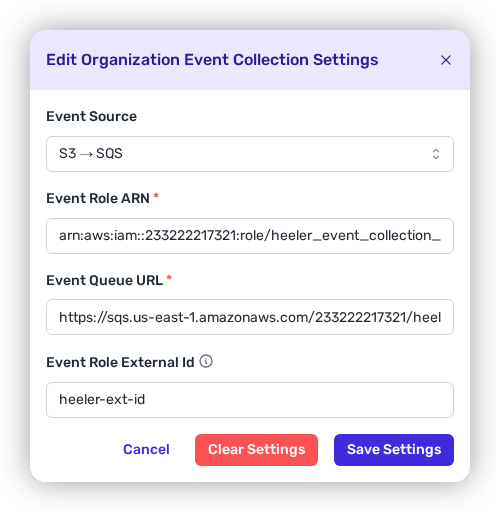
Set the **Event Source** to match your implementation (**S3 → SQS** or **CloudWatch Logs → SQS**), then paste:

* **Event Role ARN** → `heeler_event_role_arn`
* **Event Queue URL** → `heeler_event_queue_url`
* **Event Role External Id** → `heeler_event_role_external_id`

<figure><img src="https://414480750-files.gitbook.io/~/files/v0/b/gitbook-x-prod.appspot.com/o/spaces%2FXP3dp2kecwKA2KvYkntz%2Fuploads%2Fgit-blob-f8220d4ebbca76231601142e862ba5e1c7d12774%2Fcc-cloud-awsevent-05.png?alt=media" alt="The Edit Organization Event Collection Settings modal in Heeler with Event Role ARN, Event Queue URL, and Event Role External Id fields."><figcaption><p>Paste the three Terraform outputs into the Event Collection settings.</p></figcaption></figure>

Save.
{% endstep %}

{% step %}

### Confirm

The organization's **Event Collection** column flips to **Enabled**. Initial harvest can take a little while; after that, events flow on the cadence in the table above.

<figure><img src="https://414480750-files.gitbook.io/~/files/v0/b/gitbook-x-prod.appspot.com/o/spaces%2FXP3dp2kecwKA2KvYkntz%2Fuploads%2Fgit-blob-ccb3dac56351f640b7b3ab9708eb1c1e28040ba7%2Fcc-cloud-awsevent-06.png?alt=media" alt="The Cloud Organizations list showing the AWS organization with its Event Collection column reading ENABLED."><figcaption><p>The <strong>Event Collection</strong> column reads <strong>Enabled</strong> once settings are saved.</p></figcaption></figure>
{% endstep %}
{% endstepper %}

## Related

* [AWS Supported Services](/mrecEO40m5D6bt7Pq5pE/get-started/cloud-and-runtime/amazon-web-services/aws-supported-services.md) — which services support event collection.
* [Amazon Web Services](/mrecEO40m5D6bt7Pq5pE/get-started/cloud-and-runtime/amazon-web-services.md) — the base connection.
* [Containers](/mrecEO40m5D6bt7Pq5pE/findings/containers.md) — container image scanning reads Amazon ECR push events from this collection.


---

# Agent Instructions
This documentation is published with GitBook. GitBook is the documentation platform designed so that both humans and AI agents can read, navigate, and reason over technical content effectively. Learn more at gitbook.com.

## Querying This Documentation
If you need additional information that is not directly available in this page, you can query the documentation dynamically by asking a question.

Perform an HTTP GET request on the current page URL with the `ask` query parameter, and the optional `goal` query parameter:

```
GET https://docs.heeler.com/mrecEO40m5D6bt7Pq5pE/get-started/cloud-and-runtime/amazon-web-services/aws-event-collection.md?ask=<question>&goal=<endgoal>
```

`ask` is the immediate question: it should be specific, self-contained, and written in natural language.
`goal` is optional and describes the broader end goal you are ultimately trying to accomplish on behalf of the user. GitBook uses it to tailor the answer towards what is most useful for that goal.

The response will contain a direct answer to the question and relevant excerpts and sources from the documentation.

Use this mechanism when the answer is not explicitly present in the current page, you need clarification or additional context, or you want to retrieve related documentation sections.