> For the complete documentation index, see [llms.txt](https://docs.heeler.com/mrecEO40m5D6bt7Pq5pE/llms.txt). Markdown versions of documentation pages are available by appending `.md` to page URLs; this page is available as [Markdown](https://docs.heeler.com/mrecEO40m5D6bt7Pq5pE/get-started/cloud-and-runtime/amazon-web-services/aws-organization-setup.md).

# AWS Organization Setup

Onboard an entire AWS Organization to Heeler with one CloudFormation StackSet (or Terraform) applied to the payer account.

To set up Heeler across an AWS Organization, you deploy a **single template to the management (payer) account**. It uses **CloudFormation StackSets** to roll the necessary IAM roles and policies out to every member account — including accounts added later. Everything is scoped to metadata and configuration; your data plane is explicitly denied.

{% hint style="warning" %}
The configured member role is also required in the management account, even when you exclude that account from normal collection. Heeler's first organization inventory job assumes that role in the management account before it enumerates accounts and organizational units. The combined and split payer templates create it there. Apply the split member template only to member accounts, using the same member-role name configured in the payer template and in Heeler.
{% endhint %}

Choose [**CloudFormation**](#cloudformation-recommended) (the wizard launches it for you) or [**Terraform**](#terraform). If you'd rather deploy the StackSet yourself, the template is also published at `https://s3.us-east-1.amazonaws.com/heeler-cft/org-setup/template.yml`.

## CloudFormation (recommended)

{% stepper %}
{% step %}

### Start the wizard

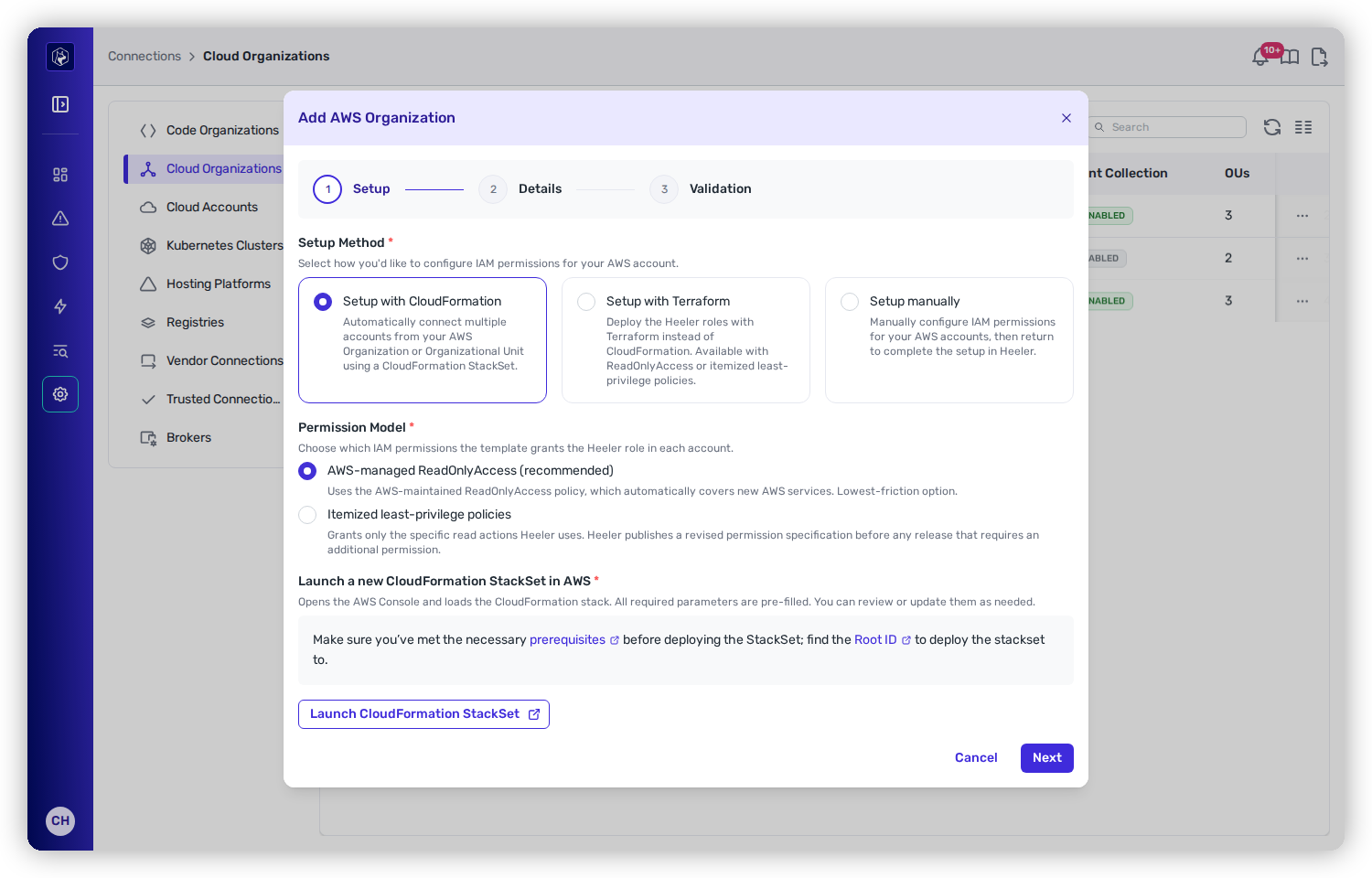
In Heeler, go to **Connections → Cloud Organizations → Add Organization → AWS**, then **Setup with CloudFormation**. Confirm you have the [setup permissions](/mrecEO40m5D6bt7Pq5pE/get-started/cloud-and-runtime/amazon-web-services.md#permissions-for-the-person-doing-the-setup) and your **Root ID** (or target **OU ID**) handy.

<figure><img src="https://414480750-files.gitbook.io/~/files/v0/b/gitbook-x-prod.appspot.com/o/spaces%2FXP3dp2kecwKA2KvYkntz%2Fuploads%2Fgit-blob-03e74c68790f7c3a5fa96e93ededdf0a3731b2bd%2Fcc-gs-cloud-aws-setup.png?alt=media" alt="The Add AWS Organization wizard, Setup step, offering Setup with CloudFormation, Setup with Terraform, or Setup manually, with a Permission Model choice and a Launch CloudFormation StackSet button, ahead of Details and Validation steps."><figcaption><p>The AWS wizard — Setup → Details → Validation. Choose CloudFormation to launch the StackSet.</p></figcaption></figure>
{% endstep %}

{% step %}

### Launch the StackSet

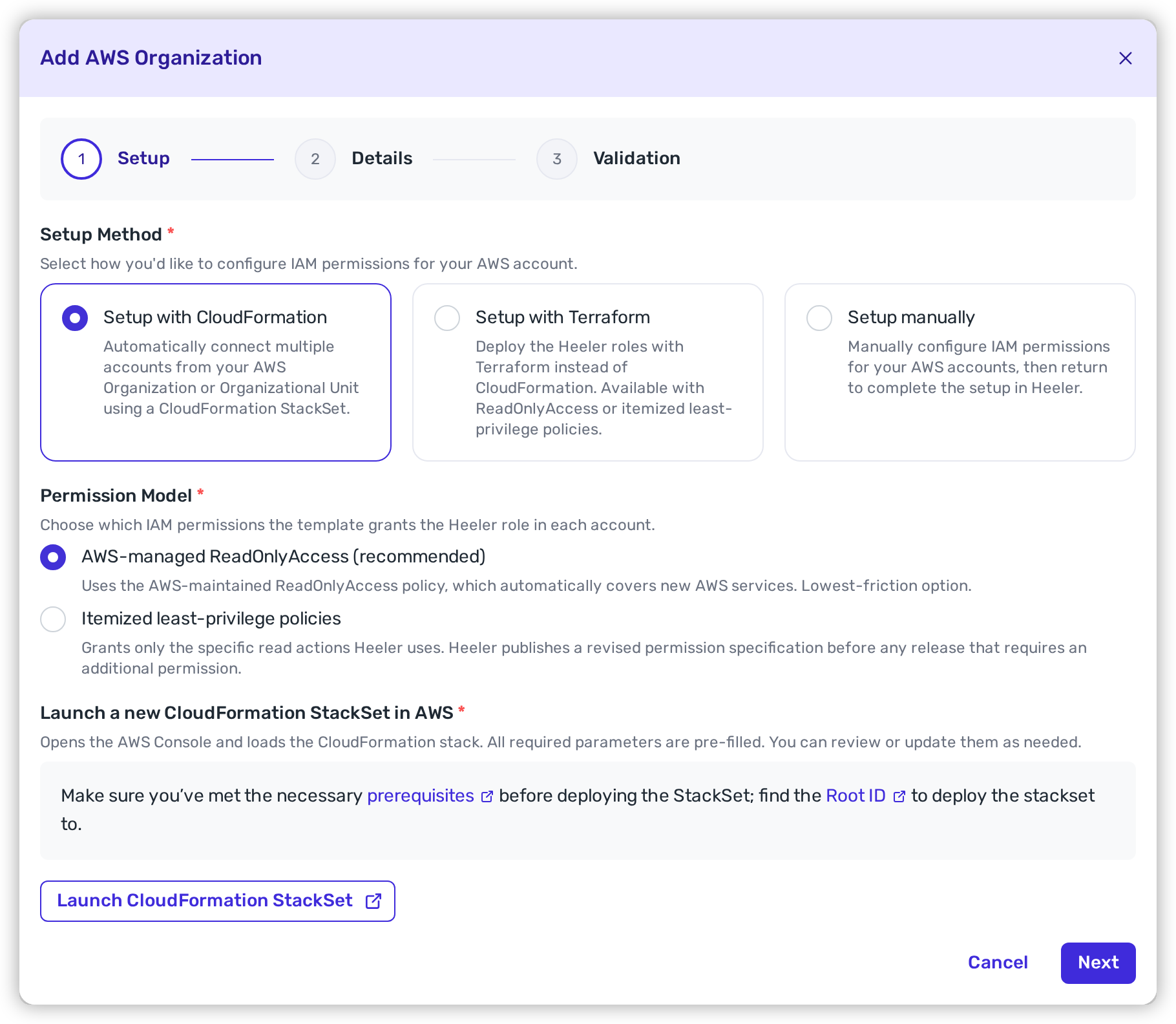
Choose the **Permission Model** the template grants the Heeler role in each account — **AWS-managed ReadOnlyAccess** (recommended) or **itemized least-privilege policies** — then click **Launch CloudFormation StackSet**. Heeler reminds you to confirm the [prerequisites](/mrecEO40m5D6bt7Pq5pE/get-started/cloud-and-runtime/amazon-web-services.md#permissions-for-the-person-doing-the-setup) and have your **Root ID** ready before opening the AWS console.

<figure><img src="https://414480750-files.gitbook.io/~/files/v0/b/gitbook-x-prod.appspot.com/o/spaces%2FXP3dp2kecwKA2KvYkntz%2Fuploads%2Fgit-blob-27048046a12b60ecedbaf4a214664e60be44f778%2Fcc-cloud-awsorg-03.png?alt=media" alt="The Add AWS Organization wizard with Setup with CloudFormation selected, the Permission Model choice, and a Launch CloudFormation StackSet button, plus links to the prerequisites and Root ID."><figcaption><p>Click <strong>Launch CloudFormation StackSet</strong> to open the AWS console with the template pre-loaded.</p></figcaption></figure>

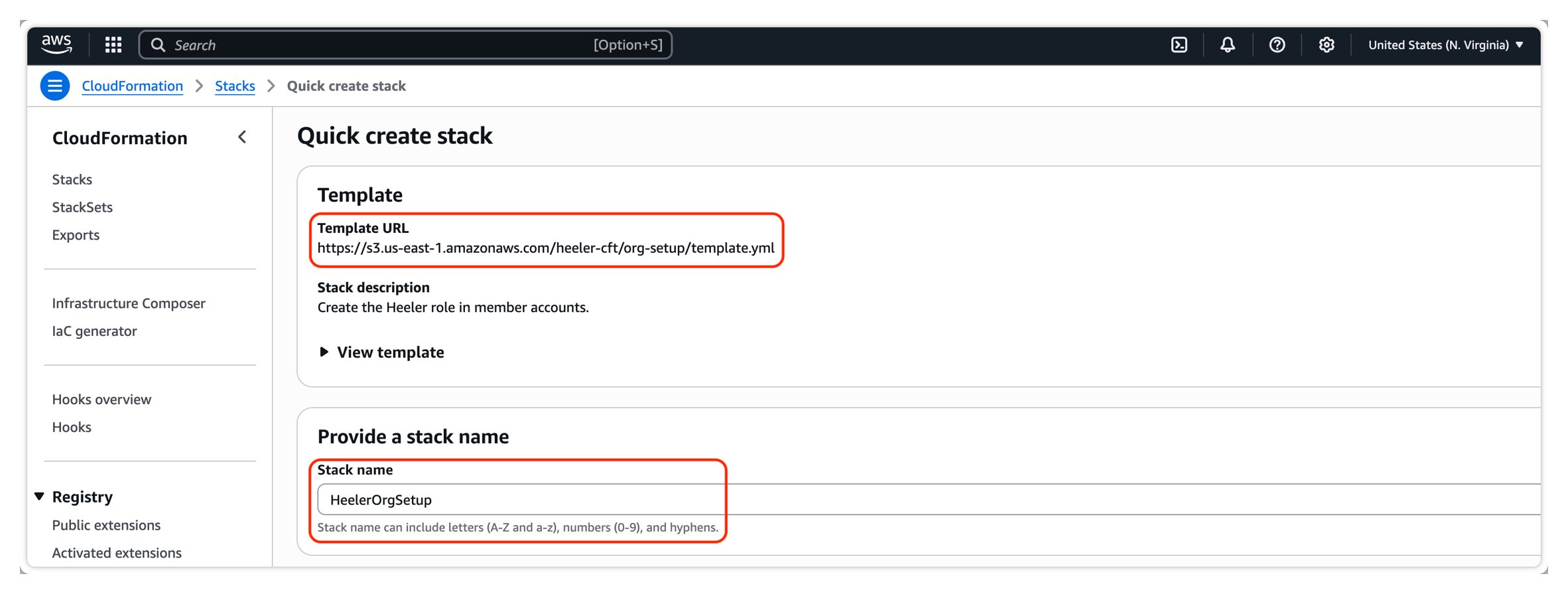
Sign in to a session **in the payer account**, then confirm the stack is deploying the Heeler template with the default stack name.

<figure><img src="https://414480750-files.gitbook.io/~/files/v0/b/gitbook-x-prod.appspot.com/o/spaces%2FXP3dp2kecwKA2KvYkntz%2Fuploads%2Fgit-blob-b506961373554155804ff842856bad9962aed1fe%2Fcc-cloud-awsorg-05.png?alt=media" alt="AWS CloudFormation Quick create stack with the Heeler org-setup template URL and the HeelerOrgSetup stack name."><figcaption><p>Confirm the Heeler template URL and the default <code>HeelerOrgSetup</code> stack name.</p></figcaption></figure>
{% endstep %}

{% step %}

### Set the parameters

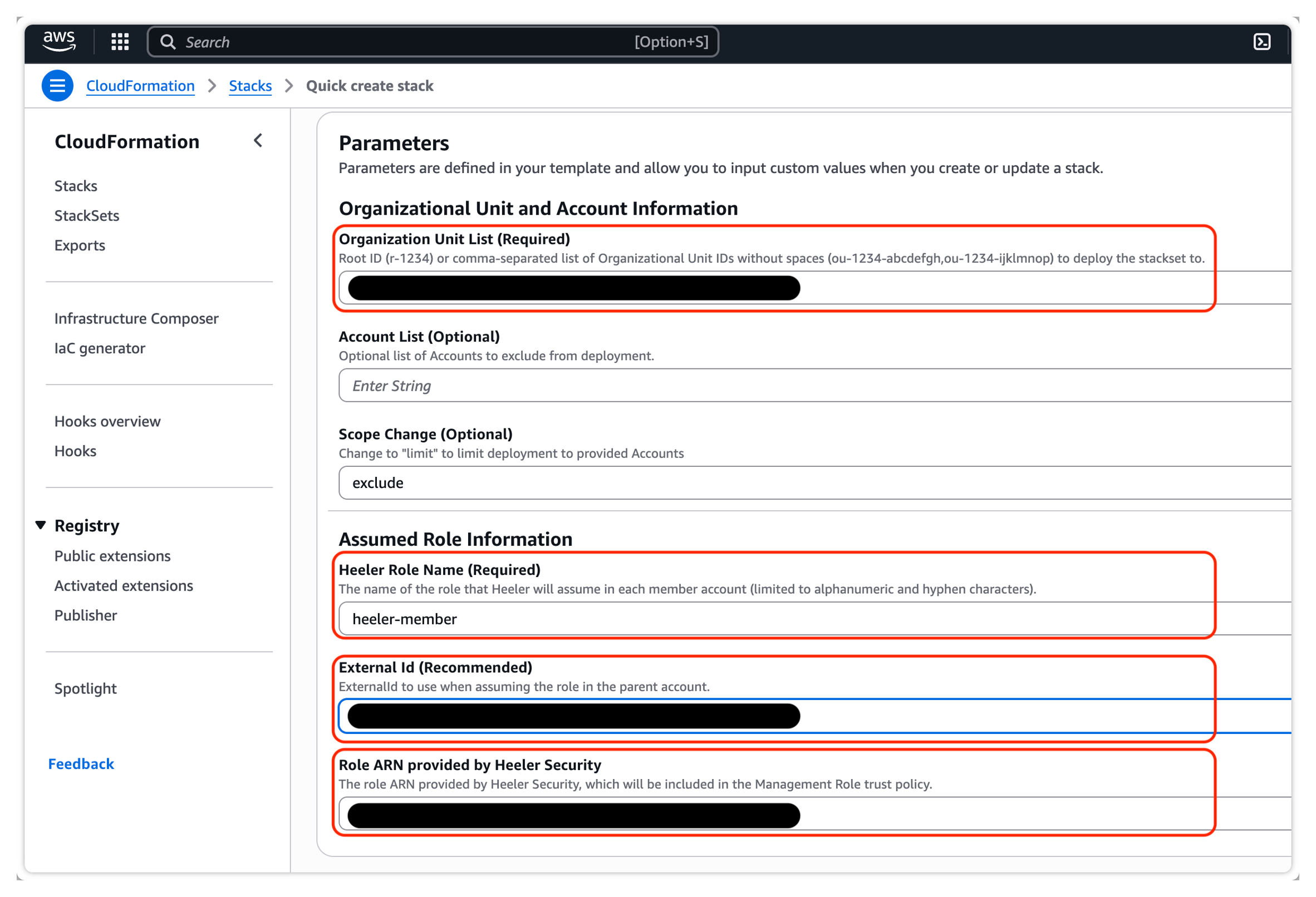
Accept the defaults or adjust:

<table><thead><tr><th width="240">Parameter</th><th>Value</th></tr></thead><tbody><tr><td><strong>Organization Unit List</strong></td><td>Root ID (<code>r-1234</code>) or a top-level OU (<code>o-abc123def4</code>).</td></tr><tr><td><strong>Account List</strong> (optional)</td><td>Accounts to <em>exclude</em> by default.</td></tr><tr><td><strong>Scope Change</strong> (optional)</td><td>Change <code>exclude</code> → <code>limit</code> to make the Account List an <em>include-only</em> list instead.</td></tr><tr><td><strong>Heeler Role Name</strong></td><td>Default <code>heeler-member</code>.</td></tr><tr><td><strong>External ID</strong></td><td>Generated for you; keep it, or supply your own. See <a href="#about-the-external-id">About the External ID</a>.</td></tr><tr><td><strong>Role ARN provided by Heeler</strong></td><td>Leave as the default unless instructed otherwise.</td></tr><tr><td><strong>CustomerManagedK8sRbac</strong> (optional)</td><td>Default <code>false</code>. Set it to <code>true</code> to skip creating the EKS access policy. See <a href="/mrecEO40m5D6bt7Pq5pE/get-started/cloud-and-runtime/amazon-web-services.md#a-clusterrole-you-manage">A ClusterRole you manage</a>.</td></tr></tbody></table>

<figure><img src="https://414480750-files.gitbook.io/~/files/v0/b/gitbook-x-prod.appspot.com/o/spaces%2FXP3dp2kecwKA2KvYkntz%2Fuploads%2Fgit-blob-336c1fb82eae73457c89f622211ead0b0dc24ca4%2Fcc-cloud-awsorg-06.png?alt=media" alt="The CloudFormation Parameters form showing Organization Unit List, Account List, Scope Change, Heeler Role Name (heeler-member), External Id, and Role ARN provided by Heeler Security."><figcaption><p>The pre-filled stack parameters. The <strong>Organization Unit List</strong> takes your Root ID or OU IDs, and the <strong>External Id</strong> is generated for you.</p></figcaption></figure>

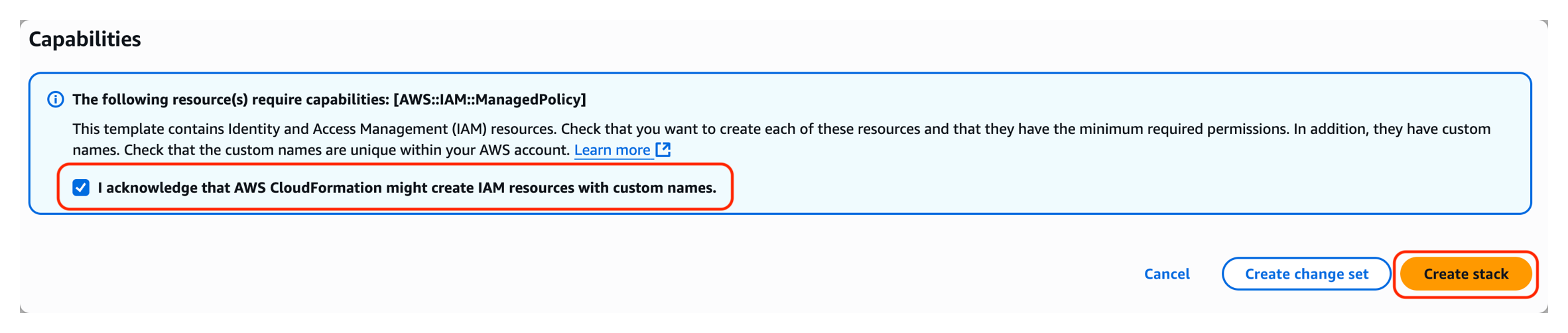
Because the StackSet deploys IAM roles and policies, acknowledge IAM resource creation, then click **Create stack**.

<figure><img src="https://414480750-files.gitbook.io/~/files/v0/b/gitbook-x-prod.appspot.com/o/spaces%2FXP3dp2kecwKA2KvYkntz%2Fuploads%2Fgit-blob-dc9dc9d7859496168c079737e2bcf07f86360f28%2Fcc-cloud-awsorg-07.png?alt=media" alt="The CloudFormation Capabilities panel with the IAM resource acknowledgement checkbox selected and the Create stack button."><figcaption><p>Acknowledge that CloudFormation may create named IAM resources, then <strong>Create stack</strong>.</p></figcaption></figure>

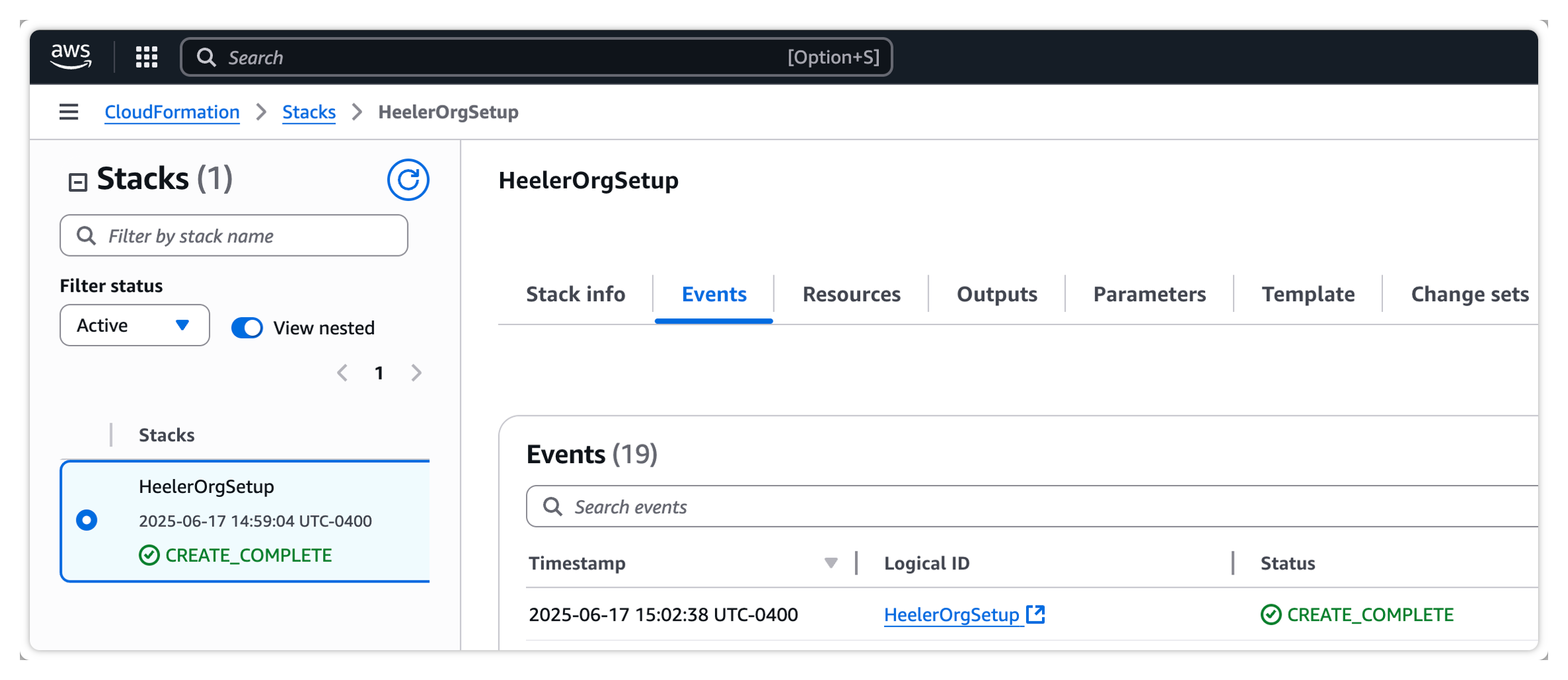
Watch the **Events** tab until it reads `CREATE_COMPLETE`.

<figure><img src="https://414480750-files.gitbook.io/~/files/v0/b/gitbook-x-prod.appspot.com/o/spaces%2FXP3dp2kecwKA2KvYkntz%2Fuploads%2Fgit-blob-9e5c112341f86dee61db2f1167183a88affe993a%2Fcc-cloud-awsorg-08.png?alt=media" alt="The CloudFormation HeelerOrgSetup stack showing CREATE_COMPLETE with the Events, Outputs, and Parameters tabs."><figcaption><p>Wait for <code>CREATE_COMPLETE</code>; the <strong>Outputs</strong> and <strong>Parameters</strong> tabs hold the values you need next.</p></figcaption></figure>
{% endstep %}

{% step %}

### Copy the outputs

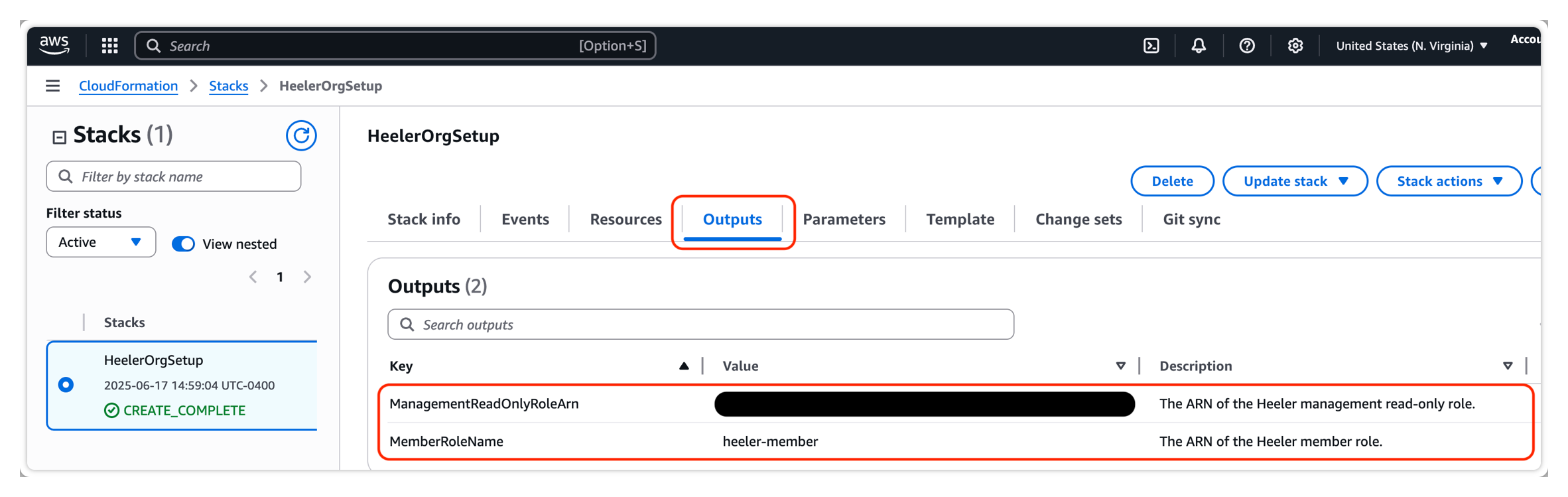
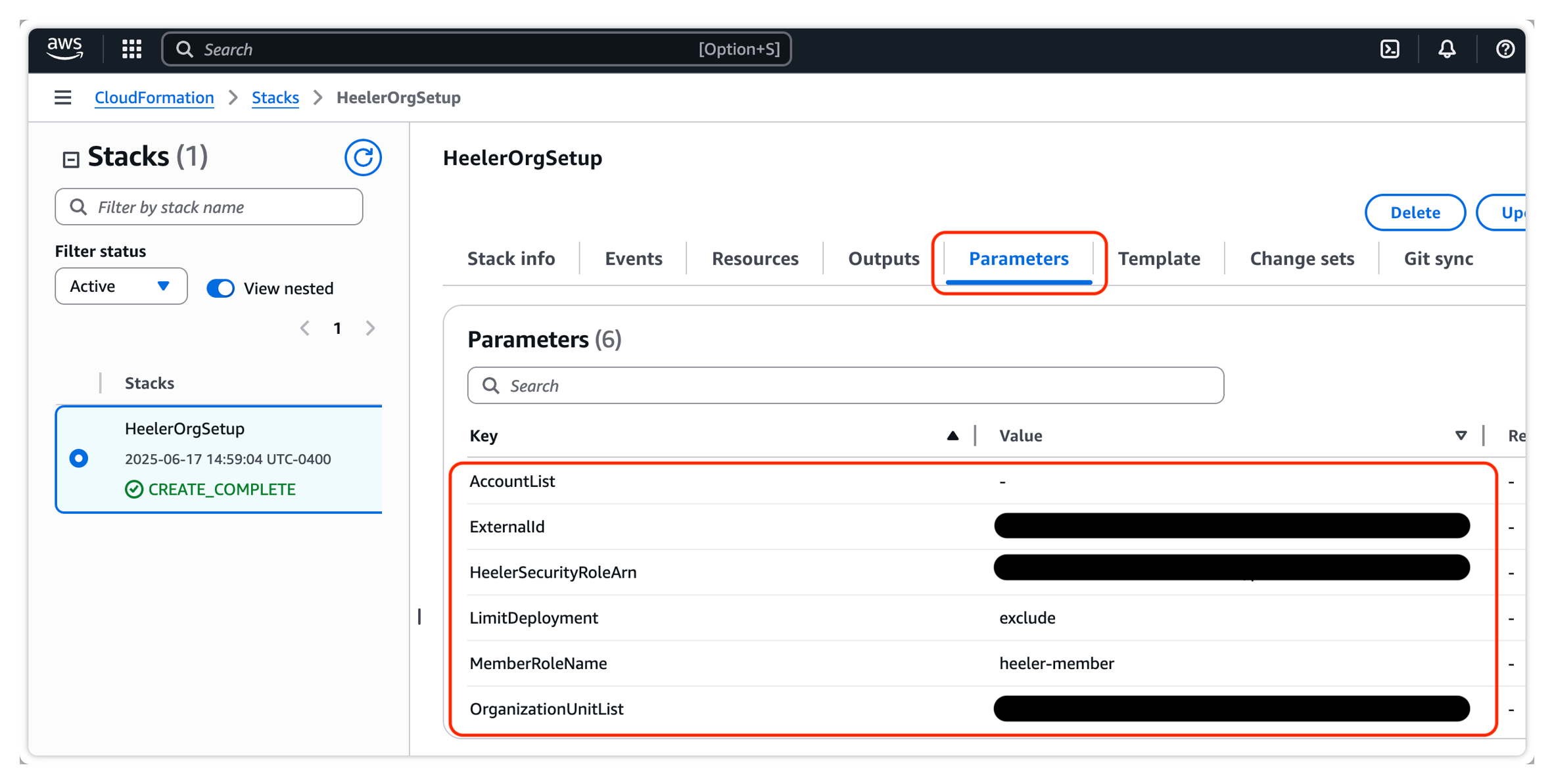
From the stack's **Outputs**, copy `ManagementReadOnlyRoleArn`; from **Parameters**, copy `ExternalID`, `MemberRoleName`, and any `AccountList` / `OrganizationUnitList` values.

<figure><img src="https://414480750-files.gitbook.io/~/files/v0/b/gitbook-x-prod.appspot.com/o/spaces%2FXP3dp2kecwKA2KvYkntz%2Fuploads%2Fgit-blob-4113fe39d050d5fd69d70efe10b284bb8837a0b5%2Fcc-cloud-awsorg-09.png?alt=media" alt="The CloudFormation stack Outputs tab showing ManagementReadOnlyRoleArn and MemberRoleName."><figcaption><p>The <strong>Outputs</strong> tab: copy <code>ManagementReadOnlyRoleArn</code>.</p></figcaption></figure>

<figure><img src="https://414480750-files.gitbook.io/~/files/v0/b/gitbook-x-prod.appspot.com/o/spaces%2FXP3dp2kecwKA2KvYkntz%2Fuploads%2Fgit-blob-ad09f379a7d520805b0d3f1711e88681df459540%2Fcc-cloud-awsorg-10.png?alt=media" alt="The CloudFormation stack Parameters tab showing AccountList, ExternalId, HeelerSecurityRoleArn, LimitDeployment, MemberRoleName, and OrganizationUnitList."><figcaption><p>The <strong>Parameters</strong> tab: copy <code>ExternalID</code>, <code>MemberRoleName</code>, and any <code>AccountList</code> / <code>OrganizationUnitList</code> values.</p></figcaption></figure>
{% endstep %}

{% step %}

### Finish in Heeler

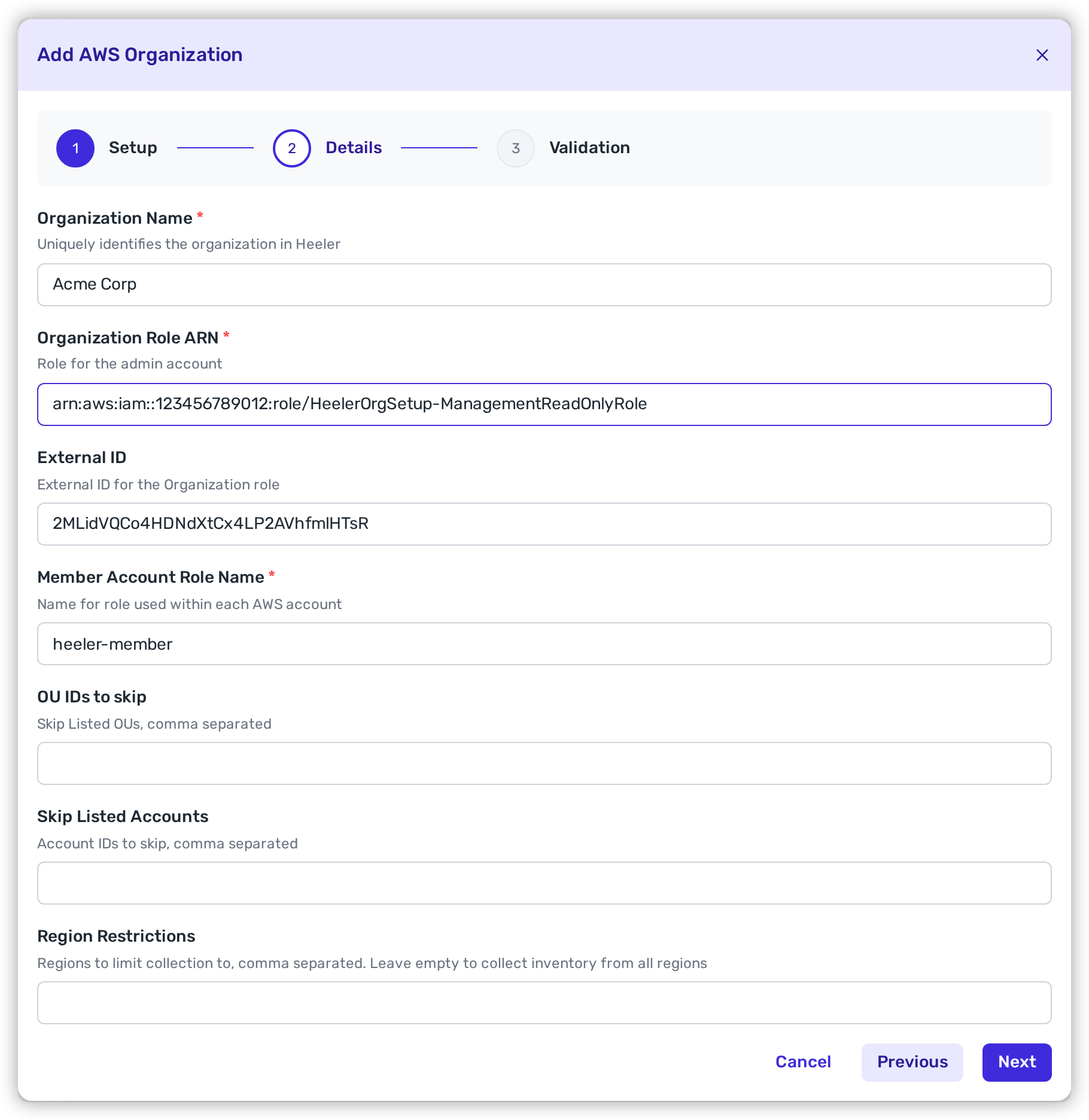
Back in the modal, populate and click **Next**:

<table><thead><tr><th width="260">Heeler field</th><th>Value</th></tr></thead><tbody><tr><td><strong>Organization Name</strong></td><td>A friendly name for the org in Heeler.</td></tr><tr><td><strong>Organization Role ARN</strong></td><td><code>ManagementReadOnlyRoleArn</code></td></tr><tr><td><strong>External ID</strong></td><td><code>ExternalID</code></td></tr><tr><td><strong>Member Account Role Name</strong></td><td><code>MemberRoleName</code></td></tr><tr><td><strong>OU IDs to skip</strong></td><td><code>OrganizationUnitList</code> values, if any</td></tr><tr><td><strong>Skip Listed Accounts</strong></td><td><code>AccountList</code> values, if any</td></tr><tr><td><strong>Region Restrictions</strong> (optional)</td><td>Limit harvesting to specific regions (useful with region-restricting SCPs).</td></tr></tbody></table>

<figure><img src="https://414480750-files.gitbook.io/~/files/v0/b/gitbook-x-prod.appspot.com/o/spaces%2FXP3dp2kecwKA2KvYkntz%2Fuploads%2Fgit-blob-85027023858d18416b4d4e4ffa95907a93b2f4c7%2Fcc-cloud-awsorg-11.png?alt=media" alt="The Add AWS Organization Details step in Heeler with Organization Name, Organization Role ARN, External ID, Member Account Role Name, OU IDs to skip, Skip Listed Accounts, and Region Restrictions fields."><figcaption><p>Paste the stack values into the Heeler modal, then click <strong>Next</strong> to run the verification checks.</p></figcaption></figure>
{% endstep %}
{% endstepper %}

{% hint style="info" %}
Heeler runs preflight checks before saving. It assumes the Organization Role, assumes the member role in the management account and verifies organization enumeration with those credentials, then tests a sampled eligible member account and its IAM permissions. Excluding the management account does not skip its mandatory role check. On success the org shows **Healthy** and inventory begins — the first pass can take a while for a large footprint.
{% endhint %}

<figure><img src="https://414480750-files.gitbook.io/~/files/v0/b/gitbook-x-prod.appspot.com/o/spaces%2FXP3dp2kecwKA2KvYkntz%2Fuploads%2Fgit-blob-e7ae0c1d3886088e270ba6c5eb4ed512f131f208%2Fcc-cloud-awsorg-12.png?alt=media" alt="The Cloud Organizations list showing the newly added AWS organization with a green HEALTHY status."><figcaption><p>A healthy AWS organization in the Cloud Organizations list.</p></figcaption></figure>

## About the External ID

The External ID is AWS's confused-deputy safeguard for the trust relationship between your management role and Heeler. The role's trust policy accepts Heeler's principal only when `AssumeRole` includes the exact External ID stored for this connection. That binding helps prevent another Heeler tenant from using Heeler as a confused deputy to access your organization. The wizard suggests a generated value, and you can use that value or supply your own. Any value that AWS accepts in an `sts:ExternalId` condition works. A new suggestion appears each time you open the wizard, so use whichever value you actually placed in the stack or module.

{% hint style="warning" %}
Record the External ID in your own secret store when you set it. After you save the connection, neither the Heeler UI nor the API shows the value again.
{% endhint %}

**Editing and rotating.** When you edit the connection, leaving the External ID field blank keeps the stored value. To rotate it, update the trust policy on the management role with the new value, then enter the same new value in Heeler and save, in the same change window.

**Member accounts.** The External ID applies to the management (organization) role only. Access to member accounts is restricted by the principal ARN of the management role; member roles do not use an `sts:ExternalId` condition, and the CloudFormation and Terraform templates do not add one.

**One value per organization.** Heeler uses a single External ID for the whole organization. Unique External IDs per member account are not supported.

## Terraform

Use Heeler's downloadable **AWS Organization Terraform template** when your team manages AWS infrastructure with Terraform. Run it against the **management (payer) account**. The template creates the management-account role, a member role and policies, and a service-managed CloudFormation StackSet that deploys the member resources to your selected accounts.

{% file src="/files/ttesAymxBWbdkPP5qMMp" %}
Download the AWS Organization Terraform template.
{% endfile %}

{% stepper %}
{% step %}

### Download and inspect the template

Extract the ZIP into a new working directory. It contains:

| File              | Purpose                                                             |
| ----------------- | ------------------------------------------------------------------- |
| `main.tf`         | Management-account IAM resources and the member-account StackSet.   |
| `variables.tf`    | Supported inputs, defaults, and version constraints.                |
| `var.auto.tfvars` | Starter values to replace with your organization and Heeler values. |
| `outputs.tf`      | Values to copy into the Heeler connection.                          |
| `README.md`       | Template-specific deployment notes.                                 |

Treat `var.auto.tfvars` and Terraform state as sensitive because they contain the External ID. Do not commit either one to source control.
{% endstep %}

{% step %}

### Confirm the AWS prerequisites

Before you begin, confirm:

* AWS Organizations is using **all features** mode.
* [Trusted access for CloudFormation StackSets](https://docs.aws.amazon.com/AWSCloudFormation/latest/UserGuide/stacksets-orgs-activate-trusted-access.html) is enabled. The template uses the service-managed permission model.
* You have the organization **Root ID** or target **OU IDs**.
* The AWS CLI is authenticated to the management account.
* Your identity has the required [AWS setup permissions](/mrecEO40m5D6bt7Pq5pE/get-started/cloud-and-runtime/amazon-web-services.md#permissions-for-the-person-doing-the-setup).
* Terraform and the AWS provider are within the supported versions listed below.

Use these read-only checks to confirm the active account, organization mode, Root ID, and StackSets trusted-access principal:

```bash
aws sts get-caller-identity --query Account --output text
aws organizations describe-organization --query 'Organization.[Id,FeatureSet]' --output table
aws organizations list-roots --query 'Roots[].Id' --output text
aws organizations list-aws-service-access-for-organization \
  --query "EnabledServicePrincipals[?ServicePrincipal=='member.org.stacksets.cloudformation.amazonaws.com'].ServicePrincipal" \
  --output text
```

The first command must return the management-account ID, `FeatureSet` must be `ALL`, and the final command must return `member.org.stacksets.cloudformation.amazonaws.com`.
{% endstep %}

{% step %}

### Copy the values from Heeler

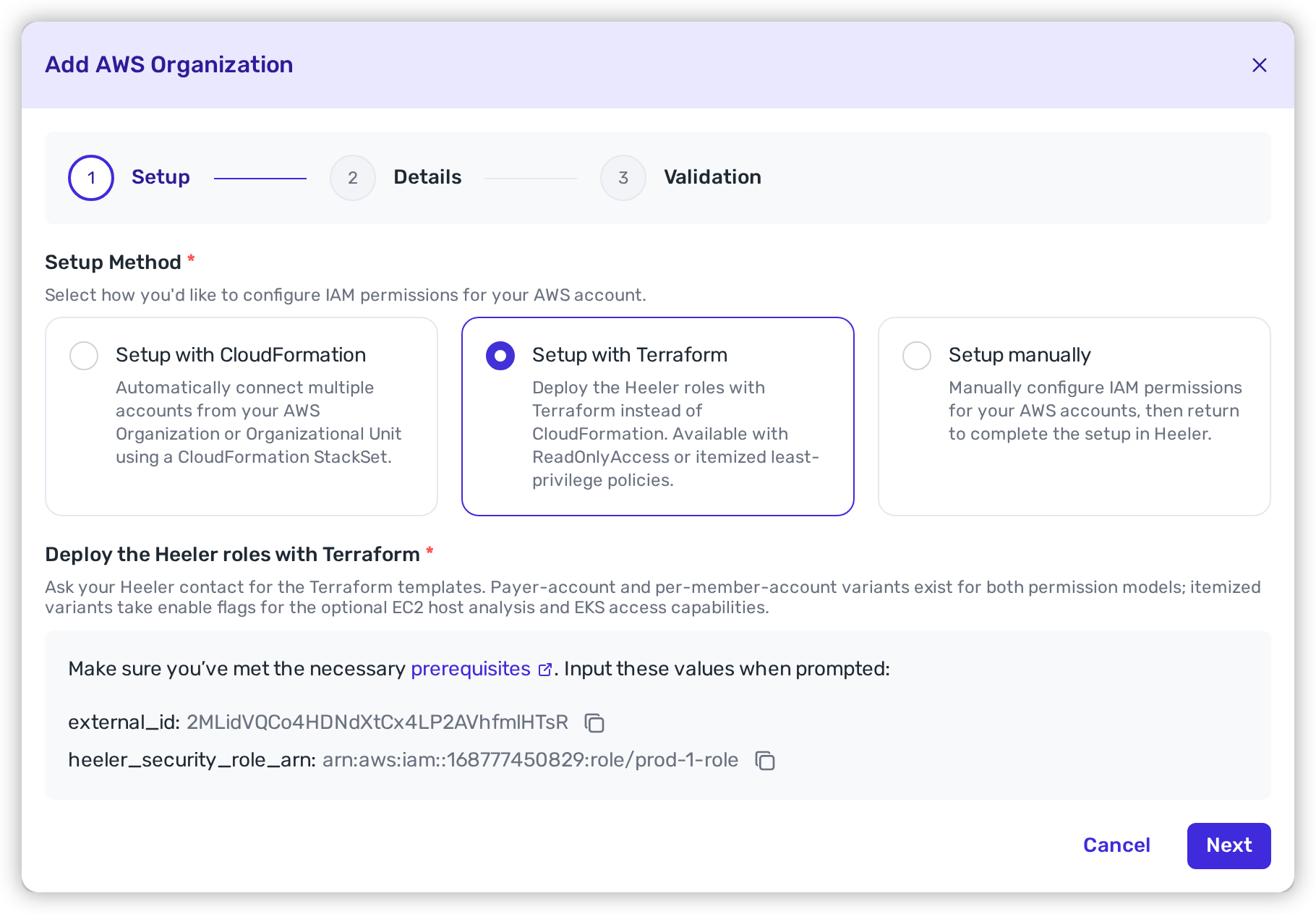
In Heeler, open **Connections → Cloud Organizations → Add Organization → AWS → Setup with Terraform**.

Copy:

* `external_id`
* `heeler_security_role_arn`

<figure><img src="https://414480750-files.gitbook.io/~/files/v0/b/gitbook-x-prod.appspot.com/o/spaces%2FXP3dp2kecwKA2KvYkntz%2Fuploads%2Fgit-blob-45d2f6ab57db91ada6d3349568d64040605cdb46%2Fcc-cloud-awsorg-13.png?alt=media" alt="The Add AWS Organization wizard with Setup with Terraform selected, showing the external_id and heeler_security_role_arn values with copy buttons."><figcaption><p>Copy both values from the environment where you are creating the connection.</p></figcaption></figure>

The External ID used by Terraform must exactly match the value saved in Heeler. See [About the External ID](#about-the-external-id) for storage and rotation behavior.
{% endstep %}

{% step %}

### Choose the deployment scope

Update `var.auto.tfvars` using the narrowest scope that matches the organization connection you intend to create.

{% tabs %}
{% tab title="All accounts in a root or OU" %}
Use `NONE` to deploy the member role to every current account under the selected root or OUs. StackSet auto-deployment also covers accounts added there later.

```hcl
aws_region              = "us-east-1"
external_id              = "<EXACT_VALUE_FROM_HEELER>"
organization_unit_list   = ["<ROOT_OR_OU_ID>"]
account_filter_type      = "NONE"
heeler_security_role_arn = "<ROLE_ARN_FROM_HEELER>"
```

{% endtab %}

{% tab title="Exclude specific accounts" %}
Use `DIFFERENCE` to cover a root or OU except for the listed accounts. Enter the same IDs in Heeler's **Skip Listed Accounts** field so Terraform deployment and harvesting remain aligned.

```hcl
aws_region              = "us-east-1"
external_id              = "<EXACT_VALUE_FROM_HEELER>"
organization_unit_list   = ["<ROOT_OR_OU_ID>"]
account_filter_type      = "DIFFERENCE"
accounts                 = ["111111111111", "222222222222"]
heeler_security_role_arn = "<ROLE_ARN_FROM_HEELER>"
```

{% endtab %}

{% tab title="Include specific accounts" %}
Use `INTERSECTION` to deploy only to the listed accounts beneath the selected root or OUs.

```hcl
aws_region              = "us-east-1"
external_id              = "<EXACT_VALUE_FROM_HEELER>"
organization_unit_list   = ["<ROOT_OR_OU_ID>"]
account_filter_type      = "INTERSECTION"
accounts                 = ["111111111111", "222222222222"]
heeler_security_role_arn = "<ROLE_ARN_FROM_HEELER>"
```

Heeler's connection form supports exclusions, not an include-only account list. Add every non-target account or OU to **Skip Listed Accounts** or **OU IDs to skip** before validation. Otherwise, Heeler can select an account where the member role was not deployed.
{% endtab %}
{% endtabs %}

Root IDs look like `r-abcd`; OU IDs look like `ou-abcd-12345678`. The target IDs define where AWS deploys the member role. The skip fields in Heeler separately define which accounts Heeler attempts to harvest, so keep the two scopes consistent.

`customer_managed_k8s_rbac` is optional and defaults to `false`. Set it to `true` to skip creating the EKS access policy in the management account and in every member account. See [A ClusterRole you manage](/mrecEO40m5D6bt7Pq5pE/get-started/cloud-and-runtime/amazon-web-services.md#a-clusterrole-you-manage).
{% endstep %}

{% step %}

### Check for resource-name collisions

Before the first apply, compare these defaults with existing IAM and StackSet resources:

| Terraform input                | Default                   | Created in                              |
| ------------------------------ | ------------------------- | --------------------------------------- |
| `management_role_name`         | `heeler-management-ro-tf` | Management account                      |
| `organization_policy_name`     | `heeler-org-visibility`   | Management account                      |
| `member_role_name`             | `heeler-member-tf`        | Management and targeted member accounts |
| `member_read_only_policy_name` | `Heeler-tf`               | Management and targeted member accounts |
| `member_eks_policy_name`       | `HeelerEKS-tf`            | Management and targeted member accounts |
| `payer_stackset_name`          | `HeelerRoles-tf`          | Management account                      |

If a default is already in use, set a unique replacement in `var.auto.tfvars` before applying. Use the same `member_role_name` across the management account, member accounts, and Heeler connection.

{% hint style="warning" %}
Do not overwrite or import an unrelated existing role, policy, or StackSet to make the plan pass. Changing one of these names after apply replaces that named resource; review and coordinate the change with the Heeler connection.
{% endhint %}
{% endstep %}

{% step %}

### Initialize and review the plan

From the extracted module directory:

```bash
terraform init
terraform validate
terraform plan
```

Confirm that the provider is using the intended region and management account, and that the StackSet deployment targets contain only the intended roots, OUs, and accounts. Review every IAM role, policy, and StackSet name before applying. A fresh deployment of the current template normally proposes 11 Terraform resources and no changes or deletions.
{% endstep %}

{% step %}

### Apply and verify the StackSet

Apply the reviewed plan:

```bash
terraform apply
```

Wait for Terraform to finish, then confirm in **AWS CloudFormation → StackSets → Stack instances** that every intended target is `CURRENT` and the operation succeeded. Resolve failed or unexpected instances before continuing.

Run a second plan:

```bash
terraform plan -detailed-exitcode
```

Exit code `0` means the configuration is clean. Exit code `1` means Terraform encountered an error. Exit code `2` means Terraform still proposes changes; review and resolve them before continuing.
{% endstep %}

{% step %}

### Copy the outputs into Heeler

Retrieve the two non-secret identifiers:

```bash
terraform output -raw ManagementReadOnlyRoleArn
terraform output -raw MemberRoleName
```

Return to Heeler's **Details** step and enter:

| Heeler field                 | Value                                                                             |
| ---------------------------- | --------------------------------------------------------------------------------- |
| **Organization Role ARN**    | `ManagementReadOnlyRoleArn`                                                       |
| **External ID**              | The exact `external_id` used in `var.auto.tfvars`.                                |
| **Member Account Role Name** | `MemberRoleName`                                                                  |
| **OU IDs to skip**           | Every OU intentionally outside the deployed member-role scope, if any.            |
| **Skip Listed Accounts**     | Every account intentionally excluded from the deployed member-role scope, if any. |

Add optional region restrictions, then click **Next**. The Terraform target scope and Heeler skip fields must describe the same set of harvestable accounts.
{% endstep %}

{% step %}

### Validate and create the connection

Heeler verifies the management role, the required member role in the management account, organization enumeration, and a sampled eligible member account. Resolve any failed check before clicking **Create connection**.
{% endstep %}
{% endstepper %}

{% hint style="warning" %}
`terraform destroy` removes the management-account IAM resources, member-account StackSet instances, and the StackSet. That removes Heeler's access and makes the connection unhealthy. Use destroy only when offboarding or when deliberately removing this deployment, and verify that no StackSet instances remain afterward.
{% endhint %}

<details>

<summary>Version compatibility</summary>

| Component              | Supported range     | CI endpoints     |
| ---------------------- | ------------------- | ---------------- |
| Terraform              | `>= 1.8.4, < 2.0.0` | 1.8.4 and 1.16.1 |
| HashiCorp AWS provider | `>= 6.9.0, < 7.0.0` | 6.9.0 and 6.63.0 |

Before upgrading within these ranges, run `terraform init -upgrade`, review the plan, apply it, and require a clean second plan.

</details>

## Related

* [AWS Event Collection](/mrecEO40m5D6bt7Pq5pE/get-started/cloud-and-runtime/amazon-web-services/aws-event-collection.md) — add near-real-time change detection.
* [Amazon Web Services](/mrecEO40m5D6bt7Pq5pE/get-started/cloud-and-runtime/amazon-web-services.md) — setup options and what the template deploys.


---

# Agent Instructions
This documentation is published with GitBook. GitBook is the documentation platform designed so that both humans and AI agents can read, navigate, and reason over technical content effectively. Learn more at gitbook.com.

## Querying This Documentation
If you need additional information that is not directly available in this page, you can query the documentation dynamically by asking a question.

Perform an HTTP GET request on the current page URL with the `ask` query parameter, and the optional `goal` query parameter:

```
GET https://docs.heeler.com/mrecEO40m5D6bt7Pq5pE/get-started/cloud-and-runtime/amazon-web-services/aws-organization-setup.md?ask=<question>&goal=<endgoal>
```

`ask` is the immediate question: it should be specific, self-contained, and written in natural language.
`goal` is optional and describes the broader end goal you are ultimately trying to accomplish on behalf of the user. GitBook uses it to tailor the answer towards what is most useful for that goal.

The response will contain a direct answer to the question and relevant excerpts and sources from the documentation.

Use this mechanism when the answer is not explicitly present in the current page, you need clarification or additional context, or you want to retrieve related documentation sections.