> For the complete documentation index, see [llms.txt](https://docs.heeler.com/mrecEO40m5D6bt7Pq5pE/llms.txt). Markdown versions of documentation pages are available by appending `.md` to page URLs; this page is available as [Markdown](https://docs.heeler.com/mrecEO40m5D6bt7Pq5pE/get-started/cloud-and-runtime/google-cloud-platform/gcp-event-collection.md).
# GCP Event Collection
Add near-real-time GCP change detection with an organization log sink routed to a Pub/Sub subscription Heeler reads.
Event collection gives Heeler **near-real-time** GCP updates between inventory polls. Heeler harvests events from an **organization-level log sink** routed to a **Pub/Sub** subscription it reads. These commands deploy Pub/Sub resources in your dedicated `heeler-security` project.
## Command-line steps
{% stepper %}
{% step %}
### Create the Pub/Sub topic
```bash
gcloud config set project heeler-security
gcloud pubsub topics create heeler-event-collection-topic
```
{% endstep %}
{% step %}
### Create the organization log sink
Get your org ID (`gcloud organizations list` — use the 12-digit **ID**, not the `DIRECTORY_CUSTOMER_ID`), then create a sink that routes the filtered create/update/delete audit events to the topic. `--include-children` covers every project under the organization. Heeler expects the complete filter below (it excludes noisy DNS `ChangesCreateRequest` events and pins the relevant Compute Engine operations); Heeler may extend it over time as GCP and Heeler add coverage:
```bash
gcloud logging sinks create heeler-event-collection-sink \
pubsub.googleapis.com/projects/heeler-security/topics/heeler-event-collection-topic \
--description="Routing events to Pub/Sub for Heeler Security" \
--include-children --organization=123456789012 \
--log-filter='logName:cloudaudit.googleapis.com AND
severity="NOTICE" AND
protoPayload.request.@type!="type.googleapis.com/cloud.dns.api.ChangesCreateRequest" AND (
protoPayload.request.@type:"add" OR
protoPayload.request.@type:"attach" OR
protoPayload.request.@type:"bulkInsert" OR
protoPayload.request.@type:"create" OR
protoPayload.request.@type:"delete" OR
protoPayload.request.@type:"deploy" OR
protoPayload.request.@type:"detach" OR
protoPayload.request.@type:"disable" OR
protoPayload.request.@type:"enable" OR
protoPayload.request.@type:"insert" OR
protoPayload.request.@type:"patch" OR
protoPayload.request.@type:"provision" OR
protoPayload.request.@type:"recreate" OR
protoPayload.request.@type:"remove" OR
protoPayload.request.@type:"update" OR
protoPayload.request.@type="type.googleapis.com/compute.disks.resize" OR
protoPayload.request.@type="type.googleapis.com/compute.instances.reset" OR
protoPayload.request.@type="type.googleapis.com/compute.instances.resume" OR
protoPayload.request.@type="type.googleapis.com/compute.instances.setMachineType" OR
protoPayload.request.@type="type.googleapis.com/compute.instances.setServiceAccount" OR
protoPayload.request.@type="type.googleapis.com/compute.instances.setSize" OR
protoPayload.request.@type="type.googleapis.com/compute.instances.start" OR
protoPayload.request.@type="type.googleapis.com/compute.instances.stop" OR
protoPayload.request.@type="type.googleapis.com/compute.instances.suspend"
)'
```
The sink command prints a logging service account — grant it **Publisher** on the topic:
```bash
gcloud pubsub topics add-iam-policy-binding heeler-event-collection-topic \
--role="roles/pubsub.publisher" \
--member="serviceAccount:service-org-123456789012@gcp-sa-logging.iam.gserviceaccount.com"
```
{% endstep %}
{% step %}
### Create the subscription
```bash
gcloud pubsub subscriptions create heeler-event-collection-subscription \
--message-retention-duration=1d --enable-message-ordering \
--topic=heeler-event-collection-topic
```
Get its **full resource name** — you'll paste this exact value into Heeler:
```bash
gcloud pubsub subscriptions describe heeler-event-collection-subscription
# name: projects/heeler-security/subscriptions/heeler-event-collection-subscription
```
{% endstep %}
{% endstepper %}
## Enable it in Heeler
{% stepper %}
{% step %}
### Open the organization's event settings
Go to **Connections → Cloud Organizations** (or the settings icon at the top right → **Connections**), then click the **⋯** menu on the GCP organization and choose **Edit Event Collection Settings**.
Open Edit Event Collection Settings from the organization's ⋯ menu.
{% endstep %}
{% step %}
### Paste the subscription resource name
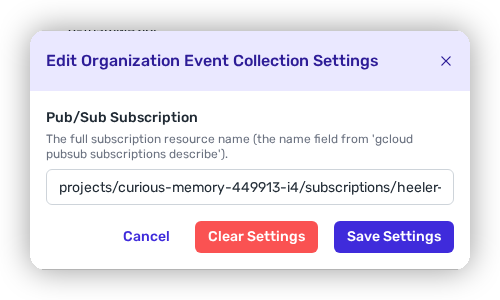
Paste the **full subscription resource name** (the `name:` line — form `projects//subscriptions/`, not just the short ID) into the **Pub/Sub Subscription** field, and save.
Paste the full Pub/Sub subscription resource name.
{% endstep %}
{% endstepper %}
After the initial harvest, events flow in near real time.
## Related
* [GCP Supported Services](/mrecEO40m5D6bt7Pq5pE/get-started/cloud-and-runtime/google-cloud-platform/gcp-supported-services.md) — which services support event collection.
* [Google Cloud Platform](/mrecEO40m5D6bt7Pq5pE/get-started/cloud-and-runtime/google-cloud-platform.md) — the base connection.
* [Containers](/mrecEO40m5D6bt7Pq5pE/findings/containers.md) — container image scanning reads Artifact Registry push events from this collection.
---
# Agent Instructions
This documentation is published with GitBook. GitBook is the documentation platform designed so that both humans and AI agents can read, navigate, and reason over technical content effectively. Learn more at gitbook.com.
## Querying This Documentation
If you need additional information that is not directly available in this page, you can query the documentation dynamically by asking a question.
Perform an HTTP GET request on the current page URL with the `ask` query parameter, and the optional `goal` query parameter:
```
GET https://docs.heeler.com/mrecEO40m5D6bt7Pq5pE/get-started/cloud-and-runtime/google-cloud-platform/gcp-event-collection.md?ask=&goal=
```
`ask` is the immediate question: it should be specific, self-contained, and written in natural language.
`goal` is optional and describes the broader end goal you are ultimately trying to accomplish on behalf of the user. GitBook uses it to tailor the answer towards what is most useful for that goal.
The response will contain a direct answer to the question and relevant excerpts and sources from the documentation.
Use this mechanism when the answer is not explicitly present in the current page, you need clarification or additional context, or you want to retrieve related documentation sections.