> For the complete documentation index, see [llms.txt](https://docs.heeler.com/mrecEO40m5D6bt7Pq5pE/llms.txt). Markdown versions of documentation pages are available by appending `.md` to page URLs; this page is available as [Markdown](https://docs.heeler.com/mrecEO40m5D6bt7Pq5pE/get-started/map-your-organization/environments/using-account-level-tags.md).

# Using Account-Level Tags

Map your existing account and OU tags to Heeler environment boundaries — even when tag keys and values are inconsistent.

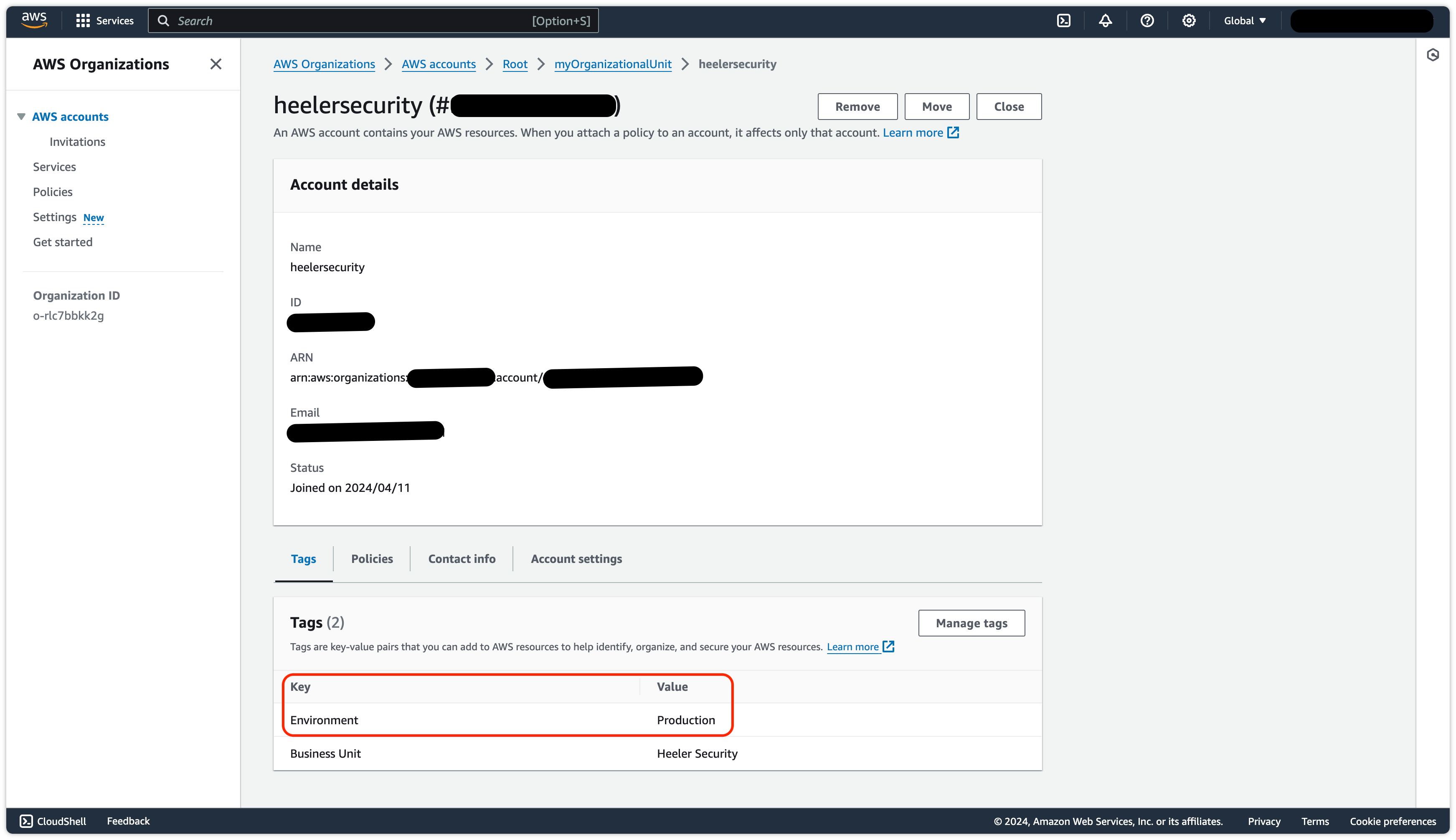
If your accounts and OUs (AWS) or folders and projects (GCP) are already tagged with environment/business context, you can map those tags straight to Heeler environments — no restructuring required. In AWS, these tags live in the **payer account under Organizations**; Heeler uses them to assign environments to member accounts and their resources.

<figure><img src="https://414480750-files.gitbook.io/~/files/v0/b/gitbook-x-prod.appspot.com/o/spaces%2FXP3dp2kecwKA2KvYkntz%2Fuploads%2Fgit-blob-b0c305d11a45e4237915251a8514521c7ba8bd24%2Fcc-cloud-envacct-01.png?alt=media" alt="AWS Organizations in the payer account, showing key/value tags on organizational units and accounts."><figcaption><p>In AWS, environment tags are defined in the payer account under the <strong>Organizations</strong> service.</p></figcaption></figure>

## Map inconsistent tags to one environment

Multiple key/value pairs can map to the **same** Heeler environment — useful when tagging varies by business unit (e.g. `Environment: Acme Prod` and `Env: Hooli Production` both mapping to **Production**):

{% stepper %}
{% step %}

### Open Environments

Go to **Administration → Connection Mapping → Environments**.
{% endstep %}

{% step %}

### Add tags to an environment

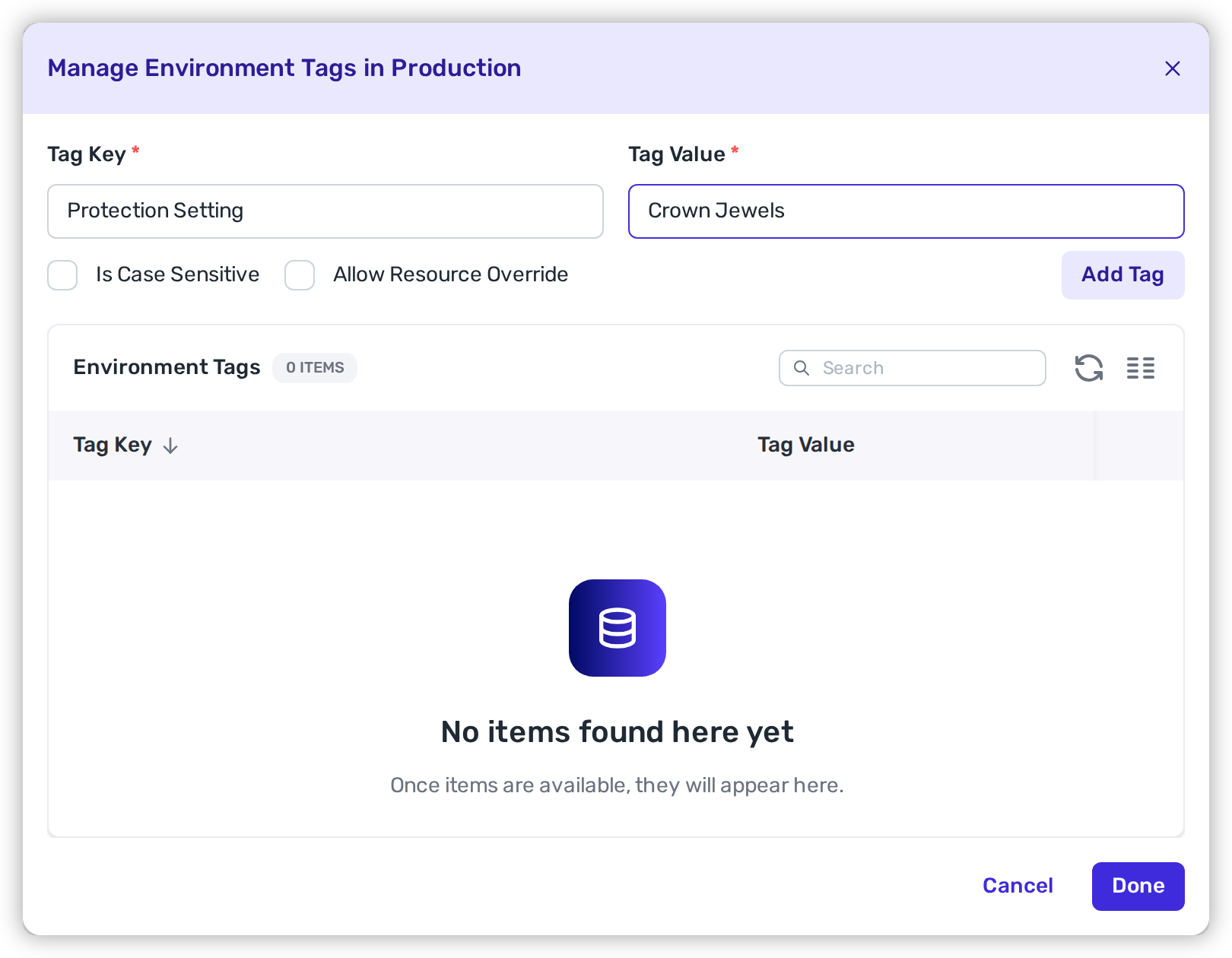
Select **Tags** under the environment you're customizing (e.g. Production), enter the key/value pair (e.g. `Environment: Acme Prod`), and click **Add Tag**.

<figure><img src="https://414480750-files.gitbook.io/~/files/v0/b/gitbook-x-prod.appspot.com/o/spaces%2FXP3dp2kecwKA2KvYkntz%2Fuploads%2Fgit-blob-903457e9a179c99974a6bc9846533d3347593d8f%2Fcc-cloud-envacct-05.png?alt=media" alt="Entering an environment tag key/value pair and clicking Add Tag under an environment."><figcaption><p>Enter the key/value pair and click <strong>Add Tag</strong> — map as many as you need to one environment.</p></figcaption></figure>
{% endstep %}

{% step %}

### Repeat and finish

Add as many key/value pairs as needed — all mapping to that environment — then **Done**.

<figure><img src="https://414480750-files.gitbook.io/~/files/v0/b/gitbook-x-prod.appspot.com/o/spaces%2FXP3dp2kecwKA2KvYkntz%2Fuploads%2F9nPIAxZocAQvABhSaQru%2FSave%20environment%20tags.png?alt=media&amp;token=279c3f42-b88d-4a93-a2f0-3a788bf97e02" alt="The environment Tags modal listing the mapped key/value pairs, with the Done button to save."><figcaption><p>Confirm the tags you mapped to the environment, then click <strong>Done</strong>.</p></figcaption></figure>
{% endstep %}
{% endstepper %}

{% hint style="info" %}
This applies the tag mapping at the **account** level: the tags on accounts define the environment for all of their resources. To let an individual resource override its account's environment, use [Resource-Level Tags](/mrecEO40m5D6bt7Pq5pE/get-started/map-your-organization/environments/using-resource-level-tags.md).
{% endhint %}

## Related

* [Environments](/mrecEO40m5D6bt7Pq5pE/get-started/map-your-organization/environments.md) — the boundaries and assignment methods.
* [Using Resource-Level Tags](/mrecEO40m5D6bt7Pq5pE/get-started/map-your-organization/environments/using-resource-level-tags.md) — finer-grained overrides.


---

# Agent Instructions
This documentation is published with GitBook. GitBook is the documentation platform designed so that both humans and AI agents can read, navigate, and reason over technical content effectively. Learn more at gitbook.com.

## Querying This Documentation
If you need additional information that is not directly available in this page, you can query the documentation dynamically by asking a question.

Perform an HTTP GET request on the current page URL with the `ask` query parameter, and the optional `goal` query parameter:

```
GET https://docs.heeler.com/mrecEO40m5D6bt7Pq5pE/get-started/map-your-organization/environments/using-account-level-tags.md?ask=<question>&goal=<endgoal>
```

`ask` is the immediate question: it should be specific, self-contained, and written in natural language.
`goal` is optional and describes the broader end goal you are ultimately trying to accomplish on behalf of the user. GitBook uses it to tailor the answer towards what is most useful for that goal.

The response will contain a direct answer to the question and relevant excerpts and sources from the documentation.

Use this mechanism when the answer is not explicitly present in the current page, you need clarification or additional context, or you want to retrieve related documentation sections.