> For the complete documentation index, see [llms.txt](https://docs.heeler.com/mrecEO40m5D6bt7Pq5pE/llms.txt). Markdown versions of documentation pages are available by appending `.md` to page URLs; this page is available as [Markdown](https://docs.heeler.com/mrecEO40m5D6bt7Pq5pE/get-started/map-your-organization/environments/using-resource-level-tags.md).

# Using Resource-Level Tags

Override an account's environment for individual compute resources by tagging them directly.

Defining environments at the OU/account level is simpler to maintain and recommended. But when different environments share one account, you can define the environment at the **resource** level for finer control.

Resource-level environment tags are supported on these compute types:

* Autoscaling Group
* Container
* Function
* Instance

## Override an account's environment for a resource

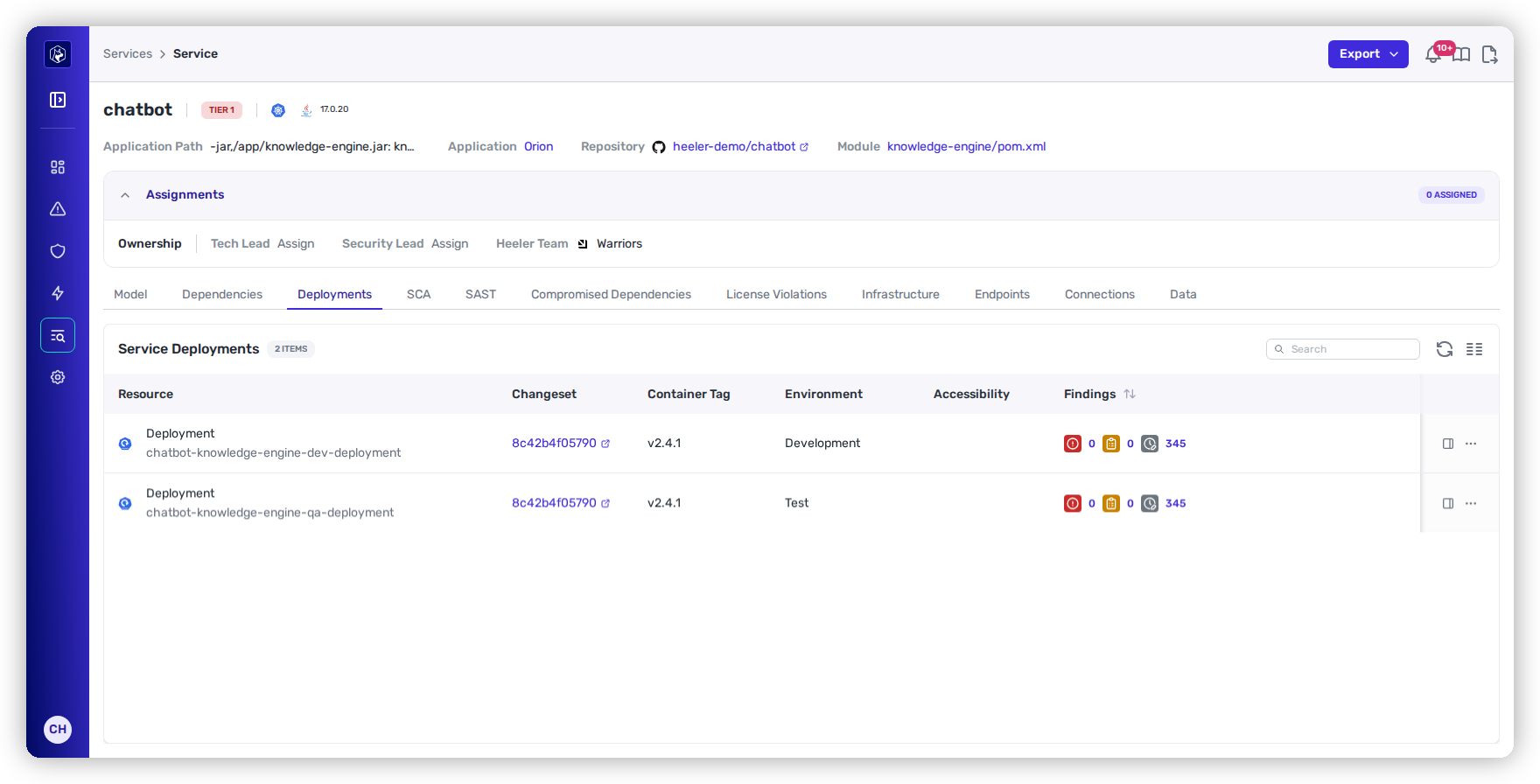
Say an app runs on AWS ECS in an account tagged `Development`, and you want one service treated as `Sandbox`. Before the override, the deployment inherits its account's `Development` environment:

<figure><img src="https://414480750-files.gitbook.io/~/files/v0/b/gitbook-x-prod.appspot.com/o/spaces%2FXP3dp2kecwKA2KvYkntz%2Fuploads%2Fgit-blob-acd5ec4139a65b1e84c7c27ba23e532aab9dcb76%2Fcc-cloud-envres-01.png?alt=media" alt="A Heeler application deployment showing the inherited Development environment from its AWS account."><figcaption><p>Before the override: the deployment inherits its account's <strong>Development</strong> environment.</p></figcaption></figure>

{% stepper %}
{% step %}

### Allow the account tag to be overridden

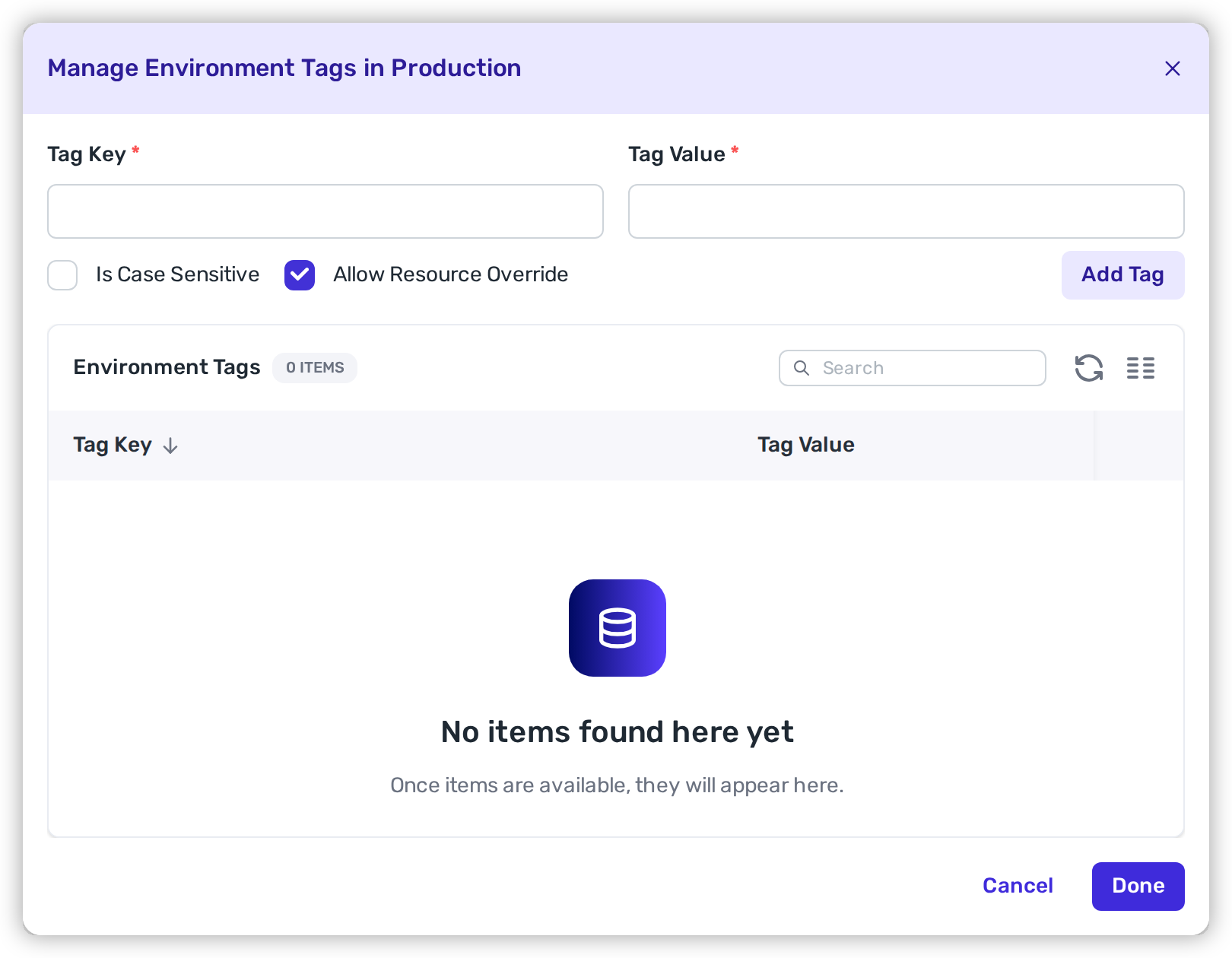
In **Connection Mapping → Environments**, edit the account-level Environment Tag (e.g. `Development`) and enable **Allow Resource Override**.

<figure><img src="https://414480750-files.gitbook.io/~/files/v0/b/gitbook-x-prod.appspot.com/o/spaces%2FXP3dp2kecwKA2KvYkntz%2Fuploads%2Fgit-blob-ec3357910e929926a74d5ec6758de44cdbeaa543%2Fcc-cloud-envres-04.png?alt=media" alt="The environment Tags modal with the Allow Resource Override checkbox enabled."><figcaption><p>Enable <strong>Allow Resource Override</strong> on the account-level tag.</p></figcaption></figure>
{% endstep %}

{% step %}

### Tag the resource in your cloud

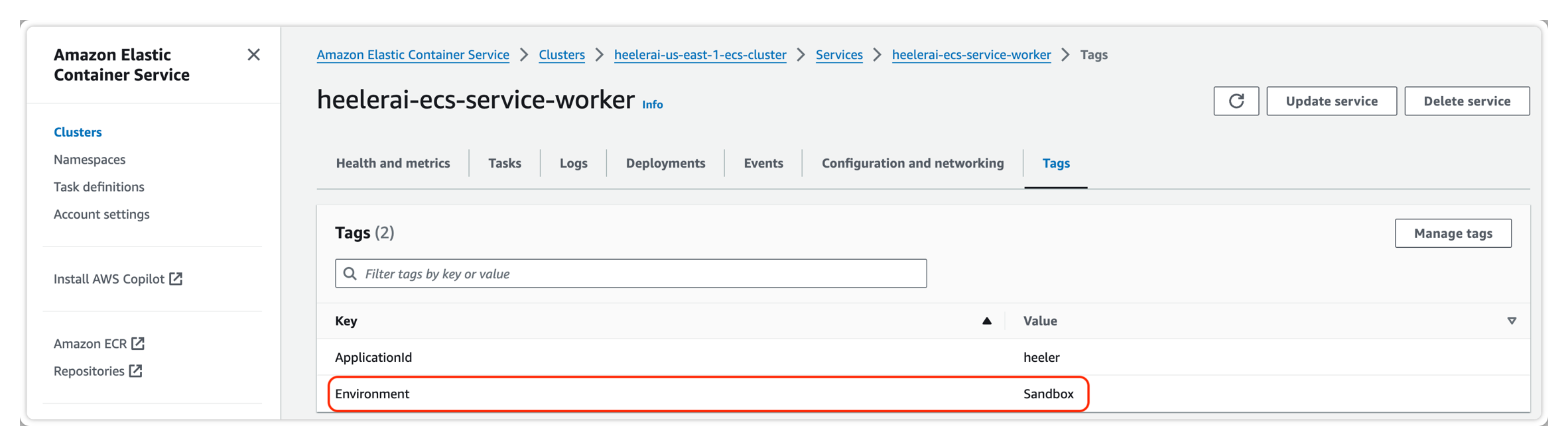
Add an environment tag to the specific resource in its account — for example, in AWS add `Environment: Sandbox` to the container service.

<figure><img src="https://414480750-files.gitbook.io/~/files/v0/b/gitbook-x-prod.appspot.com/o/spaces%2FXP3dp2kecwKA2KvYkntz%2Fuploads%2Fgit-blob-b9a1fcb4e7c641e8723d9f1662dc2d1698f5f007%2Fcc-cloud-envres-06.png?alt=media" alt="Adding an Environment: Sandbox tag to a specific AWS resource."><figcaption><p>Tag the individual resource with an accepted environment value.</p></figcaption></figure>
{% endstep %}

{% step %}

### Confirm in Heeler

After the next harvest, confirm the resource tag is picked up and that the application deployment's environment has updated to reflect the resource-level value.

<figure><img src="https://414480750-files.gitbook.io/~/files/v0/b/gitbook-x-prod.appspot.com/o/spaces%2FXP3dp2kecwKA2KvYkntz%2Fuploads%2FgYcOhh1tmLmKJYUPPmpR%2FConfirm%20Deployment%20now%20showing%20Sandbox%20environment.png?alt=media&amp;token=c895decb-8776-4e8b-a355-2a60f0475364" alt="The same Heeler application deployment now showing the Sandbox environment after the resource-level tag override."><figcaption><p>After the override: the deployment now reflects the resource-level <strong>Sandbox</strong> environment.</p></figcaption></figure>
{% endstep %}
{% endstepper %}

{% hint style="info" %}
Without **Allow Resource Override**, the account's environment tag applies to all of its resources (the [account-level](/mrecEO40m5D6bt7Pq5pE/get-started/map-your-organization/environments/using-account-level-tags.md) behavior). Enabling it lets a resource tagged with an accepted environment value win over its account.
{% endhint %}

## Related

* [Environments](/mrecEO40m5D6bt7Pq5pE/get-started/map-your-organization/environments.md) — the boundaries and assignment methods.
* [Using Account-Level Tags](/mrecEO40m5D6bt7Pq5pE/get-started/map-your-organization/environments/using-account-level-tags.md) — the account-level default.


---

# Agent Instructions
This documentation is published with GitBook. GitBook is the documentation platform designed so that both humans and AI agents can read, navigate, and reason over technical content effectively. Learn more at gitbook.com.

## Querying This Documentation
If you need additional information that is not directly available in this page, you can query the documentation dynamically by asking a question.

Perform an HTTP GET request on the current page URL with the `ask` query parameter, and the optional `goal` query parameter:

```
GET https://docs.heeler.com/mrecEO40m5D6bt7Pq5pE/get-started/map-your-organization/environments/using-resource-level-tags.md?ask=<question>&goal=<endgoal>
```

`ask` is the immediate question: it should be specific, self-contained, and written in natural language.
`goal` is optional and describes the broader end goal you are ultimately trying to accomplish on behalf of the user. GitBook uses it to tailor the answer towards what is most useful for that goal.

The response will contain a direct answer to the question and relevant excerpts and sources from the documentation.

Use this mechanism when the answer is not explicitly present in the current page, you need clarification or additional context, or you want to retrieve related documentation sections.