> For the complete documentation index, see [llms.txt](https://docs.heeler.com/mrecEO40m5D6bt7Pq5pE/llms.txt). Markdown versions of documentation pages are available by appending `.md` to page URLs; this page is available as [Markdown](https://docs.heeler.com/mrecEO40m5D6bt7Pq5pE/get-started/quickstart.md).
# Quickstart
The fastest path from zero to your first Heeler findings.
The shortest path to findings: connect one source-control organization and read what Heeler reports. This is the [Connect Your Code](/mrecEO40m5D6bt7Pq5pE/get-started/source-code-scm.md) flow reduced to the required steps; work the rest of the [checklist](/mrecEO40m5D6bt7Pq5pE/get-started.md) afterwards.
{% stepper %}
{% step %}
### Connect your code
In **Administration → Connections → Code Organizations**, click **Add Code Organization**, choose your provider, and authorize Heeler (install the app, sign in, or paste a token). See [Connect Your Code](/mrecEO40m5D6bt7Pq5pE/get-started/source-code-scm.md) for the per-provider details.
{% endstep %}
{% step %}
### Let it scan
The moment a repository is connected, Heeler discovers it and starts analyzing — **no build changes, no CI plugins, no runtime agents.** From your source alone it surfaces:
* **Open-source dependencies (SCA)** — known-vulnerable packages, plus **compromised / malicious** packages and **license** violations.
* **Code security (SAST)** — vulnerabilities in your own code, with data-flow context.
* **Secrets** — exposed credentials, each **validated** to see whether it's still live.
* [**AI agent files**](/mrecEO40m5D6bt7Pq5pE/findings/agentic-supply-chain-agent-files.md) — the agentic supply chain: agent instructions, skills, MCP config, and hooks, scanned for prompt injection, hidden/obfuscated instructions, and risky commands.
* **API endpoints** — your HTTP attack surface and each endpoint's authentication posture, discovered straight from the code.
* [**SBOM**](/mrecEO40m5D6bt7Pq5pE/catalog/sbom.md) — a CycloneDX Software Bill of Materials is generated for every repository (and rolls up to services and your whole environment).
* **The** [**catalog**](/mrecEO40m5D6bt7Pq5pE/catalog.md) — repositories, dependencies, services, and contributors, mapped as it goes.
Connect [cloud & runtime](/mrecEO40m5D6bt7Pq5pE/get-started/cloud-and-runtime.md) next and Heeler layers on deployment exposure, internet-accessibility, and runtime reachability — the context that sharpens prioritization.
{% endstep %}
{% step %}
### Read your first findings
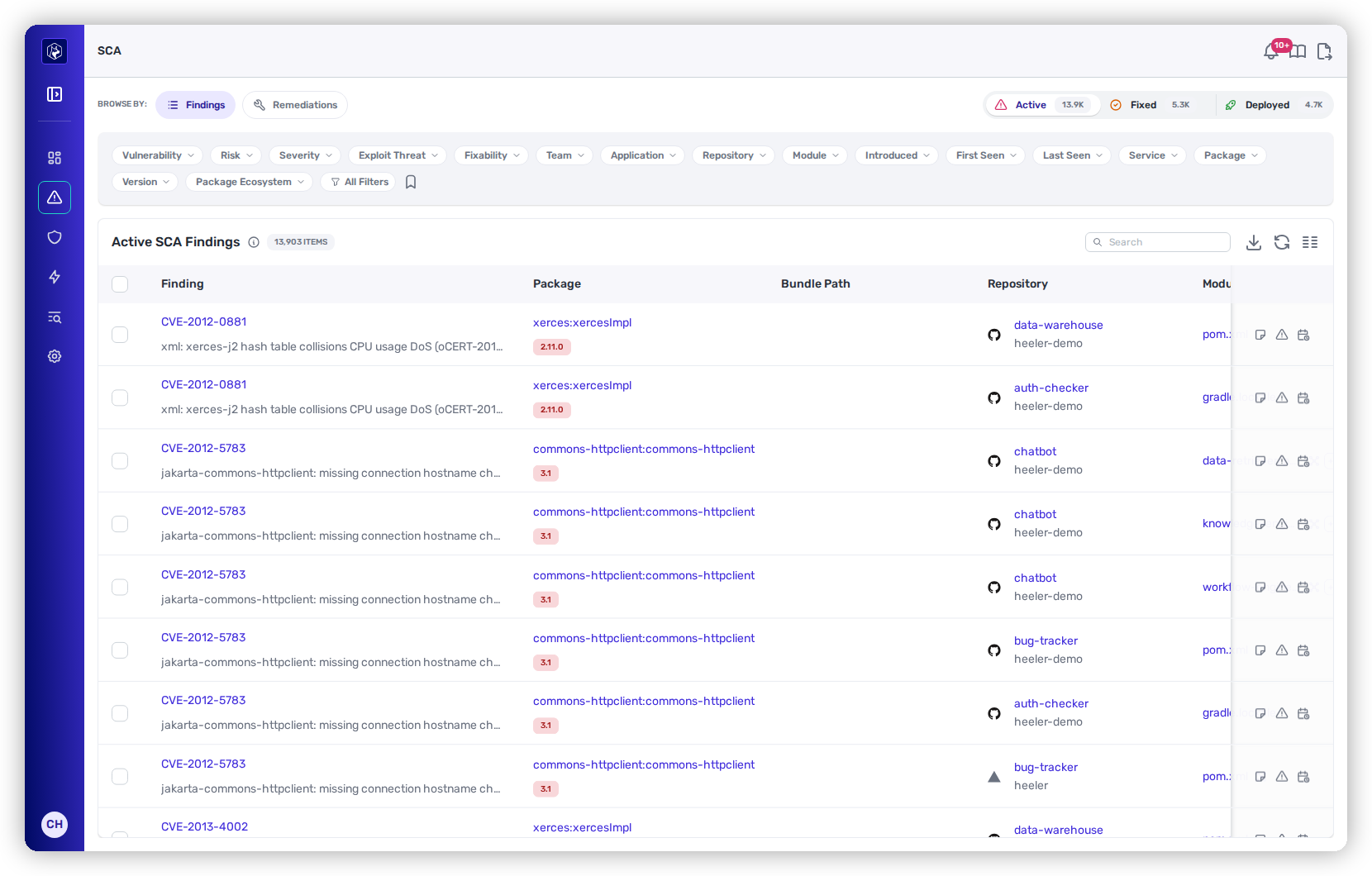
Open **Security**. The cards across the top carry a live count per capability, with the findings list below them.
Security → SCA — the lifecycle counts up top, the findings list below.
| Capability | What it counts |
| ---------------------------- | -------------------------------------- |
| **SCA** | Open-source dependency vulnerabilities |
| **SAST** | Weaknesses in your own source code |
| **Secrets** | Exposed credentials |
| **Compromised Dependencies** | Known-malicious packages |
| **Files** | At-risk AI agent files |
| **License Violations** | Disallowed dependency licenses |
Within a finding type, **Browse By** switches between **Findings** and **Remediations**, the **Active / Fixed / Deployed** tabs show where each finding is in its lifecycle, and the filters narrow by severity, risk, exploitability, team, repository, and more.
**Confirm it worked:** the cards show **non-zero counts** as analysis completes (large estates keep climbing for a while); **open a finding** to see the issue, the affected package or code, and Heeler's recommended fix; and your repositories appear in the [**Catalog**](/mrecEO40m5D6bt7Pq5pE/catalog/repositories.md) — confirming discovery ran end to end.
{% endstep %}
{% step %}
### See where to start
Open **Dashboards →** [**Priorities**](/mrecEO40m5D6bt7Pq5pE/operate/dashboards/priorities.md) to see what to fix first — Heeler's risk ordering across everything it found.
{% endstep %}
{% endstepper %}
{% hint style="success" %}
That's the fast path. To sharpen prioritization and roll Heeler out to your team, keep going down the [onboarding checklist](/mrecEO40m5D6bt7Pq5pE/get-started.md) — connect your cloud, map your organization, wire up integrations, and invite your team.
{% endhint %}
Ready to dig in? Each finding type explains how it's analyzed and prioritized: [Open Source (SCA)](/mrecEO40m5D6bt7Pq5pE/findings/open-source-sca.md) · [Code Security (SAST)](/mrecEO40m5D6bt7Pq5pE/findings/code-security-sast.md) · [Secrets](/mrecEO40m5D6bt7Pq5pE/findings/secrets.md). To decide what to fix first, see [Dashboards → Priorities](/mrecEO40m5D6bt7Pq5pE/operate/dashboards/priorities.md).
---
# Agent Instructions
This documentation is published with GitBook. GitBook is the documentation platform designed so that both humans and AI agents can read, navigate, and reason over technical content effectively. Learn more at gitbook.com.
## Querying This Documentation
If you need additional information that is not directly available in this page, you can query the documentation dynamically by asking a question.
Perform an HTTP GET request on the current page URL with the `ask` query parameter, and the optional `goal` query parameter:
```
GET https://docs.heeler.com/mrecEO40m5D6bt7Pq5pE/get-started/quickstart.md?ask=&goal=
```
`ask` is the immediate question: it should be specific, self-contained, and written in natural language.
`goal` is optional and describes the broader end goal you are ultimately trying to accomplish on behalf of the user. GitBook uses it to tailor the answer towards what is most useful for that goal.
The response will contain a direct answer to the question and relevant excerpts and sources from the documentation.
Use this mechanism when the answer is not explicitly present in the current page, you need clarification or additional context, or you want to retrieve related documentation sections.