> For the complete documentation index, see [llms.txt](https://docs.heeler.com/mrecEO40m5D6bt7Pq5pE/llms.txt). Markdown versions of documentation pages are available by appending `.md` to page URLs; this page is available as [Markdown](https://docs.heeler.com/mrecEO40m5D6bt7Pq5pE/get-started/registries-and-artifacts/aws-codeartifact.md).

# AWS CodeArtifact

Analyze the packages your teams publish to AWS CodeArtifact as first-party code, via a dedicated cross-account IAM role.

Heeler analyzes the libraries your organization publishes to **AWS CodeArtifact** — so the packages your teams build and consume are treated as first-party code: correlated with the rest of your inventory and evaluated for vulnerabilities, secrets, and policy drift, just like the repositories they originate from.

## The two IAM roles

Heeler reaches CodeArtifact through **two IAM roles**, keeping read-only discovery separate from the write-scope token permissions:

<table><thead><tr><th width="260">Role</th><th>What it does</th></tr></thead><tbody><tr><td><strong>Your existing AWS connection role</strong></td><td>The role Heeler already uses for cloud inventory. Its read-only CodeArtifact APIs (<code>ListRepositories</code>, <code>DescribeRepository</code>) inventory your domains and repositories so the modal can populate the account picker.</td></tr><tr><td><strong>A dedicated CodeArtifact role</strong></td><td>You create this in each account that hosts CodeArtifact. It holds the token + pull permissions (<code>GetAuthorizationToken</code>, <code>GetServiceBearerToken</code>, <code>ReadFromRepository</code>). Keeping these off the inventory role means no broad write permissions leak across accounts.</td></tr></tbody></table>

Heeler's worker role assumes the dedicated CodeArtifact role **directly** — there's no chain through your inventory role. The trust policy on the CodeArtifact role therefore trusts the **Heeler worker principal**, not your inventory role.

## Before you start

* An [**AWS connection in Heeler**](/mrecEO40m5D6bt7Pq5pE/get-started/cloud-and-runtime/amazon-web-services.md) for the account or organization that owns the CodeArtifact domain.
* The **Heeler inventory role has CodeArtifact read permissions** so discovery can populate the account picker. Add these if they aren't already present:

```json
{
  "Sid": "HeelerCodeArtifactInventory",
  "Effect": "Allow",
  "Action": [
    "codeartifact:ListRepositories",
    "codeartifact:DescribeRepository",
    "codeartifact:ListTagsForResource"
  ],
  "Resource": "*"
}
```

* The **dedicated CodeArtifact role exists** in every account you want to enable. The **Add CodeArtifact Registry** modal generates the exact AWS CLI commands on Step 1 — run them in each account.

## The dedicated CodeArtifact role

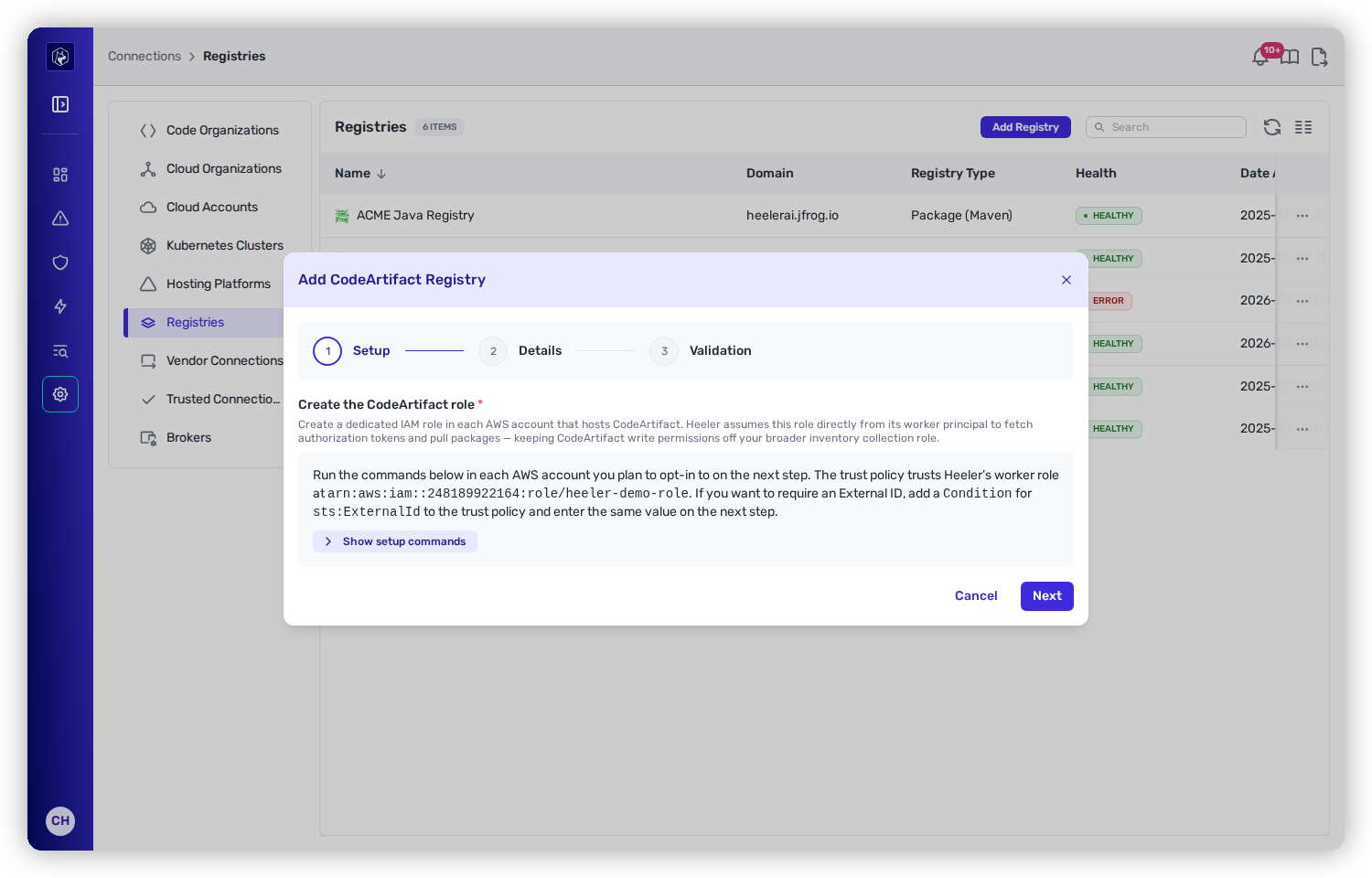
The modal's Step 1 generates the CLI commands, including a **trust policy** that trusts Heeler's worker principal and a **permissions policy** granting:

```json
{
  "Sid": "HeelerCodeArtifactAccess",
  "Effect": "Allow",
  "Action": [
    "codeartifact:GetAuthorizationToken",
    "codeartifact:GetRepositoryEndpoint",
    "codeartifact:ReadFromRepository",
    "codeartifact:ListRepositories",
    "codeartifact:DescribeRepository"
  ],
  "Resource": "*"
},
{
  "Sid": "HeelerCodeArtifactBearerToken",
  "Effect": "Allow",
  "Action": "sts:GetServiceBearerToken",
  "Resource": "*",
  "Condition": { "StringEquals": { "sts:AWSServiceName": "codeartifact.amazonaws.com" } }
}
```

{% hint style="info" %}
**External ID (optional).** To require an External ID, add a `sts:ExternalId` condition to the trust policy in every account, then enter the same value in the **External ID (Optional)** field on Step 2. Heeler doesn't generate this — pick any string and store it in your secret manager.
{% endhint %}

## Link a CodeArtifact registry

{% stepper %}
{% step %}

### Open the modal

In Heeler, go to **Connections → Registries → Add Registry → AWS CodeArtifact**.
{% endstep %}

{% step %}

### Step 1 — Setup

Expand **Show setup commands** and run the generated CLI in **each AWS account** you plan to enable.
{% endstep %}

{% step %}

### Step 2 — Details

* **Name** — a label for this registry in Heeler.
* **AWS Connection** — the IAM Role or AWS Organization connection Heeler already inventories from.
* **Accounts** — multi-select of accounts with CodeArtifact repositories under that connection. Each is labeled with its repository count (e.g. `123456789012 — 14 repositories`).
* **CodeArtifact IAM Role Name** — the short role name you created (default `heeler-codeartifact`).
* **External ID (Optional)** — only if your trust policy requires one.

<figure><img src="https://414480750-files.gitbook.io/~/files/v0/b/gitbook-x-prod.appspot.com/o/spaces%2FXP3dp2kecwKA2KvYkntz%2Fuploads%2Fgit-blob-78905801f18d6ac983096d3569570e2dd3aaf94d%2Fcc-gs-reg-codeartifact-form.png?alt=media" alt="The Add CodeArtifact Registry modal on its Setup step, describing the dedicated IAM role and the trust policy, with the generated AWS CLI commands behind a Show setup commands disclosure."><figcaption><p>Step 1 generates the CLI to create the dedicated CodeArtifact role in each account.</p></figcaption></figure>
{% endstep %}

{% step %}

### Step 3 — Validation

Heeler runs three preflight checks: **assume the role** in one sampled account (the account ID is shown), **reach the CodeArtifact API** via `ListRepositories`, and **issue a CodeArtifact authorization token**. If all pass, click **Create registry**. If Heeler can connect but can't issue a token, fix the role's permissions and retry, or **Save anyway** (package pulls fail until `codeartifact:GetAuthorizationToken` and `sts:GetServiceBearerToken` are granted).
{% endstep %}
{% endstepper %}

{% hint style="info" %}
**Why sample one account?** Checking every selected account at create time is slow. The sampled check catches the common misconfiguration; the recurring health job (below) covers all of them.
{% endhint %}

## Continued-access health check

Heeler's connection-health job runs `validate` on its normal schedule, fanning out across **every account** in the registry and confirming it can still assume the role and call `ListRepositories`. If any account fails, the registry flips to **Error** with a message naming the failing accounts.

## Editing or removing

* **Edit** to change the name, role name, account selection, or External ID. The External ID field shows blank on edit — leave it blank to keep the saved value, or enter a new one to overwrite.
* **Remove** from **Connections → Registries**. This stops first-party analysis for those repositories; it does not delete anything in AWS or remove the dedicated role (delete that manually if you no longer need it).

## What Heeler does *not* do

* **Never publishes or mutates packages** — the dedicated role's write-scope is limited to authorization-token + read actions.
* **Never stores long-lived authorization tokens** — role assumption happens per request.
* **Never proxies your downloads** — your build systems keep pulling from CodeArtifact with their own credentials.

## Troubleshooting

<table><thead><tr><th width="300">Symptom</th><th>Fix</th></tr></thead><tbody><tr><td>Couldn't assume the CodeArtifact role</td><td>The role doesn't exist in the failing account, the trust policy doesn't trust Heeler's worker principal, or the External ID doesn't match. Regenerate the commands and reapply.</td></tr><tr><td><code>AccessDeniedException</code></td><td>The role is missing a required action — reapply the permissions policy in the failing account.</td></tr><tr><td>Preflight failed at <code>list_repositories</code></td><td>The assume succeeded but the API call was blocked; check the role's permissions policy in the sampled account.</td></tr></tbody></table>

## Related

* [Connect Your Cloud & Runtime → AWS](/mrecEO40m5D6bt7Pq5pE/get-started/cloud-and-runtime/amazon-web-services.md) — the AWS connection this builds on.
* [Connect Registries and Artifacts](/mrecEO40m5D6bt7Pq5pE/get-started/registries-and-artifacts.md) — the common flow.


---

# Agent Instructions
This documentation is published with GitBook. GitBook is the documentation platform designed so that both humans and AI agents can read, navigate, and reason over technical content effectively. Learn more at gitbook.com.

## Querying This Documentation
If you need additional information that is not directly available in this page, you can query the documentation dynamically by asking a question.

Perform an HTTP GET request on the current page URL with the `ask` query parameter, and the optional `goal` query parameter:

```
GET https://docs.heeler.com/mrecEO40m5D6bt7Pq5pE/get-started/registries-and-artifacts/aws-codeartifact.md?ask=<question>&goal=<endgoal>
```

`ask` is the immediate question: it should be specific, self-contained, and written in natural language.
`goal` is optional and describes the broader end goal you are ultimately trying to accomplish on behalf of the user. GitBook uses it to tailor the answer towards what is most useful for that goal.

The response will contain a direct answer to the question and relevant excerpts and sources from the documentation.

Use this mechanism when the answer is not explicitly present in the current page, you need clarification or additional context, or you want to retrieve related documentation sections.
